Sonoff TRVZB Thermostat - External Temperature Synchronization (Zigbee2MQTT) 3 in 1 - V2.25.12 - EN Version
This is the most extensive Blueprint available for the Sonoff TRVZB Thermostat, which has as many as three solutions implemented :
-
It creates an automation to synchronize the reading from a selected external temperature sensor, which passes its value directly to the Sonoff TRVZB - number.friendly_name_external_temperature_input entity for one selected Sonoff TRVZB Thermostat that is already configured in Zigbee2MQTT. Thanks to this, the Sonoff TRV Thermostat uses the actual temperature prevailing in the room, not the temperature measured directly at the valve head.
-
It forces data reporting from the external temperature sensor to the Sonoff TRVZB Thermostat - number.friendly_name_external_temperature_input entity every full hour. This solves the problem when the temperature sensor (especially one based on the Bluetooth or Wi-Fi communication protocol) exposes data only when the temperature value changes, e.g., after a few hours when a constant temperature is maintained in the room for a long time. This can cause the Sonoff TRVZB to force a temperature sensor change to Internal, which will result in incorrect thermostat operation due to the lack of reporting for a time equal to or longer than 7200 s (2 hours).
-
Another implemented solution is the addition of protection for the External operating mode, based on which the automation will ensure that the External sensor is always selected in the Sonoff TRVZB - select.friendly_name_temperature_sensor_select entity. If the Sonoff TRVZB switches to the Internal, External_2 or External_3 sensor, the automation will immediately force a return to the correct External mode. The same will happen in the case of Unknown and Unavailable.
PREREQUISITES :
1. Each Sonoff TRVZB Thermostat must be connected to Zigbee2MQTT. The blueprint does not work with ZHA.
2. Check if you have the current firmware in the Sonoff TRVZB Thermostat - As of December 2025, it is version 1.4.1 (20251028). The version should not be lower than V1.2.1.
3. Before using this automation, make sure that the External Temperature Sensor function in the Sonoff TRVZB Thermostat settings in Zigbee2MQTT is set to EXTERNAL.
4. A separate automation must be created for each Sonoff TRVZB Thermostat.

Import Blueprint - English Version

blueprint:
  name: Sonoff TRVZB Thermostat- External Temperature Synchronization (Zigbee2MQTT) 3 in 1 - EN Version
  description: |


    ## Sonoff TRVZB Thermostat- External Temperature Synchronization (Zigbee2MQTT) 3 in 1 - V2.25.12

    ---

    **This is the most extensive Blueprint available for the Sonoff TRVZB Thermostat, which has as many as three solutions implemented :**


    * It creates an automation to synchronize the reading from a selected **external temperature sensor**, which passes its value directly to the **Sonoff TRVZB - number.friendly_name_external_temperature_input** entity for one selected **Sonoff TRVZB Thermostat** that is already configured in **Zigbee2MQTT**. Thanks to this, the **Sonoff TRV Thermostat** uses the actual temperature prevailing in the room, not the temperature measured directly at the valve head.

    * It forces data reporting from the **external temperature sensor** to the **Sonoff TRVZB Thermostat - number.friendly_name_external_temperature_input** entity every full hour. This solves the problem when the temperature sensor **(especially one based on the Bluetooth or Wi-Fi communication protocol)** exposes data only when the temperature value changes, e.g., after a few hours when a constant temperature is maintained in the room for a long time. This can cause the **Sonoff TRVZB** to force a temperature sensor change to **Internal**, which will result in incorrect thermostat operation due to the lack of reporting for a time equal to or longer than 7200 s (2 hours).

    * Another implemented solution is the **addition of protection** for the **External** operating mode, based on which the automation will ensure that the **External** sensor is always selected in the **Sonoff TRVZB - select.friendly_name_temperature_sensor_select** entity. If the **Sonoff TRVZB** switches to the **Internal, External_2** or **External_3** sensor, the automation will immediately force a return to the correct **External** mode. The same will happen in the case of **Unknown** and **Unavailable**.

    ---

    **PREREQUISITES :**

    **1.** Each **Sonoff TRVZB Thermostat** must be **connected to Zigbee2MQTT.** The blueprint does not work with ZHA.

    **2.** Check if you have the **current firmware in the Sonoff TRVZB Thermostat** - As of December 2025, it is **version 1.4.1 (20251028).** The version should not be lower than V1.2.1.

    **3.** Before using this automation, make sure that the **External Temperature Sensor** function in the **Sonoff TRVZB Thermostat settings in Zigbee2MQTT** is set to **EXTERNAL**.

    **4.** **A separate automation must be created for each Sonoff TRVZB Thermostat.**


  domain: automation

  input:
    sonoff_thermostat_climate:
      name: 1. Sonoff TRVZB Thermostat (Climate Entity)
      description: Select the **climate.friendly_name** entity, this is the main climate entity for the **Sonoff TRVZB**. Used exclusively for visual identification of the device in the Blueprint interface, and then in the created Automation.
      selector:
        entity:
          domain: climate

    trv_external_temperature_input:
      name: 2. External Temperature Input in Sonoff TRVZB (Input)
      description: Select the **number.friendly_name_external_temperature_input** entity, on which the operation of the **Sonoff TRVZB** valve is based for the **External** sensor. The value from the temperature sensor from **Point 3** will be sent to this entity **(Only if the External Sensor is selected in the Sonoff TRVZB settings in Zigbee2MQTT).**
      selector:
        entity:
          multiple: true
          filter:
            - domain: number
              device_class: temperature

    external_temperature_sensor:
      name: 3. External Temperature Sensor (Data Source)
      description: Select the **external temperature sensor** entity providing the current **temperature value** prevailing in the room for the **Sonoff TRVZB** valve. This value will be sent to **number.friendly_name_external_temperature_input**. The **operation of the Sonoff TRVZB** and all associated automations will be based on the state change of this entity's value.
      selector:
        entity:
          filter:
            - domain: sensor
              device_class: temperature

    trv_temperature_sensor_select:
      name: 4. Temperature Sensor Mode in Sonoff TRVZB (Select)
      description: Select the **select.friendly_name_temperature_sensor_select** entity based on which the automation will ensure that the **External** sensor is always selected. If the **Sonoff TRVZB** switches to the **Internal, External_2 or External_3** sensor, the automation will immediately force a return to the correct **External** mode.
      selector:
        entity:
          domain: select

trigger:
  - platform: state
    entity_id: !input external_temperature_sensor
    id: temperature_update

  - platform: time_pattern
    minutes: "0"
    id: temperature_update

  - platform: state
    entity_id: !input trv_temperature_sensor_select
    id: force_external

variables:
  external_temperature_sensor: !input external_temperature_sensor

action:
  - choose:
      - conditions:
          - condition: trigger
            id: temperature_update
        sequence:
          - action: number.set_value
            data:
              value: "{{ states(external_temperature_sensor) | float }}"
            target:
              entity_id: !input trv_external_temperature_input

      - conditions:
          - condition: trigger
            id: force_external
          - condition: template
            value_template: >
              {{ trigger.to_state.state != 'external'
                 and trigger.to_state.state not in ['unknown', 'unavailable'] }}
        sequence:
          - action: select.select_option
            data:
              option: external
            target:
              entity_id: !input trv_temperature_sensor_select

mode: single
Sonoff TRVZB Thermostat - External Temperature Synchronization (Zigbee2MQTT) 3 in 1 - V2.25.12 - PL Wersja
To najbardziej rozbudowany Blueprint dostępny dla Termostatu Sonoff TRVZB który ma zaimplementowane aż trzy rozwiązania :
-
Tworzy automatyzację do synchronizacji odczytu z wybranego zewnętrznego czujnika temperatury, która przekazuje jego wartość bezpośrednio do encji Sonoff TRVZB - number.friendly_name_external_temperature_input dla jednego wybranego Termostatu Sonoff TRVZB, który jest już skonfigurowany w Zigbee2MQTT. Dzięki temu Termostat Sonoff TRV korzysta z rzeczywistej temperatury panującej w pomieszczeniu, a nie z temperatury mierzonej bezpośrednio przy głowicy.
-
Wymusza co pełną godzinę raportowanie danych z zewnętrznego czujnika temperatury do encji Termostatu Sonoff TRVZB - number.friendly_name_external_temperature_input. Rozwiązuje to problem, gdy czujnik temperatury (szczególnie oparty o protokół komunikacji Bluetooth lub Wi-Fi) eksponuje dane wyłącznie w momencie zmiany wartości temperatury, np. po kilku godzinach, gdy w pomieszczeniu utrzymuje się długofalowo stała temperatura. Może to spowodować, że Sonoff TRVZB wymusi zmianę czujnika temperatury na Internal, co będzie skutkować nieprawidłową pracą termostatu z powodu braku raportowania przez czas równy lub dłuższy niż 7200 s (2 godziny).
-
Kolejnym zainplementowanym rozwiązaniem jest dodanie zabezpieczenia dla trybu pracy External na podstawie której automatyzacja będzie pilnować aby zawsze w encji Sonoff TRVZB - select.friendly_name_temperature_sensor_select był wybrany czujnik External. Jeżeli Sonoff TRVZB przełączy się na czujnik Internal, External_2 lub External_3, automatyzacja natychmiast wymusi powrót do poprawnego trybu External. To samo stanie się w przypadku Unknown oraz Unavailable.
WYMAGANIA WSTĘPNE :
1. Każdy Termostat Sonoff TRVZB należy połączyć z Zigbee2MQTT. Blueprint nie działa z ZHA.
2. Sprawdź, czy masz aktualne oprogramowanie układowe w Termostacie Sonoff TRVZB - Stan na grudzień 2025 to wersja 1.4.1 (20251028). Wersja nie powinna być niższa niż V1.2.1.
3. Przed użyciem tej automatyzacji upewnij się, że funkcja Zewnętrznego Czujnika Temperatury w ustawieniach Termostatu Sonoff TRVZB w Zigbee2MQTT jest ustawiona na EXTERNAL.
4. Dla każdego Termostatu Sonoff TRVZB należy utworzyć osobną automatyzację.
Importuj Blueprint - Polska Wersja
blueprint:
  name: Sonoff TRVZB Thermostat - External Temperature Synchronization (Zigbee2MQTT) 3 in 1 - PL Version
  description: |


    ## Sonoff TRVZB Thermostat - External Temperature Synchronization (Zigbee2MQTT) 3 in 1 - V2.25.12

    ---


    **To najbardziej rozbudowany Blueprint dostępny dla Termostatu Sonoff TRVZB który ma zaimplementowane aż trzy rozwiązania :**


    * Tworzy automatyzację do synchronizacji odczytu z wybranego **zewnętrznego czujnika temperatury,** która przekazuje jego wartość bezpośrednio do encji **Sonoff TRVZB - number.friendly_name_external_temperature_input** dla jednego wybranego **Termostatu Sonoff TRVZB**, który jest już skonfigurowany w **Zigbee2MQTT**. Dzięki temu **Termostat Sonoff TRV** korzysta z rzeczywistej temperatury panującej w pomieszczeniu, a nie z temperatury mierzonej bezpośrednio przy głowicy.

    * Wymusza co pełną godzinę raportowanie danych **z zewnętrznego czujnika temperatury** do encji **Termostatu Sonoff TRVZB - number.friendly_name_external_temperature_input.** Rozwiązuje to problem, gdy czujnik temperatury **(szczególnie oparty o protokół komunikacji Bluetooth lub Wi-Fi)** eksponuje dane wyłącznie w momencie zmiany wartości temperatury, np. po kilku godzinach, gdy w pomieszczeniu utrzymuje się długofalowo stała temperatura. Może to spowodować, że **Sonoff TRVZB** wymusi zmianę czujnika temperatury na **Internal**, co będzie skutkować nieprawidłową pracą termostatu z powodu braku raportowania przez czas równy lub dłuższy niż 7200 s (2 godziny).

    * Kolejnym zainplementowanym rozwiązaniem jest **dodanie zabezpieczenia** dla trybu pracy **External** na podstawie której automatyzacja będzie pilnować aby zawsze w encji **Sonoff TRVZB - select.friendly_name_temperature_sensor_select** był wybrany czujnik **External**. Jeżeli **Sonoff TRVZB** przełączy się na czujnik **Internal, External_2** lub **External_3**, automatyzacja natychmiast wymusi powrót do poprawnego trybu **External**. To samo stanie się w przypadku **Unknown** oraz **Unavailable**.


    ---

    **WYMAGANIA WSTĘPNE :**

    **1.** Każdy **Termostat Sonoff TRVZB** należy **połączyć z Zigbee2MQTT.** Blueprint nie działa z ZHA.

    **2.** Sprawdź, czy masz **aktualne oprogramowanie układowe w Termostacie Sonoff TRVZB** - Stan na grudzień 2025 to **wersja 1.4.1 (20251028).** Wersja nie powinna być niższa niż V1.2.1.

    **3.** Przed użyciem tej automatyzacji upewnij się, że funkcja **Zewnętrznego Czujnika Temperatury** w ustawieniach **Termostatu Sonoff TRVZB w Zigbee2MQTT** jest ustawiona na **EXTERNAL**.

    **4.** **Dla każdego Termostatu Sonoff TRVZB należy utworzyć osobną automatyzację.**


  domain: automation

  input:
    sonoff_thermostat_climate:
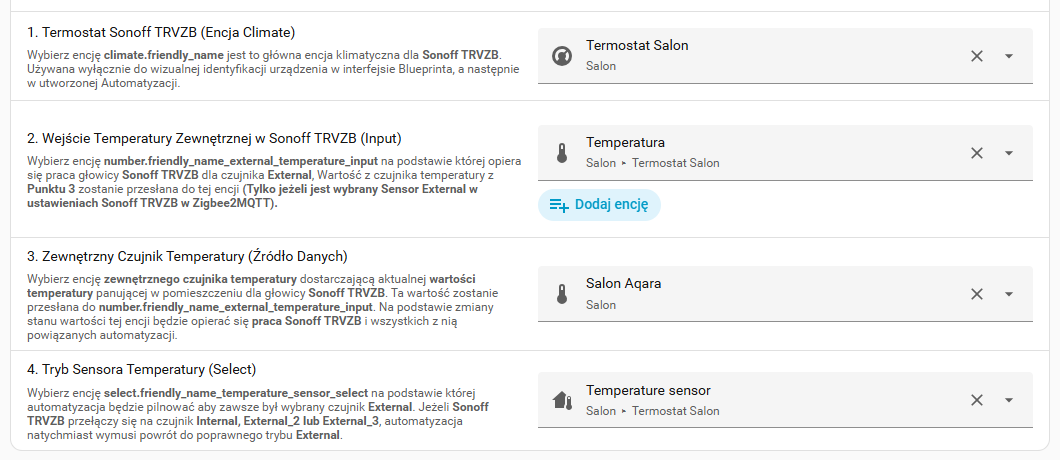
      name: 1. Termostat Sonoff TRVZB (Encja Climate)
      description: Wybierz encję **climate.friendly_name** jest to główna encja klimatyczna dla **Sonoff TRVZB**. Używana wyłącznie do wizualnej identyfikacji urządzenia w interfejsie Blueprinta, a następnie w utworzonej Automatyzacji.
      selector:
        entity:
          domain: climate

    trv_external_temperature_input:
      name: 2. Wejście Temperatury Zewnętrznej w Sonoff TRVZB (Input)
      description: Wybierz encję **number.friendly_name_external_temperature_input** na podstawie której opiera się praca głowicy **Sonoff TRVZB** dla czujnika **External**, Wartość z czujnika temperatury z **Punktu 3** zostanie przesłana do tej encji **(Tylko jeżeli jest wybrany Sensor External w ustawieniach Sonoff TRVZB w Zigbee2MQTT).**
      selector:
        entity:
          multiple: true
          filter:
            - domain: number
              device_class: temperature

    external_temperature_sensor:
      name: 3. Zewnętrzny Czujnik Temperatury (Źródło Danych)
      description: Wybierz encję **zewnętrznego czujnika temperatury** dostarczającą aktualnej **wartości temperatury** panującej w pomieszczeniu dla głowicy **Sonoff TRVZB**. Ta wartość zostanie przesłana do **number.friendly_name_external_temperature_input**. Na podstawie zmiany stanu wartości tej encji będzie opierać się **praca Sonoff TRVZB** i wszystkich z nią powiązanych automatyzacji.
      selector:
        entity:
          filter:
            - domain: sensor
              device_class: temperature

    trv_temperature_sensor_select:
      name: 4. Tryb Sensora Temperatury w Sonoff TRVZB (Select)
      description: Wybierz encję **select.friendly_name_temperature_sensor_select** na podstawie której automatyzacja będzie pilnować aby zawsze był wybrany czujnik **External**. Jeżeli **Sonoff TRVZB** przełączy się na czujnik **Internal, External_2 lub External_3**, automatyzacja natychmiast wymusi powrót do poprawnego trybu **External**.
      selector:
        entity:
          domain: select

trigger:
  - platform: state
    entity_id: !input external_temperature_sensor
    id: temperature_update

  - platform: time_pattern
    minutes: "0"
    id: temperature_update

  - platform: state
    entity_id: !input trv_temperature_sensor_select
    id: force_external

variables:
  external_temperature_sensor: !input external_temperature_sensor

action:
  - choose:
      - conditions:
          - condition: trigger
            id: temperature_update
        sequence:
          - action: number.set_value
            data:
              value: "{{ states(external_temperature_sensor) | float }}"
            target:
              entity_id: !input trv_external_temperature_input

      - conditions:
          - condition: trigger
            id: force_external
          - condition: template
            value_template: >
              {{ trigger.to_state.state != 'external'
                 and trigger.to_state.state not in ['unknown', 'unavailable'] }}
        sequence:
          - action: select.select_option
            data:
              option: external
            target:
              entity_id: !input trv_temperature_sensor_select

mode: single