MAGICCC
January 24, 2025, 7:21pm
769
Hello @bburwell sensor.nfl_red_zone as entity which is needed when I check the code
            layout_type: masonry
            width: 200px
            max-columns: 5
          card_param: cards
          filter:
            template: |
              {%- for team in integration_entities("teamtracker") -%}
                {%- if state_attr(team, "league") == "[[sport]]" -%}
                {%- if states(team) == "[[status]]" -%}
                {%- if state_attr(team, "team_homeaway") == "home" -%}
                {%- if team in state_attr('sensor.nfl_red_zone','teams') -%}
                  {{{"type": "custom:teamtracker-card",
                    "entity": team,
                    "card_mod": {"style": "ha-card {\n\n    color:  black; \n    background-color:  #ffcccc; \n    box-shadow: 0 0 10px 5px red;\n}\n"},
                    "home_side": "right"}}},
                {%- else -%}
                  {{{"type": "custom:teamtracker-card",
                    "entity": team,
                    "home_side": "right"}}},
                {%- endif -%}
                {%- endif -%}
Furthermore I guess that bit of code in the sensor is for testing purposes - seeing it’s your local HA instance?
bburwell
January 24, 2025, 7:54pm
770
Well shoot sorry, yeah my template file would be helpful. Just added it to github and tried to pull some of the sandbox items.
The data that Teamtracker uses is created by the sensor. For example the Washington Commanders play this weekend. So teamtracker uses this data:
- platform: teamtracker
  league_id: NFL
  team_id: WSH
  name: Washington Commanders
to create the sensor sensor.washington_commanders which the teamtracker card uses the data in there to populate the card. This is what my sensor is showing right now.
Guessing you are showing that sensor and the data, but the red_zone isn’t there.
Try adding the template data and let me know if that works. If it doesn’t check the sensor and let us see what you are seeing.
MAGICCC
January 24, 2025, 8:29pm
771
Indeed that works now!
Using e.g. sensor.nfl_*_* in dev tools it shows data
bburwell
January 24, 2025, 8:58pm
772
Yeah - I noticed that as well but I am not certain why yet. It is pulling the same sensor data as divisional/conference.
I’ll try to glance at it later - maybe something with the flex-table card - not sure
bburwell
January 25, 2025, 5:47pm
773
Updated the Sports_US_Professional dashboard on github to fix the overall tab not showing data.
I wasn’t excluding some sensors. Since we are using a wildcard on Overall (NHL/NFL) I missed that I had added team schedules to my sensors so I also had a sensor called sensor.nhl_schedule… as an example and it was trying to parse this which kept it from populating.
I am still hitting a snag with MLB and will look at it later and WNBA when the stats populate.
1 Like
Hi there, I’m trying to take this same approach for the Belgan Pro League (Sports Standings and Scores - #177 by kbrown01 ) and apply it to tennis rankings for both the ATP & WTA (https://site.web.api.espn.com/apis/site/v2/sports/tennis/atp/rankings?region=us&lang=en )
I successfully tested the approach for the Belgian league so I know that I have everything set-up/installed correctly.
What isn’t working is that my dashboard populates with my two test columns but has 'undefinedundefinedundefined' in each of the two test fields.
I’ve created a rest sensor, which is populating data:
##
## ATP Rankings
##
- platform: rest
  scan_interval: 36000
  name: Tennis ATP Ranking
  unique_id: sensor.tennis_atp_ranking
  resource: https://site.web.api.espn.com/apis/site/v2/sports/tennis/atp/rankings?region=us&lang=en
  value_template: "{{ now() }}"
  json_attributes:
    - rankings
And I have a template sensor (which I do not believe is populating with data):
###
### Tennis ATP Ranking
###
  - name: ATP Ranking
    unique_id: sensor.tennis_atp_ranking_list
    state: "{{ now() }}"
    attributes:
      entries: "{{ state_attr('sensor.tennis_atp_ranking','rankings')[0]['ranks'] }}"
And the dashboard code which is pointing at my rest sensor:
decluttering_templates:
  bpl_settings:
    card:
      type: custom:flex-table-card
      title: '[[title]]'
      css:
        table+: 'padding: 0px; width: 1600px;'
        tbody tr td:first-child: 'width: 5%;'
        tbody tr td:nth-child(2): 'width: 30%;'
        tbody tr td:nth-child(n+3): 'width: 5%;'
        tbody tr:hover: 'background-color: green!important; color:white!important;'
      card_mod:
        style:
          .: |
            ha-card {
              overflow: auto;
              }
          $: |
            .card-header {
               padding-top: 6px!important;
               padding-bottom: 4px!important;
               font-size: 14px!important;
               line-height: 14px!important;
               font-weight: bold!important;
             }
      entities:
        include: '[[entity]]'
      sort_by: ranks
      columns:
        - name: Rank
          data: ranks
          modify: x.current
        - name: Previous
          data: ranks
          modify: x.previous
views:
  - title: Tennis Rankings
    icon: mdi:tennis
    type: panel
    badges: []
    cards:
      - type: custom:decluttering-card
        template: bpl_settings
        variables:
          - title: ATP
          - entity: sensor.tennis_atp_ranking
I think I have two problems:
my template sensor isn’t formatted correctly
my dashboard code isn’t parsing the json properly
Would appreciate any help steering me in the right direction.
maurizio53
February 7, 2025, 8:05pm
775
I am really interested to this project, so please, let me know if you get the solution. I already created the sensor and the dashboard…
bburwell
February 7, 2025, 10:30pm
776
@jasonkjennings - your code worked for me but as I have stated I don’t use templates and honestly you don’t need them here. Just pull the data from the sensor.
With that said a couple notes:
You can simplify the code by just using the sensor to jump to the level you want.
##
## ATP Rankings
##
- platform: rest
  scan_interval: 36000
  name: Tennis ATP Ranking
  unique_id: sensor.tennis_atp_ranking
  resource: https://site.web.api.espn.com/apis/site/v2/sports/tennis/atp/rankings?region=us&lang=en
  value_template: "{{ now() }}"
  json_attributes_path: "$.['rankings'][0]"
  json_attributes:
    - ranks
When you create the sensor you are essentially getting the data at that starting point. So I can test that in developers tools:
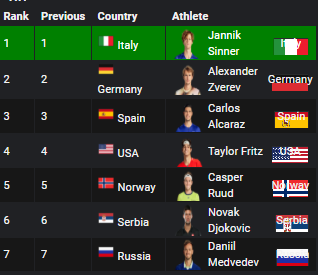
I threw your code into a sandbox dashboard and it came up with the rankings
Since I was looking at the sensor anyway I added a couple items for S&G’s so this is what the sandbox looks like now:
Here is the sandbox code if you want it
decluttering_templates:
  bpl_settings:
    card:
      type: custom:flex-table-card
      title: '[[title]]'
      css:
        table+: 'padding: 0px; width: 1600px;'
        tbody tr td:first-child: 'width: 3%;'
        tbody tr td:nth-child(2): 'width: 3%;'
        tbody tr td:nth-child(3): 'width: 3%;'
        tbody tr td:nth-child(n+4): 'width: 20%;'
        tbody tr:hover: 'background-color: green!important; color:white!important;'
      card_mod:
        style:
          .: |
            ha-card {
              overflow: auto;
              }
          $: |
            .card-header {
               padding-top: 6px!important;
               padding-bottom: 4px!important;
               font-size: 14px!important;
               line-height: 14px!important;
               font-weight: bold!important;
             }
      entities:
        include: '[[entity]]'
      sort_by: ranks
      columns:
        - name: Rank
          data: ranks
          modify: x.current
        - name: Previous
          data: ranks
          modify: x.previous
        - name: Country
          data: ranks
          modify: >-
            '<div>' + (typeof x.athlete.flag !== 'undefined' ? '<img src="' +
            x.athlete.flag + '"
            style="width:20px;height:20px;margin-right:5px;">' : '') +
            x.athlete.flagAltText + '</div>'
        - name: Athlete
          data: ranks
          modify: >-
            '<div>' + (typeof x.athlete.headshot !== 'undefined' ? '<img src="'
            + x.athlete.headshot + '"
            style="width:20px;height:20px;margin-right:5px;">' : '') +
            x.athlete.displayName + '</div>'
views:
  - title: Tennis Rankings
    icon: mdi:tennis
    type: panel
    badges: []
    cards:
      - type: custom:decluttering-card
        template: bpl_settings
        variables:
          - title: ATP
          - entity: sensor.tennis_atp_ranking
Can’t wait to see what you come up when you share your updates!!
Thanks so much for this!
I knew I wasn’t doing something right with parsing the json – having it in the right spot to start makes it much easier.
Thanks again, and yes, I’ll share when I get it completed – going to add tabs to toggle between the men/women’s rankings.
(and thanks for kick-starting the ‘if no flag/headshot’ is available!)
maurizio53
February 8, 2025, 4:04pm
778
It works great, but it’s really quite impossible to see in mobile view…Is there a way to make the dashboard visible also on mobile?
bburwell
February 8, 2025, 5:31pm
779
What isn’t working? Is it that it is too wide and you need to squish it together?
I don’t do a lot on mobile @ehcah does maybe he has some ideas but here a squishier dashboard. You need to play with width: 400px, child widths and what you really want to show. For example you could combine rank/previous into a single column
decluttering_templates:
  bpl_settings:
    card:
      type: custom:flex-table-card
      title: '[[title]]'
      css:
        table+: 'padding: 0px; width: 400px;'
        tbody tr td:first-child: 'width: 1%;'
        tbody tr td:nth-child(2): 'width: 1%;'
        tbody tr td:nth-child(3): 'width: 10%;'
        tbody tr:hover: 'background-color: green!important; color:white!important;'
      card_mod:
        style:
          .: |
            ha-card {
              overflow: auto;
              }
          $: |
            .card-header {
               padding-top: 6px!important;
               padding-bottom: 4px!important;
               font-size: 14px!important;
               line-height: 14px!important;
               font-weight: bold!important;
             }
      entities:
        include: '[[entity]]'
      sort_by: ranks
      columns:
        - name: Rank
          data: ranks
          modify: x.current
        - name: Previous
          data: ranks
          modify: x.previous
        - name: Athlete
          data: ranks
          modify: >-
            '<div
            style="display:flex;justify-content:space-between;align-items:center;">'
            + '<div style="display:flex;align-items:center;">' + (typeof
            x.athlete.headshot !== 'undefined' ? '<img src="' +
            x.athlete.headshot + '"
            style="width:20px;height:20px;margin-right:5px;">' : '') +
            x.athlete.displayName + '</div>' + '<div>' + (typeof x.athlete.flag
            !== 'undefined' ? '(' + '<img src="' + x.athlete.flag + '"
            style="width:20px;height:20px;margin-right:5px;">' +
            x.athlete.flagAltText + ')' : '') + '</div>' + '</div>'
views:
  - title: Tennis Rankings
    icon: mdi:tennis
    type: panel
    badges: []
    cards:
      - type: custom:decluttering-card
        template: bpl_settings
        variables:
          - title: ATP
          - entity: sensor.tennis_atp_ranking
maurizio53
February 8, 2025, 5:40pm
780
Yes, that’s what i mean…
bburwell
February 8, 2025, 6:05pm
781
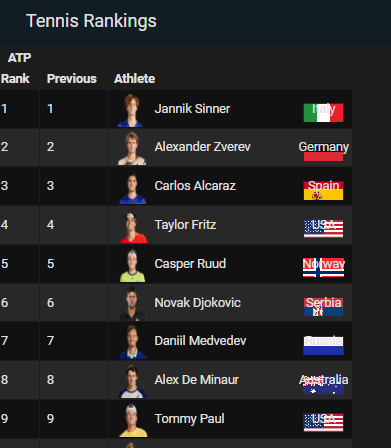
Great. You can also mess around with the images as well.
For example doing this:
        - name: Athlete
          data: ranks
          modify: >-
            '<div
            style="display:flex;justify-content:space-between;align-items:center;">'
            + '<div style="display:flex;align-items:center;">' + (typeof
            x.athlete.headshot !== 'undefined' ? '<img src="' +
            x.athlete.headshot + '"
            style="width:40px;height:40px;margin-right:5px;">' : '') +
            x.athlete.displayName + '</div>' + '<div style="background-image:
            url(' + (typeof x.athlete.flag !== 'undefined' ? x.athlete.flag :
            '') + '); background-size: cover; background-repeat: no-repeat;
            height: 30px; width: 50px; display: flex; align-items: center;
            justify-content: center;">' + (typeof x.athlete.flag !== 'undefined'
            ? x.athlete.flagAltText : '') + '</div>' + '</div>'
Gives you this:
maurizio53
February 8, 2025, 6:46pm
782
Ok, i modified the athlete option in the template, but now i get two times the flags as you can see:
And how to change the color of the name of the state?. As you see in some flags is not so clear…
EDIT: my fault… i forgot to delete the country option…
bburwell
February 8, 2025, 6:49pm
783
Sure, I am guessing that you have a column named Country in there. Just delete the Country Column.
In the code I posted today you can see that I deleted the Country column and moved that data into the Athlete Column. Combining those to try to free up some real estate for a mobile view.
1 Like