@jman11
To clarify … you did install both the SpotifyPlus Integration, and the SpotifyPlus Card components, correct? You must install (and configure) the SpotifyPlus Integration before installing the SpotifyPlus Card as well.
Note that the SpotifyPlus Card will not show up in any default entities lists. You must install the Card manually to an existing dashboard via the HA Card Picker.
The custom element doesn't exist: spotifyplus-card indicates that the card either did not install properly, or that the browser cache was not refreshed after install. I would recommend performing a hard refresh (Control-F5), as well as restarting HA. It also helps to install these components using a desktop browser (versus mobile, or HA Companion App).
Hi Todd, thanks for the quick reply… Yes I installed both SpotifyPlus Integration (after uninstalling the standard Spotify integration). Then I installed the SpotifyPlus Card.
I had the card fully working, then I came back a few minutes later and it was like I never installed it. So I installed again, and it worked fine, then it was gone again
I just went back in again and it’s there and working again! Hopefully it won’t disappear again. This is a great card that fills a lot of gaps left by the other cards! Overall I was just checking to see if the “phantom uninstal” I’m experiencing is a known issue, hopefully it’s just a cache thing and it will stay visible
@jman11
Definitely sounds like a caching thing. I would suggest restarting HA, then once it comes back up clear your browser cache (e.g. cached images and files), as well as deleting any HA-related cookies (e.g. home-assistant.io, homeassistant--http, etc).
Another possibility is a conflict with another card, but that is extremely rare.
@barry.gwilliam
It appears that HA developers are removing more MWC controls again, replacing them with WebAwesome equivalents. They have been doing this for the last 6 months, and it’s really annoying. In this instance, the <search-input-outlined> was dropped with the 2026.4.0 HA release.
I will look into it, and should have a fix within a couple of days. The only way to correct it until then it to revert back to a previous HA release.
HA devs replaced some more controls in 2026.04.0 release that used Material Design components, which broke the search / filter functionality in the SpotifyPlus Card.
[ 1.0.74 ] - 2026/04/02
Updated controls that were no longer displaying properly due to HA 2026.04.0 changes. HA devs replaced the search-input-outlined material design component with the ha-input-search component due to web-awesome changes.
Hi @thlucas
Great work on the card !
SInce the last version where the searchbar has been fixed, it seems that it’s behaviour was impacted :
I have a lovelace dashboard with multiple view, and on mobile, when I load my media view, it automatically focus on the search bar of Spotify Plus Card, bringing out the keyboard in the process.
In the past this was not the behaviour I had when loading that page.
Edit: It only does that when it’s a “fresh” load of that page, if that page has already been loaded recently, it won’t focus the search bar. But if I close fullykiosk or the HA App, and open it up again, It will focus the search bar again the first time loading my page.
This should fix the autofocus issue for sections using a filter / search bar.
Please give it a try, and let me know.
[ 1.0.75 ] - 2026/04/05
Changed autofocus property of ha-input-search component from true to false. This was causing a keyboard prompt to popup automatically when a section was focused that supports filtering.
Thanks for this plugin. I installed it just now, and only had to change the width to 'fill' to adjust it to my dashboard. Working immediately. Very grateful for it. Thanks!
I'm really enjoying this card for a kitchen dashboard displaying on a tablet, really nice to quickly get music on while cooking, etc.
I was trying to understand the shuffle behavior a bit. After I select a favorite playlist or album the card displays the Player view, but if I try to toggle the shuffle button there it does not seem to have an effect - the icon changes briefly but then immediately changes back.
I want to be able to easily shuffle a favorite playlist but then also easily be able to play a favorite album (or an album I've searched for) start to finish. Any tips for achieving that?
@sudeepban
The "the icon changes briefly but then immediately changes back" behavior leads me to believe that shuffle might be disabled for that particular playlist or content. Spotify does this sometimes for different types of playlists.
Is the shuffle button enabled in the Spotify Mobile / Desktop / Web Apps for the same playlist? This can also happen if play extends beyond the list of original items in the playlist.
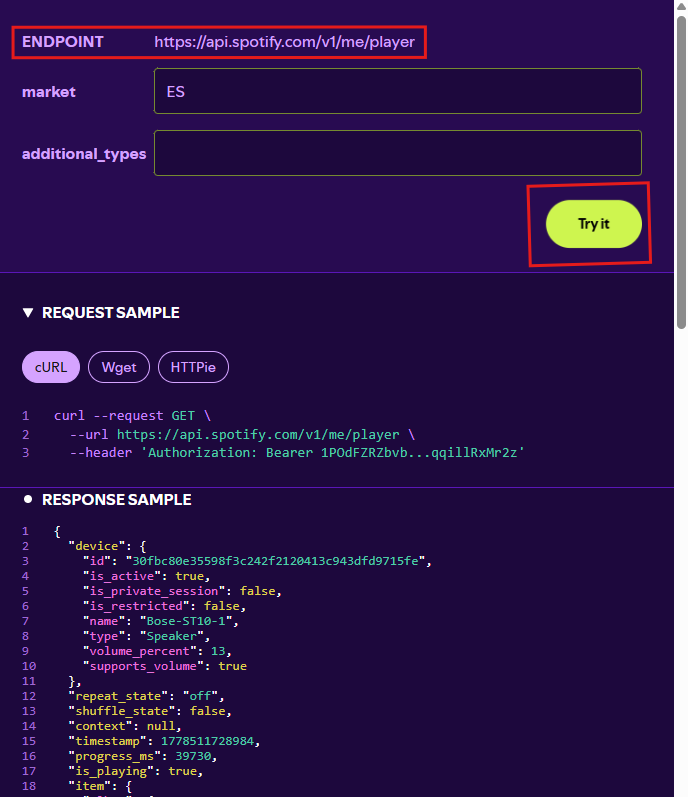
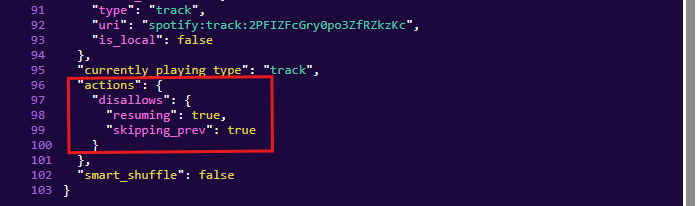
To confirm, start the specified playlist in HA. Then go to the Spotify Developer Web site, Get Playback State page and click on the "Try It" button. It should display the current play state. Look toward the bottom of the "Response Sample" for the actions data, and see if it lists anything about shuffle. If it does, then shuffling is probably disabled for that playlist. Also look for the shuffle_state value toward the top of the results.
Example:
Thanks for the super quick response! Interestingly when I play a playlist from the HA Spotify Plus card and then click "Try it" I get "empty response". When I play from the Spotify app I see the full response details. Is that unexpected?
It is definitely the same Spotify account. It is a Sonos speaker I am playing to. But that is in both cases, when playing from the Spotify app as well as when playing from the HA Spotify Plus card.
@sudeepban
Yes, Sonos devices can cause that scenario.
For Sonos devices, all content is played on the device using the local queue when the play context / tracks services are called. The local queue content that is currently playing will be different than what the Spotify Web API is currently reporting as playing. Unfortunately, Spotify developers disabled the ability to play context / tracks under Spotify control for Sonos devices! Note that the official Spotify Apps (Desktop / Web / Mobile) utilize the Spotify Embedded Client to control the device, which does not have these limitations like the Spotify Web API does.
Very interesting! Does it make sense that the only limitation I'm seeing is with this shuffle toggle on / off (also repeat fwiw)? Everything else works great, eg playing music on the Sonos device from the HA Spotify Plus card, seeing the selected track appear in the Player view in the card with album art, etc.
Yes - the shuffle settings are actually coming from the Sonos Controller (SoCo) API results in this case (instead of the Spotify Web API). I would bet that if you opened up the Sonos App, the shuffle would be disabled there as well.
If shuffle is enabled in the Sonos App, then something might have changed in the SoCo API relating to the shuffle settings. I know Sonos does some weird things that combine the Shuffle and the Repeat settings into 1 value under the covers.

 In this instance, the