Bottom Line: How do I show (10) or so rows, from an SQL query, on HA Dashboard ?
I have a front door lock, Kwikset 916, integrated into HA and all its events are stored in MariaDB; all this works well. I want to see the last (10) or so events related to lock/unlock. I have built the SQL query (using tools external to HA) to produce the result set I want but don’t know how to show on my dashboard. The result set is currently (2) columns, one with text, one with date. All the formatting is done in SQL. I am not sure how to get the query setup in HA as it seems the SQL integration is setup to return a single value.
I was interested in your post, and waiting to see if anyone came up with a template to do this, however yes, the SQL integration will return just one value in each created entity state. The extra query columns from the SQL will, apparently, go into attributes, but:
Note that in all cases only the first row returned will be used
Since the entity state cannot be an object in any form, this precludes returning a table or array, just a primitive value, possibly with extra ‘fields’ from just one row.
For myself, I use Node-RED, which can issue SQL queries to return and process an array (of objects) and such arrays can easily be returned in their entirety to HA in a Node-RED created Sensor entity as an attribute. Then it is a simple case of using the flex-table card, for example, based on the entity attribute.
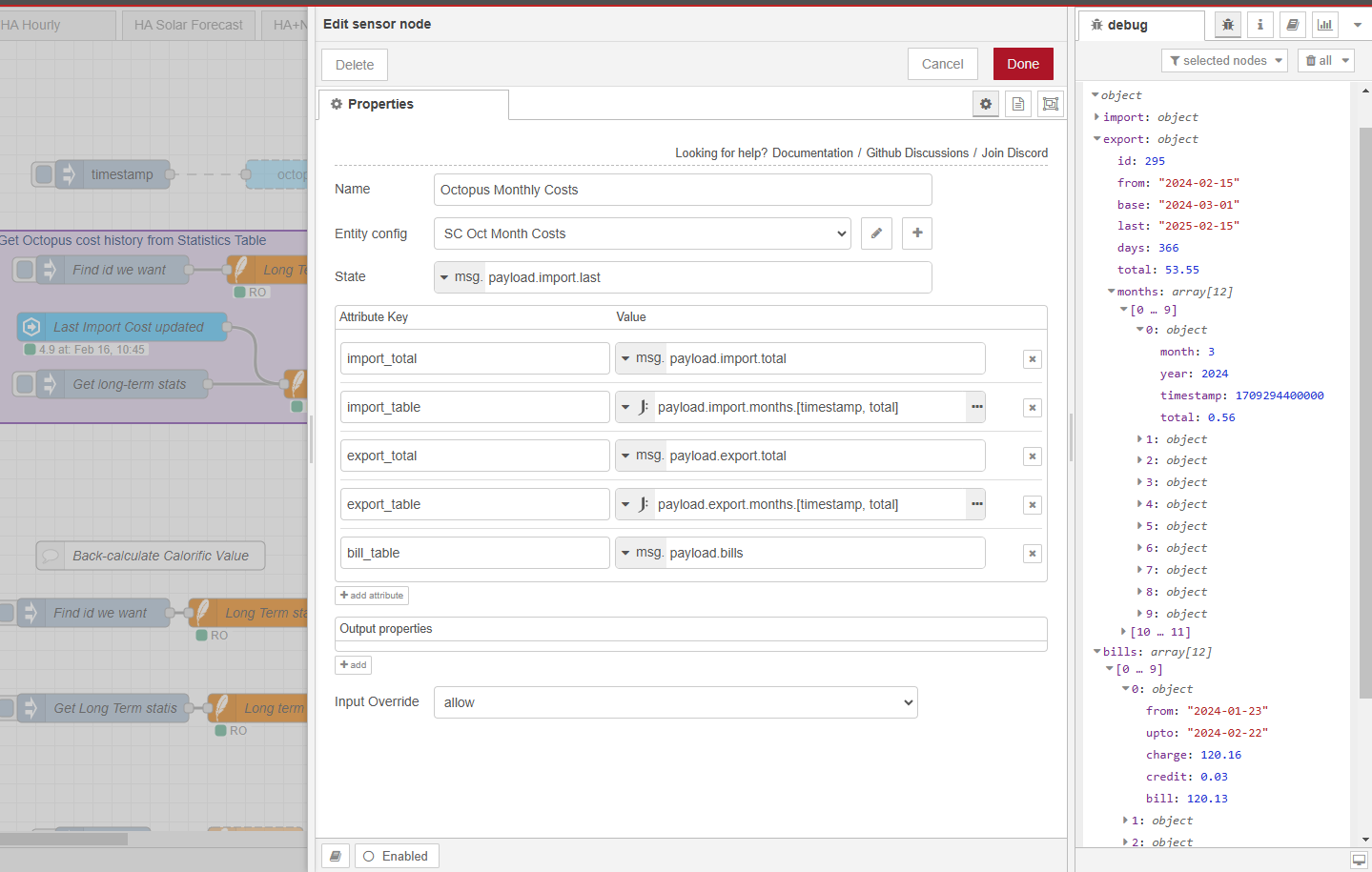
The ‘test weekly electricity cost’ comes from a basic HA SQL integration entity (single value) the rest via Node-RED to return an array of monthly billing figures from history.
Node-RED is not as popular as Jinja templates, but I personally find it relatively easy to use for useful stuff like this. I have really only just started using SQL, but it is amazing just what you can extract from the long-term statistics data!
One node to trigger the flow every time the values change, one node to run the SQL on the database (HA long-term statistics) one node to run the analysis and build the results array, one node to send it back to HA in a sensor attribute. All these components are YMTL (Yet More To Learn) but mostly ‘out of the box’ add-ons.
TY for interest and posting one solution. To date I have avoided Node-RED; yet somehow I manage to fight thru the Jinja complexity. As I really want to “see” my SQL data, your inclusion of your node red example might be the kick I need to get going with this. Thanx again.
I have now spent considerable time trying to implement this. I have the SQL data, that I want, being returned to NR and I am getting the sensor to be created (sometimes with error, sometimes not). What I simply have no luck in doing is getting the returned array of objects into the sensors attributes. The sensor node show in above graphic called “Octopus monthly costs”. Any chance you would show details of that node ? I believe what I need is not so complicated but endless web searching keeps bringing me back to this very page!
It is not intuitive, but once you get it to work for the first time it will be blindingly obvious how it all works.
The important thing is to put something into the State. This has to be a primitive value, so for testing you can always use a string “test”. If you try to put an object in there the node will generate an error.
Then you can put almost anything into the attributes.
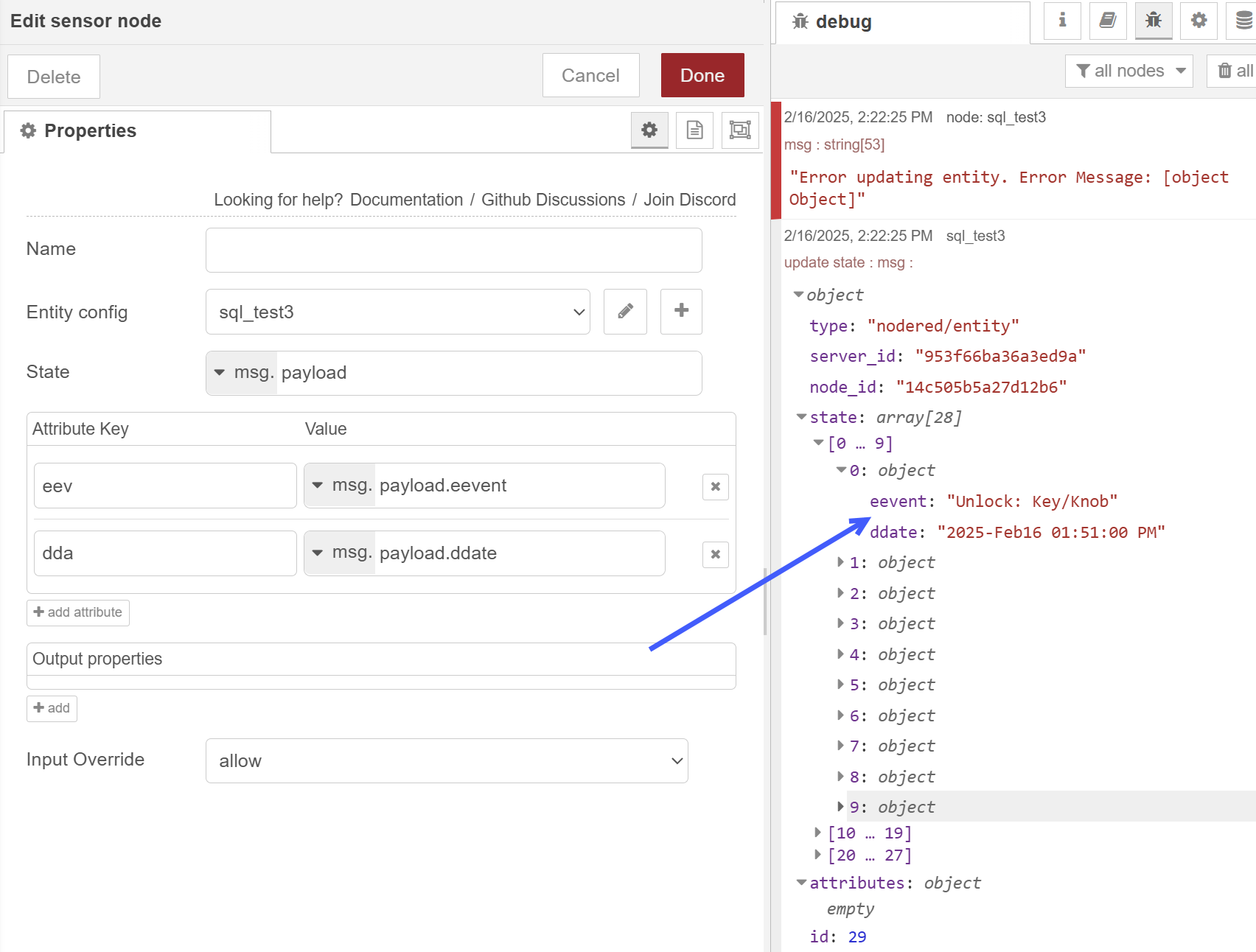
Thank you for trying to help. I am at a loss. Clearly I am getting data out of SQL (HASS in my case) and sensor is not indicating an error but my STATE holds the data I want and Attributes are empty. I tried a simple string “test” for state and it did not error, but did not provide the attributes either. I agree this should not be this much work, but once I get one working the others will follow in line. I suspect your “Analyse” node does something that makes our sensor node work ??? Appreciate any insight.
msg.payload looks to be an array of 28 objects, each object being
{“eevent”: string, “ddate” timestamp}
You cannot put an array into the sensor State. This just does not work.
You can put msg.payload into the attributes.
You cannot put payload.eevents into the attributes - payload is an array of objects, so msg.payload[0].eevent is the eevent field in the first item in the payload array.
Yes, it is complicated.
If you put msg.payload[0].ddate
into the State, then the Sensor state will hold a timestamp string of the first entry in your array
If you put msg.payload
into an attribute, then the attribute will hold the entire array of objects
If you want an array of the eevents, then you need
1 attribute key ‘eev’
2 set the value option to J: for JSONata
3 enter payload.eevent
I agree, this is not simple and it takes work to understand structured objects (and a bit of JSONata to process them, which is even more complicated)