I am trying to connect with SSH. I enabled the “Terminal & SSH” addon, created an ed25519 key on my computer, added port 22, and tried to connect from the terminal, however the connection gives me permission denied. If I add an use a password then it works.
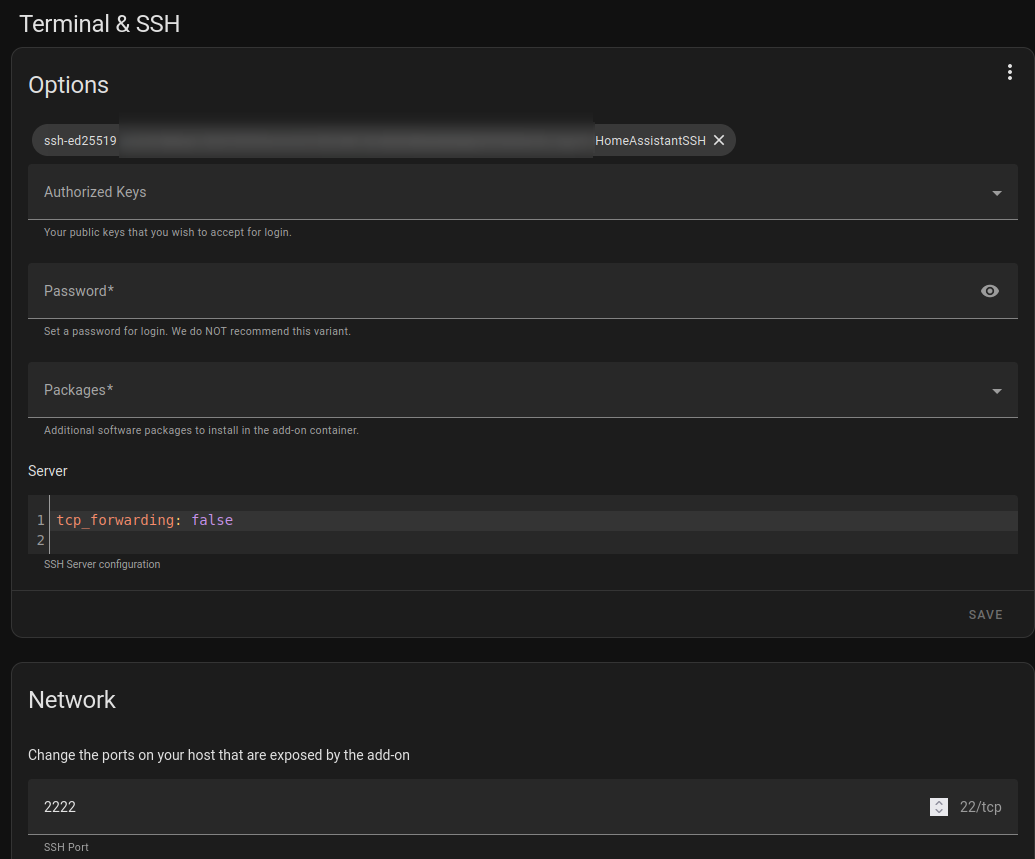
This is my terminal output
~/.ssh$ ssh -v [email protected] -p 2222
OpenSSH_8.9p1 Ubuntu-3ubuntu0.7, OpenSSL 3.0.2 15 Mar 2022
debug1: Reading configuration data /etc/ssh/ssh_config
debug1: /etc/ssh/ssh_config line 19: include /etc/ssh/ssh_config.d/*.conf matched no files
debug1: /etc/ssh/ssh_config line 21: Applying options for *
debug1: Connecting to 192.168.8.177 [192.168.8.177] port 2222.
debug1: Connection established.
debug1: identity file /home/HOSTNAME/.ssh/id_rsa type -1
debug1: identity file /home/HOSTNAME/.ssh/id_rsa-cert type -1
debug1: identity file /home/HOSTNAME/.ssh/id_ecdsa type -1
debug1: identity file /home/HOSTNAME/.ssh/id_ecdsa-cert type -1
debug1: identity file /home/HOSTNAME/.ssh/id_ecdsa_sk type -1
debug1: identity file /home/HOSTNAME/.ssh/id_ecdsa_sk-cert type -1
debug1: identity file /home/HOSTNAME/.ssh/id_ed25519 type -1
debug1: identity file /home/HOSTNAME/.ssh/id_ed25519-cert type -1
debug1: identity file /home/HOSTNAME/.ssh/id_ed25519_sk type -1
debug1: identity file /home/HOSTNAME/.ssh/id_ed25519_sk-cert type -1
debug1: identity file /home/HOSTNAME/.ssh/id_xmss type -1
debug1: identity file /home/HOSTNAME/.ssh/id_xmss-cert type -1
debug1: identity file /home/HOSTNAME/.ssh/id_dsa type -1
debug1: identity file /home/HOSTNAME/.ssh/id_dsa-cert type -1
debug1: Local version string SSH-2.0-OpenSSH_8.9p1 Ubuntu-3ubuntu0.7
debug1: Remote protocol version 2.0, remote software version OpenSSH_9.6
debug1: compat_banner: match: OpenSSH_9.6 pat OpenSSH* compat 0x04000000
debug1: Authenticating to 192.168.8.177:2222 as 'USERNAME'
debug1: load_hostkeys: fopen /home/HOSTNAME/.ssh/known_hosts2: No such file or directory
debug1: load_hostkeys: fopen /etc/ssh/ssh_known_hosts: No such file or directory
debug1: load_hostkeys: fopen /etc/ssh/ssh_known_hosts2: No such file or directory
debug1: SSH2_MSG_KEXINIT sent
debug1: SSH2_MSG_KEXINIT received
debug1: kex: algorithm: curve25519-sha256
debug1: kex: host key algorithm: ssh-ed25519
debug1: kex: server->client cipher: [email protected] MAC: <implicit> compression: none
debug1: kex: client->server cipher: [email protected] MAC: <implicit> compression: none
debug1: expecting SSH2_MSG_KEX_ECDH_REPLY
debug1: SSH2_MSG_KEX_ECDH_REPLY received
debug1: Server host key: ssh-ed25519 SHA256:REDACTED
debug1: load_hostkeys: fopen /home/HOSTNAME/.ssh/known_hosts2: No such file or directory
debug1: load_hostkeys: fopen /etc/ssh/ssh_known_hosts: No such file or directory
debug1: load_hostkeys: fopen /etc/ssh/ssh_known_hosts2: No such file or directory
debug1: Host '[192.168.8.177]:2222' is known and matches the ED25519 host key.
debug1: Found key in /home/HOSTNAME/.ssh/known_hosts:16
debug1: ssh_packet_send2_wrapped: resetting send seqnr 3
debug1: rekey out after 134217728 blocks
debug1: SSH2_MSG_NEWKEYS sent
debug1: expecting SSH2_MSG_NEWKEYS
debug1: ssh_packet_read_poll2: resetting read seqnr 3
debug1: SSH2_MSG_NEWKEYS received
debug1: rekey in after 134217728 blocks
debug1: get_agent_identities: bound agent to hostkey
debug1: get_agent_identities: agent returned 1 keys
debug1: Will attempt key: HomeAssistantSSH ED25519 SHA256:REDACTED agent
debug1: Will attempt key: /home/HOSTNAME/.ssh/id_rsa
debug1: Will attempt key: /home/HOSTNAME/.ssh/id_ecdsa
debug1: Will attempt key: /home/HOSTNAME/.ssh/id_ecdsa_sk
debug1: Will attempt key: /home/HOSTNAME/.ssh/id_ed25519
debug1: Will attempt key: /home/HOSTNAME/.ssh/id_ed25519_sk
debug1: Will attempt key: /home/HOSTNAME/.ssh/id_xmss
debug1: Will attempt key: /home/HOSTNAME/.ssh/id_dsa
debug1: SSH2_MSG_EXT_INFO received
debug1: kex_input_ext_info: server-sig-algs=<ssh-ed25519,ecdsa-sha2-nistp256,ecdsa-sha2-nistp384,ecdsa-sha2-nistp521,[email protected],[email protected],rsa-sha2-512,rsa-sha2-256>
debug1: kex_input_ext_info: [email protected]=<0>
debug1: kex_input_ext_info: [email protected] (unrecognised)
debug1: SSH2_MSG_SERVICE_ACCEPT received
debug1: Authentications that can continue: publickey,keyboard-interactive
debug1: Next authentication method: publickey
debug1: Offering public key: HomeAssistantSSH ED25519 SHA256:REDACTED agent
debug1: Authentications that can continue: publickey,keyboard-interactive
debug1: Trying private key: /home/HOSTNAME/.ssh/id_rsa
debug1: Trying private key: /home/HOSTNAME/.ssh/id_ecdsa
debug1: Trying private key: /home/HOSTNAME/.ssh/id_ecdsa_sk
debug1: Trying private key: /home/HOSTNAME/.ssh/id_ed25519
debug1: Trying private key: /home/HOSTNAME/.ssh/id_ed25519_sk
debug1: Trying private key: /home/HOSTNAME/.ssh/id_xmss
debug1: Trying private key: /home/HOSTNAME/.ssh/id_dsa
debug1: Next authentication method: keyboard-interactive
debug1: Authentications that can continue: publickey,keyboard-interactive
debug1: No more authentication methods to try.
[email protected]: Permission denied (publickey,keyboard-interactive).