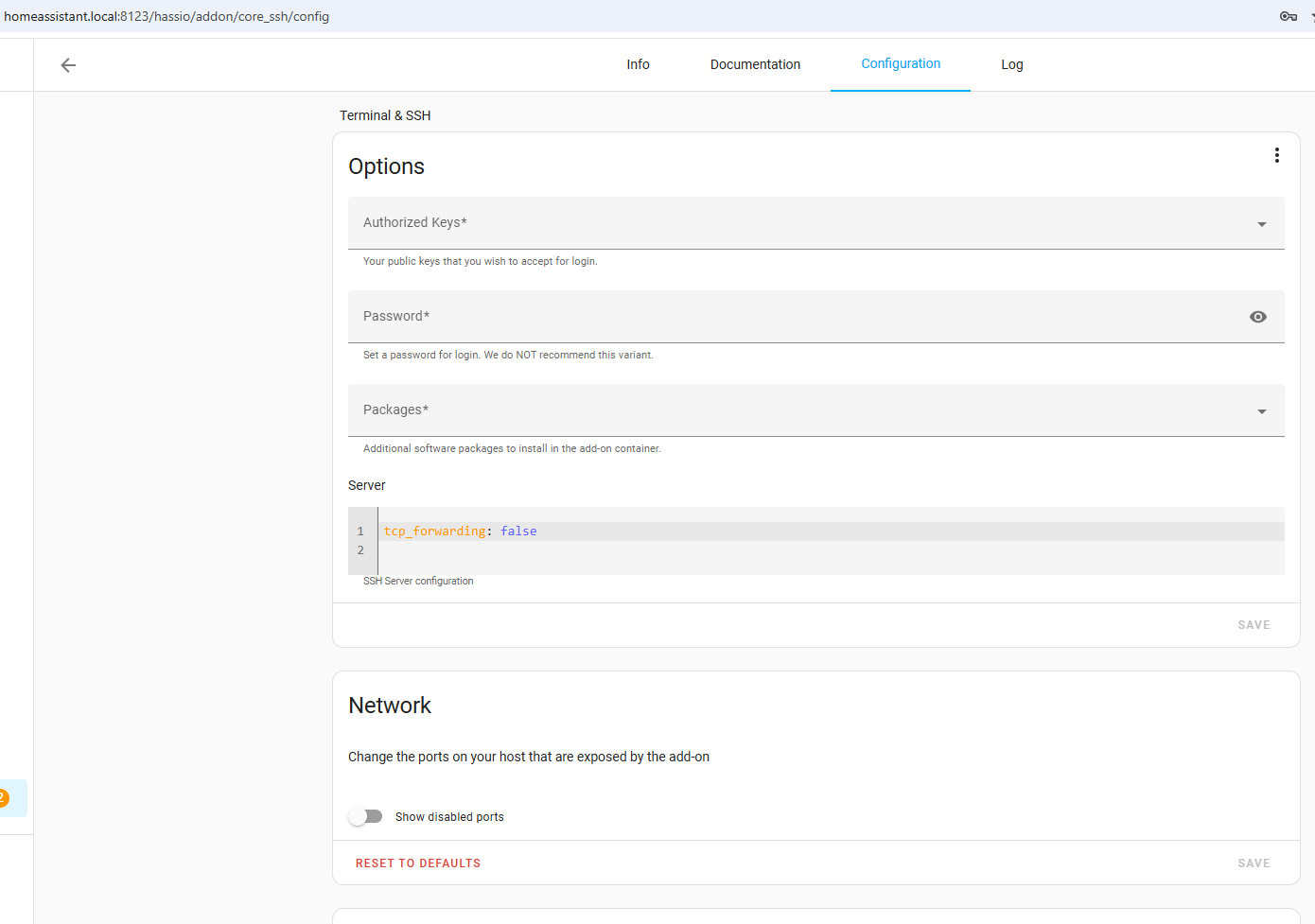
SSH port is disabled. Prevent start of SSH server

Hello,

Suddenly I found that I cannot connect to HA using putty. The message tells me that connection is refused. It used to work but I do not remember when was the last time I used it.

When I restart HA or just restart “Terminal & SSH” Add-On, I see the following:

[10:05:45] INFO: Starting Web Terminal...
[2020/06/20 10:05:45:1610] N: ttyd 1.6.0-c15cfb7 (libwebsockets 3.2.2)
[2020/06/20 10:05:45:1611] N: tty configuration:
[2020/06/20 10:05:45:1611] N:   start command: tmux -u new -A -s homeassistant bash -l
[2020/06/20 10:05:45:1613] N:   close signal: SIGHUP (1)
[2020/06/20 10:05:45:1613] N:   terminal type: xterm-256color
[2020/06/20 10:05:45:1976] N:  Using foreign event loop...
[2020/06/20 10:05:45:1984] N:  Listening on port: 8099
[10:05:45] WARNING: SSH port is disabled. Prevent start of SSH server.

This is the configuration for my “Terminal & SSH” Add-On. Can someone help me?

authorized_keys: []
password: MyPasswordIsHere
server:
  tcp_forwarding: false
port: 22
2 Likes

I don’t think you can add the port in the configuration. You have to enter it separate.

8 Likes

Then it won’t start completely

1 Like

It worked for me. Thank you for your help.

don’t work for me also with the last stable homeAssistant.
I configure the ssh key with the tutorial from: https://www.digitalocean.com/community/tutorials/how-to-create-ssh-keys-with-putty-to-connect-to-a-vps

From Putty, I have the following msg :

2020-12-08 19:21:16	Looking up host "192.168.1.63" for SSH connection
2020-12-08 19:21:16	Connecting to 192.168.1.63 port 22
2020-12-08 19:21:16	We claim version: SSH-2.0-PuTTY_Release_0.73
2020-12-08 19:21:18	Failed to connect to 192.168.1.63: Network error: Connection refused
2020-12-08 19:21:18	Network error: Connection refused

I moved from a synology Virtual Machine manager to Raspberry PI 4 supervised.
make a backup and restore it to the new install on de Pi all dashboards are working wel !!

the terminal works perfect on the synology I see in the log “INFO: Service restart after closing”
but not on the Pi I only need a terminal in HA not SSH

wat goes wrong here ?

Solved !!

Back to Clean install, then restore HAform backup but NOT the Add-on’s Terminal SSH & File editor.
Every thing ok, then install the two add-ons’s (with the correct arch X64 vs Arm that’s it !!

How did you pick the x64 arch when installing the add on? I tried a restore to move my system from a Pi to a x86 system and all the addons failed but I can’t seem to get the proper arch versions installed. When I uninstall and then reinstall they still don’t start.

1 Like

I run Home Assistant on Raspberry PI with latest version. I removed the addins(ssh and file editor), reboot and re-installed. Same error;
“SSH port is disabled. Prevent start of SSH server”.
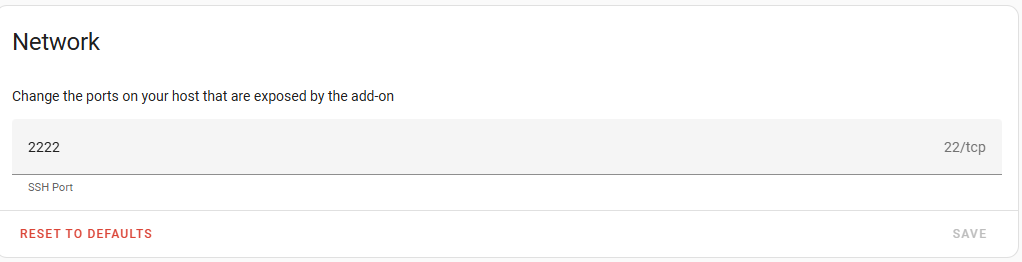
Also the menu item for network under configuration to enter the port number is not shown at all.
Don’t like to go for a clean install.:disappointed_relieved:

After setting the slider ‘Show disabled ports’, I was able to provide a custom value.(tried 2222) After that I could connect with Putty using this custom port, although the logging still says it is listening on port 22!? I tried port 22 just to check, but then I get ‘connection refused’.

I used the Advanced SSH & Web Terminal add-on, with the following config:

username: <your username here>
password: ""
authorized_keys:
  - <paste you public key here>
sftp: false
compatibility_mode: false
allow_agent_forwarding: false
allow_remote_port_forwarding: false
allow_tcp_forwarding: true

works perfectly.
Can even use a local VSCode in my PC to connect to HA.

I suppose the same would work for the regular SSH add-on.

@Marcus, Thanks but where exactly does one enter this config stuff in Advanced SSH & Web Terminal?

I used the Advanced SSH & Web Terminal add-on, with the following config:

username: <your username here>
password: ""
authorized_keys:
  - <paste you public key here>
sftp: false
compatibility_mode: false
allow_agent_forwarding: false
allow_remote_port_forwarding: false
allow_tcp_forwarding: true

works perfectly.

I’m seeing this configuration also mentioned here, but no mention of where to enter it.

Also here is another thread on this issue.

And this page finally shows where the root folder for addon_configs is.

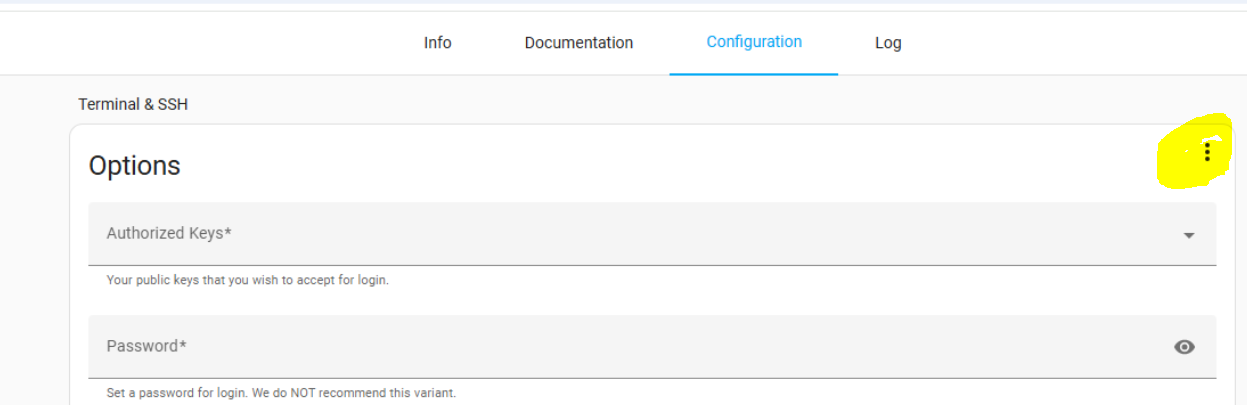
Go to the Configuration Tab of the Addon, Click the 3 dots > Edit in Yaml & paste the code there.

@ShadowFist already covered it.

Go to SettingsAdd-onsAdvanced SSH & Web TerminalConfigurations then on the Options section, click the 3 dots and Edit in YAML.