I have tested your YAML and it works how you have set it up. If I remove the conditions I can get both actions to work. You have 30 min to action it before it will be canceled.
The thing is you have a global condition that your input_boolean.bypass_entry_motion must be OFF and your action 1 is to turn it OFF. This makes no sense, why have action 1? or why have that condition?
Also you have a condition that your timer must be idle. If it not idle it wont run.
Everything works but your conflicting yourself with ether action 1 or the conditions.
Sorry for the false alarm. After a reboot of HA its working (like Windows OS, I should just reboot before testing!)
prior to the reboot, I tested multiple automations (I have 6 like this) about a dozen times (using Dev Tools to change the trigger device states)
All were trigger properly but the action buttons were not working.
btw… those global conditions are ‘bypasses’. When the bypasses are ‘on’ (or not idle), the automation will not trigger. This is by design and works really nicely. Would be great to have an option for separate bypass Boolean and timer built-in
cool, thanks, could you add support multiple states ? like armed_awaydisarmed, etc that way I could have one automation for when the alarm is armed and disarmed.
This is probably a very silly question but I’ve dug through the FAQ and done a CTRL+F in this forum and I can’t find any information on it. I’m confused about what the “start” and “end” trigger entities are? What is different about the “start trigger entity” that the “end trigger entity” does differently?
Does the “end” trigger entity stop the automation?
EDIT:
To save you the effort, I put the whole blueprint into ChatGPT and got this response:
TL;DR — What’s the difference between “Start” and “End” trigger entities?
Start Trigger Entities:
These are the entities that, when they change to a specific state (or a value crosses a threshold), start the automation. This can include sending notifications and/or running actions.
End Trigger Entities:
These are entities that, when they change to a specified state or value, also trigger the automation, but typically represent the end of a condition (like a door being closed after being opened, or a device turning off after being on). They have their own separate set of actions and notifications.
How are they used in practice?
Imagine you’re monitoring a door sensor:
Start Trigger: When the door opens (state: on)
End Trigger: When the door closes (state: off)
You could then:
Send a notification when the door opens (Start Trigger).
Send another when the door closes (End Trigger).
Run different actions depending on which trigger occurred.
Not sure if anyone else has this problem, but on the latest version of HA, if I have an action defined in the first action button and an action defined in the second action button, and then I click the second action, both the first and the second actions are triggered. This is true for iOS.
To recap: multiple actions are firing when only one button is pressed. I wonder if:
The action strings (action_button_1, action_button_2, etc.) might not be unique.
The check in wait.trigger.event.data.action is too loose, and is matching partial strings or values it shouldn’t.
Yes that is correct and is why I named them that way when developing the blueprint but you can also look at them as just trigger 1 (Start) and trigger 2 (end).
Example:
Start Notification that the “door / window is open!” (trigger 1) and you trigger has no delay.
End notification the to “door / window is still open and has not been closed!” (trigger 2) and your trigger has a delay.
or you could have a delay for start (trigger 1) and as a reminder a longer delay for end (trigger 2). End is like a reminder to go and close the door / window.
I can’t see your YAML of the automation but have you selected the Start or End Auto Action Options? If you have, then unselect it as this option is for running the actions regardless of what button you press and or if your not using action buttons then the action will be done automatically.
Thanks so much reaching out and trying to explain it to me. You are absolutely right, I had the auto start enabled for the first action. Makes perfect sense now why it was triggering even if I pressed the second button. I’ve definitely gotten myself tied up at knots. I thought that the start auto action option was only run after the timeout if no button was pressed? But reading the documentation it seems like that might not be the case.
What I’m trying to do is use this blueprint to send me a notification when the garage door has been open for too long and that notification should provide action buttons to either close the garage door or another action button that sets a input_boolean to stop the automation from running again (I have this input_boolean as a condition for the blueprint).
If, after a certain time delay, no action button has been pressed, then the garage door is automatically closed. Is that something that this blueprint can achieve? Is that where I need to use the start and end functions? Still a bit confused about how that feature works.
Sorry for the questions and thanks for the help. I really do appreciate it.
EDIT: this is edited yaml now with the end trigger options to close to the door if it’s been open and empty for too long. How does that look to you?
The trigger for both start and end is the Garage Motion must be “empty” for sometime (the end is longer than the start). The global condition is at the garage door must be open.
alias: Notify when garage door is left open
description: ""
use_blueprint:
  path: Blackshome/state-notifications-and-actions.yaml
  input:
    start_trigger_state: "off"
    start_trigger_state_entity:
      - binary_sensor.garage_motion_group
    start_time_delay_state:
      hours: 0
      minutes: 3
      seconds: 0
    include_start_notify: enable_start_notify_options
    start_notify_device:
      - 00920cd4a982458d87c08a8b49855dd7
    start_title: "📢 Home Assistant "
    start_message: The garage has been empty for some time and the Garage Door is still open
    start_notify_interruption_level: critical
    include_start_action_buttons:
      - enable_start_action_button_1
      - enable_start_action_button_2
    start_action_button_1: Close the garage door
    include_start_action_button_confirmation: enable_start_action_button_confirmation
    start_action_button_confirmation_title: 📢 Home Assistant
    start_action_button_confirmation_message: Garage door has been closed
    start_time_delay_confirmation_message: >-
      Garage door was left open and no action. The door will be closed automatically in the future.
    start_action_1:
      - action: cover.close_cover
        metadata: {}
        data: {}
        target:
          entity_id: cover.garage_door_controller_none
    include_start_auto_actions: []
    start_time_delay:
      hours: 0
      minutes: 2
      seconds: 0
    global_conditions:
      - condition: state
        entity_id: cover.garage_door_controller_none
        state: open
        for:
          hours: 0
          minutes: 0
          seconds: 30
        enabled: true
      - condition: state
        entity_id: input_boolean.close_the_garage_door_after_timeout
        state: "on"
    start_action_button_2: Stop this automation from triggering again
    start_action_2:
      - action: input_boolean.turn_off
        metadata: {}
        data: {}
        target:
          entity_id: input_boolean.close_the_garage_door_after_timeout
    start_action_button_2_confirmation_message: You won't be notified again that the garage door has been left open
    end_trigger_state: "off"
    end_trigger_state_entity:
      - binary_sensor.garage_motion_group
    end_time_delay_state:
      hours: 0
      minutes: 10
      seconds: 0
    include_end_notify: enable_end_notify_options
    end_title: 📢 Home Assistant
    end_message: >-
      Garage Door has been open and empty for too long and will be closed
      automatically
    end_notify_interruption_level: critical
    end_action_button_1: Close the Garage Door
    end_action_button_stop_confirmation_message: The garage door will not be closed
    include_end_auto_actions:
      - enable_end_action_1
    end_action_1:
      - action: cover.close_cover
        metadata: {}
        data: {}
        target:
          entity_id: cover.garage_door_controller_none
I would have the input boolean different. I would have one and call it “Holding the garage door open” and swap the logic. Then this would show a ON state in the UI that brings it to your attention (door is held open). Then from there you could have another automation that notify you the door is being held open from this state with a delay (1 hour) and would you like to close it. That one could be the start and then repeat it again with a longer delay (2 hours) for the end and again ask you if you would like to close it. Now you have 2 reminders that your holding the door open. Then another one at the time before you go to bed or if you do something when you go to bed like put your phone on do not disturb and your door is open send you a message again, would you like to close it.
It is full on but it will make sure your garage door is closed.
Thanks @Blacky! that is a great idea and I appreciate your input. I think I’ll try your way. By the way, your blueprints are seriously insanely complex. I’ve written a few of my own (Adaptive fan speed control based on temperature and speed range) being one of the more popular ones but nothing compare to the complexity of yours. One thing I struggle with is the debugging. I’m just writing these in text editors and pulling my hair out dealing with minor syntax errors etc. How do you manage yours? You got a magic workflow/tool/IDE you use or are you just that good?
I just use Studio Code Server and write the code, no fancy workflows, tools, or IDEs. Most people probably don’t see the amount of time that goes into development, updating descriptions, and especially testing. It’s a lot of work, and I honestly couldn’t say how many hours I’ve spent on these blueprints. Thanks for the kind words, it really means a lot. I just hope they’re helpful in some small way.
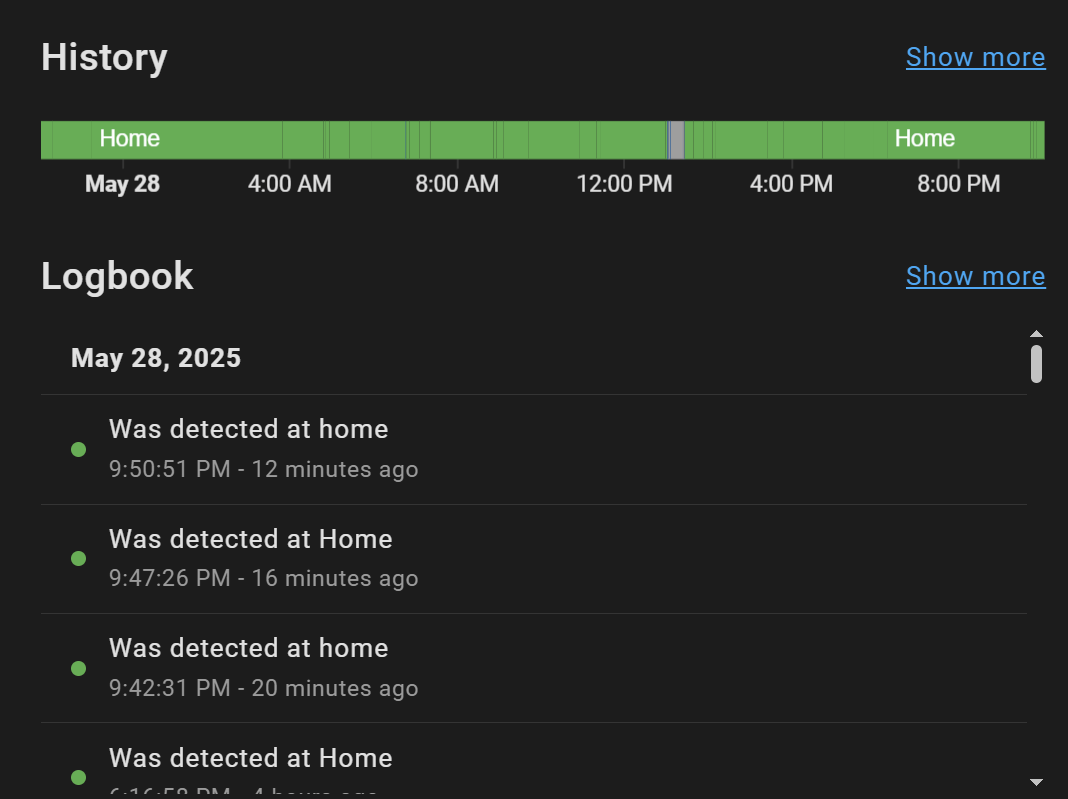
@Blacky Not sure if this is specific to a ‘Person’ entity but I get a lot of triggers when the entity is set to Home. I dont mean ‘changes from Away to Home’ I mean from Home to Home.
the BP says “Enter the entities that will trigger the automation on state change.” so I assumed that meant the state became a different value but its triggering without a value change.
as you can see, there was no state value change (and it looks like this happens frequently)…
thank you. I suspect that was it. I dont recall making a “Home” zone manually but I had two zones named exactly “Home” (both with first letter in caps)
… HA system must have internally converted one to lower case ‘home’… that was not visible, only the “Home” was.
The lower case one is created as part of the onboarding steps (when it asks you for location and to define a home radius). The UI will show it as Home to prettify it.
You might not have realised and created another “Home” zone via the UI. Given that under the hood, home and Home are different, that would explain the 2 home zones.
First off, hats off to your work here. I’m not sure how I haven’t come across this blueprint before.
I’m curious if it is possible to list multiple entities in a single notification. If yes, how would I go about it?
TIA


 TL;DR — What’s the difference between “Start” and “End” trigger entities?
 How are they used in practice?
 Bug report: