One of my ESP32-S2 devices, which due to accessibility is not yet converted to ESP-IDF but is still running on the Arduino framework, has a strange IP issue since it has been updated from ESPHome 2025.6.3 to ESPHome 2025.7.3
Somehow the ESP sometimes gets an unknown IPv6 address!
On all my ESP devices I have the IPv4 address set as fixed, defined in secrets.yaml.
And by default I always have the WiFi Info Text Sensor activated on all my ESP devices, including the IP-address, and the logging is normally set to level DEBUG.
This are the parts from the current ESPHome Yaml code that might be related to this issue:
esp32:
  board: lolin_s2_mini
  variant: esp32s2
  framework:
    type: arduino

substitutions:
  friendly_name: S2V10-01
  sys_name: s2v10_01

logger:
  level: DEBUG

api:
  encryption:
    key: !secret esph_api_encryption_key

ota:
  platform: esphome
  password: !secret pwd_ota_s2v10_01

wifi:
  networks:
  - ssid: !secret ssid_iot_wlan2
    password: !secret pwd_iot_wlan2
    bssid: !secret bssid_iot_ap3
  - ssid: !secret ssid_iot_wlan2
    password: !secret pwd_iot_wlan2
    bssid: !secret bssid_iot_ap1
  - ssid: !secret ssid_iot_wlan2
    password: !secret pwd_iot_wlan2
    bssid: !secret bssid_iot_ap2
  domain: !secret ip_domain
  manual_ip:
    static_ip: !secret ip_esp_s2v10_1
    gateway: !secret ip_gateway
    subnet: !secret ip_subnet
    dns1: !secret ip_dns1
    dns2: !secret ip_dns2

  ap:
    ssid: !secret ssid_fbap_wlan_s2v10_01
    password: !secret pwd_fbap_wlan_s2v10_01

web_server:
  port: !secret port_websrv
  auth:
    username: !secret user_websrv
    password: !secret pwd_websrv
  version: 3
  local: true

captive_portal:

text_sensor:
  - platform: wifi_info
    ip_address:
      name: ${friendly_name} IP Address
Normally the IP address sensor status is not shown in the logs, but is only visible in the HA interface.
But after updating this ESP device I now see many instances of the IP-address output in the log, like once a second or so.
And even more strange is that every now and then sometimes I see IPv6 addresses appearing.
This are some log snippets showing this:
[09:15:14][D][text_sensor:069]: 'S2V10-01 IP Address': Sending state '192.168.124.243'
[09:15:15][D][text_sensor:069]: 'S2V10-01 IP Address': Sending state '192.168.124.243'
[09:15:18][D][text_sensor:069]: 'S2V10-01 IP Address': Sending state '192.168.124.243'
[09:15:19][D][text_sensor:069]: 'S2V10-01 IP Address': Sending state '192.168.124.243'
[09:15:23][D][text_sensor:069]: 'S2V10-01 IP Address': Sending state 'c0a8:7cf3:230a:600::200a:600'
[09:15:24][D][text_sensor:069]: 'S2V10-01 IP Address': Sending state '192.168.124.243'
[09:15:26][D][text_sensor:069]: 'S2V10-01 IP Address': Sending state '192.168.124.243'
[09:15:27][D][text_sensor:069]: 'S2V10-01 IP Address': Sending state '192.168.124.243'
[09:15:28][D][text_sensor:069]: 'S2V10-01 IP Address': Sending state '192.168.124.243'
[09:15:29][D][text_sensor:069]: 'S2V10-01 IP Address': Sending state '192.168.124.243'
[09:15:30][D][text_sensor:069]: 'S2V10-01 IP Address': Sending state '192.168.124.243'
[09:15:31][D][text_sensor:069]: 'S2V10-01 IP Address': Sending state '192.168.124.243'
[09:15:32][D][text_sensor:069]: 'S2V10-01 IP Address': Sending state '192.168.124.243'
[09:15:33][D][text_sensor:069]: 'S2V10-01 IP Address': Sending state '192.168.124.243'
[09:15:34][D][text_sensor:069]: 'S2V10-01 IP Address': Sending state '192.168.124.243'
[09:15:35][D][text_sensor:069]: 'S2V10-01 IP Address': Sending state '192.168.124.243'
[09:15:36][D][text_sensor:069]: 'S2V10-01 IP Address': Sending state '192.168.124.243'
[09:15:46][D][text_sensor:069]: 'S2V10-01 IP Address': Sending state '192.168.124.243'
[09:15:47][D][text_sensor:069]: 'S2V10-01 IP Address': Sending state '192.168.124.243'
[09:15:48][D][text_sensor:069]: 'S2V10-01 IP Address': Sending state '192.168.124.243'
[09:15:49][D][text_sensor:069]: 'S2V10-01 IP Address': Sending state '192.168.124.243'
[09:15:50][D][text_sensor:069]: 'S2V10-01 IP Address': Sending state '192.168.124.243'

[09:45:51][D][text_sensor:069]: 'S2V10-01 IP Address': Sending state '192.168.124.243'
[09:45:52][D][text_sensor:069]: 'S2V10-01 IP Address': Sending state '192.168.124.243'
[09:45:54][D][text_sensor:069]: 'S2V10-01 IP Address': Sending state 'c0a8:7cf3:6cef:fd3f:cde:fe3f:e00:0'
[09:45:55][D][text_sensor:069]: 'S2V10-01 IP Address': Sending state '192.168.124.243'

[09:47:00][D][text_sensor:069]: 'S2V10-01 IP Address': Sending state '192.168.124.243'
[09:47:01][D][text_sensor:069]: 'S2V10-01 IP Address': Sending state '192.168.124.243'
[09:47:02][D][text_sensor:069]: 'S2V10-01 IP Address': Sending state '192.168.124.243'
[09:47:03][D][text_sensor:069]: 'S2V10-01 IP Address': Sending state '192.168.124.243'
[09:47:04][D][text_sensor:069]: 'S2V10-01 IP Address': Sending state '192.168.124.243'
[09:47:05][D][text_sensor:069]: 'S2V10-01 IP Address': Sending state 'c0a8:7cf3:60e2:fd3f:84e2:fd3f:679:1e00'
[09:47:06][D][text_sensor:069]: 'S2V10-01 IP Address': Sending state '192.168.124.243'
For debugging I then changed the logging level to VERY_VERBOSE with this as some related results from the logs:
[12:04:28][V][text_sensor:015]: 'S2V10-01 IP Address': Received new state 192.168.124.243
[12:04:28][D][text_sensor:069]: 'S2V10-01 IP Address': Sending state '192.168.124.243'
[12:04:28][VV][api.service:013]: send_message text_sensor_state_response: TextSensorStateResponse {
[12:04:28][VV][api.service:013]:   key: 3851178666
[12:04:28][VV][api.service:013]:   state: '192.168.124.243'
[12:04:28][VV][api.service:013]:   missing_state: NO
[12:04:28][VV][api.service:013]:   device_id: 0
[12:04:28]}
[12:04:28][VV][api.service:013]: send_message text_sensor_state_response: TextSensorStateResponse {
[12:04:28][VV][api.service:013]:   key: 3851178666
[12:04:28][VV][api.service:013]:   state: '192.168.124.243'
[12:04:28][VV][api.service:013]:   missing_state: NO
[12:04:28][VV][api.service:013]:   device_id: 0
[12:04:28]}

[12:04:32][V][text_sensor:015]: 'S2V10-01 IP Address': Received new state 192.168.124.243
[12:04:32][D][text_sensor:069]: 'S2V10-01 IP Address': Sending state '192.168.124.243'
[12:04:32][VV][api.service:013]: send_message text_sensor_state_response: TextSensorStateResponse {
[12:04:32][VV][api.service:013]:   key: 3851178666
[12:04:32][VV][api.service:013]:   state: '192.168.124.243'
[12:04:32][VV][api.service:013]:   missing_state: NO
[12:04:32][VV][api.service:013]:   device_id: 0
[12:04:32]}
[12:04:32][VV][api.service:013]: send_message text_sensor_state_response: TextSensorStateResponse {
[12:04:32][VV][api.service:013]:   key: 3851178666
[12:04:32][VV][api.service:013]:   state: '192.168.124.243'
[12:04:32][VV][api.service:013]:   missing_state: NO
[12:04:32][VV][api.service:013]:   device_id: 0
[12:04:32]}

[12:04:35][VV][api.service:013]: send_message text_sensor_state_response: TextSensorStateResponse {
[12:04:35][VV][api.service:013]:   key: 3851178666
[12:04:35][VV][api.service:013]:   state: '192.168.124.243'
[12:04:35][VV][api.service:013]:   missing_state: NO
[12:04:35][VV][api.service:013]:   device_id: 0
[12:04:35]}
[12:04:35][VV][api.service:013]: send_message text_sensor_state_response: TextSensorStateResponse {
[12:04:35][VV][api.service:013]:   key: 3851178666
[12:04:35][VV][api.service:013]:   state: '192.168.124.243'
[12:04:35][VV][api.service:013]:   missing_state: NO
[12:04:35][VV][api.service:013]:   device_id: 0
[12:04:35]}
[12:04:35][VV][api.connection:190]: Sending keepalive PING
[12:04:35][VV][api.service:013]: send_message ping_request: PingRequest {}
[12:04:35][VV][api.service:068]: on_ping_response: PingResponse {}
[12:04:36][V][text_sensor:015]: 'S2V10-01 IP Address': Received new state c0a8:7cf3:230a:600::200a:600
[12:04:36][D][text_sensor:069]: 'S2V10-01 IP Address': Sending state 'c0a8:7cf3:230a:600::200a:600'
[12:04:36][VV][api.service:013]: send_message text_sensor_state_response: TextSensorStateResponse {
[12:04:36][VV][api.service:013]:   key: 3851178666
[12:04:36][VV][api.service:013]:   state: 'c0a8:7cf3:230a:600::200a:600'
[12:04:36][VV][api.service:013]:   missing_state: NO
[12:04:36][VV][api.service:013]:   device_id: 0
[12:04:36]}
[12:04:36][VV][api.service:013]: send_message text_sensor_state_response: TextSensorStateResponse {
[12:04:36][VV][api.service:013]:   key: 3851178666
[12:04:36][VV][api.service:013]:   state: 'c0a8:7cf3:230a:600::200a:600'
[12:04:36][VV][api.service:013]:   missing_state: NO
[12:04:36][VV][api.service:013]:   device_id: 0
[12:04:36]}
[12:04:37][V][text_sensor:015]: 'S2V10-01 IP Address': Received new state 192.168.124.243
[12:04:37][D][text_sensor:069]: 'S2V10-01 IP Address': Sending state '192.168.124.243'
[12:04:37][VV][api.service:013]: send_message text_sensor_state_response: TextSensorStateResponse {
[12:04:37][VV][api.service:013]:   key: 3851178666
[12:04:37][VV][api.service:013]:   state: '192.168.124.243'
[12:04:37][VV][api.service:013]:   missing_state: NO
[12:04:37][VV][api.service:013]:   device_id: 0
[12:04:37]}
[12:04:37][VV][api.service:013]: send_message text_sensor_state_response: TextSensorStateResponse {
[12:04:37][VV][api.service:013]:   key: 3851178666
[12:04:37][VV][api.service:013]:   state: '192.168.124.243'
[12:04:37][VV][api.service:013]:   missing_state: NO
[12:04:37][VV][api.service:013]:   device_id: 0
I am not using IPv6 at all at the moment in my local network.
In Home Assistant I have IPv6 on Automatic enabled, but that is only for Matter, and there is only a link-local fe80 address defined.
It looks like the IP address is re-determined on the ESP device like every second.
This are some of the IPv6 addresses that were shown:
c0a8:7cf3:230a:600::200a:600
c0a8:7cf3:6cef:fd3f:cde:fe3f:e00:0
c0a8:7cf3:60e2:fd3f:84e2:fd3f:679:1e00
Originally I thought that this ESP device was somehow connecting to a neighbour access point and been given an IPv6 address, but that would be very strange of course.
But it appears that the given IPv6 addresses are based on the IPv4 address!
The first two groups of these IPv6 addresses are in fact the IPv4 address transferred from decimal to hex numbers.
c0a8:7cf3 = 192.168.124.243
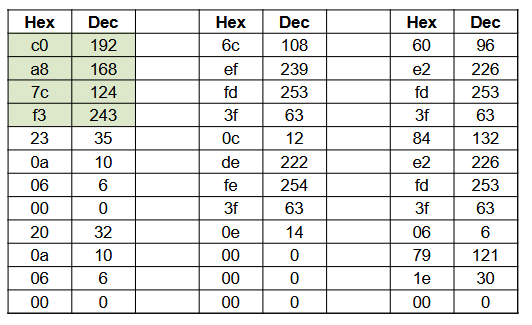
It however is not clear what the other hex numbers are.
Anyhow, this must be happening in the ESPHome code itself?
Has anybody else seen this?
I cannot find anything related to IPv4 or IPv6 in the ESPHome release notes since 2025.6.3, but can this be a recently introduced bug?