yes, you can use it in UI mode, but you cannot store it in a separate file.
just add it in the raw editor at the begin of the dashboard

Trying the route with seperate yaml files for seperate cards.
When trying to include “streamline_templates: !include_dir_named …/streamline_templates/” into my dashboard config I get this error?

Or should you include this into you configuration.yaml instead of directly into your dashboard (via raw config in UI)?
1 Like
If you are using UI mode you cannot include other files.
Only in yaml mode you can use includes
I’m also trying to use a separated file using yaml files but I get error in the dashboard view “selector_template” does not exist.
What I’ve done:
- created a “templates” folder
- Include in the folder a file called selector.yaml
Inside the file:
streamline_templates:
selector_template:
card:
type: custom:button-card
name: “[[name]]”
entity: “[[entity]]”
… - create a dashboard yaml file pointed in confiugration.yaml under lovelace::
inside the file:
streamline_templates: !include_dir_named …/templates/
views:
- path: default_view
title: Home
cards:- type: vertical-stack
cards:- type: custom:layout-card
layout_type: custom:grid-layout
layout:
grid-template-columns: 10% 10% 10% 10% 10% 10% 10%
margin: 0px
cards:- type: custom:streamline-card
template: selector_template
variables:
…
- type: custom:streamline-card
- type: custom:layout-card
- type: vertical-stack
I’ve tried siveral options with !include_dir_named configuration, but no success.
Appreciate your help to point out where the error could be.
Uploading a snapshot of the dashboard yaml file as I’m not able to past the content as the original file:

2 Likes
Hey, if you use include_dir_named you must:
- use the template name as file name (for you,
selector_template.yaml) - Remove the
streamline_templatesandselector_templatekeys from your file: you should directly put thecardkey, nothing more (except maybe thedefaultkey if you want to have default variables
Just discovered your card while reading about the latest Bubble Card release. As a big fan of decluttering-cards, I really appreciate what you’ve accomplished here. Most of my decluttering cards worked right out of the box. But I did have a couple complex ones that ran into an issue when using multiple variables on a single line. Here is the line from the decluttering card.
entity: 'number.[[prefix]]_g[[index]]_move_threshold'
If I pass prefix=basement_office_multisensor and index=8, decluttering card returns:
'number.basement_office_multisensor_g8_move_threshold'
However, streamline-card returned:
'number.basement_office_multisensor_g[[index]]_move_threshold'
To work around this, I had to use javascript:
entity_javascript: "return 'number.[[prefix]]_g' + '[[index]]' + '_move_threshold'"
Is this something you are able to support? Thanks again for your card!
I wanted to try out a very simple example, but unfortunately it doesn’t work for me either.
my_light_template.yaml:
card:
  type: custom:bubble-card
  name: "[[room_name]] Light" # This will be filled in later
  icon: "[[light_icon]]" # This will be filled in later
  entity: "[[light_entity]]" # This will be filled in late
lovelace.yaml:
streamline_templates: !include_dir_named ui/templates/streamline_templates/
On the debug console I see an
get http://.../hacsfiles/streamline-card/streamline_templates.yaml?t=1745744720417
not found error and a lot of
Uncaught (in promise) Error: The template "my_light_template" doesn't exist in streamline_templates
afterwards.
Pretty sure that happened to me because the include_dir_named was not correct. Check the location of that directory vs lovelace.yaml. In my case I needed “…/” to get it to the right place…
That’s not expected. Can you open an issue on the Github repository?
Are you using the UI mode for your dashboards? If so, you can’t use the yaml to add streamline templates in your dashboard.
If you do use the UI mode, you can put your template in the streamline_templates.yaml file, the one that got the not found error (which is not a blocking error). You can find a streamline_templates.example.yaml file where it should be placed.
If you don’t use yaml, it could be either a path issue (you can double check) or where the include is made.
It should be next to the views key.
Eg:
title: Home
views:
  - !include ../views/home/home.yaml
  - !include ../views/home/living-room.yaml
  - !include ../views/home/kitchen.yaml
  - !include ../views/home/principal-room.yaml
streamline_templates: !include_dir_named ui/templates/streamline_templates/
title: Home
views:
  - !include ui/views/info.yaml
  - !include ui/views/rooms.yaml

decluttering_templates: !include ui/templates/decluttering-card.yaml
button_card_templates: !include ui/templates/button-card.yaml
streamline_templates: !include_dir_named ui/templates/streamline_templates/
Button and decluttering templates are working. Only difference is the include_dir_named command.
@brunosabot I have some hesitation about opening an issue for this, as I’m still not sure, if it’s not a user fault. Do you need any log or something?
That’s very strange, I’m also using the yaml mode, like you do and it works.
After a path/file name double-check, you can open an issue on GitHub and we’ll try to find what going on with this.
It wasn’t the path/file name, but a chain of DAU errors.  Got it working and now I’m ready to go.
1 Like
It’s seems the initial config is not the only thing a DAU could struggle about. 
I try to pass a entity list to my template to fill a grid, but the result is an Uncaught (in promise) TypeError: can't convert null to object error.
My guess is I messed up an indentation or quote or something, but I can’t find it.
Template:
hf_room_details:
  default:
    - light_icon: mdi:ceiling-light
  card:
    type: custom:layout-card
    layout_type: custom:grid-layout
    layout:
      grid-template-columns: 100%
    cards:
      - type: heading
        heading: Licht
      - type: custom:layout-card
        layout_type: custom:grid-layout
        layout:
          grid-gap: 6px 20px
          grid-template-columns: repeat(auto-fill, 220px)
        cards: []
        cards_javascript: |
          return variables.lights.map(entity => ({
            type: 'custom:mushroom-light-card',
            entity: entity
          }));
      - type: heading
        heading: Jalousie
      - type: custom:layout-card
        layout_type: custom:grid-layout
        layout:
          grid-gap: 6px 20px
          grid-template-columns: repeat(auto-fill, 220px)
        cards:
      - type: heading
        heading: Heizung
      - type: custom:layout-card
        layout_type: custom:grid-layout
        layout:
          grid-gap: 6px 20px
          grid-template-columns: repeat(auto-fill, 220px)
        cards:
Usage:
title: Wohnzimmer
subview: true
path: details_livingroom
type: panel
cards:
  - type: custom:streamline-card
    template: hf_room_details
    variables:
      lights:
        - entity: light.wohnzimmer_deckenlampe
Hello @brunosabot and congratulations for your work ! I was looking for a framework to avoid code duplication and streamline card seems to be the good choice !
However in my current bubble-card, I can customize the card with javascript using for example (in the “style: |” section) :
${(() => {
  const temperature = parseFloat(state);
  const humidity = hass.states['sensor.ct_aqara_3_humidity']?.state; // Utilisation du capteur d'humidité
  // Met à jour le texte et la couleur
  card.querySelector('.bubble-state').innerText =
    (temperature.toFixed(1) + "°C") + (' • ' + (humidity ? parseFloat(humidity).toFixed(0) + "%" : "N/A")); // Arrondir l'humidité à 0 décimale
  // Applique la couleur et rend le texte en gras
    card.querySelector('.bubble-state').style.color = color; // Applique la couleur
    card.querySelector('.bubble-state').style.fontWeight = 'bold'; // Texte en gras
    card.querySelector('.bubble-state').style.fontSize = '13px'; // Taille de police à 13 pixels
})()} !important
I can access the card DOM element using element “card” but as I try to do the same in your “styles_javascript: |” section, I don’t know how I can access the card element to customize it ? am I getting something wrong ?
Hi @brunosabot,
I’ve encountered an issue with the streamline-card on Home Assistant version 2025.6.X.
After updating Home Assistant, any dashboard that includes the streamline-card becomes frozen.
This happens across multiple platforms: Chrome and Firefox on macOS, Chrome and Vivaldi on Android, and even in the official Home Assistant Android app.
When I replace the streamline-card with a decluttering-card, everything works as expected.
I don’t see in the logs any message that can help to understand the problem
Has anyone else encountered the problem described here?
hi, is it possible to change the background of a bubble cover card? i couldn’t do it.
I would like to get a card with a background of different colors depending on the position of the cove… example red if open, green if closed, yellow if moving
default:
  - name: ''
card:
  type: 'custom:bubble-card'
  card_type: cover
  entity: '[[entity]]'
  name: '[[name]]'
  icon_open: mdi:window-shutter-open
  icon_close: mdi:window-shutter
  show_state: true
  rows: 1
  card_layout: large
  sub_button:
    - name: 20%
      icon: mdi:star
      show_background: true
      tap_action:
        action: call-service
        service: cover.set_cover_position
        target:
          entity_id: '[[entity]]'
        data:
          position: 20
  styles_javascript: |
    return `
    .bubble-cover-card-container {
      gap: 8px;
    }
    .large .bubble-buttons {
      gap: 8px;
      right: 8px;
    }
    .bubble-button {
      background-color: var(--card-background-color, var(--ha-card-background));
      width: 36px;
      height: 36px;
    }
    .bubble-icon {
      opacity: 0.6 !important;
    }
    .large .bubble-sub-button-container {
      margin-right: 0!important;
    }
    .bubble-sub-button {
      width: 36px;
      height: 36px;
    }
    .bubble-state::after {
      content: " - ${states['[[entity]]'].attributes.current_position}%";
      margin-left: 4px;
    }
    .background-on {
      background-color: var(--card-background-color, var(--ha-card-background));
    }
    .bubble-icon-container {
      background-image: linear-gradient(to bottom, var(--state-cover-active-color) ${100-states['[[entity]]'].attributes.current_position}%, transparent ${100-states['[[entity]]'].attributes.current_position}%) !important;
      position: relative;
    }
    `
Hello @brunosabot
Is it normal to have a different behaviour if the streamline_templates are placed in the folder www/community/streamline-card/streamline_templates.yaml or directly put in the raw configuration of the view ?
With the templates in the view the visual editor works perfectly fine :
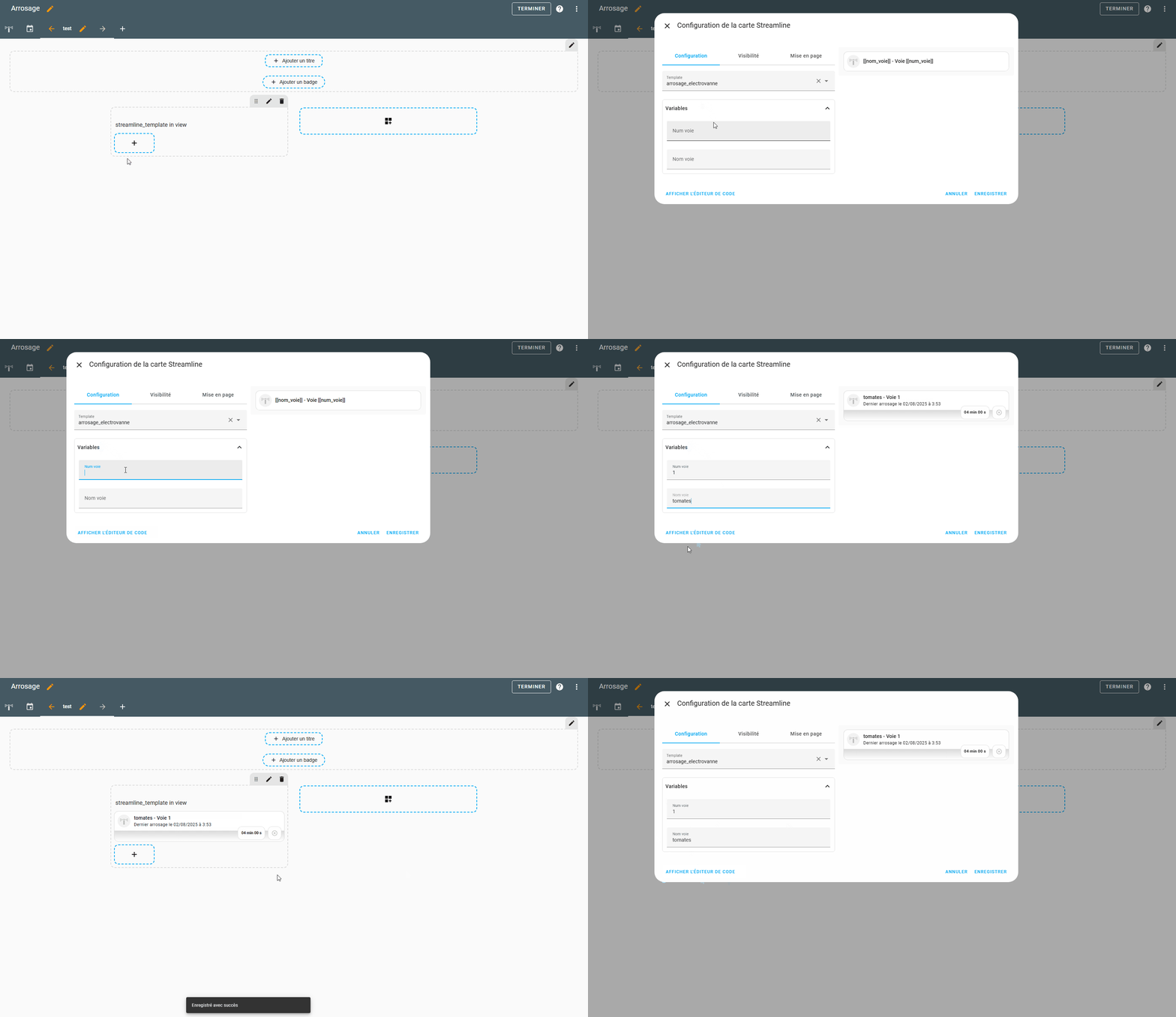
In this case my template start like this :
streamline_templates:
  arrosage_electrovanne:
    card:
      type: custom:vertical-stack-in-card
      cards:
        - type: custom:mushroom-template-card
With the templates in the folder www/community/streamline-card/streamline_templates.yaml :
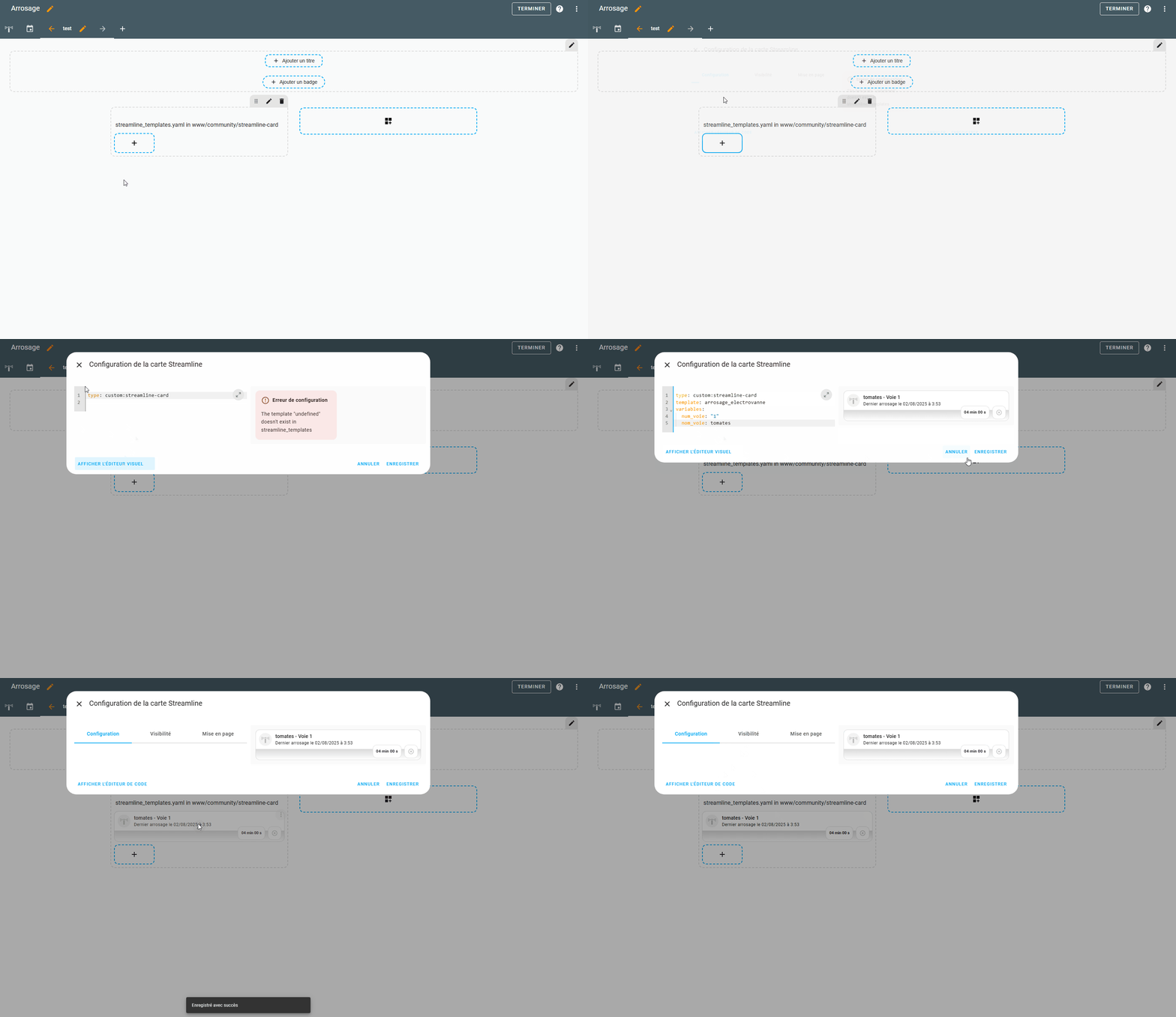
I lose the the ability to use of the visual editor and have to write all the configuration in the code editor.
In this case my template start like this :
arrosage_electrovanne:
  card:
    type: custom:vertical-stack-in-card
    cards:
      - type: custom:mushroom-template-card
This is not a big deal for me, because i know what to put in the configuration, but as i want to share the dashboard that use streamline_templates with the french community i would prefer, if it is possible, to have the visual editor in both scenario.
I don’t know if I forgot something or if this is the expected behavior ?
Thanks for the great job.
Hi,
Just a quick question: is it possible to use a bubble pop-up card in a streamline template?
Thanks.
1 Like