I got an air conditioner a while ago that had “smart” features. I thought I’d try to add it into home assistant and after learning all about Tuya, Local Tuya, Tuya Local, Tuya iot platform…
I finally have it almost 100% working.
The only thing left is the oscillation mode setting. I’ve found which DP ID I need for it:
{
  "abilityId": 106,
  "accessMode": "rw",
  "code": "windshake1",
  "description": "",
  "name": "摆风",
  "typeSpec": {
    "type": "bool"
  }
}

{
  "code": "windshake1",
  "custom_name": "",
  "dp_id": 106,
  "time": 1754856351479,
  "type": "bool",
  "value": false
 }
So it’s definitely DP ID 106, it’s a boolean field and I should be able to set it. But I’m having issues in the local tyua config UI.
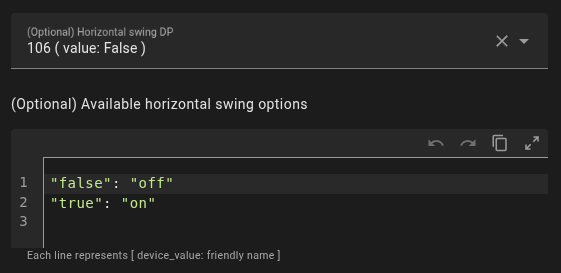
No matter what I put in the available options I can’t get it to work. I’ve trie True, true, “True”, “true”, 1, “1”, etc.
Whatever I put in it gets set to lowercase and wrapped in double quotes if I open the config window again.
I’ve tried googling but I can’t find anything about setting a boolean value this way.
Any tips?
Edit: This device also exposes a humidity target and sensor, but I cant see a way to add these to the climate device under local tuya