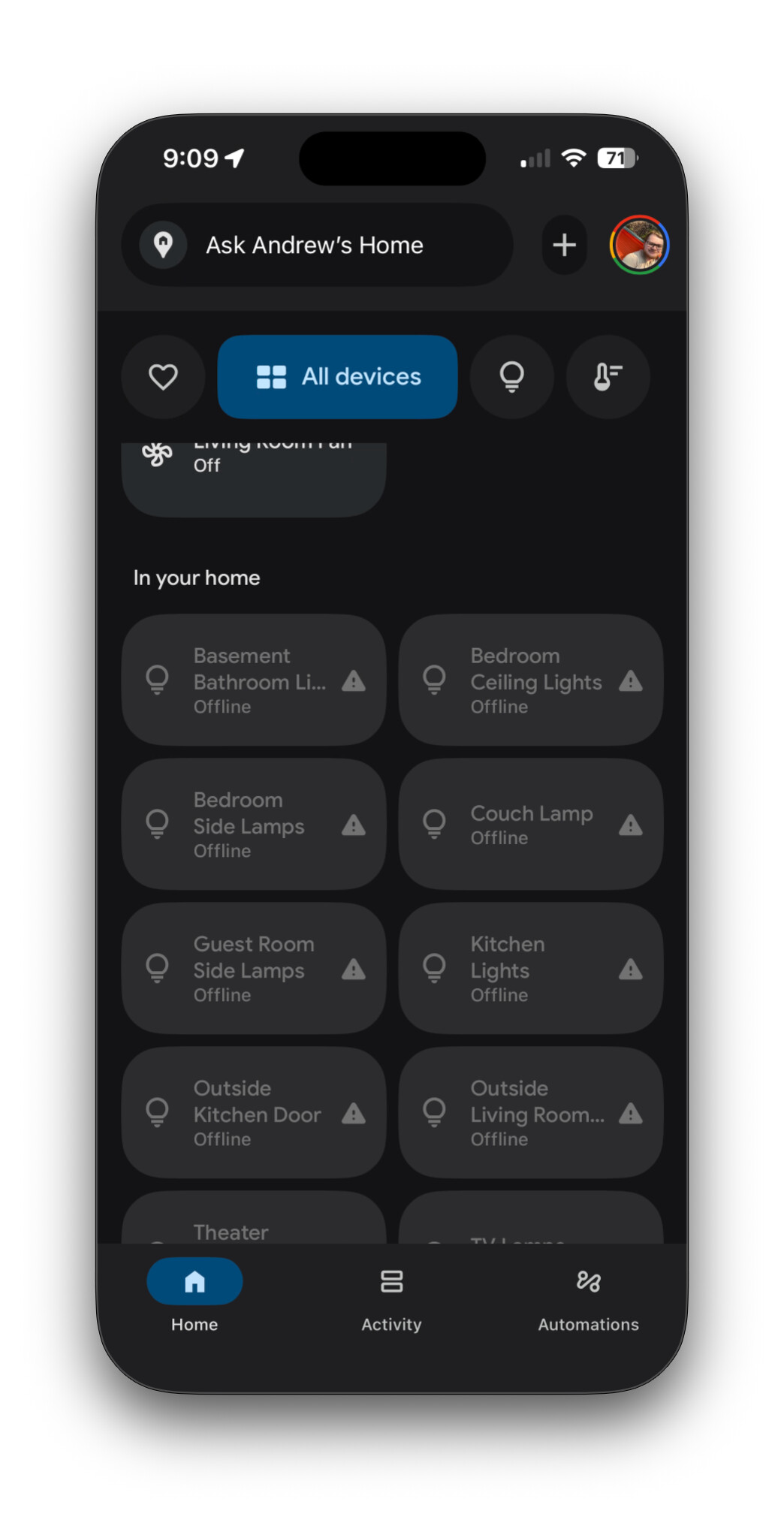
Hello! I recently changed to a Unifi network, and a Main/IOT network.
I am trying to use Home-Assistant-Matter-Hub and Google Home to allow Google Home mini’s to be able to interact with Home Assistant devices.
I previously set up HAMH, and it was working.
I have seen troubleshooting steps to enable IPV6 on Unifi, but that’s about all I have seen troubleshooting wise.
All devices are showing offline in the Google Home app.
These devices (Google Homes and Accessories) are connected to IOT vlan, and Home Assistant is connected to Main VLAN. As far as I can tell, connections between the VLANS are allowed.
Does anyone have any additional troubleshooting/setup instructions, especially when devices are on different VLANs (I’m not sure if that even matters?) or setup specifically for Unifi? I can’t get this working but I know it’s possible!
Sorry I don’t have answer, but having stuff on different vlans tends to break a lot of the various smart home networking stuff due to stuff not routing between the vlans (broadcast/mdns/etc).
the simplest solution is probably to place HA within the IOT vlan so all the IOT things can communicate without going across a vlan boundary.
Okay, so is it better to have Home Assistant then on the IOT network? (yes)
Guess I am just confused then more, because HA can control devices through the web UI just fine, HomeKit, etc. But its just the HAMH that can’t seem to do it
I’m having similar issues. I have my HA connected to my IoT network, which it successfully detected all devices on that network. However, I want it to detect devices on different networks, such as my management, trusted, and security. That part is currently not working for me.
Matter is designed to work on a flat network that requires ipv6. It will be VERY Hard ™ but not impossible to make it work across vlans. There are folks trying and some. Successful but. It’s not a normal config And EXPECT PROBLEMS.
I AM a network and tech professional and I don’t segment my network like that it became incredibly hard to manage and keep working with changes I protocol and what reflector is needed where.
If you’re not a network engineer by trade that likes to fiddle with a UI console… I wouldn’t.
Don’t allow your crap to randomly talk tk the internet, keep your stuff up to date and make sure you don’t open random stuff in email.
Id challenge thag a well operated flat network where someone is following proper operational. Security is MUCH more secure than one where someone accidently opened up something in a routing table because they didn’t understand what they were setting.
Because I have… More than once had to ask someone.
“Uh OK. But why did you open all traffic inbound to your IoT segment?” because end user didn’t understand the controls and were just blindly following instructions incorrectly.
Preface - You’re inquiring about a very sensitive topic for some people. It’s tough answering network related questions without stepping on someone’s toes because people like to gatekeep and act like arbiters of computer networking. You’ll see this behavior even more rampant on forums like OpenWRT, pfsense, and unifi. I’ve seen people argue the case that a device is a “router” simply by the fact that network traffic passes through said device, despite the actual capabilities and intention of said device. It’s a very traditional intellectual attitude inculcated by the ego of today’s post-modern university mentality. I digress… surely what I just said here will ruffle some feathers. With that said, let it be known, idc. I’m going to try to help even if my suggestions and knowledge doesn’t comply with their standards and definitions.
@NathanCu provides good advice and experienced perspective to keep things simple, which I would say is best practice, too. But, if you’re adamant on getting things to work, I can suggest this - When you segment your network with vlans, there are several ways to get devices between the networks to communicate with each other.
One way is to allow traffic between your networks using your firewall. Unifi is sophisticated enough that you can define exactly which devices to allow based on MAC address’ and/or IP address’. Still, it opens potential security vulnerabilities.
Another way is to setup a second NIC in your HA machine. Either through hardware or virtually. If you can’t install a second NIC via hardware, you can use nmcli via CMD to create a virtual NIC on the HA machine. This will allow your HA machine to sit on 2+ networks. Of course, this comes with it’s own security vulnerabilities as well. Beware, I open myself to ridicule for even mentioning this method. You can gain more insight regarding this topic here.
As Nathan had mentioned, there are things known as “reflectors” than can bounce mDNS and AVAHI traffic between networks. I’ve never been successful to deploy this method myself.
Your problem is that many protocols used for discovery are not routable, so you need reflectors to move those packets between the network.
Some protocol packets can be moved with a simple reflector that just copy th e packets between the networks other require a reflector that rewrite some data in the packets.
I’m not convinced it is possible, at least not yet. The combination of Matter requiring mDNS over IPv6, and intrinsically preferring LLAs over ULAs, makes it basically incompatible with routers and, to the best of my knowledge, any existing reflectors. Thread Border Routers (v1.3 and up) are essentially a specialized mDNS reflector designed specifically for Matter/IPv6 LLAs but I don’t think Avahi et al have added that functionality yet. If (/when) I’m wrong, I hope somebody posts a config guide, because this question comes up constantly.
Yes. Dual homing HA does work if you really want your Matter-over-WiFi devices on their own vlan. As noted, this does not turn HA into a router, just a host (endpoint) on multiple subnets. I’ve been using it his setup (via vlan tags) for years now. The only other workable option I’ve seen is running the python-matter-server separately on its own host (or VM) in the IoT vlan, because it uses IPv4 websockets to communicate with HA integration.
I added another network to the VM, Home Assistant now has two IPs, .1.110 (main) and .2.110 (IOT) and shows when HA boots up. However not able to hit the IP to get the web UI. Probably just a misconfiguration somewhere but I dont know how to fix
I think it might be easiest to just remove my IOT network, and put everything on one subnet. As some others have said, other ways to go about the security benefits
Many of the discovery services can not handle multihomed setups, so services might only be bound to one NIC.
HA is not meant to run as a router.
There are two good ways to solve this.
Either move everything to one network or move all IoT devices and HA to an IoT network and then just open up the IoT network for the companion app access.
Just remember that with the latter option you will need a WiFi network too for commisioning Matter devices through your companion app. This should not be an issue with UniFi network gear.
Thats the same conclusion I came to. The thought of segments are nice but the reality of consumer IoT says otherwise I had to make my segments so full of holes it didn’t matter anymore.
If you have unifi then you have UI network 9.x look at how they’re doing tagging and groups. It looks like a nice way to apply security profiles to devices. And it looks very easy to maintain. While not segmentation can help.
please excuse my ignorance, but why remove the vlans. Isnt the entire point of that is for security so that these devices cant talk to other stuff on the network and only talk to what they need to?
When installed ina location where the owner does not know how they operate it is ENTIRELY possible to poke holes in your so called security and not know you did it.
I will take a well intentioned attempt by a layperson to secure a basic flat consumer network any day over a complex one that the same person setup and manages.
Ill bet you I have a decent chance to infiltrate one and it’s not the simple one…
Look if I gave most folks an F1 car or even a Dodge Viper with either written instructions or no instructions or now Ai generated instructions.
4/5 times that car ends up in a ditch with no rt front tire. Most people see the viper and don’t know how easy it is tk break it’s backend loose. Trained pro won’t do that. Also the other driver is perfectly well taken care of in an Audi R6 cause that car does half the driving for you…
Nothing against GOOD, well implemented control. But security and high end network config in the hands of laypeople can be frankly, dangerous…
VLANs segregate the traffic on a network, so it can be made more secure and/or less congested.
However VLANs usually means routing traffic too and that requires the administrator to understand all the devices in the different VLANs that needs to be routed and what protocols they use and how they needs to be routed. Many discovery protocols, like ZeroConfig, mDNS, uPNP, SSDP and a whole lot of proprietary ones can not just be routed with a normal network routing.
On top of that you will also typically have added IPv6 today and that requires understanding that protocol too and how all the other protocols on top of that works too.