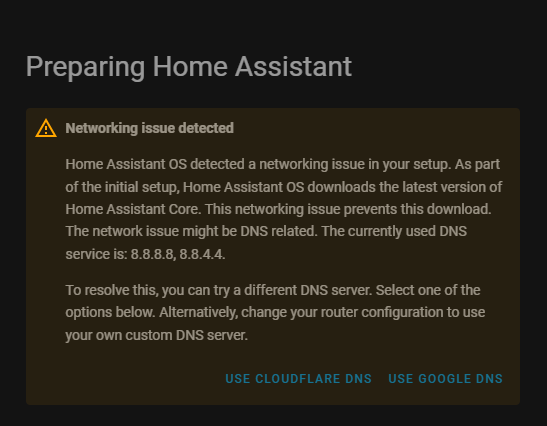
I’m new to Home Assistant and currently trying to set it up on my Raspberry Pi 4. I’m using Home Assistant OS (HAOS) and followed the official installation instructions from this page: Raspberry PI.
Everything went smoothly except for the last step . I don’t have access to my router, so I couldn’t connect the Pi via Ethernet. Instead, I set up Wi-Fi using the method in this article: Connecting wifi on HA startup . I placed the my-network file in the config/network/ folder on the SD card, following the exact format in the guide.
When I boot the Pi and navigate to its IP address in my browser, I see the “Preparing Home Assistant” screen. However, it stays stuck there, even after waiting over an hour.
When I click “Show Details”, I see this message repeating: WARNING (MainThread) [supervisor.homeassistant.core] Error on Home Assistant installation. Retrying in 30sec.
I re-flashed my SD card and went through the same procedure multiple times, with the same results.
My Setup:
Raspberry Pi 4 (4GB)
Home Assistant OS
A2 32 GB SD card flashed using Raspberry Pi Imager
Wi-Fi setup via my-network file (I followed all instructions for formatting and placement)
Accessing HA via the Pi’s IP address (no .local resolution)
My Questions:
Is this likely a Wi-Fi issue (e.g., HAOS not connecting properly)?
Is there a way to check if the Pi is connected to the internet without SSH access?
Would it help if I temporarily use a mobile hotspot instead of my home Wi-Fi?
Any advice would be greatly appreciated — thank you!
Managed to find my old config from 5 years ago for you.
Only thing that’s different from the guide is that I set up a static IP and also defined the DNS address (that last part is what I suspect is causing your issues)
Replace this:
[ipv4]
method=auto
With this (change your IP address and gateway in the address line:
PS - double check your my-network file does not have a file format set. If you’re using Windows, this is usually hidden. the guide glosses over that part, but if you’re seeing anything other than “File” under the Type column, then the file still has a file format set. You should not be seeing “Text Document” like the screenshot form the guide shows.
When selecting either USE CLOUDFLARE DNS or USE GOOGLE DNS, the terminal output shows:
using cloudflare: 2024-10-08 16:56:17.184 INFO (MainThread) [supervisor.plugins.dns] Restarting CoreDNS plugin
2024-10-08 16:56:17.197 INFO (SyncWorker_3) [supervisor.docker.manager] Restarting hassio_dns
2024-10-08 16:56:32.661 WARNING (MainThread) [supervisor.jobs] 'Updater.fetch_data' blocked from execution, no supervisor internet connection
2024-10-08 16:56:32.662 WARNING (MainThread) [supervisor.homeassistant.core] Error on Home Assistant installation. Retrying in 30 sec.
Do you have any recommendations on how to resolve this issue?
Maybe you may need to address that as the easiest solution?
Guessing: What editor did you use to write your WiFi config file? Is it in Windows format or Linux format with different end-of-line characters? Should it matter?
tentative: Raspberry Pi imager can create your home assistant 32GB sd with “customization” including the wifi name (as broadcast by your home hub router) and wifi password (usually as from the sticker on the back of the home hub). That does wifi setup before boot and I have no idea whether or not it does more than you can get at in a my-network file. It should cost no more than one 32GB micro-sd card to try flashing another, this time with it pre-configured to know your home wifi.