So I've been running the system I have for some time now and I think it's time to tweak it a bit
Using a 5600g on a micro atx board, have loads ssds so use bifurcation as well as a 10gb nic and a coral pcie so all pcie slots are used up
I have home assistant, frigate (Only currently 4 cameras but potentially installing a couple more), jelly fin, proxmox and Debian/Nas so the good ol' box does quite a bit
My worries with the system at the moment are being a 5600g I'm stuck at pcie 3.0 speeds, bifurcation gets me only 3 ssds in a 16x slot and I have no way to add anything else other than sata drives
So my thinking was, go for a better 5000 series GPU without the igpu, maybe a 5800x3d? Get a full size atx board possibly x570, grab a GPU like an Intel Arc A310, have pcie 4.0, have 4 ssds in bifurcation in top x16 slot, have the arc in bottom pcie x16 slot prob running at X4, lose the coral, offload frigate tasks both decoding and detection to the arc, have spare X1 slots if I wanna add some more nvme drives and swap my current X4 10gb nic to a newer pcie 4 x1 10gb nic
Does this make sense? It'll all be done on a budget as I'd pickup a lot of it second hand etc, would appreciate some input...
Whose budget? The national one? You need a data center, and a fat power cable running over your back fence to the nuclear power station next door, or (I suspect this may be the case), rich parents.
Sincerely, all your eggs in one hardware basket? Are bragging rights involved here?
What if there is a fire, malware infestation, or your motherboard goes partially faulty, causing data corruption over a period of time, and you don't notice till all generations of your backups are affected?
Speed is not your only factor. Reliability and robustness is critical too.
Just because you can, doesn't mean you should.
Diversify your hardware. Build to your needs. Update as necessary, focusing on specific needs. The price of hardware at the moment would tend to point you to pre-loved equipment. Choose appropriately. You don't need a Ferrari to go buy a carton of milk at the local corner store if you can walk or ride a bicycle instead.
Unless you have performance issues now, you would not gain much by doing this. Home Assistant is not something that needs fast SSDs with PCIe access directly, 10 gigabit networking and so on.
Ok wow, considering how amazing home assistant is and the developers that make it what it is I thought the community would be the same but clearly I'm wrong
The response here could not be less helpful if you guys tried
Just because your not happy with what I've got or plan to change things too that doesn't mean you can't give constructive advice
And just to put some things to bed yeh I might not saturate a 10gb nic in this system but when I'm transferring gigabytes of data locally it makes hell of a difference over the built in 1gb nic
As for performance issues actually yes I do have some performance issues, currently it's mainly cameras, frigate seems to be ok but when restreamed and sent to home assistant there is real lag when loading them up
Also I'm interested in backups and reliability so more ssds isn't necessarily about more space it's also about backing up, for instance I use a smaller nvme drive to host proxmox/debian/home assistant etc so it's actually in a raid so there's a complete backup of the drive, that goes the same for some of my storage it's also in raids for backup purposes
And yes having all your eggs in 1 basket is a bad idea but when did I say this isn't backed up in a second place or on a cloud? Jumping to conclusions doesn't help anyway
If a response can't be given that's constructive, helpful or offer advice maybe that response shouldn't be posted...
Eh, what? You asked for input on swapping out hardware, you got exactly that. You will not notice any major performance gains going for faster SSDs or 10gbit network, that's just facts. I run my Home Assistant installation on a Dell 740xd with 10 gbit and 8 raided SSDs, and when I migrate it over to my secondary host, an old NUC with a 6th gen i7, 1 gbit network and a single SSD I don't notice any performance degradation at all.
Yes, 10gbit is nice when you do backups or migrations, but other than that you will not notice any difference at all. There is no need for worrying about PCI 4.0 vs 3.0 in a HA setup.
I am aware of what will/won't be faster, large file transfers is something I do regularly so faster networking certainly does make a difference for my use case
One of the things I was hoping to improve was frigate performance, I've had to set detections on a very low quality stream because the system can't keep up, I wonder if the GPU route would help with frigate more than anything that's my reason for asking about CPU/GPU changes?
As for pcie 4 Vs 3 to be honest I'm aware it's not going to make much difference other than if I go full size atx x570 it will give me more useable pcie lanes so I can potentially add more nvme drives if I wish to have more storage in the future (thinking future proofing)
What are you actually meaning by “the system can’t keep up” , shuffling files ? , viewing high res, high frame-rate videos on your “ Monitor/TV ” ( Browser ) ?
CPU spikes mainly, my guess is the Coral/GPU can't provide enough "help" so it starts offloading to the CPU so I get massive CPU usage which in turn means more heat, more noise etc and uses the resources so the rest of the system at times slows down
Then we can determine the methodology to track that and determine what is driving it.
Slow when copying files results in disk queue?
Slow when analyzing videos?
Slow when performing resulting automations?
We're all hooting in the dark and throwing money away until we know that...
(each of those has a different likely root cause.)
Edit. Cpu throttle up. Look for Cpu queue. And yes if your accelerator isn't handling it that's exactly what happens.. Disk won't solve that. Nor will a beefier Nic.
So the upgrade path I'm thinking should hopefully solve my issue and future proof me in that case, I never said a beefier nic will solve any issues, I'm already using a 10gb nic, also didn't say disk would but just like the option of having more available for if I need more storage in the future
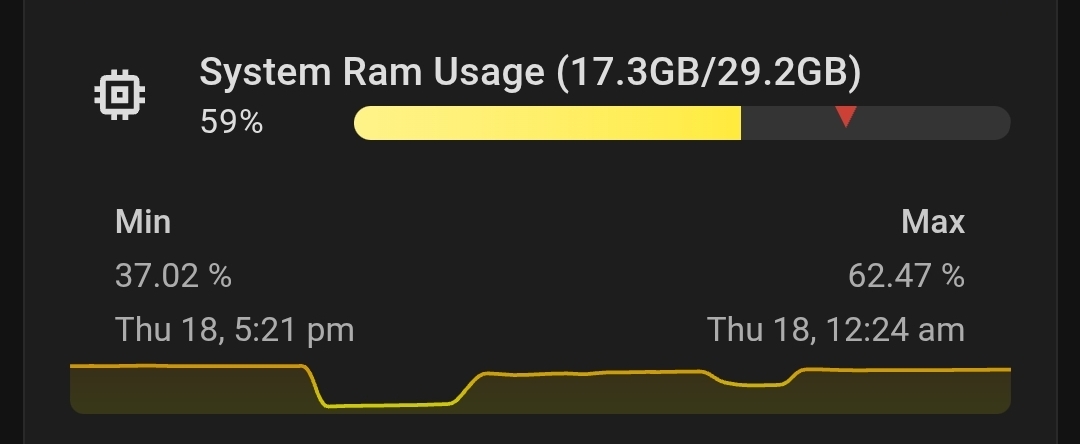
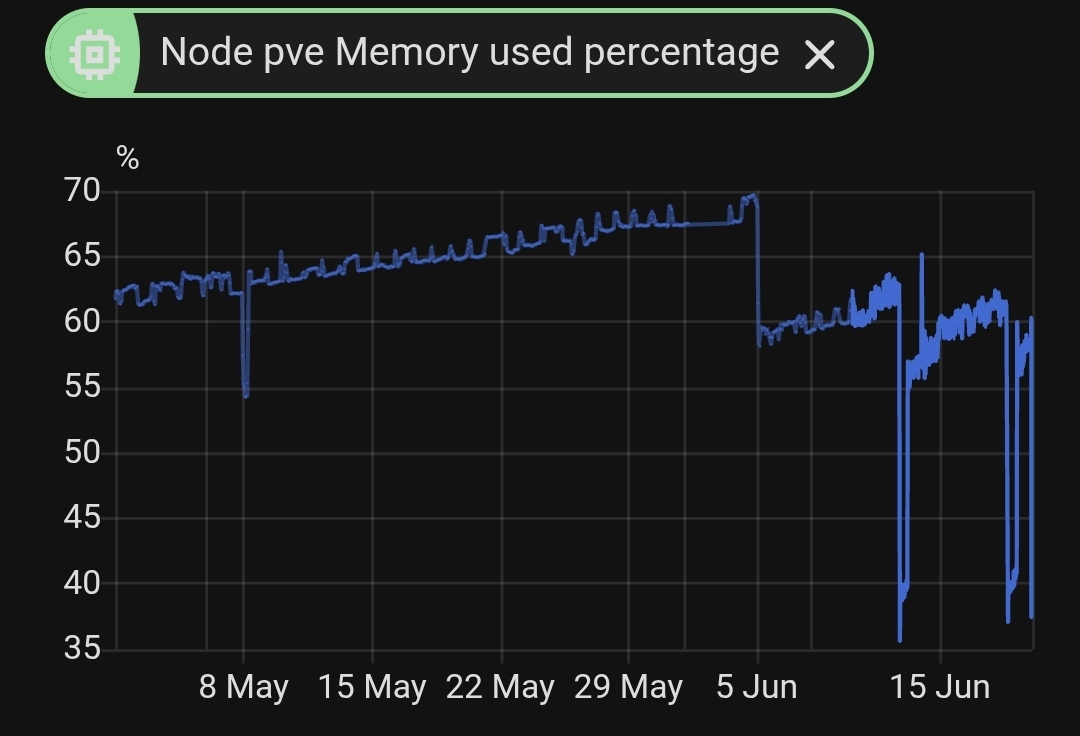
What is your peak memory utilisation? This may be your bottleneck. You may find that it is too low, given all the work that has been thrown at your system. Does your system suffer from page thrash? Are your device buffers always full and queued? Your high performance peripherals such as your video card and drives may actually be getting starved by queuing, waiting for data. Speeding them up even further may not have any benefits at all.
Even though the price of RAM is horribly expensive right now, doubling your memory to 64Gb may actually be the fastest and cheapest way to boost overall performance, rather than ill-advised wholesale replacement of hardware on a suck-it-and-see approach.
Find your problem before fixing it. Listen to the words of experience of those who have taken the effort to respond so far - you may learn by standing on the shoulders of giants rather than re-inventing the wheel and becoming disillusioned (and poor).
That is probably sampled and isn't the whole picture. You need to look at peak usage, and far more detail, not just HomeAssistant, but the underling iron it floats on, and all the other software you are running at the same time in other containers it is not aware of. HomeAssistant is (by design) quite lightweight, initially designed to run on a cheap $10 Raspberry Pi with 4Gb RAM and an SD Card and quite successfully doing so in a majority of cases. Some of your other uses are very resource hungry. Carefully find the bottlenecks and then address them one by one.
That is pulling from proxmox and is total used memory of the whole system, home assistant itself constantly sits and eats the 8gb I give the haos container. Here's a longer snapshot, I have hit as high as 70% in the last couple months