New guy here. Just started HA with an RP5 to set up some Tesla charging automations for my cars. I use Tessie b/c it logs a bunch of data on my cars and presents them in nice graphs. I guess I could use the actual TESLA integration if I have to but I’m already paying for Tessie so that is what I went with.
When I call the location API from the Tessie integration, the automation fails. I’m not sure if this is a Tessie issue or a HA issue because it was working until recently (2026.x builds). Tessie is currently in debug mode until this is resolved. All Tessie permissions are enabled on Tessie website, including location. When I enable the location call in the automations, the automation stops and I get an error via traces:
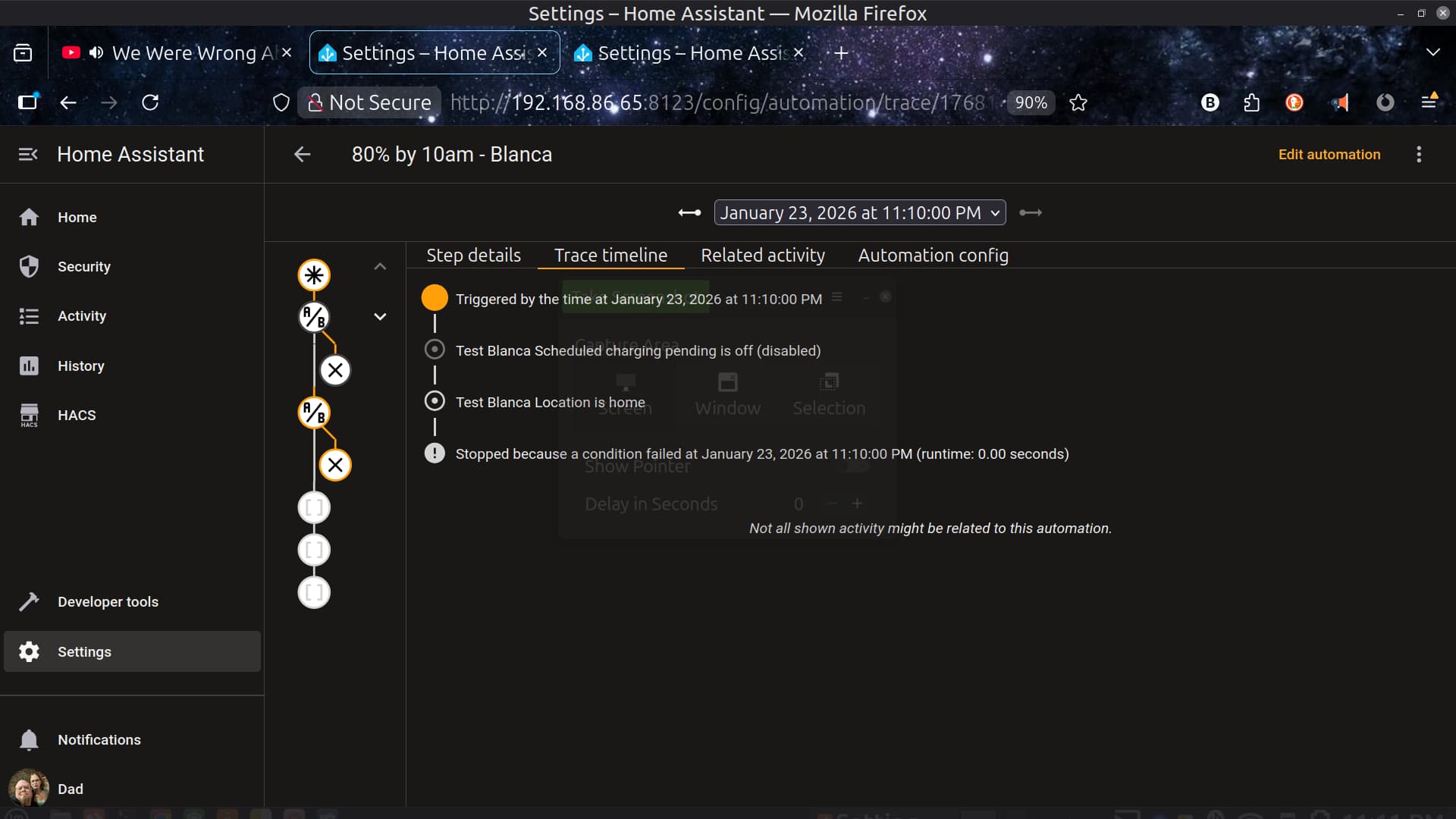
Condition failed?? It seems as though Tessie is not providing the location data when requested and therefore the automation fails. However, if I disable the location call, the automation (see below) finishes without error.
Here is the automation:
alias: 90% by 7:30 (M,W,F) - TARS
description: ""
triggers:
  - trigger: time
    at: "04:00:00"
    weekday:
      - mon
      - wed
      - fri
conditions:
  - type: is_off
    condition: device
    device_id: 1aedb7156132e1c81ebef7b1285b37c5
    entity_id: 14ad510de47f169493b57b0c1c9d448e
    domain: binary_sensor
  - condition: device
    device_id: 1aedb7156132e1c81ebef7b1285b37c5
    domain: device_tracker
    entity_id: 8a77402a3940fe34617f23a62933b990
    type: is_home
    enabled: false  #<-----This was disabled for troubleshooting. Fails if set to true
actions:
  - device_id: 1aedb7156132e1c81ebef7b1285b37c5
    domain: button
    entity_id: 84871996bd90fa12448eb5e75cff1758
    type: press
  - delay:
      hours: 0
      minutes: 0
      seconds: 5
      milliseconds: 0
  - device_id: 1aedb7156132e1c81ebef7b1285b37c5
    domain: number
    entity_id: 3f7aadff5ab4857b8f61259823f96f66
    type: set_value
    value: 30
  - device_id: 1aedb7156132e1c81ebef7b1285b37c5
    domain: number
    entity_id: 5303be4610e6e3a3eadea9f1d38ec0ed
    type: set_value
    value: 90
  - type: turn_on
    device_id: 1aedb7156132e1c81ebef7b1285b37c5
    entity_id: cec95e96368e694a7a0b87245de58c39
    domain: switch
  - action: notify.mobile_app_pixel_9_pro
    metadata: {}
    data:
      message: TARS charging started
      title: TARS
    alias: Send message "TARS charging starting"
  - delay:
      hours: 3
      minutes: 20
      seconds: 0
      milliseconds: 0
  - action: notify.mobile_app_pixel_9_pro
    metadata: {}
    data:
      message: TARS starting HVAC
      title: TARS
    alias: Send message "TARS HVAC started"
  - device_id: 1aedb7156132e1c81ebef7b1285b37c5
    domain: climate
    entity_id: c5232f5721c01b9fb7d545f17ca55b4c
    type: set_hvac_mode
    hvac_mode: heat_cool
  - delay:
      hours: 0
      minutes: 20
      seconds: 0
      milliseconds: 0
  - device_id: 1aedb7156132e1c81ebef7b1285b37c5
    domain: climate
    entity_id: c5232f5721c01b9fb7d545f17ca55b4c
    type: set_hvac_mode
    hvac_mode: "off"
mode: single
Here are the (Tessie debug enabled) logs from HA:
2026-01-24 04:44:49.440 DEBUG (MainThread) [homeassistant.components.tessie.coordinator] Finished fetching Tessie data in 0.042 seconds (success: True)
2026-01-24 04:44:58.584 DEBUG (MainThread) [homeassistant.components.tessie.coordinator] Finished fetching Tessie data in 0.043 seconds (success: True)
2026-01-24 04:44:58.586 ERROR (MainThread) [homeassistant] Error doing job: Task exception was never retrieved (task: None)
Traceback (most recent call last):
  File "/usr/src/homeassistant/homeassistant/helpers/update_coordinator.py", line 294, in _handle_refresh_interval
    await self._async_refresh(log_failures=True, scheduled=True)
  File "/usr/src/homeassistant/homeassistant/helpers/update_coordinator.py", line 533, in _async_refresh
    self.async_update_listeners()
    ~~~~~~~~~~~~~~~~~~~~~~~~~~~^^
  File "/usr/src/homeassistant/homeassistant/helpers/update_coordinator.py", line 200, in async_update_listeners
    update_callback()
    ~~~~~~~~~~~~~~~^^
  File "/usr/src/homeassistant/homeassistant/components/tessie/entity.py", line 59, in _handle_coordinator_update
    super()._handle_coordinator_update()
    ~~~~~~~~~~~~~~~~~~~~~~~~~~~~~~~~~~^^
  File "/usr/src/homeassistant/homeassistant/helpers/update_coordinator.py", line 613, in _handle_coordinator_update
    self.async_write_ha_state()
    ~~~~~~~~~~~~~~~~~~~~~~~~~^^
  File "/usr/src/homeassistant/homeassistant/helpers/entity.py", line 1024, in async_write_ha_state
    self._async_write_ha_state()
    ~~~~~~~~~~~~~~~~~~~~~~~~~~^^
  File "/usr/src/homeassistant/homeassistant/helpers/entity.py", line 1149, in _async_write_ha_state
    self.__async_calculate_state()
    ~~~~~~~~~~~~~~~~~~~~~~~~~~~~^^
  File "/usr/src/homeassistant/homeassistant/helpers/entity.py", line 1086, in __async_calculate_state
    state = self._stringify_state(available)
  File "/usr/src/homeassistant/homeassistant/helpers/entity.py", line 1030, in _stringify_state
    if (state := self.state) is None:
                 ^^^^^^^^^^
  File "/usr/src/homeassistant/homeassistant/components/sensor/__init__.py", line 569, in state
    value = self.native_value
            ^^^^^^^^^^^^^^^^^
  File "/usr/src/homeassistant/homeassistant/components/tessie/sensor.py", line 433, in native_value
    return self.entity_description.value_fn(self.get())
           ~~~~~~~~~~~~~~~~~~~~~~~~~~~~~~~~^^^^^^^^^^^^
  File "/usr/src/homeassistant/homeassistant/components/tessie/sensor.py", line 63, in <lambda>
    value_fn=lambda value: TessieChargeStates[cast(str, value)],
                           ~~~~~~~~~~~~~~~~~~^^^^^^^^^^^^^^^^^^
KeyError: True
I need to make sure that the automations run at home because that determines the charge current. Tesla remembers the location it A/C charges at and keeps the current in that data so you don’t have to change the amperage every time you plug up the car, if it is not the max. However, I have a 30A wall connector (for TARS) and a 48A wall connector (for Blanca). These require different charge currents for different wall connectors, which is why those steps are in the automation. Ex: TARS’ wall connector can not exceed 30A, while Blanca’s goes to 48A.
If the cars A/C charge AWAY from home, then the charge current defaults to whatever the charger can output at that location, up to 48A.
Any ideas as to why the location data is not being retrieved? Or is there another way to write the automation (using blocks, scripts, etc) so that location data is retrieved more reliably? Or uses recent historical data to “assume” it’s still at home? Ex: If home location for TARS hasn’t change within X hours and has TARS has NOT shifted into DRIVE, then we can assume it’s still at home, thus allowing the automation to proceed.
Any help is appreciated.