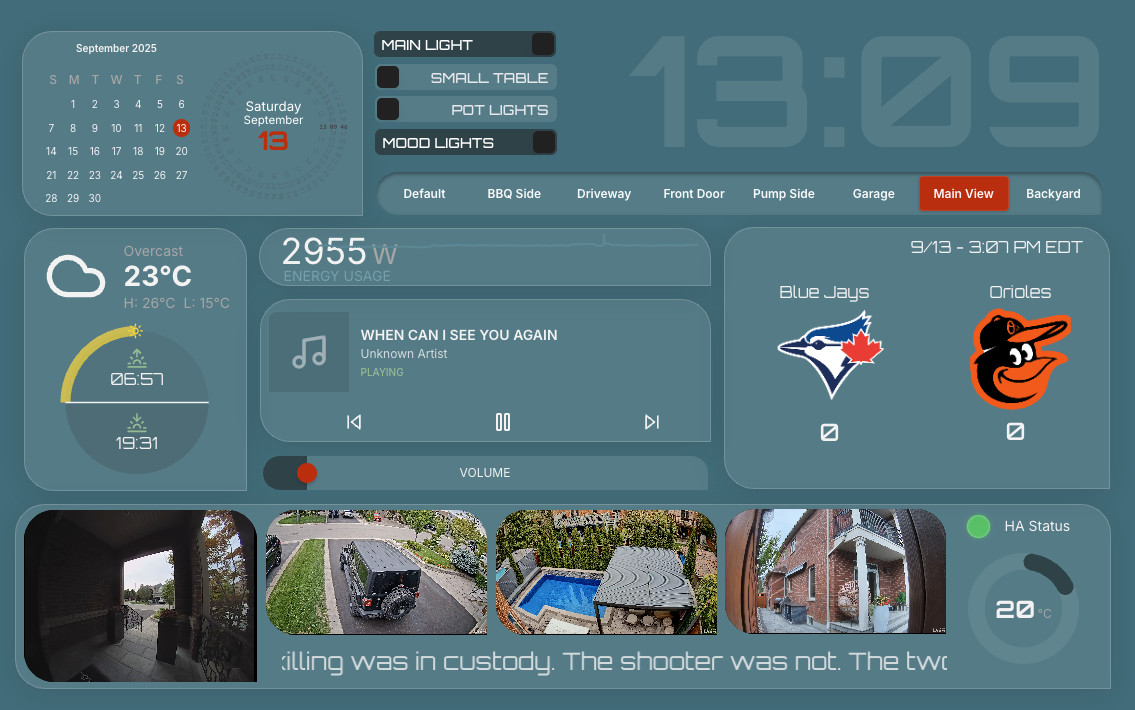
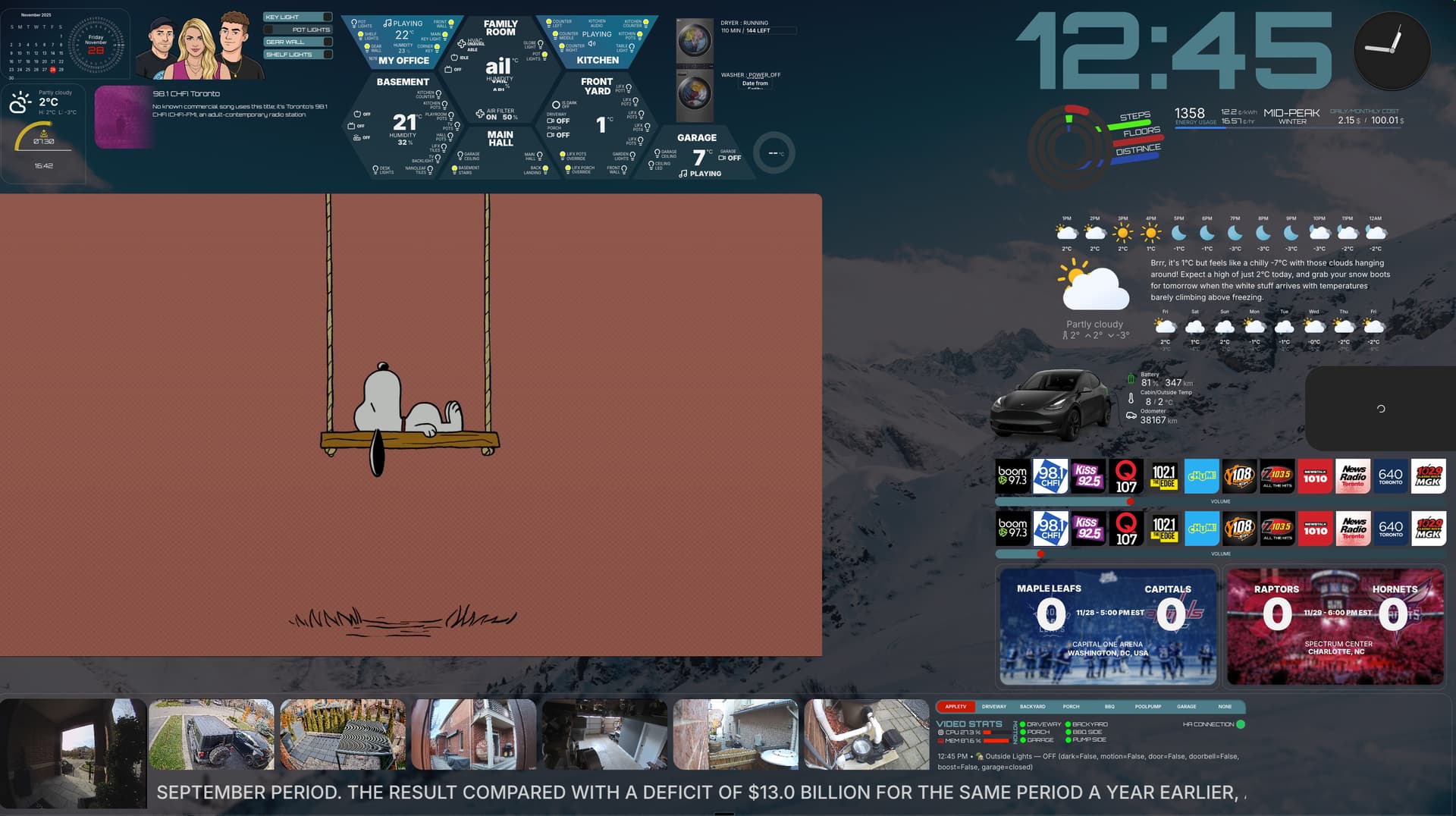
Looking for more flexibility in your Home Assistant dashboards?
I’ve been testing a new tool called Dashable that adds drag-and-drop design, support for multiple HA instances, and remote tablet control. I put together a video walkthrough to show how it works
Hi everyone — it’s been a while, but I’ve got a new video to share!
I love Home Assistant, but when it comes to dashboards I’ve always wanted something more flexible. Recently I got the chance to try Dashable, and honestly, I haven’t looked back.
Yes, it’s SaaS — full access runs about $6/month — but here’s what you get:
Remote control of your local and remote tablets.
Support for multiple HA instances (great for monitoring a cottage, a parent’s home, etc.) all in one dashboard.
A slick editor with drag-and-drop widgets.
What about security?
The connection between Dashable and HA stays between your browser and your HA instance — no HA data is sent to Dashable’s cloud.
You can even store your long-lived token locally in the browser for maximum privacy.
Encrypted cloud storage is available if you prefer syncing credentials across devices.
Does it work offline?
Sort of. You need the cloud to load or edit dashboards, but once a dashboard is loaded, it keeps running without internet — just talking directly to your local HA for real-time data.
Free to try: one dashboard is included, and right now they’re offering a one-time 50% discount (works on monthly or yearly).
I’d love to hear your thoughts! Most importantly, check out my video for a walkthrough — and don’t forget to hit the like button
Invite code to try - YOYOHAINVITE
50% code for checkout - YOYOKNOWS50
*** BTW, if you try it, share your dashboards here, I will throw some examples I have done soon!
I think dashboarding could be a lot more user friendly in Home Assistant. Both creating as well as managing. I’ve been eager to try tools making the process better. Mushroom generated dashboards was a nice try imho but it had it’s downsides for me.
I was exited to try Dashable with your invite code but i’m pretty underwhelmed. Not sure why Dashable would be better or easier than using Home Assistant itself.
I’ll wait a little longer for improvements in Home Assistant itself or other tools being released.
I certainly can see it being the future, considering most things are getting extremely pricey for what they give. The pricing is outrageous for what it does and being completely transparent, it doesn’t even look as good as most free options out there.
Okay - so I signed up for a 1 year subscription, and my take is that this thing has potential but is certainly not ready!! In fact I’m trying to find some way of contacting them to get my money back - here are just some of the issues: -
No documentation: It’s impossible to get any documentation, it just doesn’t exist. Admittedly most of it is pretty self explanatory - but when you want to understand features such as “Transforms” within the Entity Widget then you’re on your own and it just doesn’t seem to work!
Deploy a Dashboard: There’s no instructions as to how you deploy the dashboard?? From what I can see I go to the device I want to use my newly created dashboard on and login to the dashable app - problem is that users have the ability (if they know how to press Escape) to edit the dashboard! Again - documentation (even something basic) would be helpful!!
Camera Stream: I have unifi cameras throughout and the camera stream widget presented them to me - but the feed is static (seems to take a snapshot) and is therefore anything but a “stream”!
Support: I’ve emailed support on 3 separate occasions - nothing back! I can only assume that yoyoTech has some sort of special dispensation from them because unlike his experience they are less than forthcoming (I also note that comments on the yoyoTech’s YouTube video are disabled so I couldn’t get access to them from there - in the vain hope they would look at the comments)
All in all I would advise not to bother with this - the subscription model is a little acidic in the first place, but I’d be willing to forgive this if the product was actually polished and useable, but alas (in my opinion) it is not - don’t waste your money!
To add weight to your sentiment that this is spam I note (with interest) that yoyoTech has restricted comments on this video - unless you pay £2.99 to join his channel. If this isn’t the very definition of paid advertising then I don’t know what is!!
I have not/never restricted comments - in fact I responded to your comment on the video - you have to have a little patience, not everyone can respond minutes after you post something.
I am still loving Dashbable, no - its not polished, but its pretty good and the team has been pushing updates very quick, I have submitted a bunch of bugs I found and they have been fixing them pretty quick. My understanding is that it’s a pretty small team trying to build a cool product.
They don’t have much documentation yet - but its pretty self explanatory - for the most part its just drag and drop + some creativity. It will come, I would rather they work on the bugs, than the documentation - but agree they need some!
You don’t really deploy a dashboard, just log into Dashable.aop on your tablet, computer etc once, and then you can control whats displayed on that device from any computer/device logged into Dashable remotely - I am using Fully Kiosk on my tablets as well, but you don’t need too. I edit all my dashboards on my main computer and they just update automatically!
Camera stream works fantastic, I think that I had some problems as well when I first set it up, add the following to your configuration.yaml helps I believe. I have 8 camera streams on my main dashboard and I even dynamically resize them based on motion and helpers in HA. - this is one of the best features.
Over all…its a new product - if it works for you great, if not than move on - so many critical comments of something different and in my opinion pretty cool.
If you watched my video - thanks, if not I will link it below. I have been working on a new dashboard with some of the new features they have been adding, might put out an update video soon!
My sincere apologies - I was viewing your YouTube video on a restricted device and I think that is why I couldn’t make/see comments. Again - sincere and honest apologies.
I’m really desperately trying to solve this Camera Stream issue - I’ve added your suggested line to my config.yaml file and restarted Home Assistant, but alas it doesn’t seem to work - I literally get a snapshot that doesn’t stream. The cameras work fine within HA and within HA dashboards??
Any thoughts or previous troubleshooting experience would be very much appreciated (I think you said you had trouble getting the Camera Stream to work at first).
The only other thing I can thing I can think of is that I use the go2rtc add-on which I believe is now native in HA, but if you want to give that a try. Let me know how that goes - hope you get it working, the camera stuff is really my favourite part.

 Yes, it’s SaaS — full access runs about $6/month — but here’s what you get:
 What about security?
 Does it work offline?
 Free to try: one dashboard is included, and right now they’re offering a one-time 50% discount (works on monthly or yearly).