Just updated to the latest companion app and noticed the import credentials button for the thread networks. I also have a (new and updated) homepod mini. trying to import the credentials from the homepod mini I get an “error unknown type 74” message. it loops from there if I retry.
I’ve tried resetting the thread network on the HA side. running a sonoff 3.0+ with the multi protocol for HA thread access.
I have the same issue too with a HA yellow. I have managed to pair matter eve energy sockets over thread to HA with QR codes generated from apple home, but I cannot choose the the apple border router (apple tv 4k) as the preferred network and I get the same error when I try to import credentials.
Same here as well. This is a huge win. It wasn’t clear whether this was due to a change in the Home Assistant app or something fixed in an iOS release as I previously had issues onboard Matter devices into Homekit too but that now appears to be working too.
I have been unsuccessfully attempting to troubleshoot the ZBT-1 for weeks since it first arrived.
On clicking the “Send credentials to Home Assistant” button on the companion mobile app, it returns the error: “You don’t have any credentials to import.”
I think I’ve tried just about everything possible to troubleshoot this but I simply cannot get it to work. I have tried multiple troubleshooting steps which always seem to take me in a circle right back to where I started.
Initially I tried setting up multi-protocol and failed. On seeing the issues with multi-protocol I decided to reflash for thread only as matter over thread is all I need for now.
Any guidance on how to successfully troubleshoot this would be much appreciated. I’m starting to wonder if I’ve got a faulty ZBT-1 but it was a recent purchase and the impression I got is my batch number (202501) should be unaffected by the fault?
Unsure how to proceed or whether I need to apply for a replacement as per:
The ZBT-1 is attached to a Home Assistant Green. I checked the plastic where the voltage regulator is located and it appears OK at first glance, though does look a little off when holding the light at a certain angle.
The HA Companion App gets Thread credentials from the HA Thread Integration (if it has any).
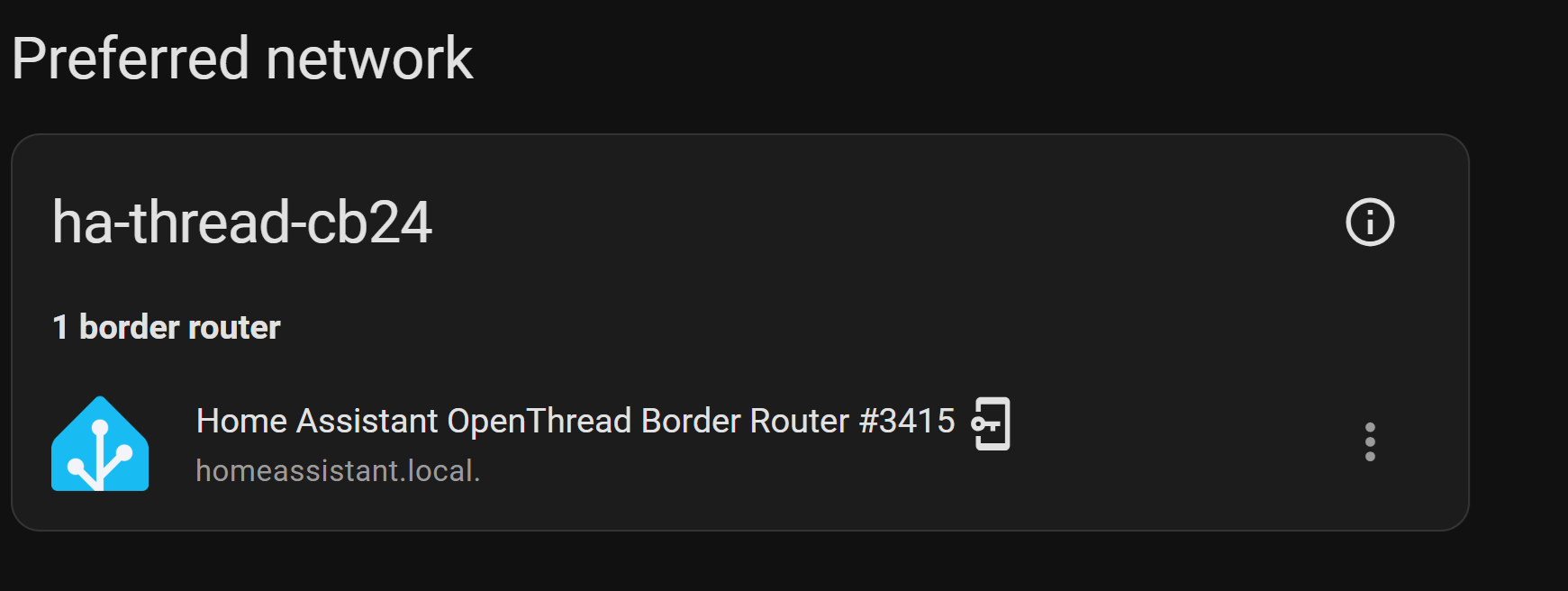
Goto HA UI->Settings->Integration->Thread, click on the Settings wheel. You should see “Preferred Network” heading and you should see an entry with a “key in phone” icon. It is this particular entry where the credentials come from. If you don’t have such an entry, then that is the problem.
Goto your OTBR AddOn, look at the logs to see if there are any major errors, and particularly if the AddOn is running
Thank you for your reply. I already tried clicking the key in phone icon (It is the same button that says “Send credentials to Home Assistant”. Clicking it returns a message saying “syncing”, followed shortly after by the “You don’t have any credentials to import” error after it times out.
I had previously checked the logs and troubleshooted accordingly to the best of my ability with the information I could find. I suspect the ZBT-1 is faulty and lodged a request as per the recall. The replacement dongle has already arrived. Just haven’t had the chance to test it yet but hoping I have better luck this time.
I’m wondering if this is a bug. If the entry shows a key in a phone icon, then HA is suppose to have the credentials to give to the phone. A saw where another user on the Forum also had a key in a phone icon, but said there was no TLV showing up in the UI to go with it, which again doesn’t make sense.
If you go into HA’s ./config/.storage/thread.datasets does it show a TLV?
Off to a rough beginning with Matter / Thread.
I also get the same “you don’t have any credentials to import” error
This is reported when testing on a secondary mobile device that does not have a SIM card. At this point it does not even try to find a border router. . No explanation and no troubleshooting tips are offered.
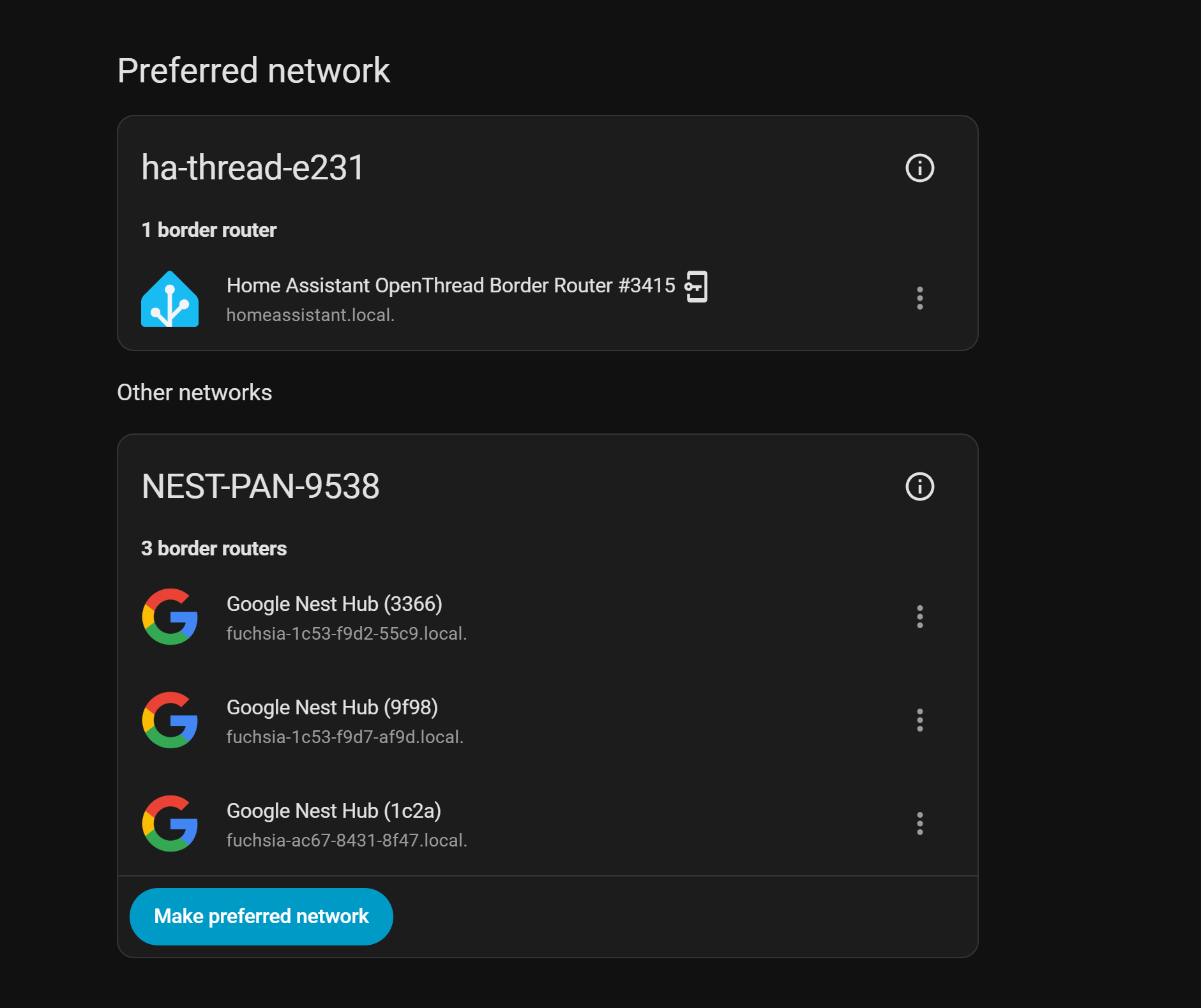
When using my primary mobile device the credentials transfer without issue and I get the phone with key icon shown beside the border router listing and I set it as the Preferred Border Router. Connecting a new Matter device finds the device but insists on connecting to a Nest Pan Border Router that has been deleted.
To troubleshoot, I disconnected all Nest hubs, forced “STOP” the Google Home app, deleted the /config/.storage/thread.datasets file.
None of this has helped. I read somewhere that a user had to delete all his Nest Hub devices in the Google Home app, but this seems a bit archaic.
Any help appreciated.
fyi:
RPi 4b
SMLIGHT_SMLIGHT_SLZB-07Mg24 flashed for Thread
For the entry with the phone with key icon, what is the name of the Thread network for that entry (or better yet show an image of what the Thread Integration is displaying)?
Unfortunately for Android based mobile phones, the only way to remove the old Nest Pan Thread credentials that are stored on the phone is to delete the cache and storage from Google Play
Having said all of that, it sounds like you want to start fresh with HA’s OTBR instead of the Nest Hub, and if correct I would set the HA OTBR Thread network as preferred and also set the OTBR entry to use for sending Thread credentials, then with the secondary mobile HA Companion App, send/sync the Thread credentials to the mobile device.
Thanks very much for your help. I deleted my Google Play, and Google Home data and (dalvik) cache on my device. After that the Border Router config was as shown. Setting up a new device resulted in the “You don’t have any credentials to import” message. After this I recovered my account and tried again, but I guess it takes time for the account data to be repopulated.
Later I reconnected my hubs to see if they were lost and was glad to see them back up and casting.
Today I connected a device with Matter and at the end it was the same Nest-Pan barged in and stole the connection. So the device is connected but though Nest which is not desirable.
Pic of routers available after reconnecting a few of the hubs
Success: I can confirm that I was able to circumvent the ‘forced use’ of the NEST-PAN Thread Border Router with a work-around. Did not need to delete any data accounts or apps. It did however require the use of a secondary Google account and device that does not have the Nest devices set up in the Home App.
I had been unable to synch the credentials with Ha using a secondary mobile device. If I added a Matter device it reported that I needed a border router. In the /Settings/Thread menu it would not let me synch credentials using the blue Synch button, reporting: “you don’t have any credentials to import”.
What cured this was to ensure the device was on the same network, using the companion app go to /Settings/Companion App/Troubleshooting/Sync Thread Credentials. Then back to to the /Settings/Matter menu Add Device and viola we have the HA TBR in action. Device paired successfully.
At this point I will delete the devices I installed previously through the NEST-PAN TBR and re-install them with the secondary mobile device and the HA TBR. I will also test if after “initiating” the HA TBR, whether or not subsequent pairings are able to utilize the HA TBR… to be continued.
Update: setup new Matter/Thread device with the mobile device that had the Nest Hub accounts linked to it and found that it would still force NEST-PAN usage. Back to try the mobile device that does not have the Nest accounts and found I had to re-sync again. The button in the Thread menu did not work so I tried the Setting/Companion App/Troubleshooting/Sync Thread credentials which was successful. Connection to the HA TBR was successful after this.
Everything was fine for me with OTBR until I connected two Google streaming boxes to the network, and now any time I provision a thread device it joins the Google thread network. I’m not willing to delete the Google play storage because I don’t want to have to re-add all of my credit cards to my phone and watch every time I need to add a thread device to OTBR.
I have Gemini telling me that I can have my OTBR join the Google thread network, but despite my best efforts I have not been able to make that happen.