Hi folks,
So I recently took the plunge to try introduce Thread to my HA setup, but am running into some difficulties, would greatly appreciate any advice/guidance here on troubleshooting.
A bit about my setup, been running HA as a VM in Proxmox for several years reliably(now on 15.2/2026.1.1). Matter has been also working well over Wi-Fi with several Meross plugs and Sengled bulbs, using ESPHome with BT proxies, WLED, some legacy Wemo stuff etc. HA runs in it’s own dedicate IOT VLAN/2.4 GHz Wi-Fi with all HA devices on the local network segment.
So recently decided to go with a ZBT-2(after reading positive reviews), using USB-2 port level passthrough in Proxmox to the VM, added OTBR(2.15.3) and Thread integrations with ZBT-2 being auto-detected correctly and latest firmware installed(OpenThread RCP 2.4.4.0) by HA. Also introduced IPv6 into the local IOT segment only with OPNSense gateway configured hopefully correctly for RAs.
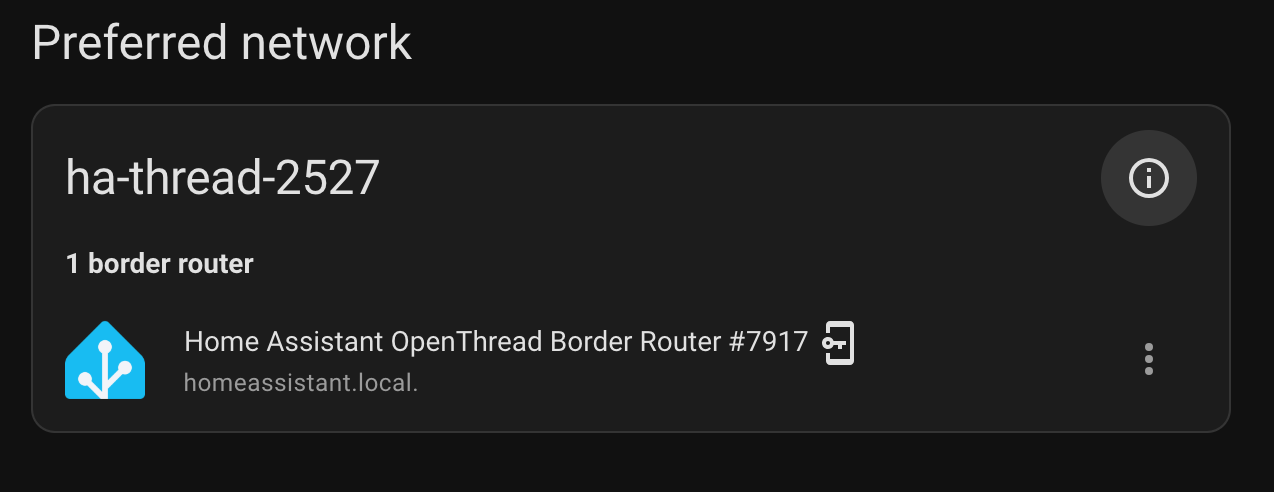
Had an ESP32-C6 lying around, so flashed it with Openthread component and after some fiddling got it to work as a Thread Extender! (see screenshot

) The ESP32 connects to the PAN via it’s Thread radio and is ping-able on its IPv6 address from HA, so far so good.
Past weekend decide to pick up some of the newer IKEA Matter/Thread devices including, Timmerflotte(temp/hum sensor), Alpstuga (CO2), Bilresa(switch), several Myggspray (motion sensors), and a bunch of Mygebett(door/window sensors) figuring they should work with my thread setup.
So far I’ve tried dozens of times to connect the Timmerflotte(MTD) and Alpstuga(FTD) with it going to the Matter setup process after scanning the QR on my iPhone (on the same IOT Wi-Fi/VLAN) and have it fail every time. I’ve sent the credential to the phone etc, so i dont’ think that’s the problem.
Looking at OTBR logs, there are some obivious routing/reachbility issues. I started with dual NICs in the HA VM, but disabled one in Proxmox as I read OTBR will easily get confused with a 2nd NIC which was IPv4 only in any case. I have a Nest Hub (2nd gen), Apple TV(non-Thread version), but have tried with these turned off, same outcome. Below are the OTBR logs.
[19:20:03] INFO: Starting mDNS Responder...
Default: mDNSResponder (Engineering Build) (Dec 15 2025 09:14:53) starting
-----------------------------------------------------------
 Add-on: OpenThread Border Router
 OpenThread Border Router add-on
-----------------------------------------------------------
 Add-on version: 2.15.3
 You are running the latest version of this add-on.
 System: Home Assistant OS 15.2  (amd64 / qemux86-64)
 Home Assistant Core: 2026.1.1
 Home Assistant Supervisor: 2026.01.0
-----------------------------------------------------------
 Please, share the above information when looking for help
 or support in, e.g., GitHub, forums or the Discord chat.
-----------------------------------------------------------
s6-rc: info: service banner successfully started
s6-rc: info: service otbr-agent: starting
[19:20:19] INFO: Setup OTBR firewall...
[19:20:21] INFO: Migrating OTBR settings if needed...
2026-01-13 19:20:25 homeassistant asyncio[226] DEBUG Using selector: EpollSelector
2026-01-13 19:20:25 homeassistant zigpy.serial[226] DEBUG Opening a serial connection to '/dev/serial/by-id/usb-Nabu_Casa_ZBT-2_DCB4D910CB78-if00' (baudrate=460800, xonxoff=False, rtscts=True)
2026-01-13 19:20:25 homeassistant serialx.platforms.serial_posix[226] DEBUG Configuring serial port '/dev/serial/by-id/usb-Nabu_Casa_ZBT-2_DCB4D910CB78-if00'
2026-01-13 19:20:25 homeassistant serialx.platforms.serial_posix[226] DEBUG Configuring serial port: [0, 0, 2147486896, 0, 4100, 4100, [b'\x03', b'\x1c', b'\x7f', b'\x15', b'\x04', 0, 0, b'\x00', b'\x11', b'\x13', b'\x1a', b'\x00', b'\x12', b'\x0f', b'\x17', b'\x16', b'\x00', b'\x00', b'\x00', b'\x00', b'\x00', b'\x00', b'\x00', b'\x00', b'\x00', b'\x00', b'\x00', b'\x00', b'\x00', b'\x00', b'\x00', b'\x00']]
2026-01-13 19:20:25 homeassistant serialx.platforms.serial_posix[226] DEBUG Setting low latency mode: True
2026-01-13 19:20:25 homeassistant serialx.platforms.serial_posix[226] DEBUG Setting modem pins: ModemPins[dtr rts]
2026-01-13 19:20:25 homeassistant serialx.platforms.serial_posix[226] DEBUG Setting TIOCMBIS: 0x00000006
2026-01-13 19:20:25 homeassistant zigpy.serial[226] DEBUG Connection made: <serialx.platforms.serial_posix.PosixSerialTransport object at 0x7fb89ecc78d0>
2026-01-13 19:20:25 homeassistant universal_silabs_flasher.spinel[226] DEBUG Sending frame SpinelFrame(header=SpinelHeader(transaction_id=0, network_link_id=0, flag=2), command_id=<CommandID.RESET: 1>, data=b'\x02')
2026-01-13 19:20:25 homeassistant universal_silabs_flasher.spinel[226] DEBUG Sending data b'~\x80\x01\x02\xea\xf0~'
2026-01-13 19:20:25 homeassistant serialx.descriptor_transport[226] DEBUG Immediately writing b'~\x80\x01\x02\xea\xf0~'
2026-01-13 19:20:25 homeassistant serialx.descriptor_transport[226] DEBUG Sent 7 of 7 bytes
2026-01-13 19:20:25 homeassistant serialx.descriptor_transport[226] DEBUG Event loop woke up reader
2026-01-13 19:20:25 homeassistant serialx.descriptor_transport[226] DEBUG Received b'~\x80\x06\x00p\xeet~'
2026-01-13 19:20:25 homeassistant universal_silabs_flasher.spinel[226] DEBUG Decoded HDLC frame: HDLCLiteFrame(data=b'\x80\x06\x00p')
2026-01-13 19:20:25 homeassistant universal_silabs_flasher.spinel[226] DEBUG Parsed frame SpinelFrame(header=SpinelHeader(transaction_id=0, network_link_id=0, flag=2), command_id=<CommandID.PROP_VALUE_IS: 6>, data=b'\x00p')
2026-01-13 19:20:25 homeassistant universal_silabs_flasher.spinel[226] DEBUG Sending frame SpinelFrame(header=SpinelHeader(transaction_id=3, network_link_id=0, flag=2), command_id=<CommandID.PROP_VALUE_GET: 2>, data=b'\x08')
2026-01-13 19:20:25 homeassistant universal_silabs_flasher.spinel[226] DEBUG Sending data b'~\x83\x02\x08\xbc\x9a~'
2026-01-13 19:20:25 homeassistant serialx.descriptor_transport[226] DEBUG Immediately writing b'~\x83\x02\x08\xbc\x9a~'
2026-01-13 19:20:25 homeassistant serialx.descriptor_transport[226] DEBUG Sent 7 of 7 bytes
2026-01-13 19:20:25 homeassistant serialx.descriptor_transport[226] DEBUG Event loop woke up reader
2026-01-13 19:20:25 homeassistant serialx.descriptor_transport[226] DEBUG Received b'~\x83\x06\x08\x982h\xff\xfe\xbdq\x16\xff\xcb~'
2026-01-13 19:20:25 homeassistant universal_silabs_flasher.spinel[226] DEBUG Decoded HDLC frame: HDLCLiteFrame(data=b'\x83\x06\x08\x982h\xff\xfe\xbdq\x16')
2026-01-13 19:20:25 homeassistant universal_silabs_flasher.spinel[226] DEBUG Parsed frame SpinelFrame(header=SpinelHeader(transaction_id=3, network_link_id=0, flag=2), command_id=<CommandID.PROP_VALUE_IS: 6>, data=b'\x08\x982h\xff\xfe\xbdq\x16')
2026-01-13 19:20:25 homeassistant serialx.descriptor_transport[226] DEBUG Closing at the request of the application
2026-01-13 19:20:25 homeassistant zigpy.serial[226] DEBUG Waiting for serial port to close
2026-01-13 19:20:25 homeassistant serialx.descriptor_transport[226] DEBUG Closing connection: None
2026-01-13 19:20:25 homeassistant serialx.descriptor_transport[226] DEBUG Closing file descriptor 7
2026-01-13 19:20:25 homeassistant serialx.descriptor_transport[226] DEBUG Calling protocol `connection_lost` with exc=None
2026-01-13 19:20:25 homeassistant zigpy.serial[226] DEBUG Connection lost: None
Adapter settings file /data/thread/0_983268fffebd7116.data is the most recently used, skipping
[19:20:25] INFO: Starting otbr-agent...
[NOTE]-AGENT---: Running 0.3.0-b067e5ac-dirty
[NOTE]-AGENT---: Thread version: 1.3.0
[NOTE]-AGENT---: Thread interface: wpan0
[NOTE]-AGENT---: Radio URL: spinel+hdlc+uart:///dev/serial/by-id/usb-Nabu_Casa_ZBT-2_DCB4D910CB78-if00?uart-baudrate=460800&uart-flow-control
[NOTE]-AGENT---: Radio URL: trel://enp6s18
[NOTE]-ILS-----: Infra link selected: enp6s18
49d.17:04:34.235 [C] P-SpinelDrive-: Software reset co-processor successfully
00:00:00.115 [N] RoutingManager: BR ULA prefix: fd8b:6c6a:b802::/48 (loaded)
00:00:00.132 [N] RoutingManager: Local on-link prefix: fd73:f5dd:df1d:940::/64
s6-rc: info: service otbr-agent successfully started
s6-rc: info: service otbr-agent-configure: starting
00:00:00.256 [N] Mle-----------: Role disabled -> detached
00:00:00.390 [N] P-Netif-------: Changing interface state to up.
00:00:00.451 [W] P-Netif-------: Failed to process request#2: No such process
00:00:00.464 [W] P-Netif-------: Failed to process request#6: No such process
Done
00:00:00.907 [W] P-Daemon------: Failed to write CLI output: Broken pipe
s6-rc: info: service otbr-agent-configure successfully started
s6-rc: info: service otbr-agent-rest-discovery: starting
00:00:01.621 [W] P-Daemon------: Daemon read: Connection reset by peer
[19:20:29] INFO: Successfully sent discovery information to Home Assistant.
s6-rc: info: service otbr-agent-rest-discovery successfully started
s6-rc: info: service legacy-services: starting
s6-rc: info: service legacy-services successfully started
00:00:27.754 [N] Mle-----------: RLOC16 c400 -> fffe
00:00:28.075 [N] Mle-----------: Attach attempt 1, AnyPartition reattaching with Active Dataset
00:00:34.575 [N] RouterTable---: Allocate router id 49
00:00:34.575 [N] Mle-----------: RLOC16 fffe -> c400
00:00:34.579 [N] Mle-----------: Role detached -> leader
00:00:34.587 [N] Mle-----------: Partition ID 0x2f418015
[NOTE]-BBA-----: BackboneAgent: Backbone Router becomes Primary!
00:00:35.843 [W] DuaManager----: Failed to perform next registration: NotFound
00:02:19.857 [N] MeshForwarder-: Dropping IPv6 TCP msg, len:80, chksum:6cb9, ecn:no, sec:yes, error:AddressQuery, prio:low, radio:all
00:02:19.857 [N] MeshForwarder-:     src:[fd8b:6c6a:b802:1:bb6e:2f4e:ef14:1cbf]:47250
00:02:19.857 [N] MeshForwarder-:     dst:[fd8b:6c6a:b802:1:3e9a:df68:f3b6:6362]:6053
00:02:19.857 [N] MeshForwarder-: Dropping IPv6 TCP msg, len:80, chksum:6891, ecn:no, sec:yes, error:AddressQuery, prio:low, radio:all
00:02:19.857 [N] MeshForwarder-:     src:[fd8b:6c6a:b802:1:bb6e:2f4e:ef14:1cbf]:47250
00:02:19.857 [N] MeshForwarder-:     dst:[fd8b:6c6a:b802:1:3e9a:df68:f3b6:6362]:6053
00:02:19.857 [N] MeshForwarder-: Dropping IPv6 TCP msg, len:80, chksum:6491, ecn:no, sec:yes, error:AddressQuery, prio:low, radio:all
00:02:19.858 [N] MeshForwarder-:     src:[fd8b:6c6a:b802:1:bb6e:2f4e:ef14:1cbf]:47250
00:02:19.858 [N] MeshForwarder-:     dst:[fd8b:6c6a:b802:1:3e9a:df68:f3b6:6362]:6053
00:02:20.648 [N] MeshForwarder-: Dropping IPv6 TCP msg, len:80, chksum:6091, ecn:no, sec:yes, error:Drop, prio:low, radio:all
00:02:20.649 [N] MeshForwarder-:     src:[fd8b:6c6a:b802:1:bb6e:2f4e:ef14:1cbf]:47250
00:02:20.649 [N] MeshForwarder-:     dst:[fd8b:6c6a:b802:1:3e9a:df68:f3b6:6362]:6053
00:02:21.673 [N] MeshForwarder-: Dropping IPv6 TCP msg, len:80, chksum:5c91, ecn:no, sec:yes, error:Drop, prio:low, radio:all
00:02:21.673 [N] MeshForwarder-:     src:[fd8b:6c6a:b802:1:bb6e:2f4e:ef14:1cbf]:47250
00:02:21.673 [N] MeshForwarder-:     dst:[fd8b:6c6a:b802:1:3e9a:df68:f3b6:6362]:6053
00:02:22.696 [N] MeshForwarder-: Dropping IPv6 TCP msg, len:80, chksum:5891, ecn:no, sec:yes, error:Drop, prio:low, radio:all
00:02:22.697 [N] MeshForwarder-:     src:[fd8b:6c6a:b802:1:bb6e:2f4e:ef14:1cbf]:47250
00:02:22.697 [N] MeshForwarder-:     dst:[fd8b:6c6a:b802:1:3e9a:df68:f3b6:6362]:6053
00:02:24.745 [N] MeshForwarder-: Dropping IPv6 TCP msg, len:80, chksum:5091, ecn:no, sec:yes, error:Drop, prio:low, radio:all
00:02:24.745 [N] MeshForwarder-:     src:[fd8b:6c6a:b802:1:bb6e:2f4e:ef14:1cbf]:47250
00:02:24.745 [N] MeshForwarder-:     dst:[fd8b:6c6a:b802:1:3e9a:df68:f3b6:6362]:6053
00:02:28.777 [N] MeshForwarder-: Dropping IPv6 TCP msg, len:80, chksum:40d1, ecn:no, sec:yes, error:Drop, prio:low, radio:all
00:02:28.777 [N] MeshForwarder-:     src:[fd8b:6c6a:b802:1:bb6e:2f4e:ef14:1cbf]:47250
00:02:28.777 [N] MeshForwarder-:     dst:[fd8b:6c6a:b802:1:3e9a:df68:f3b6:6362]:6053
Default: mDNSPlatformSendUDP got error 99 (Cannot assign requested address) sending packet to ff02::fb on interface fe80::b0a4:dcff:fed9:999f/veth806b7c1/13
Default: mDNSPlatformSendUDP got error 99 (Cannot assign requested address) sending packet to ff02::fb on interface fe80::b0a4:dcff:fed9:999f/veth806b7c1/13
Default: mDNSPlatformSendUDP got error 99 (Cannot assign requested address) sending packet to ff02::fb on interface fe80::b0a4:dcff:fed9:999f/veth806b7c1/13
Default: mDNSPlatformSendUDP got error 99 (Cannot assign requested address) sending packet to ff02::fb on interface fe80::b0a4:dcff:fed9:999f/veth806b7c1/13
Default: mDNSPlatformSendUDP got error 99 (Cannot assign requested address) sending packet to ff02::fb on interface fe80::b0a4:dcff:fed9:999f/veth806b7c1/13
Default: mDNSPlatformSendUDP got error 99 (Cannot assign requested address) sending packet to ff02::fb on interface fe80::b0a4:dcff:fed9:999f/veth806b7c1/13
Default: mDNSPlatformSendUDP got error 99 (Cannot assign requested address) sending packet to ff02::fb on interface fe80::b0a4:dcff:fed9:999f/veth806b7c1/13
Default: mDNSPlatformSendUDP got error 99 (Cannot assign requested address) sending packet to ff02::fb on interface fe80::b0a4:dcff:fed9:999f/veth806b7c1/13
00:02:39.867 [N] MeshForwarder-: Dropping IPv6 TCP msg, len:80, chksum:2011, ecn:no, sec:yes, error:AddressQuery, prio:low, radio:all
00:02:39.867 [N] MeshForwarder-:     src:[fd8b:6c6a:b802:1:bb6e:2f4e:ef14:1cbf]:47250
00:02:39.867 [N] MeshForwarder-:     dst:[fd8b:6c6a:b802:1:3e9a:df68:f3b6:6362]:6053
00:02:53.545 [N] MeshForwarder-: Dropping IPv6 TCP msg, len:80, chksum:e010, ecn:no, sec:yes, error:Drop, prio:low, radio:all
00:02:53.545 [N] MeshForwarder-:     src:[fd8b:6c6a:b802:1:bb6e:2f4e:ef14:1cbf]:47250
00:02:53.545 [N] MeshForwarder-:     dst:[fd8b:6c6a:b802:1:3e9a:df68:f3b6:6362]:6053
00:03:21.864 [N] MeshForwarder-: Dropping IPv6 TCP msg, len:80, chksum:d95e, ecn:no, sec:yes, error:AddressQuery, prio:low, radio:all
00:03:21.864 [N] MeshForwarder-:     src:[fd8b:6c6a:b802:1:bb6e:2f4e:ef14:1cbf]:45030
00:03:21.864 [N] MeshForwarder-:     dst:[fd8b:6c6a:b802:1:3e9a:df68:f3b6:6362]:6053
00:03:21.864 [N] MeshForwarder-: Dropping IPv6 TCP msg, len:80, chksum:d56c, ecn:no, sec:yes, error:AddressQuery, prio:low, radio:all
00:03:21.865 [N] MeshForwarder-:     src:[fd8b:6c6a:b802:1:bb6e:2f4e:ef14:1cbf]:45030
00:03:21.865 [N] MeshForwarder-:     dst:[fd8b:6c6a:b802:1:3e9a:df68:f3b6:6362]:6053
00:03:21.865 [N] MeshForwarder-: Dropping IPv6 TCP msg, len:80, chksum:d16c, ecn:no, sec:yes, error:AddressQuery, prio:low, radio:all
00:03:21.865 [N] MeshForwarder-:     src:[fd8b:6c6a:b802:1:bb6e:2f4e:ef14:1cbf]:45030
00:03:21.865 [N] MeshForwarder-:     dst:[fd8b:6c6a:b802:1:3e9a:df68:f3b6:6362]:6053
00:03:22.600 [N] MeshForwarder-: Dropping IPv6 TCP msg, len:80, chksum:cd6c, ecn:no, sec:yes, error:Drop, prio:low, radio:all
00:03:22.601 [N] MeshForwarder-:     src:[fd8b:6c6a:b802:1:bb6e:2f4e:ef14:1cbf]:45030
00:03:22.601 [N] MeshForwarder-:     dst:[fd8b:6c6a:b802:1:3e9a:df68:f3b6:6362]:6053
00:03:23.624 [N] MeshForwarder-: Dropping IPv6 TCP msg, len:80, chksum:c96c, ecn:no, sec:yes, error:Drop, prio:low, radio:all
00:03:23.627 [N] MeshForwarder-:     src:[fd8b:6c6a:b802:1:bb6e:2f4e:ef14:1cbf]:45030
00:03:23.627 [N] MeshForwarder-:     dst:[fd8b:6c6a:b802:1:3e9a:df68:f3b6:6362]:6053
Gemini tells me I have a ghost shard different to the one from ZBT-2, but Thread shows only one preferred Thread network. When I turn on the Nest hub, the second does appear, which currently is turned off.
Any thoughts on further troubleshooting/debugging to fix the issue would be much appreciated.
Many thanks
 )
)