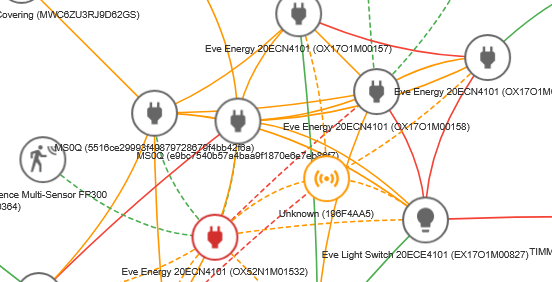
Oh yes, I agree. I frequently use the Zigbee2MQTT map, but for thread all I know of is the Eve iOS app that will show where the devices connect to - but not as a real map, just a list. But understanding the network topology and the connection strength between the devices is essential for building a robust Thread network.
The topology map on the web interface is a nice start. Be sure to turn on port 8081 for the Rest API as the docs say.
I can map some of the devices to my physical devices using MAC addresses, but that’s about all I have figured out so far.
Unfortunately for me, not all Matter over thread devices seem to appear.
I have 31 Matter devices, two on Wi-Fi and 29 on Thread. Nine of the Thread devices should be eligible as routers, leaving 20 end devices. On the Topology page I see 4 to 6 routers and 6 to 10 end devices. The number shown can go up or down quickly, changing between reloads of the diagram even when all devices are working correctly.
Am I expecting too much? Is anyone aware of a better option? I’d be interested in buying a device which I can move around to check the connectivity, but this is a hobby project so expensive professional gear is out.
Wow! That’s what I was hoping for. I even bought a Nordic Semiconductor dongle and installed their software, but now I don’t even need to configure it.
Of course there is always more to figure out. For example, I have an “island” of 5 end devices connected to a “Router (external)” I don’t recognize. The devices work fine, but perhaps with more lag than most. The router’s address is off by just the last two digits from one of my Eve outlets.
First diagnostic attempt: turn off the breaker to the Eve outlet. The mystery router is still active. On the other hand, an Aqara sensor which claims to be attached only to the Eve outlet is still working, even though the outlet is Offline. This doesn’t change after restarting the Matter server twice, or after a restart of Home Assistant. The node update controls on the mesh diagram page also do not affect this.
Not complaining, just confused for the moment. Having all the devices show up, and having useful labels is hugely better than the old tool.
Sounds reasonable. You turn off the outlet that was routing, and the devices find another route, perhaps by connecting directly to the border router. Resetting the Matter server does nothing to your Thread network. If you are running the border router as an HA “add-on," then it runs in a Docker container, so a restart of HA does nothing to the container. You would need to reboot the whole server.
What complicates things for some people is that they have multiple border routers, and each creates its own Thread network.
Thanks - I don’t know all of that. Maybe the border router is the answer for why the sensor still works. Even after a full system reboot the diagram shows the sensor attached only to the Eve outlet which is physically powered off and marked Offline in the diagram.
One question: does the yellow icon in the diagram represent my border router? Clicking it shows “Router (external)”. My hardware is HA Yellow with a ZBT-1 antenna. The software is fully up to date. I do not have any other “ecosystems” in my house with border routers.
For sure Matter Server does not know about the TBR, so most likely yes that is your HA OTBR.
The Matter Server as I understand is getting its Thread data from devices that send a particular Matter set of data/clusters that themselves hold Thread data. So the Matter Server is not participating/snooping in Thread networking. When the Eve is unplugged, Matter Server does not necessarily know this for some period of time, and I think even when it sees the device is unavailable, it will still use the info it got earlier from the Matter Cluster and show it in the map for a more extended period of time (but I don’t know for how long)
Thanks. That would explain what I am seeing. I just wish it had a way to clear whatever cache it is using and start fresh.
I did get the Nordic Semiconductor software running with their dongle. It’s an oddly ugly diagram with little pictures of circuit boards for icons, but the data is the best so far. I have tried to compare the three tools I now have below.
Nordic:
Live updates
Little to no display of stale information and nonexistent connections
Ugly icons which add no information
Can manually assign device names
Hardest to set up, dongle $16 with shipping, software free
Some devices have a MAC not seen in HA, at least by me, and no real name
Matter server:
Meaningful icons
Device names (but not the user-selected one) populated automatically
Shows devices and connections which no longer exist
Some devices have a MAC not seen in HA, at least by me, and no real name
OTBR (on port 8080, when enabled):
Update with a click
Only about half of devices are found.
Identifies the leader clearly, when it finds it
If I were paying for this I would ask for one tool with the best features of all, but I’m not in a position to make demands