Hi everyone 
Have you ever wondered why a Thread sensor keeps dropping off, which router your battery devices actually talk through, or whether your mesh has a single point of failure? I had exactly these questions with my ~20 Matter-over-Thread devices, so I built a tool to see it: Thread Pulse.
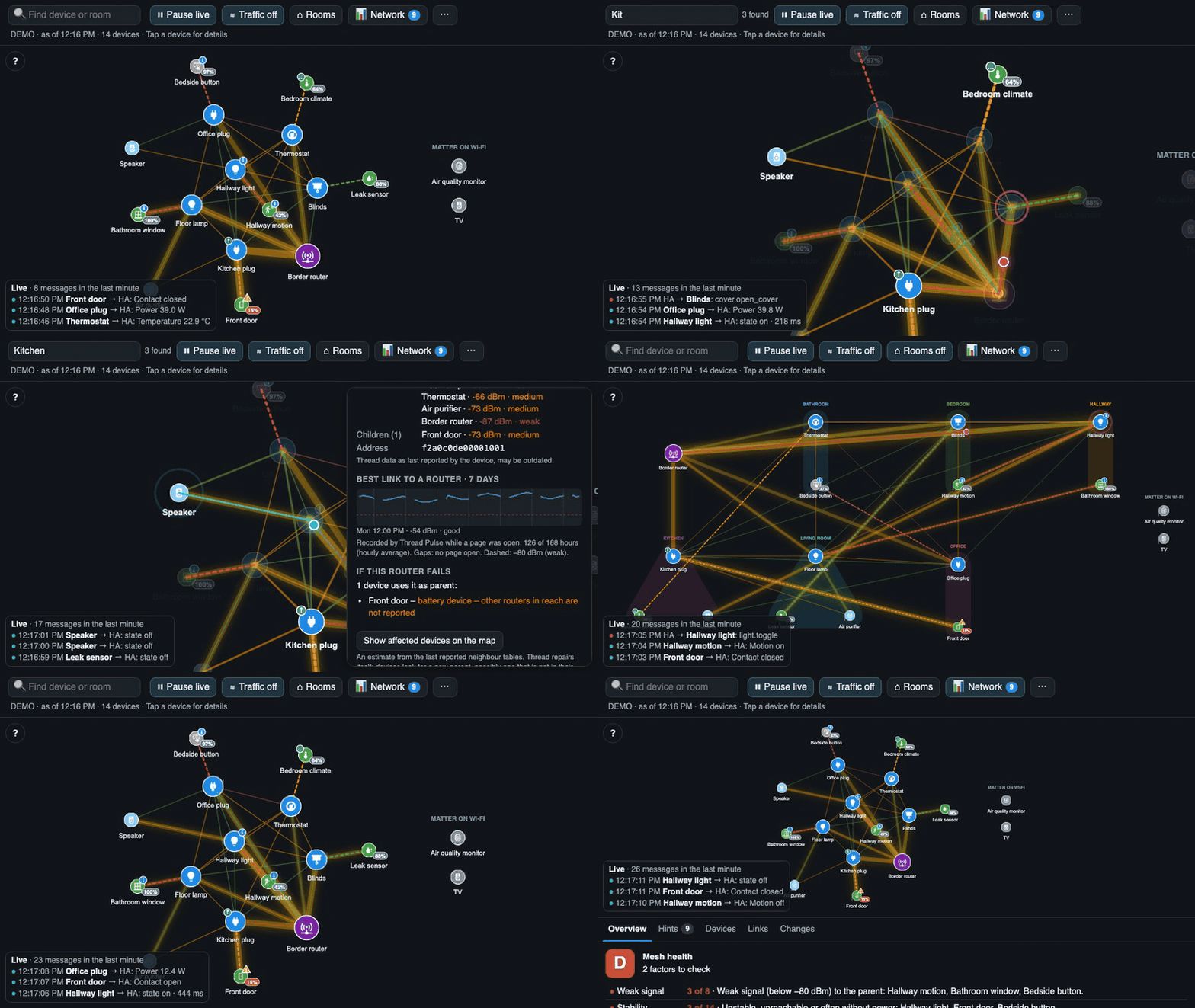
Thread Pulse draws your Matter-over-Thread devices as a live mesh – border router, routers, battery devices and the signal strength of every link – and animates every message as it happens: cyan when a device reports something to Home Assistant, magenta when Home Assistant sends a command.
What it does
- Live map of the mesh with signal strength on every link, and a “traffic heat” that shows the busy routes
- Detail panel per device: parent router, neighbours, signal, restarts and drop-offs, firmware, battery forecast, 7-day trends for signal and battery
- Mesh health grade (A–E) – always with the reasons behind it, not just a number
- “What if this router fails?” – which devices would lose their parent or get cut off
- Hints for weak spots (weak parent signal, routers that lose power, unstable devices)
- Change log (new parent, device offline/back, …), stored in Home Assistant
- Room view, search, an anonymised image export and a text report for forum posts like this one

- Works with the OpenThread Border Router add-on and – with some limits – with Apple, Google or Amazon border routers
- 6 languages (en, de, fr, it, es, nl)
Everything runs locally in your browser: it reads the Matter diagnostics from your own Home Assistant and sends nothing anywhere else.
Installation
It’s a dashboard card installed via HACS. The pull request to get Thread Pulse into the HACS default list is still pending, so for now please add it as a custom repository:
HACS → ⋮ (top right) → Custom repositories → repository riticulus/ha-thread-pulse, type Dashboard → Add. Then search for Thread Pulse in HACS → Download → reload the browser → add the card Thread Pulse to a dashboard.
Requirements: the Matter integration with at least one device on Thread, and an administrator account (Thread Pulse reads the device diagnostics, which Home Assistant only allows for admins).
 User guide: Home · riticulus/ha-thread-pulse Wiki · GitHub
 Source: GitHub - riticulus/ha-thread-pulse: Live map of your Thread network for Home Assistant – watch your Matter devices talk · GitHub
I would love your help 
This is a hobby project and I can only test it with my own network. I would be really grateful for testers and feedback – especially if you have:
- Apple, Google or Amazon border routers (with or without the OpenThread add-on)
- a large mesh, or devices from brands I don’t own
- ESPHome devices on Thread – they are not shown with their names yet and I’d need someone with such a device to make it work
- the Companion app on Android or an older iPad as a wall display
Bug reports, ideas and “it just works on my setup” are all welcome – here or as a GitHub issue.
A note on how it was made
I’ve been writing software for a long time, but I used Claude (an AI assistant) for prototyping and to speed up the work on this project. The code, the tests and the documentation are all public on GitHub, so you can see exactly what it does.
Thank you
A big thank you to everyone on Reddit who tried the first version, reported bugs and helped me fix them within hours – especially the folks with Apple-only networks and the duplicate-address sensors. Your feedback made Thread Pulse much better. And of course thanks to the Home Assistant, Matter and OpenThread teams for making all of this data available in the first place.
Happy meshing! 