Oh actually. One more heads up for you. Lmk if you want a gh issue too. I can raise one.
On conversion, it almost worked perfectly for most of my automations. This is a seriously good feature and saved a ton of time. I think it’s more likely to get you users because the onboarding is tidy.
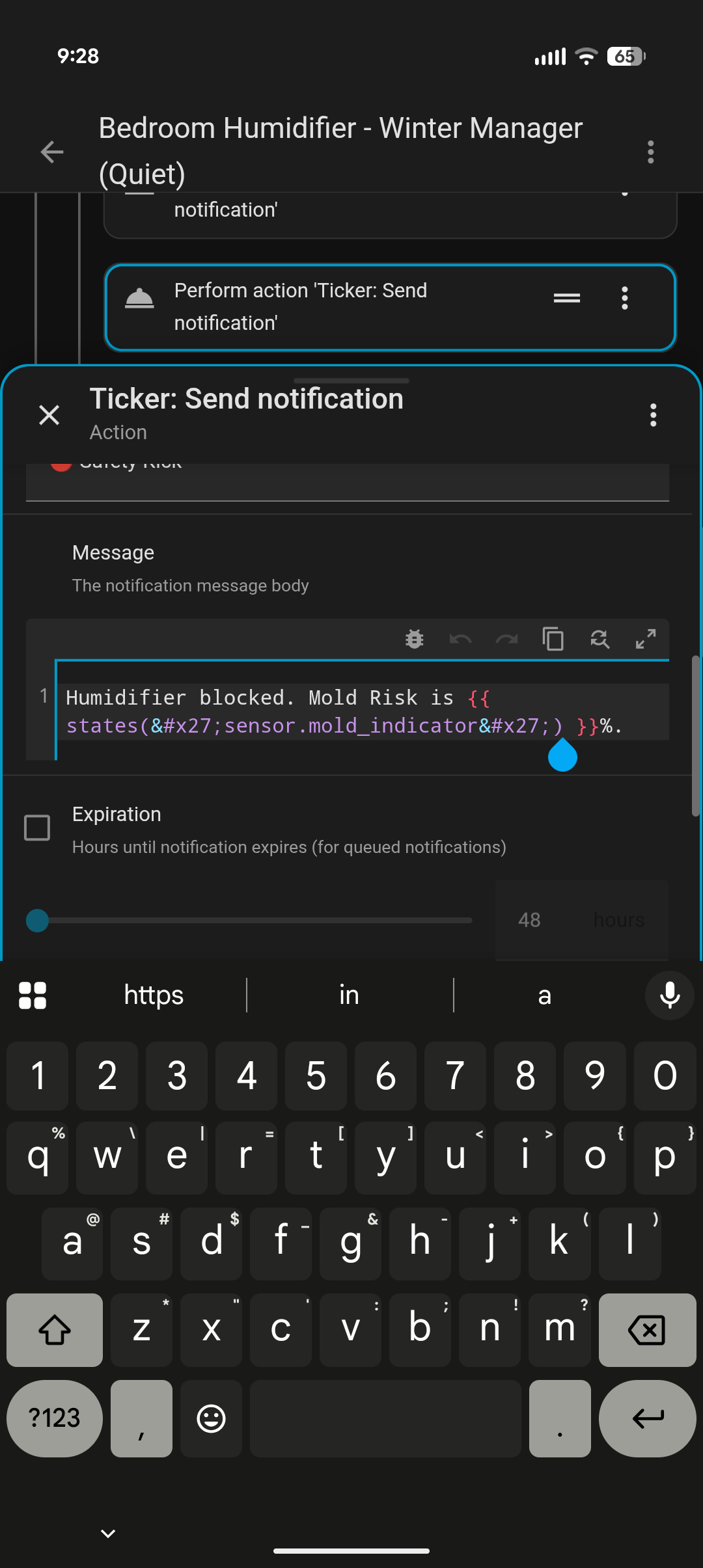
Only exception was added characters in to some of my templates. See screenshot example.
I really like this integrations, and it works very well.
However, i can’t choose Ticker as a notification service in Alarmo.
Not even manually in yaml. Error says service is missing.
Another problem. If i disable users in the settings panel of Ticker, they still get notifications. I need to open each user and disable every category, and then disable the user again.
Adding a new category, also enebles that category for disabled users
So far, I really like it. I think this integration brings a lot more seriousness and order to notifications. Honestly, I feel this is something Home Assistant OS should have natively by default.
I also think it’s great that clicking on a notification takes you directly to the history view. For me, that is a big improvement because it replaces the Telegram channel I used before when I was on Jeedom.
At the moment, the only thing missing for my use case would be the ability to display images directly inside the history view, so I can do a quick visual check when I have received several notifications.
Hey @malodie Thanks for the incredible feedback! No worries about a GH issue, I’ll do it and get cracking on it. Happy with everything that helps polish this further!
As far as discovery goes: you found it out yourself, but indeed: the names need to match. Stil cracking at making the discovery mechanism more robust, but it is a bit of a challenge juggling time between the integrations I am building at the moment
Hey @BalooDK! I know: I have the same problem and fixing it was already on my todo
It’s always nice to see you are not the only one struggling with something, because the Alarmo guys seem to have the same problem as I have with discovering notify services. Keep an eye on incoming updates in the coming week: I am working on it and fope to find a fix for this!
As for the other issues you mentioned: the auto-enable is something that is quite easy to reproduce and fix, but the other one is much harder. I’ll do some additional testing on my end and try to find out what is going on: are you ok if I DM you for specifics if needed?
Big update this time — the headline is notification actions, which solves something that’s been on my list for a while.
Notification Actions & Workflows
Actionable notifications in HA normally require two disconnected automations: one to send the notification with buttons, and a second to listen for the tap and do something. The identifiers that link them are freeform strings you have to match manually. If you rename an automation, the listener breaks silently.
In v1.3.0, you configure action buttons directly on the category in the admin panel. Ticker injects them automatically into outgoing notifications and listens for the tap itself. No second automation.
Three button types:
Script — calls any HA script when tapped. The script handles whatever logic would have gone in the second automation.
Snooze — suppresses that category’s notifications for the tapping user for a configurable duration (15 min, 30 min, 1 h, 2 h, 4 h). Only affects that person — other household members keep receiving normally.
Dismiss — logs the tap, no other action.
Existing automations are unaffected. If you pass your own data.actions, those take precedence. You can also pass actions: none to suppress injection for a specific call.
Inline images in History
Notifications with a data.image field (HTTP/HTTPS URLs or /local/ paths) now show the image inline in the History tab. Handy for quickly scanning a stack of camera notifications without opening each one on your phone. This came directly from a feature request here — thanks scude.
Other fixes
The migration wizard was producing stray HTML entities in Jinja2 templates in some edge cases — that’s fixed. Disabled users were being counted toward subscriber totals in the admin Categories tab — also fixed. And the Companion App notify service discovery introduced in v1.2.1 has been rewritten to use the device registry directly, which eliminates the cross-linking issue that came up when device names are substrings of each other (e.g. ipad_van_hans and ipad_van_hans_2).
Good question, and fair to ask. AI tooling was used extensively during development: for code generation, review, and iteration. I don’t think that needs hiding, but I also didn’t lead with it because I don’t think “built with AI assistance” changes what the integration does or whether it solves your problem, nor will it be any surprize these days. Happy to discuss any specific aspect of how it works.
there are many ways to a working solution, as you say: less fancy but working none the less! I started working on this because at some point I started struggling with a 4-person household, things changing constantly and me running in the background every day to keep up with keeping HA working properly / alive.
I am (and have been) able to keep thing running smoothly for years and to great satisfaction, but the real struggle is the amount of time it takes. Even if you are not changing anything on purpose: the changes/finding out ‘how did that work again’ type of fixing that is needed almost daily to make my home genuinely smart / buttons off was becoming a pain.
So… in short: yes this works I am sure, and yes: HA’s own native functionality allows for some incredible stuff as anyone can see here in the community every single day, but for me Ticker achieves a few simple objectives:
takes HA to a next level in terms of ‘less tinkering, more professionalism’
more complex functionality / possibilities at less continuous maintenance cost
being able to unlock that complexity at less cost and for users that can’t, don’t or won’t spend the time to find out how
Off course you don’t HAVE to adopt it, but feel free to do so if you want and give me your honest assessment of what does and does not work for you.
Thank you for your work on this. This looks really interesting and I am excited to try it out. I have also struggled with setting up notifications in modular way, rather than relying on scattered scattered notify.mobile_app_* calls.
I have tried working on complex scripts with fields to essentially make a better mobile app “service”, but it hasn’t worked as well as I’d imagined. Your integration has a lot more features than wouldn’t even be possible with scripts!
We have a mixed iOS and Android household, and a lot of my struggles are with how these app/OS differences are, especially in the more complex aspects of notifications.
Would you consider implementing more of these so they could work seamlessly with iOS and Android? I am still trying the integration out initially, but I didn’t see mention of the below in the user guide.
Critical notifications
an automation would set a simple true option for when a notification is critical, and Ticker would configure the OS-specific components of critical notifications
Formatting
Android supports HTML formatting, iOS does not. Ticker could strip formatting when the target is iOS and leave formatting for Android
They are already on the roadmap Not sure of the timeline yet, I also have a day job and I have a few things in development at the moment. But short answer: yes! Your feedback makes me realize I may need to pull this forward.
With respect to the Android/HTML question: I may need someone to help test this, as I don’t have any Android devices myself. Would you be open to help?


 Keep an eye on future updates and thank you for the kind words!
 ”
