I have a sonoff temp sensor connected to my heater that i have setup to toggle at my preferred temperatures. i can show the temperature and the switch icon. i can also toggle manually, but i want to be able to press the temp display to toggle the switch and cna’t figure out how to do this.
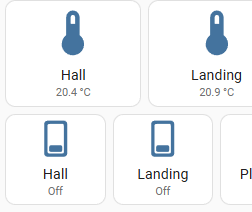
I want to be able to remove the Hall and Landing button and only have the temp buttons displayed so when i click the temp button the respective heaters toggle.
thanks
Just to toggle a switch when pressing on another entity?
type: horizontal-stack
cards:
  - type: button
    show_name: true
    show_icon: true
    tap_action:
      action: perform-action
      perform_action: switch.toggle
      target:
        entity_id: switch.test_switch
    entity: sun.sun
  - type: entity
    entity: switch.test_switch

Thanks but I really can’t get this working. My YAML is:
cards:
  - type: horizontal-stack
    cards:
      - show_name: true
        show_icon: true
        type: button
        entity: sensor.sonoff_10004b181e_temperature
        show_state: true
        name: Hall
        tap_action:
          action: perform-action
          perform_action: switch.toggle
          target:
            entity: switch.sonoff_10004b181e
      - show_name: true
and displays:

When I click on the hall button with the temp displayed I’d like it to switch on the hall heater, (and to turn yellow if possible) but can’t find a way. If i click on the lower Hall button I get this:

Suggest you to edit your post - the code is not formatted and thus cannot be analysed.
Thanks - I’ve editted the post 
I’ve also separated the YAML to include only the two items I’m working with.
YAML:
cards:
  - type: horizontal-stack
    cards:
      - show_name: true
        show_icon: true
        type: button
        tap_action:
          action: toggle
        entity: sensor.sonoff_10004b181e_temperature
        show_state: true
        name: Hall
  - type: horizontal-stack
    cards:
      - show_name: true
        show_icon: true
        type: button
        tap_action:
          action: toggle
        entity: switch.sonoff_10004b181e
        show_state: true
        name: Hall
and displays:

This is the original YAML for adding the each entity. When I click on the temperature Hall (top) i get an error message in the bottom left corner of my screen ‘Service sensor.turn_off not found’.
Any help greatly appreciated
Tried this and it works
  - type: horizontal-stack
    cards:
      - show_name: true
        show_icon: true
        type: button
        entity: sensor.sonoff_10004b181e_temperature
        show_state: true
        name: Hall
        tap_action:
          action: perform-action
          perform_action: switch.toggle
          data:
            entity_id: switch.sonoff_10004b181e
1 Like
Hi,
Thanks for this but I must be doing something wrong somewhere - I’ve copied the YAML but it I can’t get it to switch the heater on when pressed.
I think I’m trying to turn a sensor into a switch??
No worries, but thanks for your help
It does work, I tried it, did you copy the whole yaml I posted ?
Honestly not disputing you, it must be my setup.
I’ve tried creating a new card but I still can’t get it to work.
Ok, have you checked the entity IDs ?
Anything in the logs
Assume your on 2024.8.x ?
Not sure what you mean…
The physical sonoff device is a TH16 - it has the ability to switch on whatever is connected to it (Hall Heater) and it senses the temperature.
The switch is the 10004b181e and when I press the lower button (the rectangular button) the heater turns on.
I want to switch the heater on by pressing the thermometer looking icon (top).