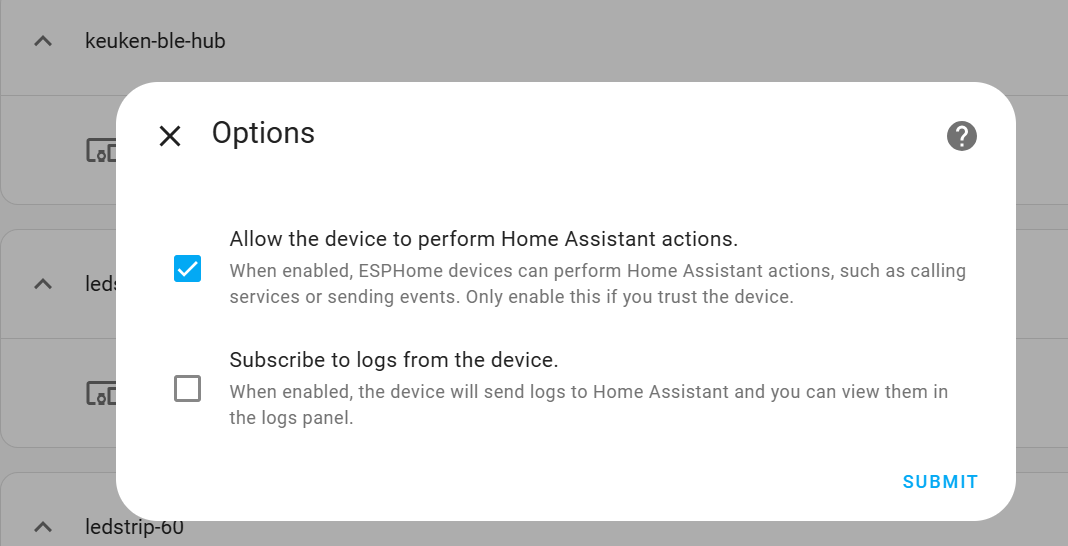
Hello, I’m relatively new to doing more complex things with esphome and HA. I’ve got a Sonoff S31 plug I’ve flashed with esphome and I have it controlling a dehumidifier for peak/off-peak electricity rates. I’m using a schedule helper for the schedule and then a simple automation to trigger the on/off. The piece I’m struggling with is getting the device to trigger the automation again after a power cycle or more commonly, a version upgrade to esphome which reboots the device. I’ve gone through the documentation and I will say I’m not 100% on whether I’m following the right approach for this. To test I created an input boolean switch that I’m trying to validate communication between HA and the device. This is the block of configuration I’m using:
I’m a bit confused on when to use “service” vs “action” as I believe service is legacy but still supported and used in some cases? Should this be event? I’ve tried a few iterations of this with no luck. Which is leading me to a communication issue. I’ve seen some mention I’ll need to serial log to capture full details of what is going on as the esphome add-on UI for capturing logs doesn’t capture everything?
Some guidance in the right direction here would be much appreciated. I eventually want to replace this with triggering the HA automation I am using already. I realize that using the native esphome automation capabilities on device might be preferrable here so insight there would be great also.
If you want some guidance then how about giving us the full configuration so that we have something to base our guidance on?? Its very annoying when people ask for help while also deciding which information is relevant for us to see. Don’t do that and just post the full config and we will determine what is or isnt relevant. I can tell you already this
on_boot:
Section is not only not relevant for what your trying to do but, its most likely not even needed at all but, its hard to really say for sure if we only have enough details to make broad guesses about how you’ve created the rest of the automation and the logic.
It soinds like you’ve got it all mixed and matched between HA and Esphome, even for things that dont need that nor should they be mixed around unless its actually necessary to do so.
Post your config so that we can see how you’ve setup any sensors/controls for the humidifier, as well as whatever automation parts you left out too. After that go ahead and also post full name, address, banking information, pin codes or passwords and a copy of photo ID… Fine! Fine! Ill settle for just the Esphome parts for now!
; )
I was simply trying to better understand what approach should be taken for my situation (which seems like a common scenario) and how to interpret the documentation (which I have tried to understand for my context). I kept my initial post short intentionally as the documentation suggests (or at least my interpretation of it) that the on_boot block is the method to use to trigger something from the local device after a reboot.
Here is the full configuration. The plug is on the same network as the HA VM.
I did see this post in my searches for a few hours. If you were suggesting the particular part about the priority setting I did try this (-100) in some of my tests. The restore state options I left as is (RESTORE_DEFAULT_OFF) per suggestions from the S31 plug sample config in the esphome docs. That said maybe I’m missing something still in that post.
Interesting. In the documentation I misread the if action’s condition item as optional and missed the required for the wait_until so I assumed the condition was the line below the wait_until of api.connected since it was the child. Not knowing any different, when the configuration validates, I assumed it wasn’t missing anything required for that block to function.
That said when I add in condition and also timeout I’m still not seeing it turn on my test input boolean switch in HA. I also noticed that my previous config did not have the colon on api.connected as shown in that other post and the docs. Added that and still no luck.
Maybe leave this route if it’s not working and follow an easier route. You can use the status component and use this in your automations within HA. This is not only working with MQTT but also with the native API. That’s the way I use it.
Thanks for your reply. I’m not sure this status sensor would work for my original situation which was to have the plug return to its last power state (typically on) upon a power loss, reboot, esphome update. I was under the impression that using the on_boot configuration was a common way to do this. The input boolean I was using in my above example was really just to validate that the on_boot configuration was working and communicating with HA without actually targeting the plug itself. If this was able to turn on the input_boolean then I could move on to replacing that part of the config with the actual automation. That was the idea at least but I’m not able to have this block do what I was expecting. If you (or anyone reading this) has a working config similar to this situation I’d really appreciate the example.
 and have a look at