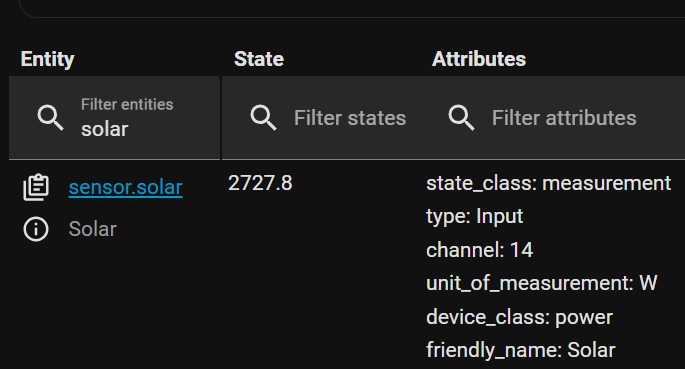
I’m watching this tutorial: Mastering Home Assistant Templates: A Beginner’s Guide at about the 8:50 point it gives the following example: {{ state_attr(light.desk_backlight’,‘energy’)}} with the result being 69.79. I tried to implement something like this in the Template editor for my system to try it out. I typed: {{ state_attr(‘sensor.solar’,‘power’)}} but the result I got was null and Result type:dict When I go into Developer tools this is what I see:
You don’t have an attribute called power. 2727.8 is the sensor’s state.
The list of attributes is on the right.
States are strings. So you will need to cast that to a float if you want to do math or comparisons on it. If just displaying it, you can leave the cast off.
Try:
{{ states('sensor.solar') | float(0) }}
The number in the parenthesis is a default if a non number is sent to float.
I tried your suggestion, and before I could type in the “| float(0)” it already gave me the desired result. Your comment not having an attribute called power. I believe you, but in the jpg I included, under the attribute column, I do see “device_class: power”. I guess I assumed incorrectly that “power” was an attribute. Still trying to wrap my head around this stuff. Thanks for your guidance!