I have a script that delays the turning off of my car charger for 10 minutes.
The script is called from an automation that asses solar usage.
If within the 10 minutes the automation deems to not want the charger turned off, it will cancel the delay script.
The problem I am having, is once the delay script is started, the next time the automation calls the script (which should be ignored) the whole automation locks up and isn’t called again until the 10 minutes expire and the script completes.
I can reproduce the issue with this very simple automation that runs every 5 seconds:
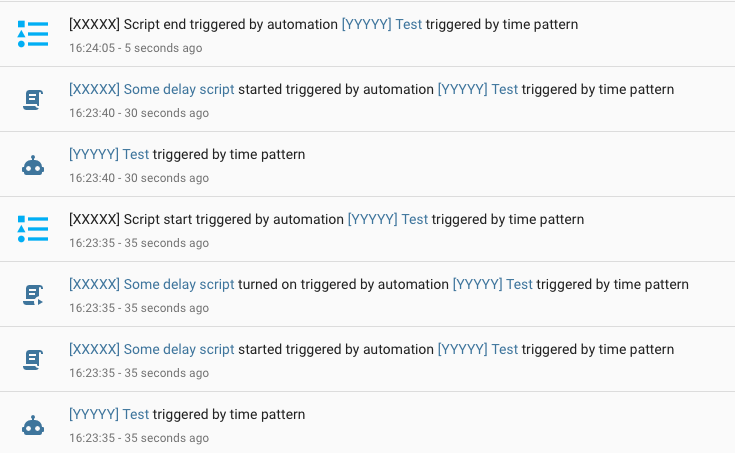
Looking at the Logbook, I see that the automation is triggered, the script starts and makes the first log. The automation is triggered again, obviously no log is made this time and the script is already running.
However no more log entries from the automation running until the script ends and dumps it’s last log.
By default , a script/automation as the mode set to single/unique.
Which prevents running them more than once at the same time … so you might try changing the mode.
I need the script to be single so the delay is running only once.
The automation is also set to single for various other reasons, however I thought that running a script from an automation by setting it to on is asynchronous and the automation continues. Which is actually happening just fine as the automation runs a second time.
Why would the automation freeze when trying to set the script to on when it is already on?
My actual automation is huge, I thought by simplifying things it would be easier to see the issue.
The script and automation I posted above is actual code I have tested and has the same issue.
This is just a test script that shows the problem I am having.
My actual script runs whenever the power meter in my house changes. I assesses if it should adjust or switch off my car charger.
Because I don’t want my charger switching off and on again in quick succession whenever a cloud goes over the house, it runs a script that delays for 10 minutes then switches it off.
The automation needs to keep running whenever the power meter changes, in case the cloud disappears and now it doesn’t need to turn the charger off, so it cancels the script from completing.
The problem is that the next time the automation runs after starting the script, it all freezes until the scripts 10 minute timer elapses.
This can all be seen happening with the 2 bits of code I posted above.
The script’s mode is single. That means while it’s busy executing its actions (such as waiting for a delay to expire) it ignores all subsequent attempts to execute the script.
That’s exactly what I want to happen.
While it’s waiting it’s 10 minutes, it shouldn’t let the automation start another 10 minute timer. However the automation should continue to run every time it’s needed so it can call script.turn_off before the script finishes executing.
But the automation only runs 1 more time after the script has been turned on. I don’t get any error that it couldn’t start the script a second time.
This is a guess, but I think turn_on is waiting for the script (with the delay) to finish in order to see if it was successful. You could check by putting a notification after it.
If so, it may be that that does not happen if continue_on_error is set to true, because then it does not need to wait for the result. But that is entirely implementation dependent (and I do not know anything about the implementation details).
A timer entity would be my weapon of choice. That is because you can see if it runs, restart it, cancel it, whatever. And it is not causing long running scripts but it is purely event driven.
Bug or not, I would use a timer helper and logic to see what time timer is doing on subsequent calls. That way scripts run no longer than needed. Timers can also be set to survive restart/automation reload.