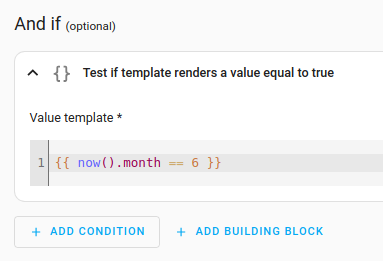
I spent most of the day struggling to create a simple entity/sensor that would output the current month name. Several dozen browser tabs later, I was none the wiser. Every discussion I found provided instructions that were either outdated (thanks to recent HA updates) or weren’t detailed enough (i.e. I had no idea how to implement their solutions).
I accidentally got it working, so I figured I’d explain how here, in excruciating detail, in case someone else new to Home Assistant is also struggling with this.
- Go to Settings.
- Go to Devices and services.
- Go to the “Helpers” tab.
- Click the “create helper” button.
- Choose “template” from the list.
- Choose “template a sensor”. Do not choose “template a binary sensor”.
- In the next window that appears, enter a name for the entity, e.g. “CurrentMonthName”.
- In the “state template” box, enter the following:
{{ now().strftime('%B') }}
Don’t alter anything else. The preview at the bottom should show the name of the current month. Click submit to save it.
Then you can go to Settings > Devices > Entities tab and search for the name you gave it in step 7, e.g. “CurrentMonthName”, and it should be there. You should also then be able to use it in automations, such as "only do this task if CurrentMonthName = January.
Side note: yes, I know you can use the time and date option for triggers in the new automation UI, but that doesn’t help when you want to use it as a condition (“and if” in the new automation creation UI) rather than as a trigger.
Further reading: this uses the strftime Python method. Using the information there (and also here), it is possible to obtain other values, such as day, time, day name, week number of the year, year, etc. Note that the current month name is denoted by “%B” in the above code.
The strftime method takes any time input and converts it to whatever format is specified; the template for use is {{ input_time().strftime(‘format’) }}, if that makes it easier to understand… so in the above example, we’re providing “now” as the time for input, and %B as the format for output (meaning the current month name).
If, for instance, you want the current month expressed as a number, you can use %m or %-m (use %-m if you don’t want the leading zero, e.g. “1” instead of “01” for January). This then provides a numerical value to the entity, so you can then use less than or more than conditions when creating automations.
(The alternative, using %B as above, results in a string (an alphanumerical value) rather than a number, which becomes more cumbersome when creating automations.)
Keep in mind that - when in the template sensor creation window, you can experiment with the format and you can see immediately the output example in the preview below. This makes it faster to figure out if you’re going to have the desired output.
Hope this helps someone else save all the time I just wasted today trying to figure this out.