Tuya Solar Thermal Controller Not Supported

I’ve just replaced my solar thermal controller with a SR208C purchased from AliExpress. It was picked up by the Tuya App and Home Assistant can see it but it’s showing as “Unsupported”. I have attached the Diagnostics which appears to show all the entitles but I have no entitles available for the device.

Am I missing something or is this not supported? If not supported any pointers on how I can add it. I’m a software developer but program in PHP not Python but I’m sure with a starting point I’ll be able to get something working.

{
  "home_assistant": {
    "installation_type": "Home Assistant OS",
    "version": "2023.5.2",
    "dev": false,
    "hassio": true,
    "virtualenv": false,
    "python_version": "3.10.11",
    "docker": true,
    "arch": "x86_64",
    "timezone": "Europe/London",
    "os_name": "Linux",
    "os_version": "6.1.25",
    "supervisor": "2023.04.1",
    "host_os": "Home Assistant OS 10.1",
    "docker_version": "23.0.3",
    "chassis": "embedded",
    "run_as_root": true
  },
  "custom_components": {
    "meross_lan": {
      "version": "3.0.3",
      "requirements": []
    },
    "alexa_media": {
      "version": "4.6.2",
      "requirements": [
        "alexapy==1.26.5",
        "packaging>=20.3",
        "wrapt>=1.12.1"
      ]
    },
    "localtuya": {
      "version": "5.0.0",
      "requirements": []
    },
    "tapo": {
      "version": "1.6.1",
      "requirements": [
        "plugp100==2.5.1"
      ]
    },
    "hacs": {
      "version": "1.32.1",
      "requirements": [
        "aiogithubapi>=22.10.1"
      ]
    },
    "sonoff": {
      "version": "3.5.1",
      "requirements": [
        "pycryptodome>=3.6.6"
      ]
    },
    "awesome_thermostat": {
      "version": "1.0.0",
      "requirements": []
    }
  },
  "integration_manifest": {
    "domain": "tuya",
    "name": "Tuya",
    "codeowners": [
      "@Tuya",
      "@zlinoliver",
      "@frenck"
    ],
    "config_flow": true,
    "dependencies": [
      "ffmpeg"
    ],
    "dhcp": [
      {
        "macaddress": "105A17*"
      },
      {
        "macaddress": "10D561*"
      },
      {
        "macaddress": "1869D8*"
      },
      {
        "macaddress": "381F8D*"
      },
      {
        "macaddress": "508A06*"
      },
      {
        "macaddress": "68572D*"
      },
      {
        "macaddress": "708976*"
      },
      {
        "macaddress": "7CF666*"
      },
      {
        "macaddress": "84E342*"
      },
      {
        "macaddress": "D4A651*"
      },
      {
        "macaddress": "D81F12*"
      }
    ],
    "documentation": "https://www.home-assistant.io/integrations/tuya",
    "integration_type": "hub",
    "iot_class": "cloud_push",
    "loggers": [
      "tuya_iot"
    ],
    "requirements": [
      "tuya-iot-py-sdk==0.6.6"
    ],
    "is_built_in": true
  },
  "data": {
    "endpoint": "https://openapi.tuyaeu.com",
    "auth_type": 0,
    "country_code": "44",
    "app_type": "tuyaSmart",
    "mqtt_connected": true,
    "disabled_by": null,
    "disabled_polling": false,
    "name": "SR208C",
    "model": "SR208C",
    "category": "znrb",
    "product_id": "hyrswocbx6i1rveo",
    "product_name": "SR208C",
    "online": true,
    "sub": false,
    "time_zone": "+01:00",
    "active_time": "2023-05-12T11:16:30+00:00",
    "create_time": "2023-05-12T11:16:30+00:00",
    "update_time": "2023-05-12T11:16:31+00:00",
    "function": {
      "switch": {
        "type": "Boolean",
        "value": {}
      },
      "mode": {
        "type": "Enum",
        "value": {
          "range": [
            "cold",
            "heating",
            "auto"
          ]
        }
      },
      "temp_set": {
        "type": "Integer",
        "value": {
          "unit": "\u2103",
          "min": 0,
          "max": 100,
          "scale": 0,
          "step": 1
        }
      },
      "temp_unit_convert": {
        "type": "Enum",
        "value": {
          "range": [
            "c",
            "f"
          ]
        }
      },
      "instant_heating": {
        "type": "Boolean",
        "value": {}
      }
    },
    "status_range": {
      "switch": {
        "type": "Boolean",
        "value": {}
      },
      "mode": {
        "type": "Enum",
        "value": {
          "range": [
            "cold",
            "heating",
            "auto"
          ]
        }
      },
      "temp_set": {
        "type": "Integer",
        "value": {
          "unit": "\u2103",
          "min": 0,
          "max": 100,
          "scale": 0,
          "step": 1
        }
      },
      "temp_unit_convert": {
        "type": "Enum",
        "value": {
          "range": [
            "c",
            "f"
          ]
        }
      },
      "instant_heating": {
        "type": "Boolean",
        "value": {}
      },
      "countdown_left": {
        "type": "Integer",
        "value": {
          "unit": "min",
          "min": 0,
          "max": 1440,
          "scale": 0,
          "step": 1
        }
      },
      "temp_top": {
        "type": "Integer",
        "value": {
          "unit": "\u2103",
          "min": 0,
          "max": 4000,
          "scale": 1,
          "step": 1
        }
      },
      "temp_bottom": {
        "type": "Integer",
        "value": {
          "unit": "\u2103",
          "min": 0,
          "max": 4000,
          "scale": 1,
          "step": 1
        }
      },
      "pump_state": {
        "type": "Boolean",
        "value": {}
      },
      "ele_heating_state": {
        "type": "Boolean",
        "value": {}
      }
    },
    "status": {
      "switch": false,
      "mode": "heating",
      "temp_set": 60,
      "temp_unit_convert": "c",
      "instant_heating": false,
      "countdown_left": 0,
      "temp_top": 1090,
      "temp_bottom": 1090,
      "pump_state": false,
      "ele_heating_state": false
    },
    "home_assistant": {
      "name": "SR208C",
      "name_by_user": null,
      "disabled": false,
      "disabled_by": null,
      "entities": []
    }
  }
}

Fixed the problem by using Local Tuya where I was able to access the required data.

Hi neil-w,

I have the same issue with SR208C controller.

I added it using local tuya but i do not see all functions, can you share more details on how you integrated all functionalities.

Thx

I’m not using the pump option as it wasn’t compatible with my pump. In the end I kept my existing Solar controller and just added the two temperature probes supplied to my water tank so I can bring the two values in to HA.

Hi,

Thx for the info.
For the moment i succeeded to integrate all available sensors of it even the setting for electric heating.

But i do not know for all parameters the usage or how the handle them :slight_smile:

1 Like

Hello! Have any of you tried to disassemble the device to see what kind of chip does it have inside? Wondering if it’s and ESP32 or 8266 that would be ESPHome flashable.
I am building a controller for my solar boiler system and it’s working great. I am missing a good enclosure and better display for now haha

Hi do you mind sharing your project as i to would like build one did you use an esp32

Hi do you mind sharing your project as i to would like build one did you use an esp32

There you have it! :smiley:
There’s a few things going on there.
T1 is for the temperature on solar collectors
T2 is the temperature on the bottom of the tank (where water is sent to the collectors)
T3 is the temperature on consumption pipe
T4 is the temperature in the middle of the tank - that one is the one I consider the tank temperature for using in the climate entity.
I have two systems there, one that turn recycling pump on bases on the differential between T2 and T1 and the other one, the climate entity, controls the heating element.
I have a scheduler there in case it looses contact to HA, but also have a flag called boiler_manual_flag that puts it on manual and ignores the scheduler. I use it mainly when we are not home to prevent heating element to turn on.

Hardware is basically an ESP32-WROOM-32D from Aliexpress + thermistors, + RTC + little OLED screen and 2 industrial Solid State Relays the controls the mains voltage.

I am out of home but I can get a picture tomorrow. It’s, temporarily-permanent installed on a protoboard LOL

Still missing some overheat configurations but working great for 6+ months

esphome:
  name: solar-boiler-controller
  friendly_name: Boiler Controller
  on_boot:
    then:
      - ds1307.read_time:

esp32:
  board: esp32dev
  framework:
    type: arduino

logger:
api:
ota:

wifi:
  ssid: !secret wifi_ssid
  password: !secret wifi_password

i2c:
  sda: 25
  scl: 26
  scan: true
  id: bus_a

time:
  - platform: homeassistant
    id: remote_time
    on_time_sync:
      then:
        ds1307.write_time:
  - platform: ds1307
    update_interval: never
    id: local_time
    on_time:
      - seconds: 0
        minutes: 0
        hours: 6
        days_of_week: SUN-SAT
        then:
          - lambda: |-
              if (!id(boiler_manual_flag)) {
                auto call = id(hot_water_boiler).make_call();
                call.set_mode(climate::CLIMATE_MODE_HEAT);
                call.perform();
              }
      - seconds: 0
        minutes: 0
        hours: 9
        days_of_week: SUN-SAT
        then:
          - if:
              condition:
                lambda: 'return !id(boiler_manual_flag);'
              then:
                - climate.control:
                    id: hot_water_boiler
                    mode: 'OFF'
      - seconds: 0
        minutes: 0
        hours: 19
        days_of_week: SUN-SAT
        then:
          - if:
              condition:
                lambda: 'return !id(boiler_manual_flag);'
              then:
                - climate.control:
                    id: hot_water_boiler
                    mode: HEAT
      - seconds: 0
        minutes: 0
        hours: 22
        days_of_week: SUN-SAT
        then:
          - if:
              condition:
                lambda: 'return !id(boiler_manual_flag);'
              then:
                - climate.control:
                    id: hot_water_boiler
                    mode: 'OFF'

sensor:
  - platform: adc
    id: t1_sensor
    attenuation: 11db
    pin: 36
    update_interval: 15s

  - platform: resistance
    id: resistance_sensor_t1
    sensor: t1_sensor
    configuration: DOWNSTREAM
    resistor: 10kOhm

  - platform: ntc
    sensor: resistance_sensor_t1
    id: temperature_1
    calibration:
      b_constant: 3980
      reference_temperature: 25°C
      reference_resistance: 10kOhm
    filters:
      - lambda: return x + id(temperature_correction_global);
    name: T1 Temperature

  - platform: adc
    id: t2_sensor
    attenuation: 11db
    pin: 39
    update_interval: 15s

  - platform: resistance
    id: resistance_sensor_t2
    sensor: t2_sensor
    configuration: DOWNSTREAM
    resistor: 10kOhm

  - platform: ntc
    sensor: resistance_sensor_t2
    id: temperature_2
    calibration:
      b_constant: 3980
      reference_temperature: 25°C
      reference_resistance: 10kOhm
    filters:
      - lambda: return x + id(temperature_correction_global);
    name: T2 Temperature

  - platform: adc
    id: t3_sensor
    attenuation: 11db
    pin: 34
    update_interval: 15s

  - platform: resistance
    id: resistance_sensor_t3
    sensor: t3_sensor
    configuration: DOWNSTREAM
    resistor: 10kOhm

  - platform: ntc
    sensor: resistance_sensor_t3
    id: temperature_3
    calibration:
      b_constant: 3980
      reference_temperature: 25°C
      reference_resistance: 10kOhm
    filters:
      - lambda: return x + id(temperature_correction_global);
    name: T3 Temperature

  - platform: adc
    id: t4_sensor
    attenuation: 11db
    pin: 35
    update_interval: 15s

  - platform: resistance
    id: resistance_sensor_t4
    sensor: t4_sensor
    configuration: DOWNSTREAM
    resistor: 10kOhm

  - platform: ntc
    sensor: resistance_sensor_t4
    id: temperature_4
    calibration:
      b_constant: 3980
      reference_temperature: 25°C
      reference_resistance: 10kOhm
    filters:
      - lambda: return x + 10;
    name: T4 Temperature

  - platform: template
    id: temp_diff
    unit_of_measurement: °C
    update_interval: 5s
    lambda: |-
      return (id(temperature_1).state - (id(temperature_2).state));
    on_value:
      then:
        - lambda: |-
            if (id(temperature_1).state >= id(recycle_on_minimum) && x >= id(recycle_on_hysteresis) && x >= id(recycle_off_hysteresis)) {
              ESP_LOGD("custom", "ligou temp");
              id(recycling_pump).turn_on();
            } else {
              id(recycling_pump).turn_off();
              ESP_LOGD("custom", "desligou temp");
            }

            if (id(temperature_1).state <= id(anti_freeze)) {
              id(anti_freeze_cycle) = "true";
              id(recycling_pump).turn_on();
              ESP_LOGD("custom", "ligou freeze");
            } else if (id(anti_freeze_cycle)) {
              id(anti_freeze_cycle) = "false";
            //  id(recycling_pump).turn_off();
              ESP_LOGD("custom", "desligou freeze");
            }

climate:
  - platform: bang_bang
    sensor: temperature_4
    name: Hot Water Boiler
    id: hot_water_boiler
    visual:
      min_temperature: 0
      max_temperature: 70
      temperature_step: 1
    default_target_temperature_low: 53 °C
    default_target_temperature_high: 56 °C
    heat_action:
      - switch.turn_on: boiler
    idle_action:
      - switch.turn_off: boiler
    away_config:
      default_target_temperature_low: 5 °C
      default_target_temperature_high: 8 °C

switch:
  - platform: gpio
    id: recycling_pump
    pin:
      number: 33
      inverted: true
    name: "Recycling Pump"

  - platform: gpio
    id: boiler
    pin:
      number: 32
      inverted: true
    name: "Boiler"

  - platform: template
    id: boiler_manual_mode
    name: Boiler Manual Mode
    turn_on_action:
        - globals.set:
            id: boiler_manual_flag
            value: "true"
    turn_off_action:
        - globals.set:
            id: boiler_manual_flag
            value: "false"
    lambda: 'return id(boiler_manual_flag);'

  - platform: template
    id: recycler_manual_mode
    name: Recycler Manual Mode
    turn_on_action:
        - globals.set:
            id: recycler_manual_flag
            value: "true"
    turn_off_action:
        - globals.set:
            id: recycler_manual_flag
            value: "false"
    lambda: 'return id(recycler_manual_flag);'

globals:
  - id: temperature_correction_global
    type: float
    restore_value: true
    initial_value: '0.0'

  - id: boiler_overheat
    type: float
    restore_value: true
    initial_value: '70.0'

  - id: recycle_on_minimum
    type: float
    restore_value: true
    initial_value: '50.0'

  - id: recycle_on_hysteresis
    type: float
    restore_value: true
    initial_value: '15.0'

  - id: recycle_off_hysteresis
    type: float
    restore_value: true
    initial_value: '3.0'

  - id: anti_freeze
    type: float
    restore_value: true
    initial_value: '5.0'

  - id: solar_overheat
    type: float
    restore_value: true
    initial_value: '100.0'

  - id: boiler_manual_flag
    type: bool
    restore_value: true
    initial_value: "false"

  - id: recycler_manual_flag
    type: bool
    restore_value: true
    initial_value: "false"

  - id: anti_freeze_cycle
    type: bool
    restore_value: true
    initial_value: "false"

number:
  - platform: template
    name: Temperature Correction
    id: temperature_correction
    entity_category: config
    unit_of_measurement: '°C'
    min_value: -10
    max_value: 15
    step: 0.5
    restore_value: true
    optimistic: true
    set_action:
      then:
        - globals.set:
            id: temperature_correction_global
            value: !lambda 'return x;'

  - platform: template
    name: Boiler Overheat
    id: boiler_overheat_temp
    entity_category: config
    unit_of_measurement: '°C'
    min_value: -0
    max_value: 75
    step: 1
    restore_value: true
    optimistic: true
    set_action:
      then:
        - globals.set:
            id: boiler_overheat
            value: !lambda 'return x;'

  - platform: template
    name: Recycle On Hysteresis
    id: recycle_on_hysteresis_temp
    entity_category: config
    unit_of_measurement: '°C'
    min_value: 0
    max_value: 40
    step: 2.5
    restore_value: true
    optimistic: true
    set_action:
      then:
        - globals.set:
            id: recycle_on_hysteresis
            value: !lambda 'return x;'

  - platform: template
    name: Recycle Off Hysteresis
    id: recycle_off_hysteresis_temp
    entity_category: config
    unit_of_measurement: '°C'
    min_value: 0
    max_value: 75
    step: 1
    restore_value: true
    optimistic: true
    set_action:
      then:
        - globals.set:
            id: recycle_off_hysteresis
            value: !lambda 'return x;'

  - platform: template
    name: Anti Freeze Temperature
    id: anti_freeze_temp
    entity_category: config
    unit_of_measurement: '°C'
    min_value: -20.0
    max_value: 99
    step: 1
    restore_value: true
    optimistic: true
    set_action:
      then:
        - globals.set:
            id: anti_freeze
            value: !lambda 'return x;'

  - platform: template
    name: Solar Overheat Temperature
    id: solar_overheat_temp
    entity_category: config
    unit_of_measurement: '°C'
    min_value: -20.0
    max_value: 150
    step: 1
    restore_value: true
    optimistic: true
    set_action:
      then:
        - globals.set:
            id: solar_overheat
            value: !lambda 'return x;'

display:
  - platform: ssd1306_i2c
    id: oled1
    update_interval: 5.0s
    contrast: 0.4
    model: "SH1106 128x64"
    address: 0x3C
    lambda: |-
      it.strftime(0, 0, id(roboto12), "%d-%m-%Y %H:%M", id(local_time).now());
      it.printf(0, 12, id(roboto12), "Placas: %.1f°C", id(temperature_1).state);
      it.printf(0, 24, id(roboto12), "Baixo: %.1f°C", id(temperature_2).state);
      it.printf(0, 36, id(roboto12), "Saida: %.1f°C", id(temperature_3).state);
      it.printf(0, 48, id(roboto12), "Boiler: %.1f°C", id(temperature_4).state);

font:
  - file: "gfonts://Roboto"
    id: roboto12
    size: 12
2 Likes

Hi have you made any updates to this project as plan on trying it now. Have you seen this esp32 board to use

https://www.aliexpress.com/item/1005006284154750.html?spm=a2g0o.order_list.order_list_main.72.21ef1802rYBkQg

1 Like

Hi home2a2blue,
I have the same problems with SR208C controller.
I added it using local tuya but the automatic integration-support is not helpful for me, I don’t understand the displayed data and got not temperature for example.
Can you show me how you got all your entites of SR208C in HA .
Or is there any yaml-Code as a solution?
Thx a lot.

I’ve been trying to integrate the SR208C into home assistant for a while now. Can someone tell me - if I set up LocalTuya (Still trying to do that - sounds quite complicated!), is the device still visible in my tuya app, or do I have to choose to use it with EITHER home assistant OR tuya?

@neil-w

I’m in the process of making a solar thermal heating system and looking for a solar thermal controller that can output data on home assistant there are many in Ali express did you get any luck with the sr208c in the end?

Using the Tuya Local there is the possibility to add it to home assistant.
The device is not officially supported (yet), but I managed to create my own configuration and read the data.

Here is my device request for SR208C

Here is my current config file, if you want to try:

name: Solar water heater controller
products:
  - id: hyrswocbx6i1rveo
    manufacturer: Solar Electronics
    model: SR208C
entities:
  - entity: sensor
    name: Collector temperature (T1)
    icon: "mdi:sun-thermometer-outline"
    class: temperature
    dps:
      - id: 26
        type: integer
        name: sensor
        mapping:
          - scale: 10
        range:
          min: -300
          max: 4000
        unit: C
        class: measurement
  - entity: sensor
    name: Tank temperature bottom (T2)
    icon: "mdi:thermometer-chevron-down"
    class: temperature
    dps:
      - id: 22
        type: integer
        name: sensor
        mapping:
          - scale: 10
        range:
          min: 0
          max: 4000
        unit: C
        class: measurement
  - entity: sensor
    name: Tank temperature top (T3)
    icon: "mdi:thermometer-chevron-up"
    class: temperature
    dps:
      - id: 21
        type: integer
        name: sensor
        mapping:
          - scale: 10
        range:
          min: 0
          max: 4000
        unit: C
        class: measurement
  - entity: binary_sensor
    name: Circulation pump
    icon: "mdi:pump"
    category: diagnostic
    dps:
      - id: 30
        type: boolean
        name: sensor

Add this to a new file in the “devices” folder of tuya-local.
(for example: /homeassistant/custom_components/tuya_local/devices/SR208C.yaml)

Then when you try to add the device using the cloud-based configuration, the device will be recognized as SR208C (or whatever name you used).

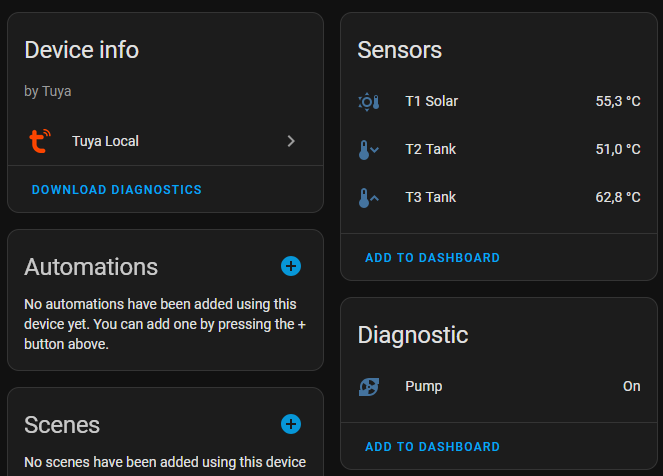
Then you will see the sensors like this:


You can make then graphs or anything with it.

Notice that I only added the T1, T2, T3 and the R1 Pump state. I do not need anything else, but based on my config, it is quite easy to adapt it to add the Thermostat Heating for example.
Use the tuya cloud or my github request to learn about the DPS for each function.

Enjoy

Dear gents, after much digging around I came up with this. Maybe it will be of some help:

“data”: {
“client_id”: “845…tyy”,
“client_secret”: “e04.xxxx…5d3”,
“devices”: {
“xxxxxxxxxxxxxxxxxxxxx”: {
“add_entities”: false,
“device_id”: “xxxxxxxxxxxxxxxx”,
“dps_strings”: [
“1 (value: True)”,
“2 (value: auto)”,
“4 (value: 60)”,
“6 (value: c)”,
“8 (value: False)”,
“21 (value: 219)”,
“22 (value: 181)”,
“26 (value: 196)”,
“30 (value: False)”,
“32 (value: False)”
],
“enable_debug”: false,
“entities”: [
{
“device_class”: “temperature”,
“friendly_name”: “Collector Temperature T1”,
“id”: 26,
“platform”: “sensor”,
“scaling”: 0.1,
“unit_of_measurement”: “\u00b0C”
},
{
“device_class”: “temperature”,
“friendly_name”: “Boiler Base T2”,
“id”: 22,
“platform”: “sensor”,
“scaling”: 0.1,
“unit_of_measurement”: “\u00b0C”
},
{
“device_class”: “temperature”,
“friendly_name”: “Boiler Middle T3”,
“id”: 21,
“platform”: “sensor”,
“scaling”: 0.1,
“unit_of_measurement”: “\u00b0C”
},
{
“friendly_name”: “Pump State”,
“id”: 30,
“platform”: “binary_sensor”,
“state_off”: “False”,
“state_on”: “True”
},
{
“friendly_name”: “Instant Heating”,
“id”: 8,
“platform”: “binary_sensor”,
“state_off”: “False”,
“state_on”: “True”
},
{
“friendly_name”: “Electric Heating”,
“id”: 32,
“platform”: “binary_sensor”,
“state_off”: “False”,
“state_on”: “True”
},
{
“device_class”: “temperature”,
“friendly_name”: “Instant Heating Set Temperature”,
“id”: 4,
“platform”: “sensor”,
“scaling”: 1.0,
“unit_of_measurement”: “C”
},
{
“friendly_name”: “State”,
“id”: 2,
“platform”: “sensor”
}
],
“friendly_name”: “SR208C”,
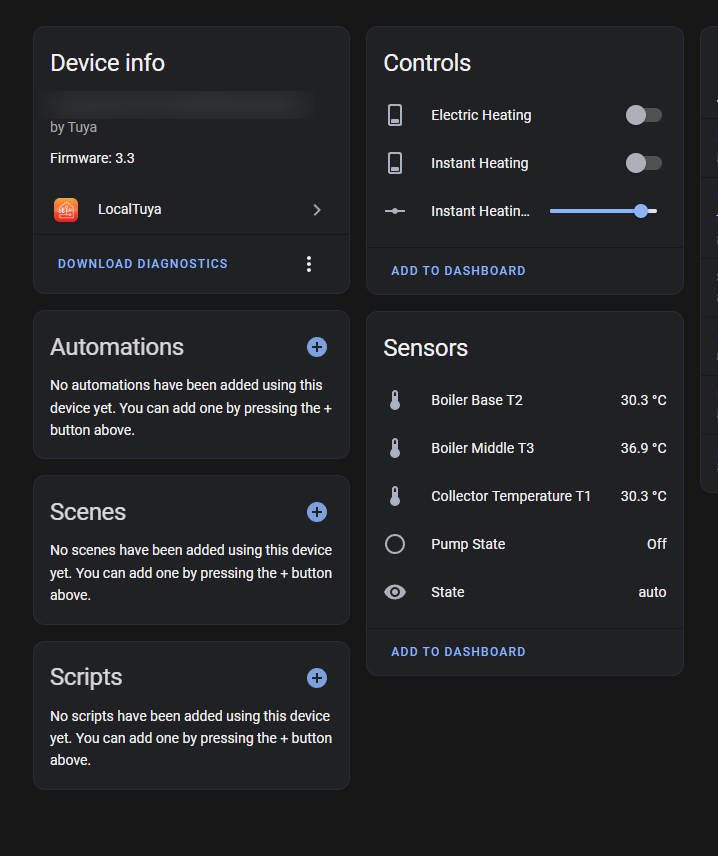
Result below. Some settings are boleans but I preffer just to see the state without being able to interact. Start forced heating, etc.

Or Like this for turning On/Off the heating element and adjusting the set temperature:

      {
        "device_class": "temperature",
        "friendly_name": "Collector Temperature T1",
        "id": 26,
        "platform": "sensor",
        "scaling": 0.1,
        "unit_of_measurement": "\u00b0C"
      },
      {
        "device_class": "temperature",
        "friendly_name": "Boiler Base T2",
        "id": 22,
        "platform": "sensor",
        "scaling": 0.1,
        "unit_of_measurement": "\u00b0C"
      },
      {
        "device_class": "temperature",
        "friendly_name": "Boiler Middle T3",
        "id": 21,
        "platform": "sensor",
        "scaling": 0.1,
        "unit_of_measurement": "\u00b0C"
      },
      {
        "friendly_name": "Pump State",
        "id": 30,
        "platform": "binary_sensor",
        "state_off": "False",
        "state_on": "True"
      },
      {
        "friendly_name": "State",
        "id": 2,
        "platform": "sensor"
      },
      {
        "current": 8,
        "friendly_name": "Instant Heating",
        "id": 8,
        "is_passive_entity": false,
        "platform": "switch",
        "restore_on_reconnect": false
      },
      {
        "current": 32,
        "friendly_name": "Electric Heating",
        "id": 32,
        "is_passive_entity": false,
        "platform": "switch",
        "restore_on_reconnect": false
      },
      {
        "friendly_name": "Instant Heating Set Temperature",
        "id": 4,
        "is_passive_entity": false,
        "max_value": 75.0,
        "min_value": 0.0,
        "platform": "number",
        "restore_on_reconnect": false,
        "step_size": 5.0

That looks fantastic! Ive finally managed to get Tuya-local to work, and I now have some entities from the SC208C, but the “tank temperature bottom” reading seems to be tied to the thermostat rather than being available as a separate entity. I don’t understand why, because the code in SR207.yaml definitely defines Tank temperature bottom (T2).

I’d like to try Bogdan’s setup to see if that gets around the problem - where do I copy/paste that code?

Create a template for configuring the local device and use it when adding the device. Here is the template:

  • binary_sensor:
    id: ‘1’
    friendly_name: Controller Power
    device_class: power
    state_on: ‘True’
    state_off: ‘False’
    platform: binary_sensor

  • sensor:
    id: ‘2’
    friendly_name: Mode
    platform: sensor

  • number:
    id: ‘4’
    friendly_name: Set Temperature
    min_value: 0.0
    max_value: 75.0
    step_size: 5.0
    unit_of_measurement: “°C”
    restore_on_reconnect: false
    is_passive_entity: false
    platform: number

  • sensor:
    id: ‘26’
    friendly_name: Collector Temperature (T1)
    device_class: temperature
    state_class: measurement
    unit_of_measurement: “°C”
    scaling: 0.1
    platform: sensor

  • sensor:
    id: ‘22’
    friendly_name: Boiler Base (T2)
    device_class: temperature
    state_class: measurement
    unit_of_measurement: “°C”
    scaling: 0.1
    platform: sensor

  • sensor:
    id: ‘21’
    friendly_name: Boiler Top / Middle (T3)
    device_class: temperature
    state_class: measurement
    unit_of_measurement: “°C”
    scaling: 0.1
    platform: sensor

  • binary_sensor:
    id: ‘30’
    friendly_name: Pump State
    device_class: running
    state_on: ‘True’
    state_off: ‘False’
    platform: binary_sensor

  • switch:
    id: ‘8’
    friendly_name: Instant Heating
    restore_on_reconnect: false
    is_passive_entity: false
    platform: switch

  • switch:
    id: ‘32’
    friendly_name: Electric Heating
    restore_on_reconnect: false
    is_passive_entity: false
    platform: switch