No longer maintained. Feel free to copy and/or fork
Copied from the TS0044 blueprint by @Stringer here: Zigbee2MQTT - Tuya 4-button Scene Switch (TS0044)
I added support for buttons 5 and 6, and modified texting since the button placement is different
Looks like this:
blueprint:
  name: Zigbee2MQTT - Tuya 6-Button Scene Switch
  description: Automate your Tuya 6-Button Scene Switch via Zigbee2MQTT.
  domain: automation
  input:
    switch:
      name: Tuya 6-Button Scene Switch
      description: Tuya 6-Button Scene Switch to use
      selector:
        entity:
          integration: mqtt
          domain:
          - sensor
          multiple: false
    button_one_short_press:
      name: Single Press - Button 1
      description: Action to run on button 1 (upper-left) single press
      default: []
      selector:
        action: {}
    button_one_double_press:
      name: Double Press - Button 1
      description: Action to run on button 1 (upper-left) double press
      default: []
      selector:
        action: {}
    button_one_long_press:
      name: Long Press - Button 1
      description: Action to run on button 1 (upper-left) long press
      default: []
      selector:
        action: {}
    button_two_short_press:
      name: Single Press - Button 2
      description: Action to run on button 2 (upper-right) single press
      default: []
      selector:
        action: {}
    button_two_double_press:
      name: Double Press - Button 2
      description: Action to run on button 2 (upper-right) double press
      default: []
      selector:
        action: {}
    button_two_long_press:
      name: Long Press - Button 2
      description: Action to run on button 2 (upper-right) long press
      default: []
      selector:
        action: {}
    button_three_short_press:
      name: Single Press - Button 3
      description: Action to run on button 3 (middle-left) single press
      default: []
      selector:
        action: {}
    button_three_double_press:
      name: Double Press - Button 3
      description: Action to run on button 3 (middle-left) double press
      default: []
      selector:
        action: {}
    button_three_long_press:
      name: Long Press - Button 3
      description: Action to run on button 3 (middle-left) long press
      default: []
      selector:
        action: {}
    button_four_short_press:
      name: Single Press - Button 4
      description: Action to run on button 4 (middle-right) single press
      default: []
      selector:
        action: {}
    button_four_double_press:
      name: Double Press - Button 4
      description: Action to run on button 4 (middle-right) double press
      default: []
      selector:
        action: {}
    button_four_long_press:
      name: Long Press - Button 4
      description: Action to run on button 4 (middle-right) long press
      default: []
      selector:
        action: {}
    button_five_short_press:
      name: Single Press - Button 5
      description: Action to run on button 5 (lower-left) single press
      default: []
      selector:
        action: {}
    button_five_double_press:
      name: Double Press - Button 5
      description: Action to run on button 5 (lower-left) double press
      default: []
      selector:
        action: {}
    button_five_long_press:
      name: Long Press - Button 5
      description: Action to run on button 5 (lower-left) long press
      default: []
      selector:
        action: {}
    button_six_short_press:
      name: Single Press - Button 6
      description: Action to run on button 6 (lower-right) single press
      default: []
      selector:
        action: {}
    button_six_double_press:
      name: Double Press - Button 6
      description: Action to run on button 6 (lower-right) double press
      default: []
      selector:
        action: {}
    button_six_long_press:
      name: Long Press - Button 6
      description: Action to run on button 6 (lower-right) long press
      default: []
      selector:
        action: {}
  source_url: https://community.home-assistant.io/t/tuya-zigbee-6-button-switch-ts0046-automation-blueprint/575541
mode: restart
max_exceeded: silent
trigger:
- platform: state
  entity_id: !input switch
  attribute: action
action:
- variables:
    command: '{{ trigger.to_state.state }}'
- choose:
  - conditions:
    - '{{ command == ''1_single'' }}'
    sequence: !input button_one_short_press
  - conditions:
    - '{{ command == ''2_single'' }}'
    sequence: !input button_two_short_press
  - conditions:
    - '{{ command == ''3_single'' }}'
    sequence: !input button_three_short_press
  - conditions:
    - '{{ command == ''4_single'' }}'
    sequence: !input button_four_short_press
  - conditions:
    - '{{ command == ''5_single'' }}'
    sequence: !input button_five_short_press
  - conditions:
    - '{{ command == ''6_single'' }}'
    sequence: !input button_six_short_press
  - conditions:
    - '{{ command == ''1_double'' }}'
    sequence: !input button_one_double_press
  - conditions:
    - '{{ command == ''2_double'' }}'
    sequence: !input button_two_double_press
  - conditions:
    - '{{ command == ''3_double'' }}'
    sequence: !input button_three_double_press
  - conditions:
    - '{{ command == ''4_double'' }}'
    sequence: !input button_four_double_press
  - conditions:
    - '{{ command == ''5_double'' }}'
    sequence: !input button_five_double_press
  - conditions:
    - '{{ command == ''6_double'' }}'
    sequence: !input button_six_double_press
  - conditions:
    - '{{ command == ''1_hold'' }}'
    sequence: !input button_one_long_press
  - conditions:
    - '{{ command == ''2_hold'' }}'
    sequence: !input button_two_long_press
  - conditions:
    - '{{ command == ''3_hold'' }}'
    sequence: !input button_three_long_press
  - conditions:
    - '{{ command == ''4_hold'' }}'
    sequence: !input button_four_long_press
  - conditions:
    - '{{ command == ''5_hold'' }}'
    sequence: !input button_five_long_press
  - conditions:
    - '{{ command == ''6_hold'' }}'
    sequence: !input button_six_long_press
1 Like
Thanks for sharing this! I had to make some changes for this to work:
- I changed the mode from restart to single. With restart, the automation would restart when you lift your finger off the button (as that clears the action), so presses were not consistently triggered.
- The action value for me is on the sensor entity itself - not an action attribute. So, I had to remove
attribute: action.
Here’s the full blueprint.
blueprint:
  name: Zigbee2MQTT - Tuya 6-Button Scene Switch
  description: Automate your Tuya 6-Button Scene Switch via Zigbee2MQTT.
  domain: automation
  input:
    switch:
      name: Tuya 6-Button Scene Switch
      description: Tuya 6-Button Scene Switch to use
      selector:
        entity:
          integration: mqtt
          domain:
          - sensor
          multiple: false
    button_one_short_press:
      name: Single Press - Button 1
      description: Action to run on button 1 (upper-left) single press
      default: []
      selector:
        action: {}
    button_one_double_press:
      name: Double Press - Button 1
      description: Action to run on button 1 (upper-left) double press
      default: []
      selector:
        action: {}
    button_one_long_press:
      name: Long Press - Button 1
      description: Action to run on button 1 (upper-left) long press
      default: []
      selector:
        action: {}
    button_two_short_press:
      name: Single Press - Button 2
      description: Action to run on button 2 (upper-right) single press
      default: []
      selector:
        action: {}
    button_two_double_press:
      name: Double Press - Button 2
      description: Action to run on button 2 (upper-right) double press
      default: []
      selector:
        action: {}
    button_two_long_press:
      name: Long Press - Button 2
      description: Action to run on button 2 (upper-right) long press
      default: []
      selector:
        action: {}
    button_three_short_press:
      name: Single Press - Button 3
      description: Action to run on button 3 (middle-left) single press
      default: []
      selector:
        action: {}
    button_three_double_press:
      name: Double Press - Button 3
      description: Action to run on button 3 (middle-left) double press
      default: []
      selector:
        action: {}
    button_three_long_press:
      name: Long Press - Button 3
      description: Action to run on button 3 (middle-left) long press
      default: []
      selector:
        action: {}
    button_four_short_press:
      name: Single Press - Button 4
      description: Action to run on button 4 (middle-right) single press
      default: []
      selector:
        action: {}
    button_four_double_press:
      name: Double Press - Button 4
      description: Action to run on button 4 (middle-right) double press
      default: []
      selector:
        action: {}
    button_four_long_press:
      name: Long Press - Button 4
      description: Action to run on button 4 (middle-right) long press
      default: []
      selector:
        action: {}
    button_five_short_press:
      name: Single Press - Button 5
      description: Action to run on button 5 (lower-left) single press
      default: []
      selector:
        action: {}
    button_five_double_press:
      name: Double Press - Button 5
      description: Action to run on button 5 (lower-left) double press
      default: []
      selector:
        action: {}
    button_five_long_press:
      name: Long Press - Button 5
      description: Action to run on button 5 (lower-left) long press
      default: []
      selector:
        action: {}
    button_six_short_press:
      name: Single Press - Button 6
      description: Action to run on button 6 (lower-right) single press
      default: []
      selector:
        action: {}
    button_six_double_press:
      name: Double Press - Button 6
      description: Action to run on button 6 (lower-right) double press
      default: []
      selector:
        action: {}
    button_six_long_press:
      name: Long Press - Button 6
      description: Action to run on button 6 (lower-right) long press
      default: []
      selector:
        action: {}
mode: single
trigger:
- platform: state
  entity_id: !input switch
action:
- variables:
    command: '{{ trigger.to_state.state }}'
- choose:
  - conditions:
    - '{{ command == ''1_single'' }}'
    sequence: !input button_one_short_press
  - conditions:
    - '{{ command == ''2_single'' }}'
    sequence: !input button_two_short_press
  - conditions:
    - '{{ command == ''3_single'' }}'
    sequence: !input button_three_short_press
  - conditions:
    - '{{ command == ''4_single'' }}'
    sequence: !input button_four_short_press
  - conditions:
    - '{{ command == ''5_single'' }}'
    sequence: !input button_five_short_press
  - conditions:
    - '{{ command == ''6_single'' }}'
    sequence: !input button_six_short_press
  - conditions:
    - '{{ command == ''1_double'' }}'
    sequence: !input button_one_double_press
  - conditions:
    - '{{ command == ''2_double'' }}'
    sequence: !input button_two_double_press
  - conditions:
    - '{{ command == ''3_double'' }}'
    sequence: !input button_three_double_press
  - conditions:
    - '{{ command == ''4_double'' }}'
    sequence: !input button_four_double_press
  - conditions:
    - '{{ command == ''5_double'' }}'
    sequence: !input button_five_double_press
  - conditions:
    - '{{ command == ''6_double'' }}'
    sequence: !input button_six_double_press
  - conditions:
    - '{{ command == ''1_hold'' }}'
    sequence: !input button_one_long_press
  - conditions:
    - '{{ command == ''2_hold'' }}'
    sequence: !input button_two_long_press
  - conditions:
    - '{{ command == ''3_hold'' }}'
    sequence: !input button_three_long_press
  - conditions:
    - '{{ command == ''4_hold'' }}'
    sequence: !input button_four_long_press
  - conditions:
    - '{{ command == ''5_hold'' }}'
    sequence: !input button_five_long_press
  - conditions:
    - '{{ command == ''6_hold'' }}'
    sequence: !input button_six_long_press
2 Likes
Thanks. I admit I haven’t looked at this for a while.
In the end, I moved the handling of this button to Node-RED, which I think is a bit easier, and handles the button up/down more efficiently, and for which the “empty” action field is not as much a problem.
For the action to be in the entity itself, I think it might depend whether you use ZHA or Z2M. With Z2M, there is a specific toggle on each device to copy the “action” into the entity. It might be the default in ZHA?
1 Like
There is a ZHA implementation:
Based on:
Github RAW TS0044
Github RAW TS0046
No ZB MQTT is required.
I use it with dongle.
nice worsk in ZHa with Github RAW TS0046
but there was an mistake on line 273 it should be like this:
Button 2
  - conditions:
      - condition: trigger
        id:
          - b2-1
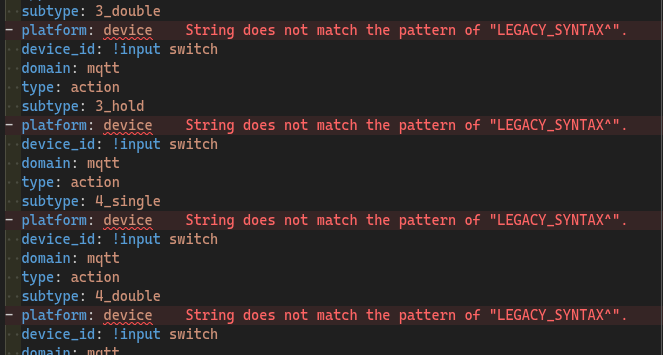
I get some errors on lines 11, 13 and 125.
Error: String does not match the pattern of “LEGACY_SYNTAX”

I haven’t used this in a long time, so can’t help.
I have moved the config to Node-Red to handle different kinds of actions of this button.
If I am not wrong they are not real errors, it is only the editor that does not know about the correct syntax.
My automations have a lot of those errors and they work perfectly.
Hello Renan Tomal Fernandes,
That is a warning from the Home Assistant extension that you are using legacy versions of code that may not work with all the current updates. You probably want to look at the Docs and update it, but it will continue to work. It just might not do the new stuff that is added if you follow current releases.
1 Like
Hi, I just bought the Loratap 6 button scene switch, but I fall at the first hurdle when trying to use the blueprint. The device appears to install fine in Zigbee2MQTT and I can see the actions when I press a button. However, when I try to find the entity to be used by the blueprint, the only entity that appears is the battery sensor. I’ve uninstalled it a number of times, but no luck.
As a bit of a newbee to Home Assistant, I’m sure I’m missing something basic so any pointers on how to specify the entity to use would be gratefully accepted.
Thanks,
Chris
1 Like