Hi. I bought a zigbee presence sensor from Aliexpress. The model read by ZHA is “_TZE204_gkfbdvyx”. I ran different quirks but all of them either always detected presence or did not detect it at all. I looked for guides on the internet but none of them want to work with this exact model correctly. Does anyone have this model by any chance and can send me their quirk? I will mention that it is a 24Ghz model and it is mounted in the ceiling.

I can’t help I’m afraid, but have exactly the same issue here.
These things are getting to be a real PITA - there seems to be a slight variation everytime I buy one.I managed to get my previous purchase (_TZE204_ya4ft0w4) working with a quirk, but a subsequent update of HA meant I could ditch the quirk and it now works just fine in Home Assistant.
But, like you say, I just cannot get this new one going at all.
Will submit a feature request in GitHub I guess.
Currently work in progress but it works.
# Tuya mmWave radar 24GHz, _TZE204_gkfbdvyx
# Loginovo Smart Human Presence Sensor M100, Model C3007
# TZ-HS-24G Zigbee Ceiling 24G
(
    TuyaQuirkBuilder("_TZE204_gkfbdvyx", "TS0601")
    .tuya_dp(
        dp_id=1,
        ep_attribute=TuyaOccupancySensing.ep_attribute,
        attribute_name=OccupancySensing.AttributeDefs.occupancy.name,
        # 0: state="none", presence=false
        # 1: state="presence" presence=true
        # 2: state="move" presence=true
        converter=lambda x: True if x in (1, 2) else False,
    )
    .adds(TuyaOccupancySensing)
    .tuya_number(
        dp_id=2,
        attribute_name="move_sensitivity",
        type=t.uint16_t,
        min_value=0,
        max_value=10,
        step=1,
        translation_key="move_sensitivity",
        fallback_name="Motion sensitivity",
    )
    .tuya_number(
        dp_id=3,
        attribute_name="detection_distance_min",
        type=t.uint16_t,
        multiplier=0.1,
        device_class=SensorDeviceClass.DISTANCE,
        unit=UnitOfLength.METERS,
        min_value=0,
        max_value=6,
        step=0.5,
        translation_key="detection_distance_min",
        fallback_name="Minimum range",
    )
    .tuya_number(
        dp_id=4,
        attribute_name="detection_distance_max",
        type=t.uint16_t,
        multiplier=0.1,
        device_class=SensorDeviceClass.DISTANCE,
        unit=UnitOfLength.METERS,
        min_value=0,
        max_value=9,
        step=0.5,
        translation_key="detection_distance_max",
        fallback_name="Maximum range",
    )
    .tuya_sensor(
        dp_id=9,
        attribute_name="distance",
        type=t.uint16_t,
        state_class=SensorStateClass.MEASUREMENT,
        device_class=SensorDeviceClass.DISTANCE,
        unit=UnitOfLength.METERS,
        multiplier=0.1,
        entity_type=EntityType.STANDARD,
        translation_key="target_distance",
        fallback_name="Target distance",
    )
    .tuya_switch(
        dp_id=101,
        attribute_name="find_switch",
        entity_type=EntityType.STANDARD,
        translation_key="distance_switch",
        fallback_name="Distance tracking",
    )
    .tuya_number(
        # L1-L5 ?
        dp_id=102,
        attribute_name="presence_sensitivity",
        type=t.uint16_t,
        min_value=1,
        max_value=10,
        step=1,
        translation_key="presence_sensitivity",
        fallback_name="Presence Sensitivity",
    )
    .tuya_illuminance(
        # confirmed via cluster 0x04000 reporting lumens?
        dp_id=103,
    )
    .tuya_enum(
        dp_id=104,
        attribute_name="motion_state",
        enum_class=TuyaPresenceState,
        entity_platform=EntityPlatform.SENSOR,
        entity_type=EntityType.STANDARD,
        translation_key="motion_state",
        fallback_name="Motion state",
    )

    .tuya_number(
        dp_id=105,
        attribute_name="presence_timeout",
        type=t.uint16_t,
        device_class=SensorDeviceClass.DURATION,
        unit=UnitOfTime.SECONDS,
        min_value=1,
        max_value=1500,
        step=1,
        translation_key="fading_time",
        fallback_name="Fading time",
    )
    # Sensor fails when skip_configuration is enabled
    #.skip_configuration()
    .add_to_registry()
)
1 Like
@Bruners Thanks for creating this - I’ve been using it, seems to grab all the settings correctly, it’s not detecting prescence consistently - attached is the current settings
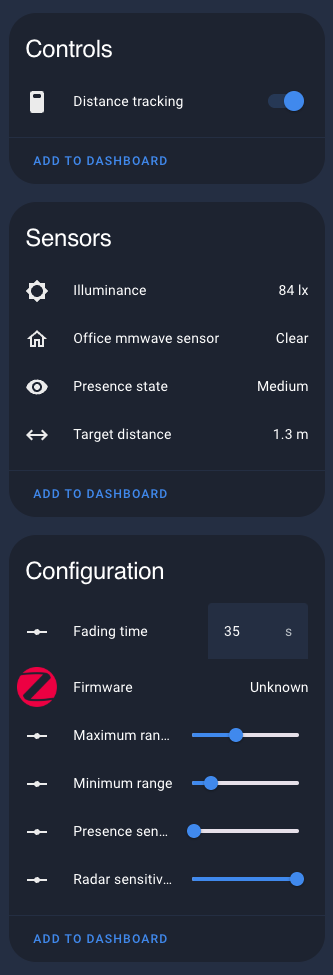
Illuminance seems to work, the target distance is updating, the detect stays on clear.
Just checking there wasn’t something in the configuration I have set incorrectly?
Thanks again for the work on this.
2 Likes
Following this - I’ve learned about quirks a few weeks ago and have been getting some really good bargains on AE. I thought they were all old models or something - absolutely stoked to see this was posted as recently as a week ago.
Let me know how I can contribute to this one in particular.
Not fully sure what the presence status actually shows, im getting different results somewhat random.
Presence sensitivity is set to 1 in your photo, i have mine and radar at 6-7
So I have a version of this sensor I just picked up from Ali, its not the wall mount version its normal puck style housing, but it does report the same exact model number.
I can’t seem to get the quirk to load, and am not sure if its the same device really, but the only hit I get on this exact device name is this thread, any ideas?
Blockquote
“nwk”: “0xCA91”,
“manufacturer”: “_TZE204_gkfbdvyx”,
“model”: “TS0601”,
“friendly_manufacturer”: “_TZE204_gkfbdvyx”,
“friendly_model”: “TS0601”,
“name”: “_TZE204_gkfbdvyx TS0601”,
“quirk_applied”: false,
“quirk_class”: “zigpy.device.Device”,
“quirk_id”: null,
“manufacturer_code”: 4417,
“power_source”: “Mains”,
@Bruners hey mate, like I commented on github, I have the TE200 version of this sensor (so the _TZE200_gkfbdvyx). It seems it’s 100% the same as the 204. About your code, it only needs a few tweaks from your merged code to mimic stock app behaviour:
# Tuya mmWave radar 24GHz, _TZE200_gkfbdvyx
# Loginovo Smart Human Presence Sensor M100, Model C3007
# TZ-HS-24G Zigbee Ceiling 24G
(
    TuyaQuirkBuilder("_TZE200_gkfbdvyx", "TS0601")
    .tuya_dp(
        dp_id=1,
        ep_attribute=TuyaOccupancySensing.ep_attribute,
        attribute_name=OccupancySensing.AttributeDefs.occupancy.name,
        # 0: state="none", presence=false
        # 1: state="presence" presence=true
        # 2: state="move" presence=true
        converter=lambda x: True if x in (1, 2) else False,
    )
    .adds(TuyaOccupancySensing)
    .tuya_number(
        dp_id=2,
        attribute_name="move_sensitivity",
        type=t.uint16_t,
        min_value=1,
        max_value=10,
        step=1,
        translation_key="move_sensitivity",
        fallback_name="Motion sensitivity",
    )
    .tuya_number(
        dp_id=3,
        attribute_name="detection_distance_min",
        type=t.uint16_t,
        multiplier=0.01,
        device_class=SensorDeviceClass.DISTANCE,
        unit=UnitOfLength.METERS,
        min_value=0,
        max_value=6,
        step=0.5,
        translation_key="detection_distance_min",
        fallback_name="Minimum range",
    )
    .tuya_number(
        dp_id=4,
        attribute_name="detection_distance_max",
        type=t.uint16_t,
        multiplier=0.01,
        device_class=SensorDeviceClass.DISTANCE,
        unit=UnitOfLength.METERS,
        min_value=0.5,
        max_value=9,
        step=0.5,
        translation_key="detection_distance_max",
        fallback_name="Maximum range",
    )
    .tuya_sensor(
        dp_id=9,
        attribute_name="distance",
        type=t.uint16_t,
        state_class=SensorStateClass.MEASUREMENT,
        device_class=SensorDeviceClass.DISTANCE,
        unit=UnitOfLength.METERS,
        multiplier=0.1,
        entity_type=EntityType.STANDARD,
        translation_key="target_distance",
        fallback_name="Target distance",
    )
    .tuya_switch(
        dp_id=101,
        attribute_name="find_switch",
        entity_type=EntityType.STANDARD,
        translation_key="distance_switch",
        fallback_name="Distance tracking",
    )
    .tuya_number(
        dp_id=102,
        attribute_name="presence_sensitivity",
        type=t.uint16_t,
        min_value=1,
        max_value=10,
        step=1,
        translation_key="presence_sensitivity",
        fallback_name="Presence Sensitivity",
    )
    .tuya_illuminance(dp_id=103)
    .tuya_enum(
        dp_id=104,
        attribute_name="motion_state",
        enum_class=TuyaPresenceState,
        entity_platform=EntityPlatform.SENSOR,
        entity_type=EntityType.STANDARD,
        translation_key="motion_state",
        fallback_name="Motion state",
    )

    .tuya_number(
        dp_id=105,
        attribute_name="presence_timeout",
        type=t.uint16_t,
        device_class=SensorDeviceClass.DURATION,
        unit=UnitOfTime.SECONDS,
        min_value=5,
        max_value=15000,
        step=5,
        translation_key="fading_time",
        fallback_name="Fading time",
    )
    .skip_configuration()
    .add_to_registry()
)
Would be awesome if you could merge the few corrections and have it “applies_to” both _TZE200 and _TZE204 version! Thanks!!
BTW, on aliexpress they stated “new version”. So I just opened up the sensor to see if something changed in the hardware and it did!! It seems they’re actually using a new sensor chip. Well the PCB for the sensor chip changed for sure and they moved the actual chip to the other side of the PCB, so it’s between 2 pcb’s and you can’t see it without desoldering. But this is definitely a new hardware design so it’s going to be interesting to compare how well the sensor works.
BTW if anyone is interested, I’ve uploaded modded versions of the TZE200_gkfbdvyx to have them spam less: GitHub - gekkehenkie11/ZY-M100-Sensor-patching
Hey friend. Thanks for all your work!
I’m not keen on flashing; may I clarify which or where is the most updated (and hopefully working?) quirk for _TZE204_gkfbdvyx?
1 Like
The latest is on my github page
@brunner i have tried some oher quirk code but i dont get how to use your i think i am stupid haha can someone please help