UK Health Security Agency Alerts

I think this is quite new, so if anyone’s interested…

The UK Health Security Agency has a free API which carries health alerts. The first of the summer’s heat warnings was issued today, but it also includes warnings about covid, flu etc. Same principle as weather and flood warnings.

https://ukhsa-dashboard.data.gov.uk/access-our-data/overview

1 Like

Thanks!

I was scraping the hot weather alerts until now and will take a look at this tomorrow,

I’ll be sure to copy whatever you come up with! :grin:

well that was fun.

The documentation isn’t great but, whilst I found the API metric heat-alert_headline_matrixNumber, I cannot find the path to get to it (beyond https://api.ukhsa-dashboard.data.gov.uk/ as following that path always ends up with historical data.

Perhaps someone else can see what I am missing? …I’ve popped off a request via their feedback page but not holding my breath.


edit: In the interim, if anyone wants to scrape, this is what I am using:

  • Set for the south-east but just change that in the url. You can work out your area here.
  • All but sensor.uk_cold_alert & sensor.uk_heat_alert will show as unavailable if there is no alert. I use jazzyisj’s excellent unavailable-entities-sensor and ignore them with a label.
  • the markdown cards are sensitive to spaces and newlines so copy exactly.
Scrape
scrape: #- restart required for changes ----------------------------------------

  - resource:  https://ukhsa-dashboard.data.gov.uk/weather-health-alerts/cold/south-east
    scan_interval: 86400 # 1/day in secs # default is 600
    sensor:

      - name: "uk_cold_alert"
        unique_id: "uk_cold_alert"
        icon: mdi:thermometer-low
        select: "#main-content > div > div.govuk-grid-row > div:nth-child(2) > div.govuk-grid-row > div > dl > div:nth-child(2) > div"
        value_template: "{{ value }}"

      - name: "uk_cold_alert_score"
        unique_id: "uk_cold_alert_score"
        icon: mdi:thermometer-low
        select: "#main-content > div > div.govuk-grid-row > div:nth-child(2) > div.govuk-grid-row > div > dl > div:nth-child(3) > dd"
        value_template: "{{ value }}"

      - name: "uk_cold_alert_liklihood"
        unique_id: "uk_cold_alert_liklihood"
        icon: mdi:thermometer-low
        select: "#main-content > div > div.govuk-grid-row > div:nth-child(2) > div.govuk-grid-row > div > dl > div:nth-child(5) > dd"
        value_template: "{{ value }}"

      - name: "uk_cold_alert_start"
        unique_id: "uk_cold_alert_start"
        icon: mdi:thermometer-low
        select: "#main-content > div > div.govuk-grid-row > div:nth-child(2) > div.govuk-grid-row > div > dl > div:nth-child(6) > dd"
        value_template: "{{ value }}"

      - name: "uk_cold_alert_end"
        unique_id: "uk_cold_alert_end"
        icon: mdi:thermometer-low
        select: "#main-content > div > div.govuk-grid-row > div:nth-child(2) > div.govuk-grid-row > div > dl > div:nth-child(7) > dd"
        value_template: "{{ value }}"

  - resource:  https://ukhsa-dashboard.data.gov.uk/weather-health-alerts/heat/south-east
    scan_interval: 86400 # 1/day in secs # default is 600
    sensor:

      - name: "uk_heat_alert"
        unique_id: "uk_heat_alert"
        icon: mdi:thermometer-high
        select: "#main-content > div > div.govuk-grid-row > div:nth-child(2) > div.govuk-grid-row > div > dl > div:nth-child(2) > div"
        value_template: "{{ value }}"

      - name: "uk_heat_alert_score"
        unique_id: "uk_heat_alert_score"
        icon: mdi:thermometer-high
        select: "#main-content > div > div.govuk-grid-row > div:nth-child(2) > div.govuk-grid-row > div > dl > div:nth-child(3) > dd"
        value_template: "{{ value }}"

      - name: "uk_heat_alert_liklihood"
        unique_id: "uk_heat_alert_liklihood"
        icon: mdi:thermometer-high
        select: "#main-content > div > div.govuk-grid-row > div:nth-child(2) > div.govuk-grid-row > div > dl > div:nth-child(5) > dd"
        value_template: "{{ value }}"

      - name: "uk_heat_alert_start"
        unique_id: "uk_heat_alert_start"
        icon: mdi:thermometer-high
        select: "#main-content > div > div.govuk-grid-row > div:nth-child(2) > div.govuk-grid-row > div > dl > div:nth-child(6) > dd"
        value_template: "{{ value }}"

      - name: "uk_heat_alert_end"
        unique_id: "uk_heat_alert_end"
        icon: mdi:thermometer-high
        select: "#main-content > div > div.govuk-grid-row > div:nth-child(2) > div.govuk-grid-row > div > dl > div:nth-child(7) > dd"
        value_template: "{{ value }}"
Card
    - type: conditional
      conditions:
        - entity: sensor.uk_heat_alert
          state_not: "No alert"
      card:
        type: markdown
        content: >
          {% set heat = states('sensor.uk_heat_alert')[:-6] %}
          
          |  |  |

          | -: | -- |

          | <font color = {%- if 'yellow' == heat %} 'gold' {%- elif 'amber' == color %}'darkorange' {%- else %}'firebrick' {%- endif %}>
          <ha-icon icon="mdi:fire">
          </ha-icon></font>
          | <a href='https://ukhsa-dashboard.data.gov.uk/weather-health-alerts/heat/south-east'> **{{ heat }} heat alert** </a>
          |

          | from: | **{{ states('sensor.uk_heat_alert_start') }}** |

          | to: | **{{ states('sensor.uk_heat_alert_end') }}** |

    - type: conditional
      conditions:
        - entity: sensor.uk_cold_alert
          state_not: "No alert"
      card:
        type: markdown
        content: >
          {% set cold = states('sensor.uk_cold_alert')[:-6] %}

          |  |  |

          | -: | -- |

          | <font color = {%- if 'yellow' == cold %} 'gold' {%- elif 'amber' == color %}'darkorange' {%- else %}'firebrick' {%- endif %}>
          <ha-icon icon="mdi:fire">
          </ha-icon></font>
          | <a href='https://ukhsa-dashboard.data.gov.uk/weather-health-alerts/cold/south-east'> **{{ cold }} cold alert** </a>
          |

          | from: | **{{ states('sensor.uk_cold_alert_start') }}** |

          | to: | **{{ states('sensor.uk_cold_alert_end') }}** |

The result are 2 cards that compliment the Severe Weather Warnings from this thread (The heat card is the bottom one, the Severe Weather Warning is the top one).

3 Likes

How about this: https://ukhsa-dashboard.data.gov.uk/api/proxy/alerts/v1/heat ?

GET /api/proxy/alerts/v1/heat HTTP/1.1
Host: ukhsa-dashboard.data.gov.uk

It returns a JSON response:

[
    {
        "status": "Green",
        "geography_name": "North East",
        "geography_code": "E12000001",
        "refresh_date": "2025-06-11T10:14:35+01:00"
    },
    {
        "status": "Green",
        "geography_name": "North West",
        "geography_code": "E12000002",
        "refresh_date": "2025-06-11T10:14:35+01:00"
    },
    ...
    {
        "status": "Green",
        "geography_name": "South West",
        "geography_code": "E12000009",
        "refresh_date": "2025-06-11T10:14:35+01:00"
    }
]
1 Like

how did you work that out? …eager to learn!

Just poking around behind the scenes of the UKHSA data dashboard—basically opening up developer tools in the browser and checking out the network traffic. Sometimes you get lucky and find a proper API, but no such luck with this one.

1 Like

The UKHSA API might still be under development. There are API docs showing a public API v2. But, when I navigate the tree, I can’t yet find a sub_theme for heat or cold alerts.

1 Like

I’ll circle back to this every so often and check

Adding the geography code gets the data eg east midlands is https://ukhsa-dashboard.data.gov.uk/api/proxy/alerts/v1/heat/E12000004

It returns the below but I lack the knowledge what to do with it, any ideas?

{“status”:“Yellow”,“risk_score”:10,“text”:“

Significant impacts are possible across the health and social care services due to the high temperatures, including:

  • a rise in deaths, particularly among those aged 65 and over or with health conditions. There may also be impacts on younger age groups
  • a likely increase in demand for health services
  • internal temperatures in care settings (hospitals and care homes) may exceed the recommended threshold for clinical risk assessment
  • the heat affecting the ability of the workforce to deliver services
  • indoor environments overheating increasing the risk to vulnerable people living independently in community and care settings
”,“likelihood”:“Low”,“impact”:“Medium”,“period_start”:“2025-08-13T18:00:00+01:00”,“period_end”:“2025-08-18T18:00:00+01:00”,“refresh_date”:“2025-08-13T16:39:54+01:00”,“geography_name”:“East Midlands”,“geography_code”:“E12000004”}

1 Like

OK, this…

rest:
  - resource: https://ukhsa-dashboard.data.gov.uk/api/proxy/alerts/v1/heat/E12000004
    scan_interval: 3600
    sensor:
      - name: "UKHSA status"
        value_template: "{{ value_json.status }}"
      - name: "UKHSA risk score"
        value_template: "{{ value_json.risk_score }}"
      - name: "UKHSA text"
        value_template: "{{ value_json.text }}"
      - name: "UKHSA likelihood"
        value_template: "{{ value_json.likelihood }}"
      - name: "UKHSA impact"
        value_template: "{{ value_json.impact }}"
      - name: "UKHSA start"
        value_template: "{{ value_json.period_start }}"
      - name: "UKHSA end"
        value_template: "{{ value_json.period_end }}"
      - name: "UKHSA refresh date"
        value_template: "{{ value_json.refresh_date }}"

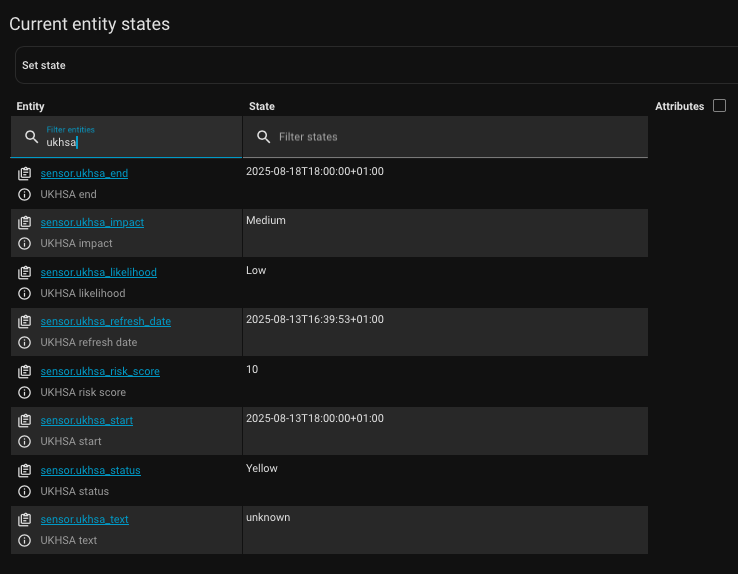
will give you this:

…need to fix sensor.ukhsa_text (the text is >255 characters), but this will get you started.

edit: for anyone else, here are some of the regions:
E12000001 North East
E12000002 North West
E12000003 Yorkshire and The Humber
E12000004 East Midlands
E12000005 West Midlands
E12000006 East of England
E12000007 London
E12000008 South East
E12000009 South West

1 Like

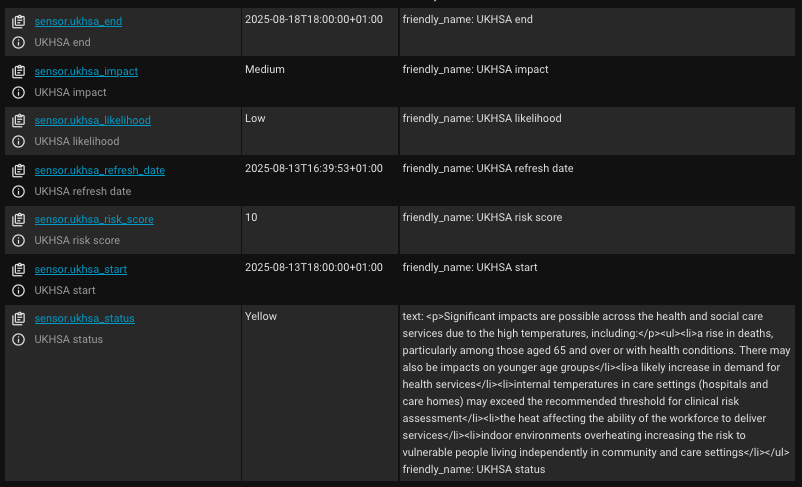
OK, the fix is to store it as an attribute, not a state.

rest: #-------------------------------------------------------------------------

  - resource: https://ukhsa-dashboard.data.gov.uk/api/proxy/alerts/v1/heat/E12000008
    scan_interval: 3600
    sensor:
      - name: "UKHSA status"
        value_template: "{{ value_json.status }}"
        json_attributes: # text >255 characters so must be stored as an attribute
          - text
      - name: "UKHSA risk score"
        value_template: "{{ value_json.risk_score }}"
      - name: "UKHSA likelihood"
        value_template: "{{ value_json.likelihood }}"
      - name: "UKHSA impact"
        value_template: "{{ value_json.impact }}"
      - name: "UKHSA start"
        value_template: "{{ value_json.period_start }}"
      - name: "UKHSA end"
        value_template: "{{ value_json.period_end }}"
      - name: "UKHSA refresh date"
        value_template: "{{ value_json.refresh_date }}"

text is now an attribute of status (note that I’m using E12000008 in this example) :


edit: Combined with cold alerts (I have had to add heat/cold to the names to differentiate):

rest:
  - resource: https://ukhsa-dashboard.data.gov.uk/api/proxy/alerts/v1/heat/E12000008
    scan_interval: 3600
    sensor:
      - name: "UKHSA heat status"
        value_template: "{{ value_json.status }}"
        json_attributes: # text >255 characters so must be stored as an attribute
          - text
      - name: "UKHSA heat risk score"
        value_template: "{{ value_json.risk_score }}"
      - name: "UKHSA heat likelihood"
        value_template: "{{ value_json.likelihood }}"
      - name: "UKHSA heat impact"
        value_template: "{{ value_json.impact }}"
      - name: "UKHSA heat start"
        value_template: "{{ value_json.period_start }}"
      - name: "UKHSA heat end"
        value_template: "{{ value_json.period_end }}"
      - name: "UKHSA heat refresh date"
        value_template: "{{ value_json.refresh_date }}"

  - resource: https://ukhsa-dashboard.data.gov.uk/api/proxy/alerts/v1/cold/E12000008
    scan_interval: 3600
    sensor:
      - name: "UKHSA cold status"
        value_template: "{{ value_json.status }}"
        json_attributes: # text >255 characters so must be stored as an attribute
          - text
      - name: "UKHSA cold risk score"
        value_template: "{{ value_json.risk_score }}"
      - name: "UKHSA cold likelihood"
        value_template: "{{ value_json.likelihood }}"
      - name: "UKHSA cold impact"
        value_template: "{{ value_json.impact }}"
      - name: "UKHSA cold start"
        value_template: "{{ value_json.period_start }}"
      - name: "UKHSA cold end"
        value_template: "{{ value_json.period_end }}"
      - name: "UKHSA cold refresh date"
        value_template: "{{ value_json.refresh_date }}"
3 Likes

Perfect, thank you so much for your help. I have it working now following your instructions and I am displaying it on the dashboard using a slightly modified version of the card you are using in the scrape version. Thanks again.

Great. Please share your card yaml!

I added the geography data as a sensor in the restful config as well.

type: conditional
conditions:
  - condition: state
    entity: sensor.ukhsa_heat_status
    state_not: Green
card:
  type: markdown
  content: >
    {% set heat = states('sensor.ukhsa_heat_status') %}

    |  |  |

    | -: | -- |

    | <font color = {%- if 'Yellow' == heat %} 'gold' {%- elif 'Amber' == heat
    %}'darkorange' {%- else %}'firebrick' {%- endif %}> <ha-icon
    icon="mdi:fire"> </ha-icon></font> | <a
    href='https://ukhsa-dashboard.data.gov.uk/weather-health-alerts/heat/east-midlands'>
    **{{ heat }} heat alert** </a> &nbsp;&nbsp; for
    **{{states('sensor.ukhsa_heat_geography_name') }}** <br />from:  **{{
    states('sensor.heat_start_ukhsa') }}** <br />to:  **{{
    states('sensor.heat_end_ukhsa') }}**<br />|


    {{state_attr('sensor.ukhsa_heat_status', 'text') }} 
  card_mod:
    style:
      .: |
        ha-card {
          --mdc-icon-size: 50px;
        }
        ha-markdown:
          $: |
            td {
              vertical-align: top;
                }

The start and end times (the two sensors in the card where ukhsa is at the end of the name rather than the beginning) are template sensors i used to format the date and time how I wanted it. Below is an example of the start time sensor.

{{ as_timestamp(states('sensor.ukhsa_heat_start')) | timestamp_custom('%A %-d %B %Y at %I:%M %p') }}

Updated card adding risk score, impact and likelihood.

type: conditional
conditions:
  - condition: state
    entity: sensor.ukhsa_heat_status
    state_not: Green
card:
  type: markdown
  content: >-
    {% set heat = states('sensor.ukhsa_heat_status') %}

    |  |  |

    | -: | -- |

    | <font color = {%- if 'Yellow' == heat %} 'gold' {%- elif 'Amber' == heat
    %}'darkorange' {%- else %}'firebrick' {%- endif %}> <ha-icon
    icon="mdi:fire"> </ha-icon></font> | <a
    href='https://ukhsa-dashboard.data.gov.uk/weather-health-alerts/heat/east-midlands'>
    **{{ heat }} heat alert** </a> &nbsp;&nbsp; for
    **{{states('sensor.ukhsa_heat_geography_name') }}** <br />from:  **{{
    states('sensor.heat_start_ukhsa') }}** <br />to:  **{{
    states('sensor.heat_end_ukhsa') }}**|


    Risk score: {{states('sensor.ukhsa_heat_risk_score') }}&nbsp; Impact:
    {{states('sensor.ukhsa_heat_impact') }}&nbsp; Likelihood:
    {{states('sensor.ukhsa_heat_likelihood') }}<br
    />{{state_attr('sensor.ukhsa_heat_status', 'text') }}
  card_mod:
    style:
      .: |
        ha-card {
          --mdc-icon-size: 50px;
        }
        ha-markdown:
          $: |
            td {
              vertical-align: top;
                }

Great! I also added the risk, location etc, and like your date formatting.
I removed the text as I suspect it is always the same (or similar):


Edit: You can also format the dates without creating 2 new sensors. Add the following after the {% set heat = states('sensor.ukhsa_heat_status') %} line

{% set start = states('sensor.ukhsa_heat_start')|as_timestamp|timestamp_custom('%A %-d %B %Y at %I:%M %p') %}
{% set end = states('sensor.ukhsa_heat_end')|as_timestamp|timestamp_custom('%A %-d %B %Y at %I:%M %p') }}

Then use those variables instead: from: **{{ start }}** <br />to: **{{ end }}** |

1 Like

Perfect, thank you for that tip. That has saved on four sensors and I have some other cards I can use that on to get rid of unnecessary sensors.

Below is my updated card for anyone following.

type: conditional
conditions:
  - condition: state
    entity: sensor.ukhsa_heat_status
    state_not: Green
card:
  type: markdown
  content: >-
    {% set heat = states('sensor.ukhsa_heat_status') %}

    {% set start =
    states('sensor.ukhsa_heat_start')|as_timestamp|timestamp_custom('%A %-d %B
    %Y at %I:%M %p') %}

    {% set end =
    states('sensor.ukhsa_heat_end')|as_timestamp|timestamp_custom('%A %-d %B %Y
    at %I:%M %p') %}

    |  |  |

    | -: | -- |

    | <font color = {%- if 'Yellow' == heat %} 'gold' {%- elif 'Amber' == heat
    %}'darkorange' {%- else %}'firebrick' {%- endif %}> <ha-icon
    icon="mdi:fire"> </ha-icon></font> | <a
    href='https://ukhsa-dashboard.data.gov.uk/weather-health-alerts/heat/east-midlands'>
    **{{ heat }} heat alert** </a> &nbsp;&nbsp; for
    **{{states('sensor.ukhsa_heat_geography_name') }}** <br />from:  **{{ start
    }}** <br />to:  **{{ end }}**|


    Risk score: **{{states('sensor.ukhsa_heat_risk_score') }}**&nbsp; Impact:
    **{{states('sensor.ukhsa_heat_impact') }}**&nbsp; Likelihood:
    **{{states('sensor.ukhsa_heat_likelihood') }}**<br
    />{{state_attr('sensor.ukhsa_heat_status', 'text') }}
  card_mod:
    style:
      .: |
        ha-card {
          --mdc-icon-size: 50px;
        }
        ha-markdown:
          $: |
            td {
              vertical-align: top;
                }