Hello together,
i have a problem adding Thread devices over Matter. I am using a Home Assistant ZBT-2 antenna confiugred as Thread Border Router via Open Thread Border Router installed as a App on Home Assistant. The Matter Server also runs directly on the Home Assistant instance. I have never configured Matter/Thread before and have never onboarded any Matter/Thread devices.
The Raspberry Pi with Home Assistant installed runs on a Subnet where the all devices are installed in (192.168.2.0/24, fd00:2::/64). The iPhone I use for comissioning is in the same subnet for onboarding of devices. There is no host isolation or IGMP snooping configured. mDNS is configured for the network on the unifi router.
When I try to add different Ikea devices (scanning via HomeAssistant App) the device is found but is hanging in “configuration”-state according to my iPhone. The keys could be sent from HA to the iPhone without any problem.
2026-04-05 13:52:51.715 (MainThread) DEBUG [matter_server.server.device_controller.mdns] Commissionable Matter node disappeared: AsyncServiceInfo(type='_matterc._udp.local.', name='8959DC1677A3058B._matterc._udp.local.', addresses=[], port=None, weight=0, priority=0, server=None, properties={}, interface_index=None)
2026-04-05 13:53:48.350 (MainThread) DEBUG [matter_server.server.device_controller.mdns] Discovered commissionable Matter node: AsyncServiceInfo(type='_matterc._udp.local.', name='8959DC1677A3058B._matterc._udp.local.', addresses=[], port=5540, weight=0, priority=0, server='B6E7724E46851A17.local.', properties={b'VP': b'4476+32769', b'SII': b'9500', b'SAI': b'2100', b'SAT': b'5000', b'ICD': b'0', b'D': b'1208', b'CM': b'2', b'RI': b'0200CCF05D2FA9002813B890B694341C2B17', b'PH': b'36', b'PI': None}, interface_index=None)
2026-04-05 13:54:49.208 (MainThread) DEBUG [matter_server.server.device_controller.mdns] Commissionable Matter node disappeared: AsyncServiceInfo(type='_matterc._udp.local.', name='8959DC1677A3058B._matterc._udp.local.', addresses=[], port=None, weight=0, priority=0, server=None, properties={}, interface_index=None)
2026-04-05 13:54:50.009 (MainThread) DEBUG [matter_server.server.device_controller.mdns] Discovered commissionable Matter node: AsyncServiceInfo(type='_matterc._udp.local.', name='8959DC1677A3058B._matterc._udp.local.', addresses=[], port=5540, weight=0, priority=0, server='B6E7724E46851A17.local.', properties={b'VP': b'4476+32769', b'SII': b'9500', b'SAI': b'2100', b'SAT': b'5000', b'ICD': b'0', b'D': b'165', b'CM': b'0', b'RI': b'0200CCF05D2FA9002813B890B694341C2B17', b'PH': b'36', b'PI': None}, interface_index=None)
2026-04-05 13:55:09.727 (MainThread) DEBUG [matter_server.server.device_controller.mdns] Commissionable Matter node disappeared: AsyncServiceInfo(type='_matterc._udp.local.', name='8959DC1677A3058B._matterc._udp.local.', addresses=[], port=None, weight=0, priority=0, server=None, properties={}, interface_index=None)
It seems like that the device cant get and iPv6 address but i cant find any indicators why. Everything was built like described in the manual of ZBT-2 for example (https://support.nabucasa.com/hc/en-us/articles/31347105826077-Forming-a-new-Thread-network-with-Home-Assistant-Connect-ZBT-2).
I tried to solve the problem myself but right now i tried like 8 hours in debugging, reinstalling and configuring but with no positive outcome. Both devices I try to add show the exact same error (hanging in configuration mode)
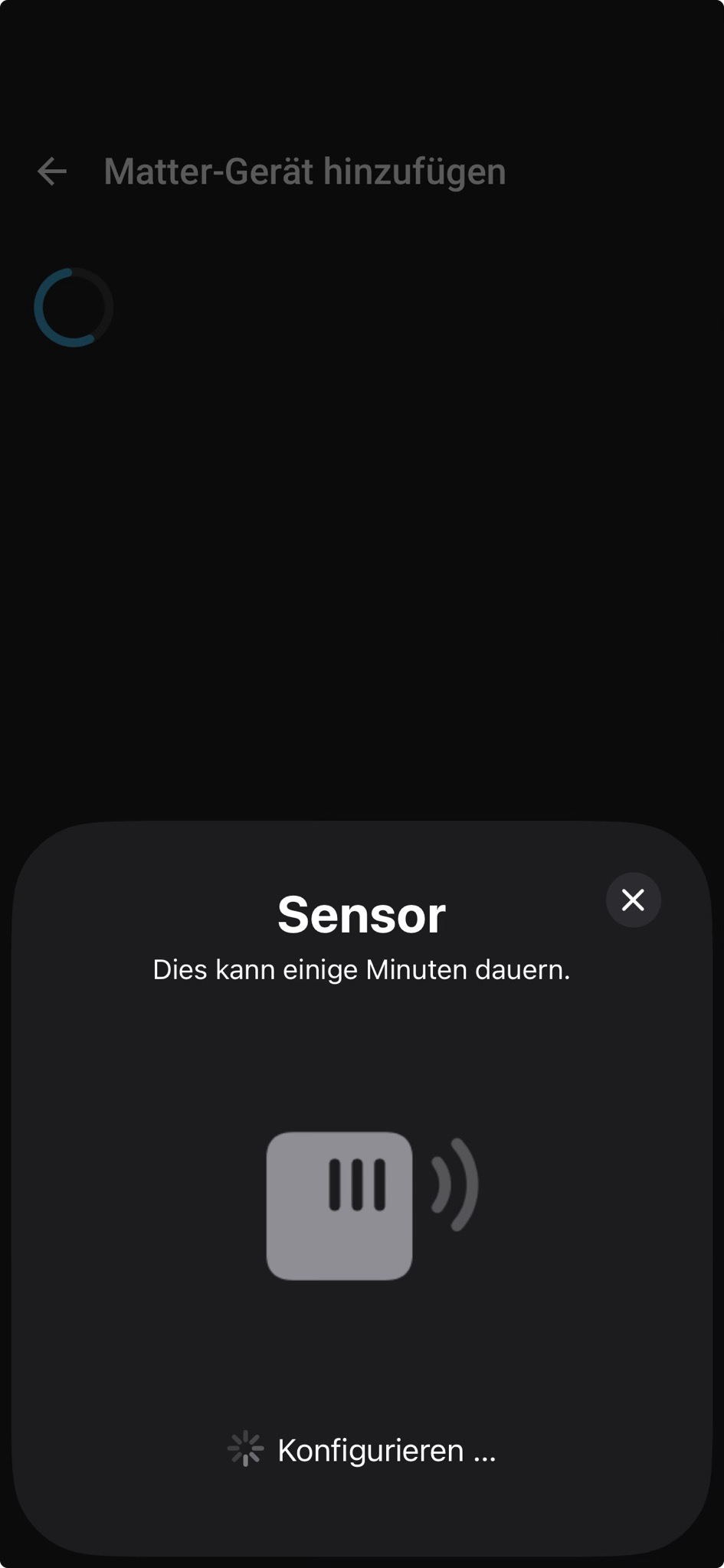
The OTBR Logs (error) from an onboarding attempt:
-----------------------------------------------------------
 Add-on: OpenThread Border Router
 OpenThread Border Router add-on
-----------------------------------------------------------
 Add-on version: 2.16.5
 You are running the latest version of this add-on.
 System: Home Assistant OS 17.1  (aarch64 / raspberrypi4-64)
 Home Assistant Core: 2026.4.1
 Home Assistant Supervisor: 2026.03.2
-----------------------------------------------------------
 Please, share the above information when looking for help
 or support in, e.g., GitHub, forums or the Discord chat.
-----------------------------------------------------------
s6-rc: info: service banner successfully started
s6-rc: info: service otbr-agent: starting
[13:52:58] INFO: Setup OTBR firewall...
[13:52:58] INFO: Migrating OTBR settings if needed...
2026-04-05 13:53:00 homeassistant asyncio[237] DEBUG Using selector: EpollSelector
2026-04-05 13:53:00 homeassistant zigpy.serial[237] DEBUG Opening a serial connection to '/dev/serial/by-id/usb-Nabu_Casa_ZBT-2_E072A1DBDEDC-if00' (baudrate=460800, xonxoff=False, rtscts=True)
2026-04-05 13:53:00 homeassistant serialx.platforms.serial_posix[237] DEBUG Configuring serial port '/dev/serial/by-id/usb-Nabu_Casa_ZBT-2_E072A1DBDEDC-if00'
2026-04-05 13:53:00 homeassistant serialx.platforms.serial_posix[237] DEBUG Configuring serial port: [0, 0, 2147486896, 0, 4100, 4100, [b'\x03', b'\x1c', b'\x7f', b'\x15', b'\x04', 0, 0, b'\x00', b'\x11', b'\x13', b'\x1a', b'\x00', b'\x12', b'\x0f', b'\x17', b'\x16', b'\x00', b'\x00', b'\x00', b'\x00', b'\x00', b'\x00', b'\x00', b'\x00', b'\x00', b'\x00', b'\x00', b'\x00', b'\x00', b'\x00', b'\x00', b'\x00']]
2026-04-05 13:53:00 homeassistant serialx.platforms.serial_posix[237] DEBUG Setting low latency mode: True
2026-04-05 13:53:00 homeassistant serialx.platforms.serial_posix[237] DEBUG Setting modem pins: ModemPins[dtr rts]
2026-04-05 13:53:00 homeassistant serialx.platforms.serial_posix[237] DEBUG Setting TIOCMBIS: 0x00000006
2026-04-05 13:53:00 homeassistant zigpy.serial[237] DEBUG Connection made: <serialx.platforms.serial_posix.PosixSerialTransport object at 0x7f9c38c7d0>
2026-04-05 13:53:00 homeassistant universal_silabs_flasher.spinel[237] DEBUG Sending frame SpinelFrame(header=SpinelHeader(transaction_id=0, network_link_id=0, flag=2), command_id=<CommandID.RESET: 1>, data=b'\x02')
2026-04-05 13:53:00 homeassistant universal_silabs_flasher.spinel[237] DEBUG Sending data b'~\x80\x01\x02\xea\xf0~'
2026-04-05 13:53:00 homeassistant serialx.descriptor_transport[237] DEBUG Immediately writing b'~\x80\x01\x02\xea\xf0~'
2026-04-05 13:53:00 homeassistant serialx.descriptor_transport[237] DEBUG Sent 7 of 7 bytes
2026-04-05 13:53:00 homeassistant serialx.descriptor_transport[237] DEBUG Event loop woke up reader
2026-04-05 13:53:00 homeassistant serialx.descriptor_transport[237] DEBUG Received b'~\x80\x06\x00p\xeet~'
2026-04-05 13:53:00 homeassistant universal_silabs_flasher.spinel[237] DEBUG Decoded HDLC frame: HDLCLiteFrame(data=b'\x80\x06\x00p')
2026-04-05 13:53:00 homeassistant universal_silabs_flasher.spinel[237] DEBUG Parsed frame SpinelFrame(header=SpinelHeader(transaction_id=0, network_link_id=0, flag=2), command_id=<CommandID.PROP_VALUE_IS: 6>, data=b'\x00p')
2026-04-05 13:53:00 homeassistant universal_silabs_flasher.spinel[237] DEBUG Sending frame SpinelFrame(header=SpinelHeader(transaction_id=3, network_link_id=0, flag=2), command_id=<CommandID.PROP_VALUE_GET: 2>, data=b'\x08')
2026-04-05 13:53:00 homeassistant universal_silabs_flasher.spinel[237] DEBUG Sending data b'~\x83\x02\x08\xbc\x9a~'
2026-04-05 13:53:00 homeassistant serialx.descriptor_transport[237] DEBUG Immediately writing b'~\x83\x02\x08\xbc\x9a~'
2026-04-05 13:53:00 homeassistant serialx.descriptor_transport[237] DEBUG Sent 7 of 7 bytes
2026-04-05 13:53:00 homeassistant serialx.descriptor_transport[237] DEBUG Event loop woke up reader
2026-04-05 13:53:00 homeassistant serialx.descriptor_transport[237] DEBUG Received b'~\x83\x06\x08\xd8x\xf0\xff\xfe\x94\x9a:o\x9f~'
2026-04-05 13:53:00 homeassistant universal_silabs_flasher.spinel[237] DEBUG Decoded HDLC frame: HDLCLiteFrame(data=b'\x83\x06\x08\xd8x\xf0\xff\xfe\x94\x9a:')
2026-04-05 13:53:00 homeassistant universal_silabs_flasher.spinel[237] DEBUG Parsed frame SpinelFrame(header=SpinelHeader(transaction_id=3, network_link_id=0, flag=2), command_id=<CommandID.PROP_VALUE_IS: 6>, data=b'\x08\xd8x\xf0\xff\xfe\x94\x9a:')
2026-04-05 13:53:00 homeassistant serialx.descriptor_transport[237] DEBUG Closing at the request of the application
2026-04-05 13:53:00 homeassistant zigpy.serial[237] DEBUG Waiting for serial port to close
2026-04-05 13:53:00 homeassistant serialx.descriptor_transport[237] DEBUG Closing connection: None
2026-04-05 13:53:00 homeassistant serialx.descriptor_transport[237] DEBUG Closing file descriptor 7
2026-04-05 13:53:00 homeassistant serialx.descriptor_transport[237] DEBUG Calling protocol `connection_lost` with exc=None
2026-04-05 13:53:00 homeassistant zigpy.serial[237] DEBUG Connection lost: None
Adapter settings file /data/thread/0_d878f0fffe949a3a.data is the most recently used, skipping
[13:53:00] INFO: Starting otbr-agent...
50d.15:43:46.757 [C] P-SpinelDrive-: Software reset co-processor successfully
50d.15:43:46.770 [C] P-RadioSpinel-: RCP => [C] Platform------: Reset info: 0x3 (EXT)
50d.15:43:46.770 [C] P-RadioSpinel-: RCP => [C] Platform------: Extended Reset info: 0x301 (PIN)
00:00:00.237 [W] P-Netif-------: Failed to process request#2: No such process
00:00:00.240 [W] P-Netif-------: Failed to process request#6: No such process
Connection to :: 8081 port [tcp/tproxy] succeeded!
s6-rc: info: service otbr-agent successfully started
s6-rc: info: service otbr-agent-configure: starting
Done
00:00:00.590 [W] P-Daemon------: Failed to write CLI output: Broken pipe
Done
s6-rc: info: service otbr-agent-configure successfully started
s6-rc: info: service otbr-agent-rest-discovery: starting
s6-rc: info: service otbr-web: starting
[13:53:01] INFO: Starting otbr-web...
s6-rc: info: service otbr-web successfully started
[INFO]-WEB-----: Running 0.3.0-b067e5ac-dirty
[INFO]-WEB-----: Border router web started on wpan0
[13:53:02] INFO: Successfully sent discovery information to Home Assistant.
s6-rc: info: service otbr-agent-rest-discovery successfully started
s6-rc: info: service legacy-services: starting
s6-rc: info: service legacy-services successfully started
00:00:35.746 [W] DuaManager----: Failed to perform next registration: NotFound
00:00:35.950 [W] P-RadioSpinel-: Error processing result: NoAddress
00:00:35.950 [W] P-RadioSpinel-: Error waiting response: NoAddress
00:38:10.663 [W] P-RadioSpinel-: Error processing result: NoAddress
00:38:10.663 [W] P-RadioSpinel-: Error waiting response: NoAddress
As you can see in the following screenshot, the thread network is listed as preferred:
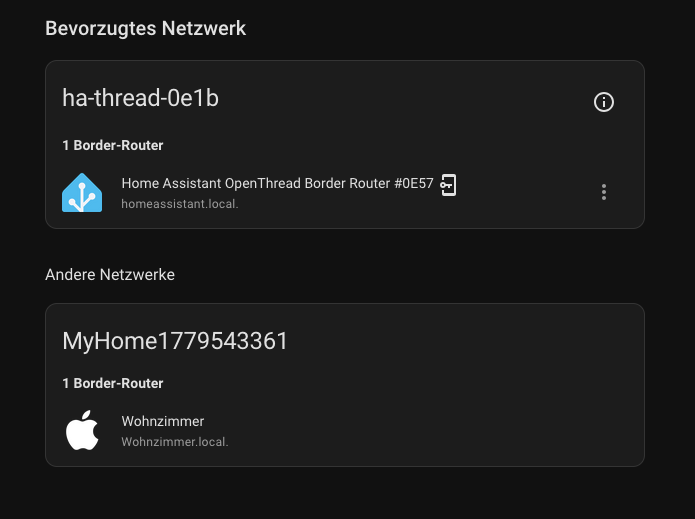
The Apple Thread Network has never been used.