Unable to add Matter Thread Devices

Hello Everyone,

HA Yellow (using built in Matter - ZigBee disabled) Version: 2025.8.0
OT Border Router Installed
Deco X75Pro Router/Wi-Fi (using the dedicated IoT Wireless) IPV6 does work.
Android / iOS Devices

Devices trying to add: Eufy Door Locks (C34) x 4

I’m new to HA but not new to home automation (SmartThings before Samsung)

I have a few Matter non-thread devices added.

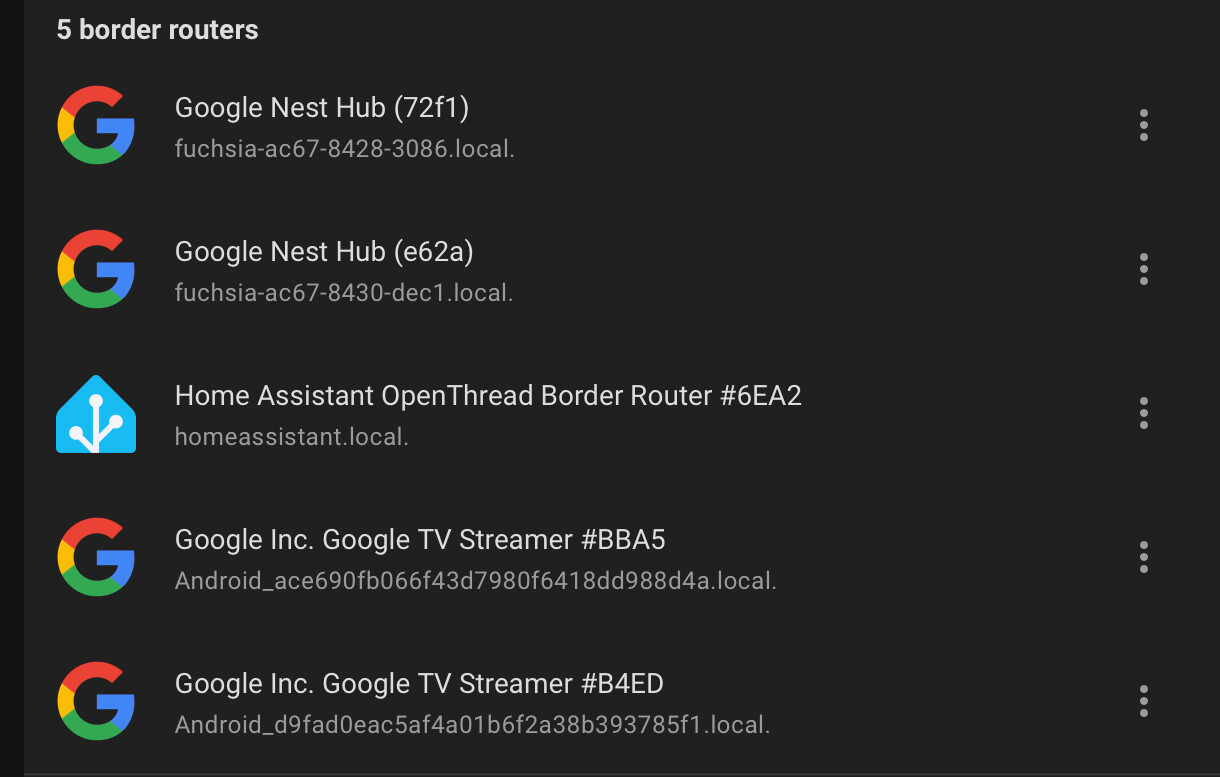
It was a hot mess getting to this point, I didn’t know that Google Hubs had thread routers built in, so I have a few of those I needed to get rid of them first; which I was successful at (I think, they’re not showing anywhere anymore, my Android phone doesn’t show them anymore, HA doesn’t show them anymore. I also just unplugged them).

Anyway, I was able to get two of the locks connected, but now I can’t get the other two. I get all the way through the connection and it fails when it gets to “Adding Device to Home Assistant”. I look at the logs (which I changed to verbose) and it doesn’t say much.

If I sync the credentials, they come back with the green checkmark (HA and this device use the same network).

On iOS, it just says “Pairing Failed” and the log files are practically blank.

Pretty much at a loss on what to do next. I’ve gone as far as to take an old iPhone, wipe it and start from scratch so I could make sure it wasn’t my phone(s) causing issues.

I’ve rebooted everything a dozen times.
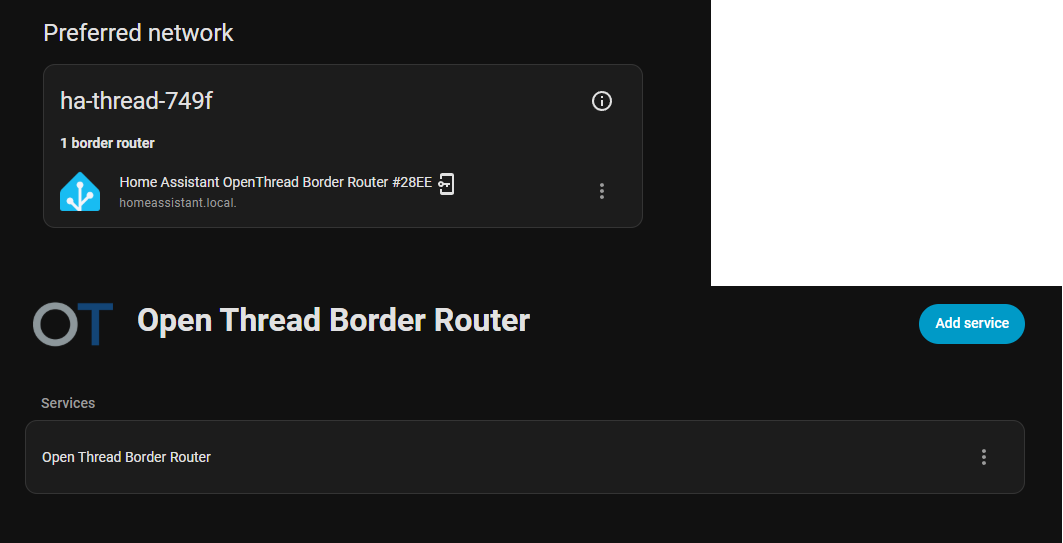
How many router nodes do you have in your network and are they spread out evenly to cover the area?

Looking at the logs, the Matter Server saw the device and started a commissioning session and along the way the communications stopped. So kinda looks like a Thread communication problem. As Wally suggested, you may need some more thread devices that have router capabilities. Alternatively is commission the device near the Yellow just to see if the commissioning works and if it does, then it just adds more evidence that its a Thread networking problem.

I don’t know why you got rid of your Nest devices. It is advised to have HA join the Nest thread network so they all join in. If they are not joined, they can coexist. You could have even just have added HA to the Nest thread network without the OTBR. I would use the Android phones to add them, seeing Google is the one who wrote the code driving the OTBR too. From what I herd, Apple can be a bit pickier.

I used to have an esp based OTBR but gave up because updating it was a pain, but now I have a Skyconnect and Nest devices all in the same network, originally created by the Nest devices:

I’m not sure you can force the Nest devices to accept HA credentials though, I did it the other way around. But they do span up a healthy Thread network together now.

3 Nodes (1 Primary and 2 secondary), all placed around the house.

I removed all the Nest devices because the very first time I tried to join the thread devices, it said it couldn’t connect to the Google Nest Network, so I figured it was because it wasn’t configured properly or whatever, so I went through and removed them all. Then I was able to connect the first two.

I guess my best bet is to delete the entire thing, delete the credentials from the devices, factory reset the matter devices and start over. Let Google force itself to be the boss and then add HA to the network.

3 nodes?
That is not a lot.
You probably need to add more router nodes.
Get someains powered light bulbs or smart plugs to extend the mesh network.

Sorry for the late reply.

I may have misunderstood the question. I thought you were asking about wireless APs. Cause three is overkill for the size of our house.

Which nodes are you asking about?

Thread router nodes.
Mains powered Thread devices are generally router devices that expand and make the mesh more resilient to dropouts.

Oh!

Just the one, the HA.

If I delete and restart it from scratch and add in the Nest Hubs, I’ll have three (2 nest hubs and the HA).

2025.08 broke my Matter Hub as well. I noticed that all of my Zigbee devices were disconnected from Google Home. I think I noticed it few days back, but did not have the time to work on it and it didn’t bother me too much as everything was functional from the Home Assistant Companion app on my phone. When I actually started troubleshooting, first thing I did was going back to my alpha86 back-up (the Matter Hub add-on version). This didn’t help. So I did a complete restore of my Home Assistant from 2 weeks ago, going back to version 2025.7.3. Then I started updating all the add-ons and integrations one by one and started testing if my Zigbee devices are still connected to Google Home. So finally I am left with pending update on the Home Assistant Core. Seems the problem is there.
For now, I am staying with 2025.7.3. Tomorrow if I have the time might try checking my 2025.7.4 back-up. If it works, then it means it is the 2025.8 update that is causing the issues. At least for me.

Forgot to mention - I am running HA as an OS in VM if that makes any difference.

Not really sure what you are talking about.
Matter and Zigbee are two different protocols and Zigbee can not have multiple coordinators.
What are your setup and how do your Zigbee devices relate to the Matter hub?

The problem is not Zigbee, as Zigbee was functioning normally. I had access to and controll all my devices via Home Assistant. The problem is in the Matter bridge, as all of them dissapeared (greyed out and not accessible) in Google Home app. I am using the Matter Hub Add-on, creating a Matter Bridge between Zigbee and Matter, exposing the Zigbee devices that you choose to Google Home and being able to be controled with voice through the Google devices.
Also, seems the problem is not really in the Matter Hub Add-on, as I rolled back its latest update and that didn’t solve the problem. It was just when I went back to older version of Home Assistant Core that fixed things. Now running the 2025.7.3 version of Home Assistant Core and the latest version of Matter Hub Add-on, still everything works normally. Meaning the 2025.8 version of Home Assistant Core did something causing problems when bridging Zigbee to Matter.

Have your tried restarting the HA host (not just HA core)?

And also try to restart your Matter Bridge.
It is the part that connects the HA devices with the Matter fabric.
I am not sure Matter Bridge is the same as Matter Server.

Yes, I’ve done all the usual restart stuff. As a matter of fact there was a moment when my entire building plus the neighbourhood was without electricity for almost a day, as they’ve been doing some preventive maintenance works, so there has been a restart of my entire host. But yesterday tried with all the standard restarts again and without any luck. Not to repeat myself, but I also tried rolling back just the Matter Hub add-on to a version before its latest update and this still didn’t work. Only when I rolled back the entire OS is when everything started working again.

I went ahead and removed all my matter devices (even the ones that were working), factory reset the HA Yellow, and factory reset the matter (and matter thread) devices.

Starting from scratch.

Added the HA to the existing thread network (which includes the two Google Nest Hubs), sent credentials to my phone, synced through the troubleshooting in the companion app, got green checkmarks.

Went to add the first matter thread device, same thing. Got all the way to the end and got the error, “Something went wrong”.

2025-08-15 20:35:59.225 (Dummy-2) INFO [chip.ChipDeviceCtrl] Established secure session with Device
2025-08-15 20:36:00.650 (MainThread) DEBUG [matter_server.server.device_controller.mdns] Commissionable Matter node disappeared: AsyncServiceInfo(type='_matterc._udp.local.', name='2703CD61C97171A3._matterc._udp.local.', addresses=[], port=None, weight=0, priority=0, server=None, properties={}, interface_index=None)
2025-08-15 20:36:31.504 (Dummy-2) CHIP_ERROR [chip.native.EM] <<5 [E:51197i with Node: <FFFFFFFB00000000, 0> S:18443 M:146322396] (S) Msg Retransmission to 0:FFFFFFFB00000000 failure (max retries:4)
2025-08-15 20:36:44.964 (Dummy-2) CHIP_ERROR [chip.native.CTL] Error on commissioning step 'SendNOC': 'src/app/CommandSender.cpp:354: CHIP Error 0x00000032: Timeout'
2025-08-15 20:36:45.674 (Dummy-2) CHIP_ERROR [chip.native.EM] Failed to send Solitary ack for MessageCounter:165543534 on exchange 51198i with Node: <0000000000000000, 0>:src/messaging/ExchangeContext.cpp:99: CHIP Error 0x00000002: Connection aborted
2025-08-15 20:36:45.674 (Dummy-2) WARNING [chip.ChipDeviceCtrl] Failed to commission: src/app/CommandSender.cpp:354: CHIP Error 0x00000032: Timeout
2025-08-15 20:36:45.675 (MainThread) ERROR [matter_server.server.client_handler] [548082365216] Error while handling: commission_on_network: Commissioning failed for node 14.

Restarted the HA, the Nest Hubs hubs, my phone, matter thread device, router and APs, and now I’m getting the “Can’t connect to Google-0F8D - Check that your device can work with this network type and try again.”

Well - it already worked with it once before, Google, so WTF is the issue now?

There aren’t any logs for this, so that means whatever is wrong now, it’s not even hitting HA to create a log file.

At this point, again, I’m at a loss of what to do.

Is it Google? It’s HA? Is it the device causing issues? I’m just not sure anymore.

Could the issue be that some of the devices are trying to connect to AP1 and HA is hardwired into the main router? Maybe mDNS isn’t working across the whole network like it is supposed to, or something is blocking it?

You had a working network setup and credentials copied to the phone and that might cause a problem with your phone if it is an Android, in that the credentials do not also update correctly.

Oh, my bad, forgot to mention that I used an old tablet. I factory reset it first and then logged into Google and HA. Got the correct credentials and received green check marks when I did the credential sync from the companion app.

I’m not doing the data clear on my main phone again. You might as well do a factory reset at that point, it really messes up Samsung devices.

:slight_smile: If you’ve read what I’ve written - I had no electricity at home for 8 hours. Yes! On top of all the soft restarts I’ve done on the VM, the Add-ons, etc, everyhing was also force restarted, simply because there was not electricity for a very long period of time.

I recommend that your post your problem to the following thread instead: