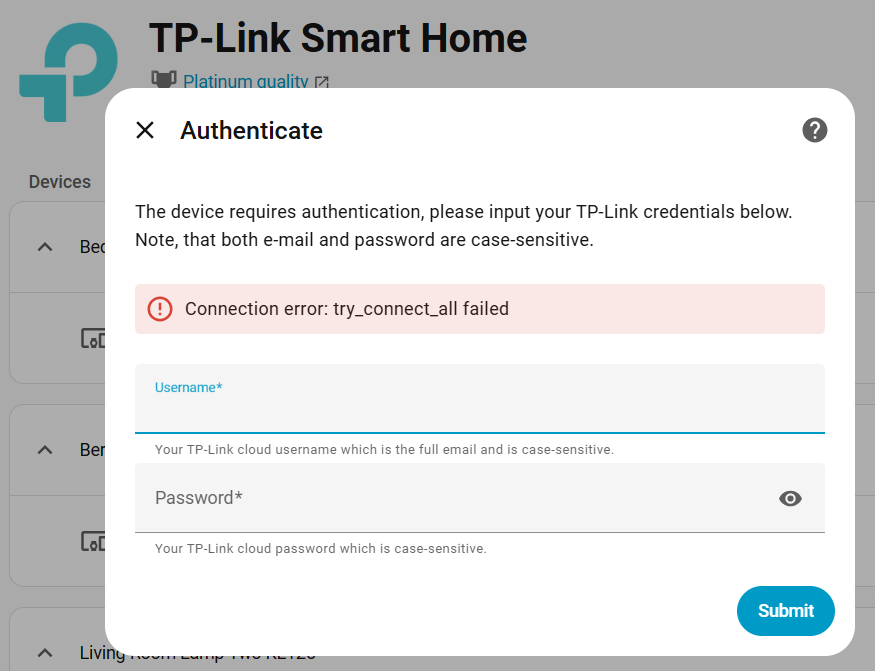
I just added a Tapo C425 security camera to the Tapo app on my phone. But when I try to add it to home assistant authentication fails. This is the same username and password I used to login to tplinkcloud.com and the phone app.
when you click ADDDevice in the Tapo integration, the first thing you are asked about a HOST Name or IP address , if you don’t HA will try to auto-discover
But you should know your devices, so you can look in to your Router which IP-Nr your Cam have in your network ( AS you successfully added it in your app it should have an ip-number )
If this Cam is “added” to a TAPO-Hub, you should add this Hub to HA(You also find the HUB IP-nr in your Router, if that the case)
I enter the IP address of the camera when prompted. After enabling debug logging I got these errors. It seems like a username and or password issue. Not sure why though.
2025-12-25 13:44:12.104 DEBUG (MainThread) [kasa.transports.sslaestransport] Device response did not match our challenge on ip 10.99.1.176, check that your e-mail and password (both case-sensitive) are correct.
2025-12-25 13:44:12.104 DEBUG (MainThread) [kasa.protocols.smartprotocol] Unable to authenticate with 10.99.1.176, not retrying: Device response did not match our challenge on ip 10.99.1.176, check that your e-mail and password (both case-sensitive) are correct.
2025-12-25 13:44:12.104 DEBUG (MainThread) [kasa.discover] Unable to connect with SmartCamProtocol: Device response did not match our challenge on ip 10.99.1.176, check that your e-mail and password (both case-sensitive) are correct.
2025-12-25 13:44:12.104 DEBUG (MainThread) [kasa.discover] Trying to connect with SmartProtocol
2025-12-25 13:44:12.104 DEBUG (MainThread) [kasa.device_factory] Using SmartDevice for SMART.TAPOROBOVAC
2025-12-25 13:44:12.104 DEBUG (MainThread) [kasa.device] Initializing 10.99.1.176 of type <class 'kasa.smart.smartdevice.SmartDevice'>
2025-12-25 13:44:12.104 DEBUG (MainThread) [kasa.protocols.smartprotocol] 10.99.1.176 multi-request-batch-1-of-1 >> '{"method":"multipleRequest","request_time_milis":1766688252104,"terminal_uuid":"56VsauZUVwf0z/IyyRjbWA==","params":{"requests":[{"method":"component_nego"},{"method":"get_device_info"},{"method":"get_connect_cloud_state"}]}}'
2025-12-25 13:44:12.104 DEBUG (MainThread) [kasa.transports.ssltransport] Going to send {"method":"multipleRequest","request_time_milis":1766688252104,"terminal_uuid":"56VsauZUVwf0z/IyyRjbWA==","params":{"requests":[{"method":"component_nego"},{"method":"get_device_info"},{"method":"get_connect_cloud_state"}]}}
2025-12-25 13:44:12.104 DEBUG (MainThread) [kasa.transports.ssltransport] Transport not established or session expired, logging in
2025-12-25 13:44:12.104 DEBUG (MainThread) [kasa.transports.ssltransport] Going to send login request
2025-12-25 13:44:12.104 DEBUG (MainThread) [kasa.transports.ssltransport] Sending {"method":"login","params":{"password":"8D3DCA8EA505098DD3FE5EE9BF2C1F54","username":"[email protected]"}} to https://10.99.1.176:4433/app
2025-12-25 13:44:12.104 DEBUG (MainThread) [kasa.httpclient] Posting to https://10.99.1.176:4433/app
2025-12-25 13:44:12.108 DEBUG (MainThread) [kasa.httpclient] Device 10.99.1.176 received an os error, enabling sequential request delay: Cannot connect to host 10.99.1.176:4433 ssl:False [Connect call failed ('10.99.1.176', 4433)]
2025-12-25 13:44:12.108 DEBUG (MainThread) [kasa.protocols.smartprotocol] Device 10.99.1.176 got a connection error, will retry 3 times: ("Device connection error: 10.99.1.176: Cannot connect to host 10.99.1.176:4433 ssl:False [Connect call failed ('10.99.1.176', 4433)]", ClientConnectorError(ConnectionKey(host='10.99.1.176', port=4433, is_ssl=True, ssl=False, proxy=None, proxy_auth=None, proxy_headers_hash=None), ConnectionRefusedError(111, "Connect call failed ('10.99.1.176', 4433)")))
2025-12-25 13:44:12.109 DEBUG (MainThread) [kasa.protocols.smartprotocol] 10.99.1.176 multi-request-batch-1-of-1 >> '{"method":"multipleRequest","request_time_milis":1766688252109,"terminal_uuid":"56VsauZUVwf0z/IyyRjbWA==","params":{"requests":[{"method":"component_nego"},{"method":"get_device_info"},{"method":"get_connect_cloud_state"}]}}'
I changed my password to not include ANY special characters at tplinkcloud.com. Then I relogged into the website. Then the Tapo phone app had logged me out, I used the new password and logged into the phone app. But the new password did not work when trying to authenticate from HA.
I also tried using a completely bogus username and password, and get the same error as shown below. I wanted to see of there might be a different authentication specific error.
Not sure what the problem is. But thanks for your help.
I changed my password to contain no special characters. Logged in at tplinkcloud.com then used it to login to phone app. But it still failed authenticating in HA.
Everything works in my end, the only thing i could think of is try if rebooting HA (and ur Cam), to see if that would help, also look into ssl issues if you have that enabled in HA
( i use a laptop in my network, to install, and not i.e a phone which connect over ssl(if it’s not connect local over wifi)
Yes i see, i mend custom-integration from HACS , anyway i edited my former post, and my earlier with “adding a camera-account” for 3rd part access, might be redundant in this initial stage, however i think you need it
Ah, HACS. I just searched for Tapo in HACS and found this. Unfortunately the C425 is not listed in supported cameras. But I’ll give it a try anyway.
I did try rebooting and when I did I got a notification that authentication failed for a Tapo bulb I had. I used the new password and it worked for the bulb too.
ok, yeah in HA’s Docs c425 is not supported and in HACS: Tapo Cameras Control,only limited
Maybe You could try to use HA’s generic_camera /Onvif or Rstp , but even here you need to create a Camera_Account in your APP ( You need this in anyways if you want “stream” through 3rd part )
Yea, I think the Tapo C425 is going back. I think I’ll get a Reolink which should have no problem streaming video. I have a Reolink doorbell and the video streams fine. Thanks again for your help.
It’s mostly because this Camera is battery powered, so onvif/rstp will drain it, i have no idea what protocol these uses or how much you will “gain” from the camera without onvif