I’m slowly losing my mind with this one. I added a green box to my network, and I am now trying to show the sensors and devices I own on a floor plan with ha_floorplan.
- I installed and activated HACS & Floorplan (v1.1.4).
- I created an SVG in Inkscape and added the text fields.
- I created the CSS and YAML files (see code below).
Current state:
- When I click on a text field, I can see the cards with the data coming from the sensors
- But the value of the text fields remains to the default I set up in Inkscape.
- I tried to input a static value, and I can’t get it to work either.
Here’s the XML code of the SVG
<text id="label-thermostat-middle"
      x="223.06477" y="665.95538"
      style="font-size:26.6667px;font-family:sans-serif;fill:#ffffff;text-anchor:start;">
      00.0°C</text>
I found two ways to display values in the doc, so I tried both. Neither seems to work.
Here’s the YAML I’m using:
V1 with a text action
title: EG Floorplan
views:
  - title: EG Floorplan
    path: floorplan
    theme: Google Dark Theme
    panel: true
    type: panel
    badges: []
    cards:
      - type: custom:floorplan-card
        config:
          image: /local/floorplan/home_simple/EG_Home.svg
          stylesheet: /local/floorplan/home_simple/EG_Home.css
          log_level: debug
          console_log_level: debug
          full_height: true
          defaults:
            hover_action: hover-info
            tap_action: more-info
          rules:
            - entity: sensor.homematic_thermostat_evo_eg_middle_temperature
              element: label-thermostat-middle
              text_action:
                template: '${entity.state ? entity.state + " °C" : "—"}'
V2 using the floorplan.text_set service
title: EG Floorplan
views:
  - title: EG Floorplan
    path: floorplan
    theme: Google Dark Theme
    panel: true
    type: panel
    badges: []
    cards:
      - type: custom:floorplan-card
        config:
          image: /local/floorplan/home_simple/EG_Home.svg
          inline: true
          stylesheet: /local/floorplan/home_simple/EG_Home.css
          log_level: debug
          console_log_level: debug
          full_height: false
          defaults:
            hover_action: hover-info
            tap_action: more-info
          rules:
            - entity: sensor.homematic_thermostat_evo_eg_middle_temperature
              element: label-thermostat-middle
              action:
                service: floorplan.text_set
                data:
                  text: '${entity.state ? entity.state + " °C" : "—"}'
In the DOM, I see the text element with the correct ID:
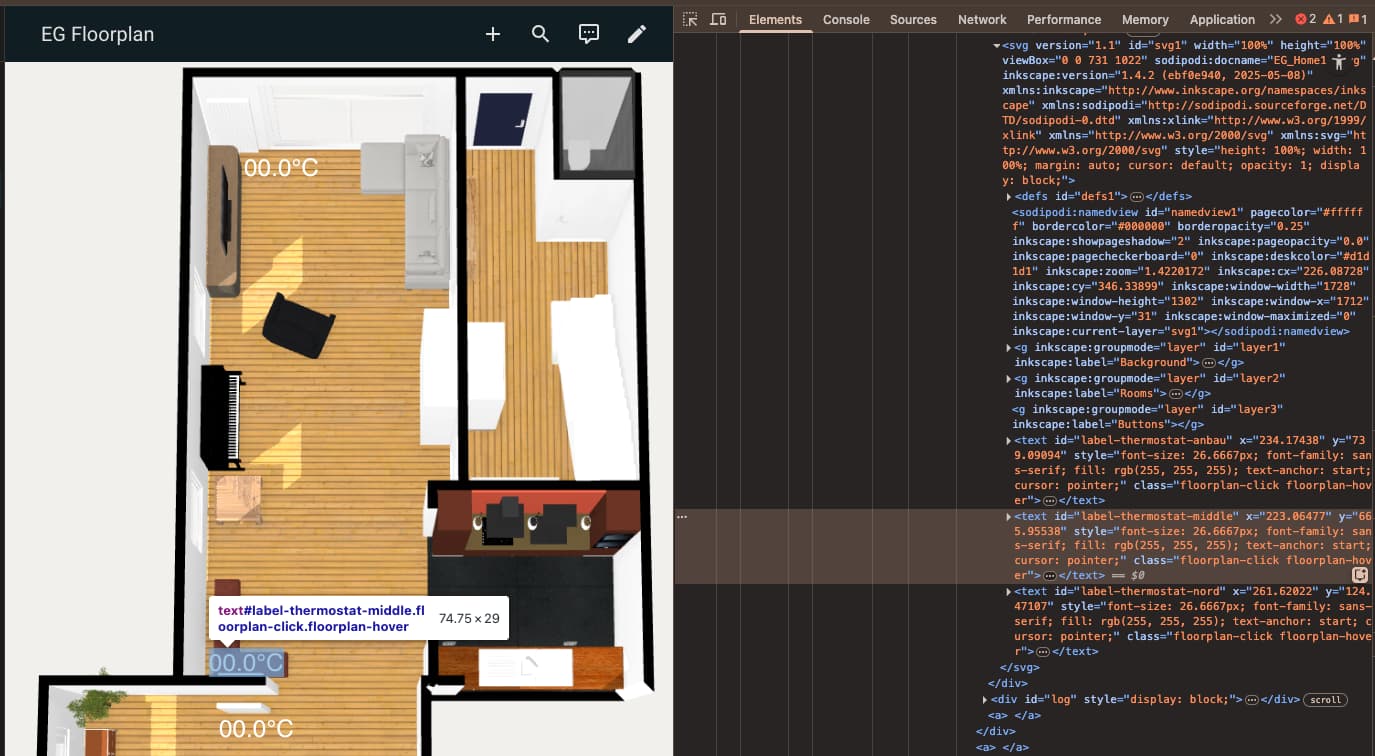
But I can’t find it with a JS command: document.getElementById('label-thermostat-middle')
What am I missing?