Hi folks,
I am looking at two new switches and am unsure if I need managed switches to run a HA device VLAN, or if a VLAN is ‘necessary’.
I am about to kick off my HA build and understand I should run my HA devices on a VLAN for security.
What I think my options are:
1 Get two managed switches and a second link between the switches dedicated to VLAN (or save the second link and move the HA NUC to connect to switch 1).
2 Send it / Get cheaper unmanaged switches and use Crowdsec & other security tooling to detect bad stuff.
Questions:
Should I invest in managed switches?
Does HA / crowdsec / other sec tools I’ll research mitigate any of the likely risks if I do not run a VLAN?
If I run a VLAN from switch 1 to switch 2, am I correct that I would need a second dedicated link between the two so that other devices connected to switch 2 are excluded form the VLAN?
Of note:
I am price sensitive but I am interested in the ‘proper’ way to run my network.
My routers do not support VLAN and I cannot yet afford to upgrade them. I think it is down to the choice in switches.
Smart devices will be a mix of brands, some aliexpress, ikea, all purchased based on recommendations here.
Of possible note in terms of network config:
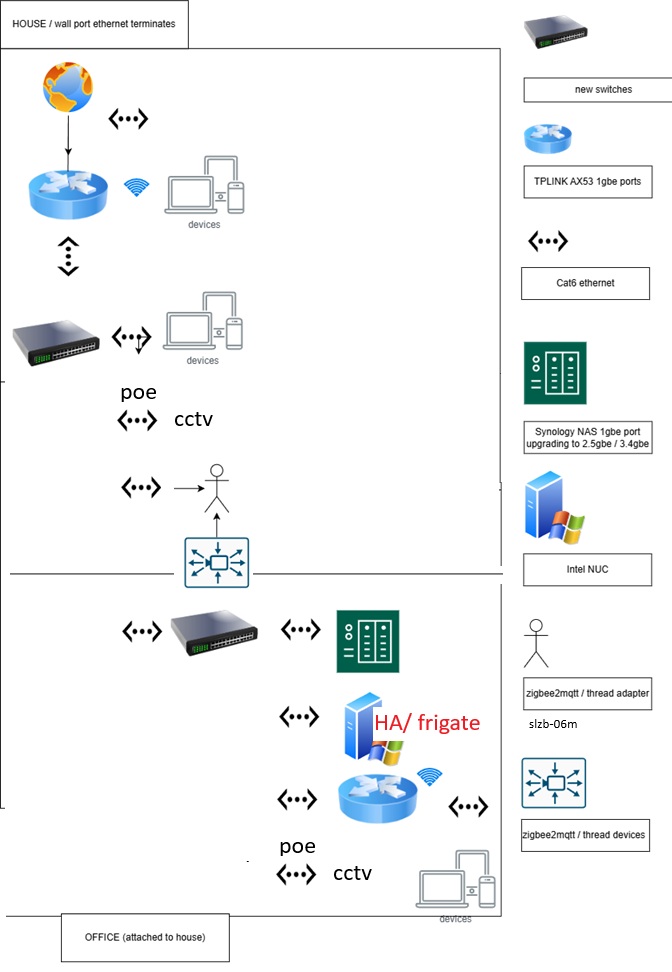
HA/Frigate would run on an Intel NUC in my office via switch 2, the location of which is ideal for space, connected by a single cat6 link to switch 1. HA / NUC could be moved to the house to run off switch 1 if need be.
SLZB-06M zigbe2mqtt adapter would run off switch 1 as it is central, but I can run it off switch 2 and build a mesh out to it (it’s only about 5m away but brickwork is in the way).
Three cctv cameras (models that play well with HA) will terminate to switch 1, possibly also switch 2.
Here is an enterprise-grade best practice gold tier Gartner network diagram. I does not include the cctv cameras or any professionalism whatsoever.
Networking isn’t my day specialty, but you seem to be mixing up some things.
Let’s start at the beginning: Why are you looking to use VLANs?
Managed switches aren’t a substitute for a proper router with VLAN capabilities. It would complement it though. Your router is what will allow routing between VLANs.
You don’t need a second link and you don’t need the number of switches to match your number of VLANs. They’re a form of virtual network segmentation and have nothing to do with the physical layout of your network.
I would strongly suggest that you spend on proper equipment throughout if you want to do this properly (and be prepared to skill up on networking) or simplify your setup and use a single, flat network, which is perfectly fine for most users of HA, but that takes us back to the initial question: Why do you want to setup VLANs?
If you do not have the knowledge to set up VLANs, then you should not be using it.
You do definitely not have the knowledge. Sorry to say.
If you want to go through with it, then a VLAN capable router is a requirement, since that is the one that makes the VLANs able to communicate with other VLANs.
Another important part is a VLAN capable access point, since a lot of equipment is WiFi connected and the VLANs needs to be extended all the way to the first interconnection with a device.
Be aware that VLAN aware or VLAN passthrough is not VLAN capable devices. These devices just allow the VLAN data to be transferred through the device, but the device can not react to it.
Once you get the hardware you need to get the knowledge too and you can NOT rely on AI to help you. AI can be used to do a task you already know how to do, but you need to check the output of the AI and that require the knowledge.
You need to understand (not just know about) IPv4 and IPv6 (Your IPv4 knowledge can not really be used in IPv6, so you need to start with the basics again and do the whole learning thing), but also all the protocols running on top of those transport protocols. Especially the discovery protocols are important (both the many standard ones, but also the proprietary ones), because these are rarely IP routable, so you need to set up other means for routing, like reflectors or proxy devices.
When you understand the protocols and especially the discovery protocols, then you need to know the devices too, so you know which device needs which setup. No idea to split the network up in VLANs just to allow everything in the end.
I only see VLANs usable for two situations.
to separate cloud only devices from other devices, which means devices where there are no direct connection between HA, mobile phones, frigate or any other device on your network. That means for devices that connects directly to the vendor cloud and HA use integrations that connect to the same cloud service. Here it makes sense, but if you are worried about security, then those kind of devices are the ones that should be avoided and so this situation is really not that interesting.
to run multiple SSIDs on the WiFi, which is not really VLANs, because in this situation the SSIDs should be linked to the same network. The idea with multiple SSIDs is that you can have a 2.4/5 Ghz network for your normal devices and a 2.4 Ghz-only network for your IoT devices that generally can not handle 5 Ghz and therefore sometimes fight with the APs attempts to see if the device can actually run 5 Ghz.
Other than that I suggest you listen to the advice earlier in the thread and use a good firewall instead.
Reminds me about the many times I see people with issues using mDNS and VLANs (as an example of what you’re saying). You need a router that can route mDNS traffic (the cheap hardware cannot do that).