I use Virtualbox for the VM. I went back to a clone from almost a year ago. I could access the UI from there and just updated to OS 15.2. I was on the core previous to this one, 16.2. Making clones as I go along. About to update to OS 16.2
i am new and migrate from OpenHab to HomeAssistant about 2 Weeks ago. Today the Version 2026.1 for Core an 2026.01 for Supervisor is presented. But if i start the Update it wiil stop updating with Message Core-Dump. I think there is any depence that will break something?
What information will be needed to help fixing this? as i see i´m not alone with some trouble.
I tried to make Update of Supervisor from cli and got the following message:
Error: Update of Supervisor failed: failed to register layer: signal: bus error (core dumped):
Unfortunately, I’m still not entirely sure what caused the issue.
First, I restored the VM to its January 1st state using a Proxmox backup. Then, I updated the following add-ons one by one, restarting after each update:
ESP32 Device Tracker
Zigbee2MQTT
Telnet/SSH
Mushroom Cards
After that, I restored only the database (MariaDB add-on) from my latest full backup. Once that was done, I was able to successfully install version 2026.01.
The only clue I found in the console while it was broken was that the supervisor process (python3 -m supervisor) was pinned at 100% CPU usage immediately after boot. Additionally, every time I restarted the VM, I saw the message: “HomeAssistant CLI terminated.”
If anyone knows how to extract more detailed supervisor logs via the console, please let me know. I still have a copy of the faulty VM for troubleshooting.
Restored the backup I took when I tried to do the core update.
There are a couple of Z-wave devices that still don’t seem to be working correctly. But almost all of it is there. I think I might wait for a bit before I remove them and reinstall them.
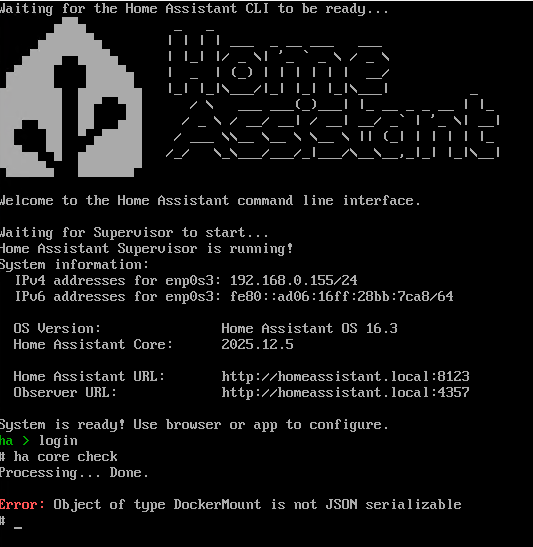
The only thing I don’t understand is that if I do ha core check from the CLI I still get the same error.
I just wanted to add my experience. I have HA on bare metal (not virtualized). After upgrading to 2026.1.0 the UI will run for a short time, but then gives a 502 error. As others have mentioned, automations are still running and responding, it’s just the web gui that’s not working. The only way I found to fix it was to do a reboot of the host. A simple ha core restart did not fix the problem.
I downgraded to 2025.12.5 but still had the issue. I went back to 2025.12.4 and now the GUI has been solid for two days.
i have disabled the Supervisor Update from via shell but yesterday it run from self and killed the UI. After connect the headless to Display and Keyboard, i was able to reboot. After that the UI comes back and first i download the latest backup. The Supervisor was after that 2026.1 and i run the core Update that i has also set to skip from UI. This runs successfull but a “core check” still display “DockerMount” issue. On the ha cli on Display i can see that there are many errors in different Python scripts and i don´t know what going on.
My problem now ist that i can´t trust the system because i don´t know if every thing is good or not !? at this state iám not happy ith that.
Same problem for me, on HA Green.
What’s worse, it’s really had to even restore a backup due to the funky state thiings are in :
I’m actually considering factory-reset-ing and trying to restore a backup from there
Same issue here, running HAOS on RasPi. After an automatic update to 2026.1 the UI does not load, and core check gives the “Object of type DockerMount is not JSON serializable” error. The observer page says everything’s fine.
I’ve now downgraded the core to version 2025.12.4 that worked for @troyc, to no avail. Still the same error and no GUI.
I wonder if the backups are of any use as they cannot be restored. The backup restore command says the backup is partial. After I had to make a clean install from scracth a month ago due to an update breaking everything and backups being only partial, I think I paid extra attention to take full backups this time. Apparently that didn’t work out.
As a sidenote, the console is flooded with errors related to Bluetooth (at least “Cannot set baudrate”), and occasional warnings of undervoltage. These were not present after I had done the fresh install in December.
Edit: Did a clean install and then managed to restore a backup (taken Jan 4th) right on the welcome page. The installed version is now 2025.12.3 which seems to work. The GUI loads ok, but core check still gives the “Object of type DockerMount is not JSON serializable” error! Strange. The Bluetooth errors and undervoltage warnings are still there as well.
Might the “Not serializable” error and GUI not loading be of different origin?
Running into the same issue running HA OS on a Proxmox VM. Update went well and started up fine. When I tried to reboot, the UI never reloaded. ha core logs showed that the system shutdown but never started back up. Running ha core rebuild gets it going again but it is a frustrating workaround.
My upgrade to 2026.1.0 went off without any issues. I ran into problems attempting to upgrade to 2026.1.1 this morning. After a very long restart, the upgrade didn’t take (HA core still sitting at 2026.1.0). The symptoms are exactly like what I documented in this thread. The solution to that issue is linked. I have not yet changed the startup timeout to see if that works for 2026.1.1, but that’ll be my next step.
For me, after upgrading to 2026.1.0, the GUI did actually start and became available. However, after an indeterminate amount of time, the GUI became unavailable. The only way I found to get the GUI back was to restart the host, but eventually the GUI would become unavailable again. That’s also when I first noticed the “Object of type DockerMount is not JSON serializable” error.
Downgrade to 2025.12.5 was the same behavior and same error on the CLI.
Downgrade to 2025.12.4 and currently the GUI has been running now for 3 days.
However, the “Object of type DockerMount is not JSON serializable” error still shows on the CLI for 2025.12.4. So, I’m not sure they are related.
Slightly off-topic, but I would look into those undervoltage warnings asap. Those are unrelated to the update and can only be triggered if you’re using an undersized power supply for your Pi.