Updated BVG (Berlin public transit) sensor

I started this a year or two ago to implement the v5 version of BVG’s API, and finally updated the component to use the latest v6 API (https://v6.bvg.transport.rest/). This is heavily based on the work of disrupted and fluffykraken, with a few small changes to support my use case - mostly updating to the latest API, and retrieving two times for a given stop/direction. This was very much created for my own use, but I’m sharing here in case anyone else finds it useful.

Github repo: bvg-sensor

Below is an example of a (work-in-progress) dashboard for next to my front door that shows a few convenient departure times. The n/a times in this screenshot are expected, as there are no trains due to construction. I created the cards using Mushroom template cards, a bit of CSS, and referenced the official BVG line colors for fun.

thanks, this looks great! @zgbee
It just motivated me to install my first ever custom sensor. Took me about an hour and some research to figure everything out, but then it clicked.
For now, I have added three tram lines to my starting dashboard HA. Nothing fancy yet. In the long run I am aiming for some display (maybe e ink) that I can place in the corridor).

If you don’t mind to share the code for your above screenshotted dashboard - that would be amazing and highly appreciated.

Otherwise I only have one question: how did you manage to show not just the next leaving U or tram, but also the one following on that one?

Best,
LukeAno

I want to contribute something to the community as well:
In case anyone will have the same question as I and is wondeirng how to get the data for the following tram - I managed to achieve it with this approach:

I manually fetched the name of the sensor (each connection is one sensor) from the developer tools > states.

Then I went to the configuration.yaml and added the following template:

template:
  - sensor:
      - name: "Second Tram M12 to Eberswalder Str."
        state: "{{ state_attr('sensor.SENSORNAME', 'due_in_next') }}"
        unit_of_measurement: "min"
        attributes:
          departure_time: >
            "{{ state_attr('sensor.SENSORNAME', 'departure_time_next') }}"
          direction: >
            "{{ state_attr('sensor.SENSORNAME', 'direction_next') }}"
          line: >
            "{{ state_attr('sensor.SENSORNAME', 'line_name_next') }}"

you need to replace SENSORNAME with your data, ofc.

Hey @LukeAno , glad you found it helpful!

Here’s the full code for one of my Tram cards. I’m using a few HACS addons, and it’s got some custom styling elements to control the color and attempt to align the title graphics/text to my screen. A lot of the “noise” in the code is to try and hide all the borders of the elements within the cards. Someday I’ll revisit and make a cleaner card from scratch.

And your update is correct… right now I’m just keeping track of the 2 upcoming times, and appending _next to the desired value gets the following time.

type: custom:stack-in-card
cards:
  - type: custom:mushroom-template-card
    primary: Mollstraße/Prenzlauer Allee
    picture: /local/img/tram_logo.svg
    card_mod:
      style:
        mushroom-state-info $: |
          .primary {
            font-size: 25px !important;
            font-weight: 400 !important;
            margin-top: -2px;
            padding-left: 1em;
            border-top: 10px solid rgb(208,46,38);
            left: -0.5em;
            position: relative;
          }
        mushroom-shape-avatar $: |
          .picture {
            border-radius: 0 !important;
          }
          .container {
            width: 50px !important;
            height: 50px !important;
          }
        .: |
          ha-card {
            border: 0;
          }
  - type: custom:stack-in-card
    mode: horizontal
    cards:
      - type: custom:stack-in-card
        cards:
          - type: custom:mushroom-template-card
            primary: "{{ state_attr('sensor.m2_to_alexanderplatz', 'direction') }}"
            secondary: >-
              {{ state_attr('sensor.m2_to_alexanderplatz', 'due_in') }} min

              {% set delay = state_attr('sensor.m2_to_alexanderplatz', 'delay')
              %}

              {% if delay > 0 %}
                (+{{ delay }})
              {% elif delay < 0 %}
                ({{ delay }})
              {% endif %}
            icon: ""
            entity: sensor.m2_to_alexanderplatz
            fill_container: false
            card_mod:
              style:
                mushroom-state-info $: |
                  .primary, .secondary {
                    font-size: 1.3em !important;
                    font-weight: 400 !important;
                    color: #000 !important;
                  }
                  .container {
                    flex-direction: row !important;
                  }
                  .primary::before {
                    content: 'M2';
                    display: inline-block;
                    background-color:#7AB929;
                    color:#fff;
                    padding: 0 0.3em;
                    margin-right: 0.3em;
                    font-weight:600;
                    line-height: 1.2em;
                  }
                  .primary {
                    width: 14em;
                  }
                .: |
                  ha-card {
                    border: 0;
                    padding: 2px 12px !important;
                  }
          - type: custom:mushroom-template-card
            primary: "{{ state_attr('sensor.m2_to_alexanderplatz', 'direction_next') }}"
            secondary: >-
              {{ state_attr('sensor.m2_to_alexanderplatz', 'due_in_next') }} min

              {% set delay = state_attr('sensor.m2_to_alexanderplatz',
              'delay_next') %}

              {% if delay > 0 %}
                (+{{ delay }})
              {% elif delay < 0 %}
                ({{ delay }})
              {% endif %}
            icon: ""
            entity: sensor.m2_to_alexanderplatz
            fill_container: false
            card_mod:
              style:
                mushroom-state-info $: |
                  .primary, .secondary {
                    font-size: 1.3em !important;
                    font-weight: 400 !important;
                    color: #000 !important;
                  }
                  .container {
                    flex-direction: row !important;
                  }
                  .primary::before {
                    content: 'M2';
                    display: inline-block;
                    background-color:#7AB929;
                    color:#fff;
                    padding: 0 0.3em;
                    margin-right: 0.3em;
                    font-weight:600;
                    line-height: 1.2em;
                  }
                  .primary {
                    width: 14em;
                  }
                .: |
                  ha-card {
                    border: 0;
                    padding: 2px 12px 12px !important;
                  }
        card_mod:
          style: |
            ha-card {
              border: 0;
            }
      - type: custom:stack-in-card
        cards:
          - type: custom:mushroom-template-card
            primary: "{{ state_attr('sensor.m2_to_danziger', 'direction') }}"
            secondary: |-
              {{ state_attr('sensor.m2_to_danziger', 'due_in') }} min
              {% set delay = state_attr('sensor.m2_to_danziger', 'delay') %}
              {% if delay > 0 %}
                (+{{ delay }})
              {% elif delay < 0 %}
                ({{ delay }})
              {% endif %}
            icon: ""
            entity: sensor.m2_to_danziger
            fill_container: false
            card_mod:
              style:
                mushroom-state-info $: |
                  .primary, .secondary {
                    font-size: 1.3em !important;
                    font-weight: 400 !important;
                    color: #000 !important;
                  }
                  .container {
                    flex-direction: row !important;
                  }
                  .primary::before {
                    content: 'M2';
                    display: inline-block;
                    background-color:#7AB929;
                    color:#fff;
                    padding: 0 0.3em;
                    margin-right: 0.3em;
                    font-weight:600;
                    line-height: 1.2em;
                  }
                  .primary {
                    width: 14em;
                  }
                .: |
                  ha-card {
                    border: 0;
                    padding: 2px 12px !important;
                  }
          - type: custom:mushroom-template-card
            primary: "{{ state_attr('sensor.m2_to_danziger', 'direction_next') }}"
            secondary: >-
              {{ state_attr('sensor.m2_to_danziger', 'due_in_next') }} min

              {% set delay = state_attr('sensor.m2_to_danziger', 'delay_next')
              %}

              {% if delay > 0 %}
                (+{{ delay }})
              {% elif delay < 0 %}
                ({{ delay }})
              {% endif %}
            icon: ""
            entity: sensor.m2_to_danziger
            fill_container: false
            card_mod:
              style:
                mushroom-state-info $: |
                  .primary, .secondary {
                    font-size: 1.3em !important;
                    font-weight: 400 !important;
                    color: #000 !important;
                  }
                  .container {
                    flex-direction: row !important;
                  }
                  .primary::before {
                    content: 'M2';
                    display: inline-block;
                    background-color:#7AB929;
                    color:#fff;
                    padding: 0 0.3em;
                    margin-right: 0.3em;
                    font-weight:600;
                    line-height: 1.2em;
                  }
                  .primary {
                    width: 14em;
                  }
                .: |
                  ha-card {
                    border: 0;
                    padding: 2px 12px 12px !important;
                  }
        card_mod:
          style: |
            ha-card {
              border: 0;
            }
    card_mod:
      style: |
        ha-card {
          border: 0;
        }

Hi @zgbee , Thanks a lot!

I will see if I can adapt your code to my tram lines.

I have not used mushroom cards so far, so that will be something new to me.
If you have any advices for me on where to put your code and what I have to do (besides installing mushroom from HACS) - that would be highly appreciated.

So far I installed mushroom from HACS and put your code into the configuration.yaml, but I assume that this was not the correct thing to do as i get this error message now:
image

Enjoy the weekend!

Hey @LukeAno,

The YAML I shared also depends on a couple other HACS components: Card Mod and Stack In Card. It should work if you also add those two to HACS.

That code can be pasted directly into the dashboard editor. Easiest thing to do would probably be to add any card to a dashboard, manually edit the YAML for the card, and replace any existing code with the sample I pasted.

The only code I added directly to my main configuration.yaml was the sensor code for the stops I’m monitoring.

The cards at the top are also HACS addons. I think these two: Clock Weather Card and Lovelace Horizon Card

Hey @zgbee ,

awesome, thanks a lot!
I basically got it to work - gonna try to adapt everything to my needs. thanks a lot!

hey @zgbee,

just a small update as I have finally found some time to dig into this.
It works just fine, thanks for your code.
The only issue I have is that the (red) line is not aligned with the top of the logo. I just don’t manage to include a gap between the stationname and the line - also not, when I remove the logo. Any ideas? I have taken your code and only changed the variables.

Hey Luke, sorry it took me so long to get back to you! (i don’t regularly check here, and my email notifications apparently weren’t set up correctly)

To adjust that alignment, you should be able to fix with the custom CSS rules in this section, right below where the line’s icon and name are specified. Try playing with the margin-top property - you might need to make it a negative number (or larger negative number) to move the border higher. The values I have are what got everything aligned properly on the tablet I’m using for my dashboard (even though they dont’ look quite right on my laptop’s screen). And if for some reason changing the number has no effect at all, try adding !important to the value, like in the two lines right above it - that will force this value to take effect even if another CSS rule has priority.

cards:
  - type: custom:mushroom-template-card
    primary: Mollstraße/Prenzlauer Allee
    picture: /local/img/tram_logo.svg
    card_mod:
      style:
        mushroom-state-info $: |
          .primary {
            font-size: 25px !important;
            font-weight: 400 !important;
            margin-top: -2px;
            padding-left: 1em;
            border-top: 10px solid rgb(208,46,38);
            left: -0.5em;
            position: relative;
          }

Hi @zgbee ,

thank you so much for your great work—I’ve integrated the sensor, and it’s working really well!

At my stops, however, multiple buses and trams arrive, so having a 3rd or even 4th departure shown would be very helpful (and sometimes even necessary).

Is there a chance this could be added in a future update? Or could you let me know where in the code I could make this adjustment myself?

Thanks again, and best regards,
Clarnii

Hey Clarnii, glad you found it useful!

That’s actually a feature I had intended to implement originally, but hadn’t gotten around to it. I’ve updated the sensor to support this now! I’ve updated the code in github.

Note there is a breaking change, in that the _next method of retrieving a future time no longer works. Instead, by default 4 upcoming times are stored in a list for a given sensor, and you can access them independently:

{{ state_attr('sensor.u2_to_alexanderplatz', 'departures')[1].due_in }}

Hi,
first: nice add-on! It works like a charm. Just one issue: after installing following the instructions in the readme, the reload option in the HA restart menu is gone :frowning:
After removing all files from the extension and removing the sensor configuration and restarting HA, the option is back.
I have googled a little bit and found that:

HA Developers guide - Config entries
Maybe you can fix it?

Hey Sven,

Do you have a screenshot of the issue / which menu you’re talking about? I want to make sure I can reproduce the issue if there’s something that needs to be resolved. I’ve also had this extension enabled forever so it’s possible I’m completely unaware I’m missing an option.

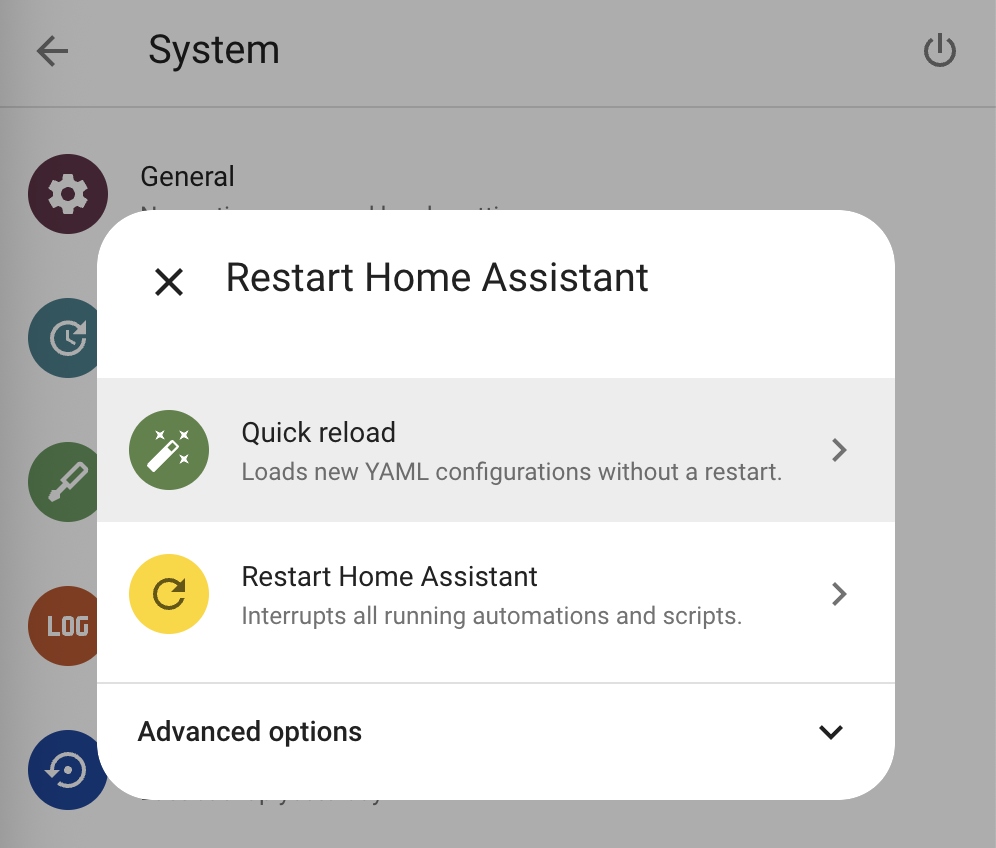
I just went into the System menu on my end and I see these options when I click the power button:

Okay, this seems strange. In my case the “Quick reload” option does not appear anymore.

You can DM if you want instead of posting here - but if you share the station config lines you’re adding to your yaml, I could see if I’m able to reproduce. (also - if you comment the lines out instead of removing them entirely, does that change the behavior?)

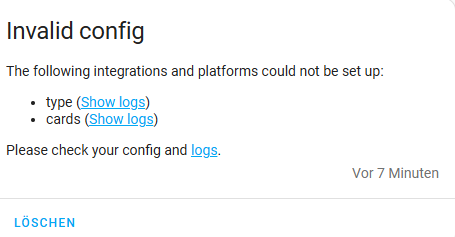
Thank you for your support. I have removed the entire configuration an the sensor. I’ll try this on instead:
home-assistant-berlin-transport