I recently wanted to integrate my 5G router Teltonika ALTOS (codename “CAP700”) into Home Assistant and use it as a reliable source for Wi-Fi based presence detection.
Originally, I came from an OpenWrt router and thought I could simply use the router’s integration for that - since Teltonika’s firmware is actually based on OpenWrt.
Unfortunately the current Teltonika integration is not compatible with the CAP700 and does only expose some rather basic modem entities anyway.
Fortunately, Teltonika provides a complete REST API in RutOS, which makes it possible to build a robust integration with Node-RED and MQTT.
As other people are trying to pull Teltonika data into Home Assistant as well, I thought I could share my implementation.
The result:
- Automatic Wi-Fi presence entities for every connected client
- Automatic creation and removal of Home Assistant entities via MQTT Discovery
- Tracking of offline devices
- Automatic cleanup of guest devices that have not connected for more than 30 days
- Router diagnostic sensors (RAM usage, flash usage, CPU load, uptime, …)
- Support for static DHCP leases to distinguish permanent devices from temporary guests
The complete flow is attached down below and can be imported directly into Node-RED. Only the router URL, username, password and MQTT broker need to be adjusted.
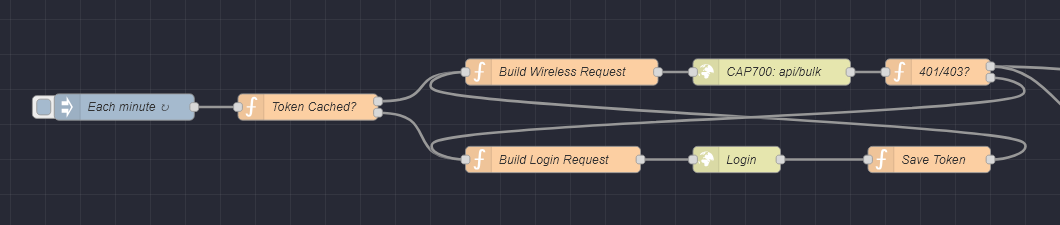
Screenshot Auth/API Flow
Architecture
The flow polls the Teltonika API once per minute.
Because RutOS access tokens are only valid for 4 minutes, the flow maintains a cached token in Node-RED that gets renewed as soon as the previous one has expired.
- Check whether a token is already cached
- If not, perform a login request
- Cache the returned token
- Execute a bulk API request
The bulk request collects:
- Static DHCP leases
- Wireless client status
- Router usage statistics
Using the bulk endpoint keeps the number of API calls low and makes the flow more efficient.

Screenshot Parsing / MQTT section
Presence Detection
The API’s wireless status endpoint returns all currently associated clients.
The flow converts these clients into Home Assistant MQTT Discovery entities using a MAC-address based identity scheme.
By providing them as device_tracker entities it’s possible to attach them to persons and use them natively in presence automations.
Each client receives:
- Presence state
- Hostname
- IP address
- MAC address
- SSID
- Band (2.4 GHz / 5 GHz)
- Signal strength
- TX/RX rate
- Time since the status changed
Offline devices remain available in Home Assistant, allowing dashboards to show both connected and disconnected devices.
Devices that disappear for more than 30 days and are not configured as static DHCP leases are automatically removed again through MQTT Discovery cleanup.
Router Diagnostics
For presentational purpose I have also created a flow for some diagnostic sensors:
- RAM Usage
- Flash Usage
- CPU Load (1m / 5m)
- Uptime
Final Dashboard
Using the custom components auto-entities and multiple-entity-row a possible dashboard looks like this:

Note:
- Since Teltonika’s API should be compatible across the company’s most modern routers the Node-Red flow should be simply adaptable. You should then, of course, change the entity names inside the function nodes.
- With current AI-assistance it should be easy to vibe-code a custom integration that does all the steps mentioned above “natively”. But personally I like to understand the outcome, so I went the Node-Red road.
- To persist the known devices inside Node-Red across restarts it could be helpful to change the set/get context data to file-based instead of memory-based. Read more here.