Using Ollama to run a script in Home Assistant

I have a script in HA that needs two variables defined to run. The script is for switching input/output and device setting on various devices to switch between consoles and other devices in my gaming setup. Running the script requires you to define the console and display you want to use. (I have 34 consoles and three displays, so it’s a lot easier to automate all of this :smile:.)

I’d like to be able to control this with a voice command but don’t want to have to define every possible way you could phrase “I want to play super nintendo” as a sentence trigger or whatever. Before I was using the Extended OpenAI Conversation HACs custom integration and had it working exactly how I wanted but I recently set up an Ollama instance and would love to use something hosted locally if possible.

I currently have the Ollama integration set up in Home Assistant with qwen3:4b as the model.

Is there a way I can configure Ollama in HA so that it:
1.) recognizes a command like “let’s play PS3 on the OLED” it plugs the “PS3” and “OLED” into the variables in the script then runs it.
2.) recognizes a command like “let’s play PS3” where no display is defined, it assumes “OLED” is the preferred display.

Hopefully what I’m asking here makes sense, if I’m not providing enough information, please let me know.

Question.

Do you want it to work using ‘local assist’ without LLM or do you care?

If it’s the latter you need to reframe how you are using tools and giving instructions to your llm.

Also for ‘for ollama’ isn’t enough. What model. What GPU, how much vram and what is your configured context window (yes it all matters)

Hey, sorry for the lack of clarity.

I’d definitely prefer the later, this is my first time dipping my toes into anything beyond using the HACs integration I mentioned above and I figure this could be a fun opportunity to learn something new.

  • Model is Qwen3:4b.
  • GPU is an old 3070TI I had laying around from an PC upgrade.
  • 8GB of VRAM
  • Context Window Size is 8192. I don’t think I ever changed it. Only have the script and one of my TV’s exposed as entities to the voice assistant currently for testing.
1 Like

Ok - Reason I ask - and you can research each path on its own

Speech to Phrase limits the way you can do stuff - and assist local runs everything through the local sentences / intent system - it’s not bad but it’s… Less forgiving. That’s what LLMs do for you. so, if you’re getting started it’s easier to go LLM only and back into speech to phrase - ironic as STP is easier hardware wise. :slight_smile:

I’ll spare you the rant about LLMs need context to work right (go read Fridays party - yes 200 something posts). They ALSO need good tools.

But at the core of it - IF you give an LLM a good enough tool - (read script) and document the tool correctly (think of your user as the LLM and your documentation is the description fields of your script) any average 9th grader should be able to look at your script and ‘figure it out’ if you have ANY hope in the world for Qwen3:4b there to do the magic part.

Now for you to have any hope of being successful with your chosen hardware - 8K context is probably the top of what you can do. 8K is 8k toks (words/4 ish) which includes…

  • FULL entity name, all alias data, state data (no device data… No label data) for EVERY ent you ‘exposed’ to assist. In low VRAM setups - this is your biggest control valve.
  • All system intents, their descriptions and param data (there’s somewhere around 40 out of the box with HA now, HASSTurnOn, HASSTurnOff etc.)
  • System Date / time
  • The full contents of the prompt template from your conversation agent setup.

So - the more you expose or the more scripts you load the more likely you are to blow that tiny 8k ctx window open - so for your setup be conservative about what you ‘expose’ to assist.

So you’l notice im carefully guiding you through context management of that 8K - becasue at the end of the day with your original question…

How do I get it to basically play madlibs with my script?

Thats the easy part- you make sure it understand what the script fields are and explain it the rules of engagement…

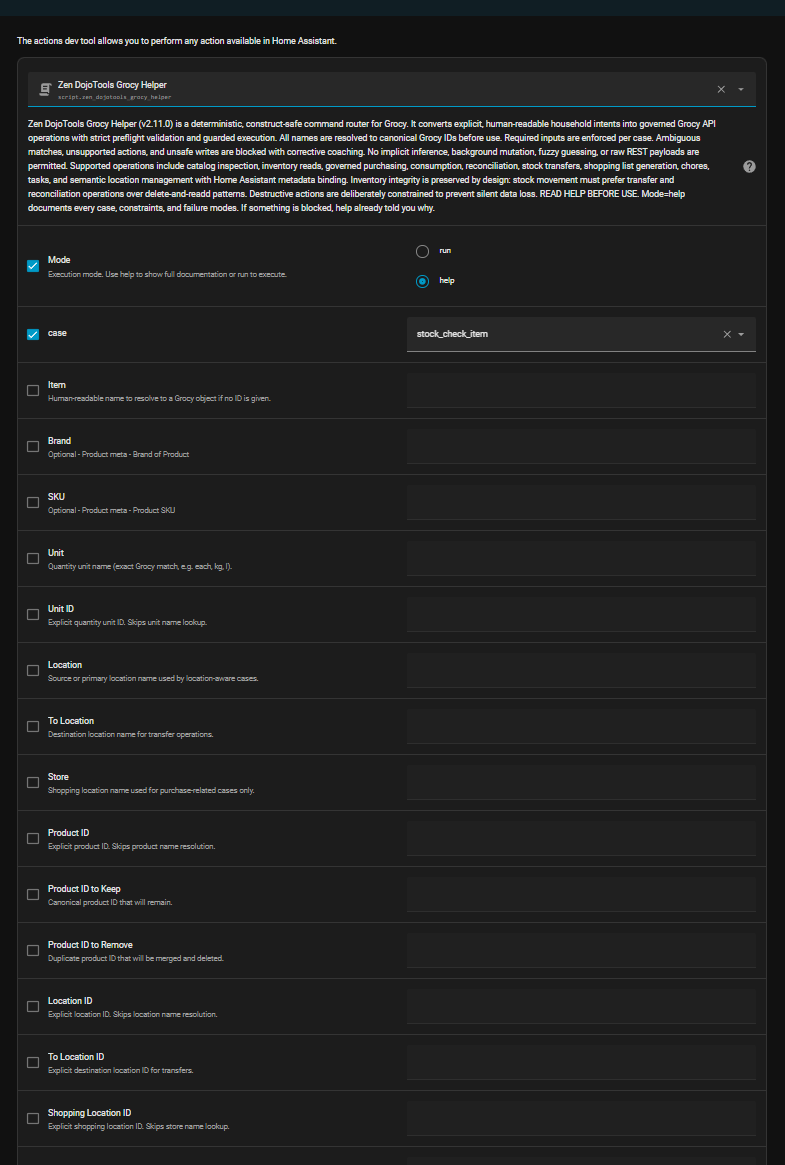
Then this happens:


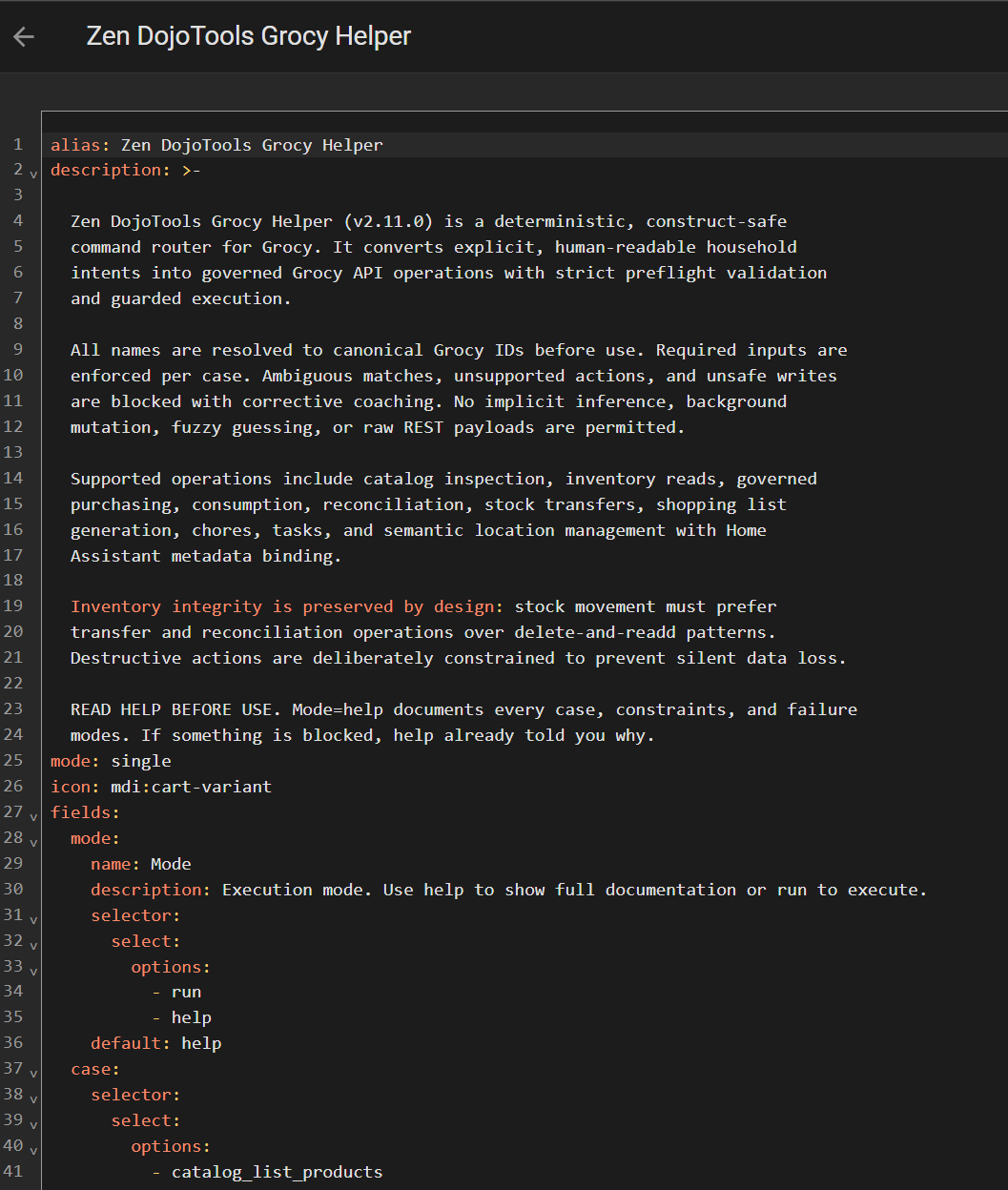
This is the script she’s talking about…


…and I cutoff half the fields… Yes I’m posting this within the week on my Github for anyone following along.

Is that script completely impractical for a human user - yes. Is it being used by a human - NO. Write the description and the field docs as such - for an AI user. Then you can even make a small model do big things.

The instructions in the description are painfully descriptive of what the tool is and how to use it.

Then expose the entities relevant for your tool and - it SHOULD be able to mad lib its way to victory.

Make sense?

2 Likes

You don’t need to specify all possible options. You create templates with list-type variables. One will specify consoles, another TV.
"let’s play {console}[ on the {display}]"
See the documentation here

If you still want to use LLM, but you plan to do this in a limited way, I can offer an easier way.
You’ll need this integration. And one script—which will become the tool.
The script should instruct the model on how to select two variables from your phrase.

You don’t have to worry about context or speed - Qwen 4B is more than enough for such tasks.

1 Like

I think I get what you mean. I’m pretty sure the script I’m start with here is a lot simpler than that one you’re using as an example (It’s fairly human usable for one :smile:) I’m not terribly worried about the context size as I don’t use voice commands for much aside from controlling my gaming/entertainment set up. For example, I’m not someone who uses voice commands to control individual lights, but I would like to expose a few toggle helpers that change the lighting in each room from using the ceiling lights to more ambient lighting, ect.

On the topic of context, I definitely think I’m grasping at what you’re explaining here but allow me to go on a bit of a side tangent to see if I’m right.

So all the script in question needs to run is an action like this:

action: script.1706081556020
data:
  console: Super Nintendo
  display: CRT

When I was using this Extended OpenAI Conversation custom integration, this bit was what allowed that to work the way I wanted:

- spec:
    name: switch_console
    description: Use this function to determine what console I want to play. This function has NOTHING to do with finding my phone. "Super Graphics" should be understood to mean "Super Grafx".
    parameters:
      type: object
      properties:
        console:
          type: string
          description: The name of a videogame console. If I name 3DO, I am NOT looking for a lost phone.
        display:
          type: string
          description: The name of the display device. Valid names are "PVM 14m4U", "WebOS TV", "Live Gamer Ultra", and "VisionRGB-E2S". If no name is provided use the default option of "WebOS TV".
      required:
      - console
      - display      
  function:
    type: script
    sequence:
    - service: script.1706081556020
      data:
        console: "{{console}}"
        display: "{{display}}"

So some items of note: I had to be very particular with two consoles. For some reason, when I asked it to switch to the 3DO, it would trigger a “find my phone” script I have set up, never figured out WHY, maybe it just assumed no one wanted to actually play a 3DO and instead I needed to call for help :smile:. The more interesting one to me though was the issue of the NEC Super Grafx. Because of the nature of how speech to text works, it would interpret that as “Super Graphics” and then OpenAI’s model would seem to make the determination that I meant “The console with super graphics” and slot PS5 on the console variable. Obviously the GPT model I was using at the time had more tools at it’s disposal to make that determination but by explaining to the model what I actually meant, it was able to take the correct action and behave appropriately.

Am I getting at what you’re describing here? I feel like the real hang up I have whenever I mess with LLMs in the context of HA is that I want to think in terms of YAML and Jinja2 templates but really I need to think in terms of “how would I explain this to a coworker who is learning about this for the first time”.

Update: got it working by adding this as the description.

description: >-
  This is a script to switch between playing
  video game consoles when I want to play videogames. In order to use this tool,
  the user must specify arguments for “console_01” and “display_01” as part of
  the tool call. “console_01” should be used to designate the name of a
  videogame console I’ve asked to play. Valid names are “NES”, “SNES”, “Super
  Nintendo”, “2600”, “5200”, “7800”, “Jaguar”, “Intellivision”, “Colecovision”, “N64”, “Gamecube”, “Wii”, “Wii U”, “Switch”, “Switch 2”, “PC Engine”, “Super Grafx”, “3DO, “Neogeo AES”, “Neo Geo CD”, “Master
  System”, “Genesis”, “Saturn”, “Dreamcast”, “PS1”, “PS2”, “PS3”, “PS4”, “PS5”,
  “PSP Go”, “PSTV”, “Xbox”, “Xbox 360”, “Nuon”, “CDi”. display_01 should be used
  to designate the name of a display device. Valid names are “CRT”, "PVM 14m4U",
  "WebOS TV", "Live Gamer Ultra", and "VisionRGB-E2S". If no value is provided
  for "display_01", use "WebOS TV".

Also very cool that it’s able to make a lot of the judgment calls to determine like say, Nintendo 64 means N64 without me having to explain it.

1 Like

What do you use to power on the consoles. @Zevin_Mars
This is pretty neat

Oh now that I’m re reading it your just setting the correct inputs?

The script is primarily for just switching input/ouputs on the AV matrix switches/displays and loading the appropriate profile on the RetroTink 4K. Once I hit around 20 consoles it was getting hard to keep track of it all to do manually. Some consoles have IR or network commands that allow you to power the on remotely and in those cases they will power on as part of the script. For the older stuff you have to power them on yourself. Hypothetically I could make a mod that can replace the switches mechanism but I’ve never researched where to start with that.

I plan to make a post for Share your Projects eventually because there’s been so much involved in getting the script to this point and just having a comprehensive write up of how it all works would be nice.