Velair: local-first climate scheduling for Home Assistant climates

First, thanks for the great work on Velair! Looking at the UI, having daily model templates is already super handy, but setting explicit numerical temperatures on every single time slot can get a bit tedious over time.

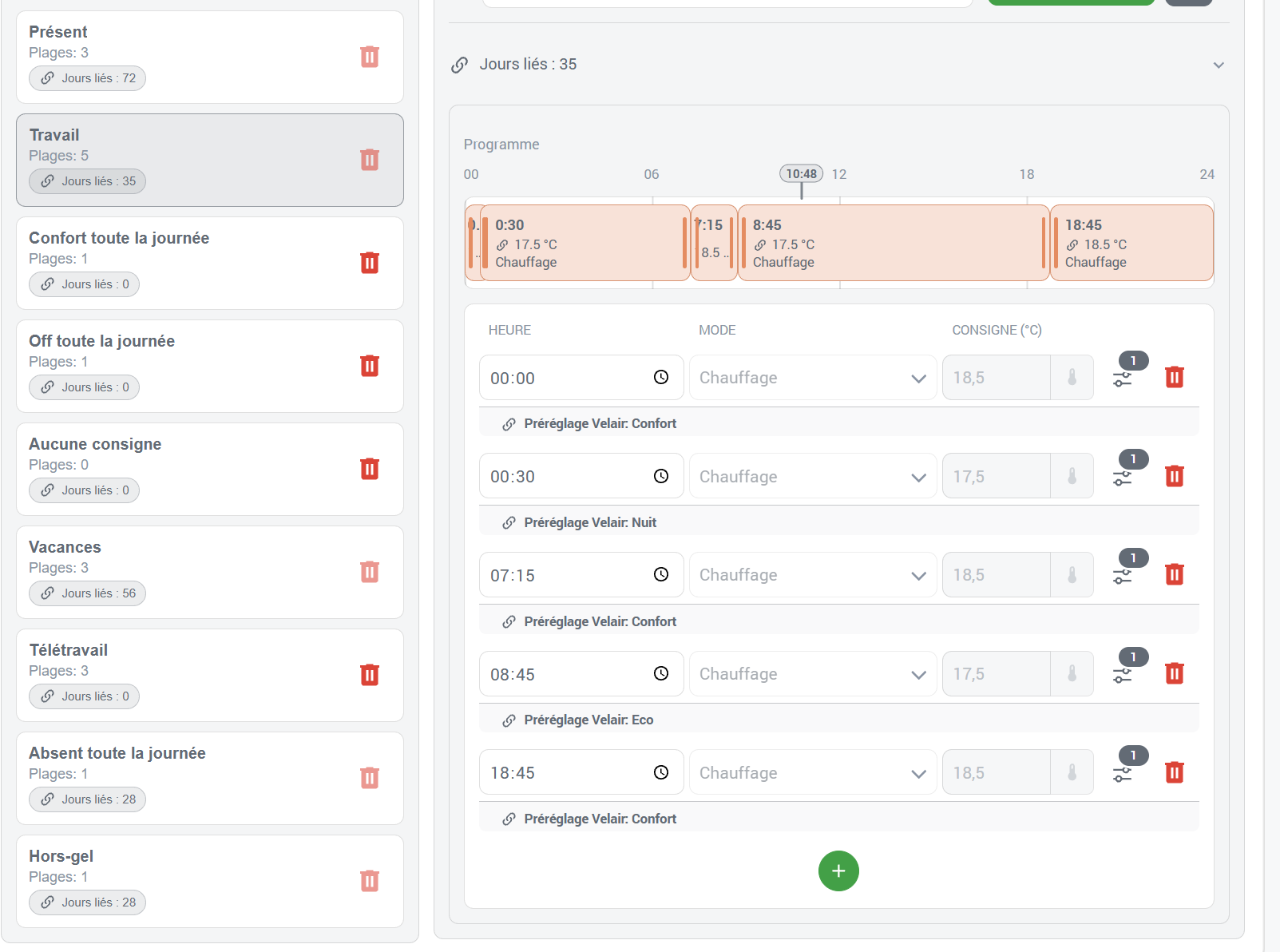
It would be awesome to have Temperature Presets / Named Profiles (e.g., Night = 17°C, Eco = 18°C, Morning = 18.5°C, Comfort = 19°C) that could be assigned directly to time slots instead of raw temperature values.

Key benefits:

  • Centralized Updates: If I decide to drop Night from 17°C to 16°C, updating the preset once would automatically update all schedules using it across the board.

  • Color Coding Option: Assigning custom color codes to each preset (e.g., blue for Night, green for Eco, orange for Comfort) would provide an instant visual overview of the daily timeline.

What do you think about this approach?

Hi @GuiPoM,

Thanks for the kind words and the suggestion. I think reusable Temperature presets would be a useful addition to Velair, especially for adjusting several schedules without editing every block individually.

The approach will be to let a temperature block use either a direct value or a named preset. Blocks using a preset will remain linked to it, so changing its temperature will update all blocks referencing it across Default and Profile schedules. Existing numerical schedules will keep their current behaviour.

I would call these “Temperature presets” rather than “Profiles”, since Velair already uses Climate Profiles for complete alternative routines. They will also be separate from presets exposed by the climate device itself.

This fits something I have been considering for the Templates section: making it easier to reuse schedules across selected days, Default schedules and Profile schedules. Applying templates to selected climates and weekdays is already possible; the useful extension would be a clearer workflow covering Profile schedules too. Modes would continue selecting Profiles, which contain the schedules.

There is an important distinction, though: schedule templates currently copy their blocks. I will preserve that behaviour while allowing the copied blocks to retain references to shared temperature presets. Keeping entire templates permanently linked introduces additional questions about local edits and which changes should propagate.

Optional preset colours also seem feasible. I would want them to help identify blocks while keeping the preset name, effective temperature and existing operating-state indicators readable.

The main work will be making shared updates predictable: validating every affected climate, supporting heating, cooling and target ranges, showing where a preset is used, and respecting Boosts, pauses and manual control.

I will try to add reusable Temperature presets in the next Velair release, following the approach described above. Optional preset colours and the broader Templates improvements may follow separately.

Thanks again for the suggestion — it addresses a practical limitation when maintaining several schedules.

1 Like

Hi @CristianGonzalezFern,

First of all, thanks again for your previous feedback and for taking the temperature preset idea on board so quickly!

I’ve been testing the integration further, and I wanted to share a few thoughts, questions, and a minor bug report:

1. Away / No-Frost mode & Anticipation
I couldn’t find a built-in “Away” or “No-Frost” (hors-gel) mode. While regular routines can handle some scenarios via profiles, an “Away” state usually behaves more like a timed override or boost (e.g., away until a specific date/time). In that kind of scenario, does Velair’s anticipation feature still kick in correctly to ensure the home is back to the target temperature by the scheduled return time?
This is how I implementated away and I see that setting a boost has some drawbacks.

2. Seasonal Temperature Sets / Decoupled Time Slots
To expand a bit on temperature management: I often use the exact same time slots across different periods, but with different temperature targets (for example, a Winter mode with a smaller setback versus a Mid-season mode with deeper drops). It would be fantastic if we could dynamically associate a schedule (time grid) with a specific temperature set or mode on the fly, rather than duplicating schedules. To complète my previous query…

3. Integration & Widget UI Behavior
On the positive side, I’ve fully integrated Velair with my existing automations, and it works really smoothly! However, I’ve noticed a small quirk: the custom widgets/cards sometimes show as “unavailable” until you actually open the main Velair page for the first time in a session (as if they aren’t initialized until loaded in the UI).

4. Open Window Handling
Since Velair focuses on local-first scheduling, how does it handle external overrides like open window sensors? It would be great to ensure that if a window opens (triggering a climate pause or shutdown), the active Velair schedule doesn’t immediately override or fight it until the window is closed again.
I discovered the blueprint Pause a zone while windows are open velair/docs/user/blueprints.md at main · cgonfer/velair · GitHub. I was more expecting a sensor or anything in the configuration, but at least it exists to help quickly setup that feature, this is nice !

5. Atypical Weeks & Dynamic Teleworking Schedules
My weekly routine isn’t strictly fixed due to shifting teleworking days. Right now, I rely on custom Home Assistant buttons and a nightly script to switch profiles/schedules when needed. I suspect there isn’t a magic bullet for this yet, but I’m curious if you have any recommended patterns or future ideas in mind for handling irregular, non-standard weekly schedules more natively.

Thanks again for your amazing work on this project! This is by far the most complete and feature-packed project I have seen in this area.
I am planning to demo Velair this week :blush:

Hi @GuiPoM,

Thanks for continuing to test Velair and for sharing your experience with your automations!

Away / No-Frost and anticipation

A temporary pause may help here: it suspends Velair’s scheduled control and resumes it when the pause expires. You can leave the thermostat unchanged during the pause or turn it off.

The timing matters, though. Preconditioning does not run while the zone is paused, so resuming at your arrival time would not give it time to prepare the home beforehand. Resuming earlier, with a comfort block scheduled for your return, can cover that through a Home Assistant automation. An active Boost also blocks preconditioning for that zone.

For frost protection, leaving the thermostat unchanged could preserve a suitable target you have already set; the pause itself does not establish a frost-protection temperature.

Could you share how you configured your Away behaviour and which drawbacks you encountered with Boost? That would help me understand whether the existing pause controls cover your setup or whether something more specific is needed.

Seasonal temperature sets

This makes sense, especially to avoid maintaining several copies of the same schedule. I’ll give it some thought alongside the temperature preset idea and consider how it could fit into Velair without making configuration more complicated.

Cards loading only after opening the panel

The cards should work without opening the main panel first. Please check that your dashboard has this resource registered as a JavaScript module:

url: /velair_frontend/velair-card.js
type: module

Remove any old or duplicate /local/velair-card.js resource and reload the browser or companion app. If it still happens, could you share your Velair version and the exact error shown? “Unavailable” and “custom element doesn’t exist” would point to different causes.

Open windows

There is already an optional open-window blueprint for this. You can also build your own automation using velair.pause_zone, optionally turning the climate off, and velair.resume_zone.

One of the main reasons I kept window handling in a Home Assistant blueprint was to let users take full advantage of Home Assistant automations: combining sensors, presence, helpers, conditions, delays, and any other logic their setup needs. Built-in window settings in Velair would limit those possibilities to the options I had implemented. Instead, your automations decide when and why to pause, while Velair manages the pause reasons and resumes scheduling when they have all been cleared. The blueprint provides a ready-to-use starting point, and the same pause actions are available for more advanced custom automations.

The useful part is the pause_id: each automation can identify its own reason for pausing. For example, a window automation could use window_guard, while another automation uses maintenance. Both reasons can remain active together. Closing the window removes only window_guard, so the zone stays paused until maintenance also ends.

That lets independent automations cooperate without accidentally resuming each other’s pauses. Use distinct IDs for independent reasons and the same ID when adding and removing a particular reason. Avoid an unrestricted resume when you only intend to clear one automation’s pause.

Turning the thermostat off directly does not suspend Velair’s scheduling, which is why using these pause actions is important.

Irregular teleworking weeks

Your buttons and nightly script are a good fit for the current design. Home Assistant can decide which Mode or Profile is needed, and Velair applies its schedule. Selecting the routine the night before also gives preconditioning time to prepare for the morning.

Thanks again for all the feedback! I noticed you have a YouTube channel—is that where you’re planning to demo Velair? Thank you for taking the time to share the project. If there’s anything I can help with while you prepare it—explaining features, putting together example configurations, or providing resources—please let me know. I’d also be happy to take part in an interview or help prepare specific content for the video, if that would be useful. I speak Spanish and English, so either language would work for me!

On the seasonal stuff, I’m switching over from a homemade Node Red automation that uses outdoor temperature to decide whether to heat, cool, or do nothing. The do nothing feature is great as units wont turn on and save me energy and money when weather is mild.

Before it inititates a scheduled start it checks today’s high/max temp.

  • Less than 20°C = run winter mode
  • Between 20°C and 27°C = do not turn on
  • Greater than 27°C = run summer mode

If summer mode starts:

  • It checks if the current outside temp is greater than 24°C. If not, nothing turns on and it will recheck every 30 mins and enable if the temp rises above the threshold. The sytem alerts me to close windows.
  • At scheduled turn off times it does a simliar check. If outside is greater than 22°C it won’t switch off, rechecking every 30 mins until temp drops below the threshold. The system alerts me to open windows.

Hi @CristianGonzalezFern,

Thanks for the detailed breakdown, especially regarding how pauses and pause_id work under the hood!

Let me follow up on a few points based on your explanations:

1. Away Mode & Anticipation My expectation for an “Away” mode is really closer to how native ecosystems like Tado or Netatmo handle it. I’d love to see Velair handle this natively: setting a default Away temperature (globally or per schedule), where Away acts like a timed override with a defined return time (e.g., away until 7 PM).

The key point here is anticipation. If I’m coming home at 7 PM and the house has been setback at 17°C all day, I expect Velair to factor in the preconditioning so that the house actually hits 20°C at 7 PM. If I have to manually handle the anticipation math and schedule triggers via external Home Assistant automations for return times, then Velair isn’t really solving that part for me. No-frost (hors-gel) can stay a basic, static state since it’s indefinite, but “Away” needs that smart return-time + preconditioning loop as a schedule override.

Here I really see a nice addition to Velair and a very good fit in term of features as it already has all the knowledge to handle it properly, and any external logic will never go close to that.

2. Open Windows Thanks for pointing out the blueprint and the power of pause_id! It’s actually a very robust architecture for advanced setups (allowing multiple independent reasons to stack up without stepping on each other). However, from a UX perspective, it might feel a bit complex for a standard user looking for an out-of-the-box experience. Having a simpler option to directly map a binary sensor (or a helper boolean) to a zone’s pause state directly in the UI, while keeping the underlying pause_id logic for advanced use cases, could be the best of both worlds. But it exists, and there is already a way of defining it, so definitively not anything important !

3. Atypical Weeks Totally agree that keeping it external via scripts/toggles works fine for now. This is what I am doing, I switch modes each day at midnight depending on status in Home Assistant.
If you ever find a clean way to introduce conditional schedule alternatives based on modes or state helpers without bloating the UI, that would be a neat bonus, but it’s definitely not urgent. This could also help defining for example what I mentionned with winter, same schedule, another set of temperatures, but it should not make the use of Velair more complex, I fully agree and understand, there are already many steps to go through.

4. Regarding the YouTube Demo Yes, that’s indeed where I’ll be showcasing Velair! :clapper_board: I am documenting my migration from Netatmo to Tado + Home Assistant + Velair to prepare 2026/2027 and I will most probably also have another content after Winter to explain what went well with this new local control approach.

Thanks again for the incredible work and the great exchange!

Thanks for sharing your setup! It gives me some useful ideas to consider as I work through the seasonal temperature sets and linked presets.

I’d like to make it easier to change temperatures without duplicating schedules, while keeping the flexibility to control everything through Home Assistant automations. I’ll keep your example in mind as I explore how this could fit into Velair.

2 Likes

Hi @CristianGonzalezFern!

Just wanted to share that I’ve just published a new video (in French) covering a complete tour and setup of Velair to get everything ready for winter: :link: Watch the video here (https://youtu.be/xIrB-Z2WPio)

Regarding your kind offer to take part in an interview or help prepare content: just to clarify, I always produce my content with complete independence, whether we’re dealing with commercial brands or open-source projects. That being said, I always make sure to provide thorough, elaborate feedback with concrete avenues to explore to help improve the project!

Following up on a few specific points from our exchange:

  • Temperature Templates: As we discussed, being able to define temperature targets using Home Assistant templates (instead of static values) would bring amazing flexibility for dynamic adjustments and reuse profiles.

  • Window Handling: While the pause_id logic is clever, having native support to simply assign an open/close sensor entity directly to the thermostat would be so much smoother. It could be as straightforward as picking the sensor, or letting advanced users build custom automations around it when complex checks and decisions are needed, without forcing it as the only path.

That said, my main operational feedback and core pain point regarding absences remains:

The Missing Piece: A True “Away” Mode with Return Anticipation

Right now, handling being away from home cleanly is still quite tricky.

  • The limitation of current workarounds: Using a temporary time boost or manually switching the schedule doesn’t cut it for a true away scenario.

  • Why anticipation matters: When you are away (whether for an evening or a few days), you expect the scheduling system to anticipate your return time so that the house is already at the correct temperature the exact moment you step back inside.

  • The challenge with automations: Because of how scheduling and overrides currently interact, this cannot be cleanly handled by a basic automation or a separate static schedule change without losing the core benefits of Velair’s intelligent preconditioning and heating/cooling curves.

Having a native Away mode that properly factors in return-time anticipation would make Velair truly unbeatable for local climate management. I think it cannot be managed outside Velair and with what exists now.

1 Like

Hi @GuiPom!

I found your video incredibly thorough. You explored Velair in real depth and explained its features and setup clearly, leaving very little to guesswork. Thank you also for your kind words about the project—I really appreciate them.

I also understand and respect your editorial independence, and I appreciate the detailed, practical feedback you’ve shared here and along the video.

I haven’t had enough time to reply properly to both of your messages, but your suggestions haven’t been forgotten. I’ve been working on several of these areas, and the upcoming version now includes some substantial additions.

Away mode and return anticipation

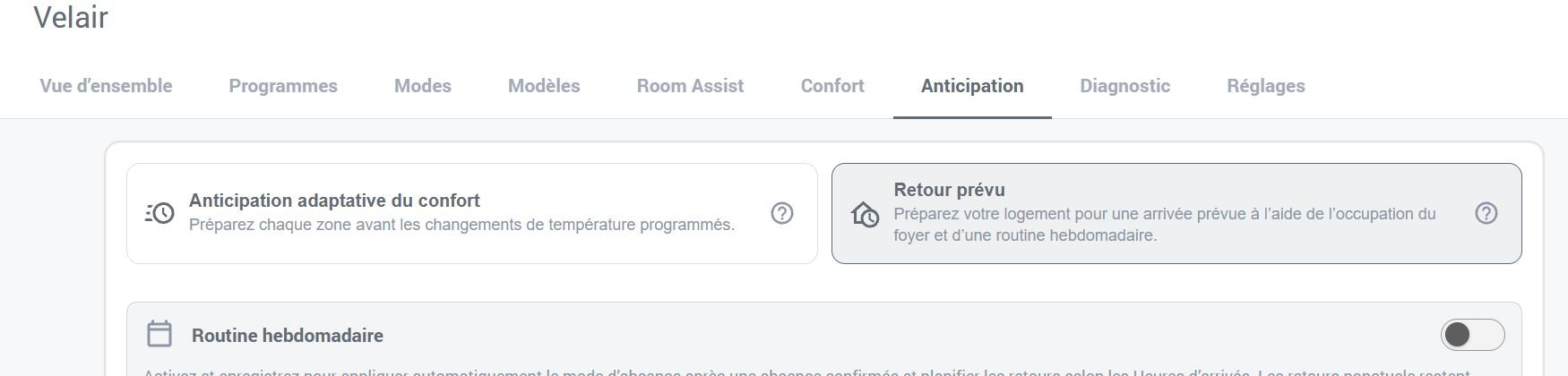
Your main point is addressed by a new native feature called Planned Return, configured directly in the Velair panel. It also provides Home Assistant actions, including velair.start_planned_return, so automations and scripts can use the same native behavior.

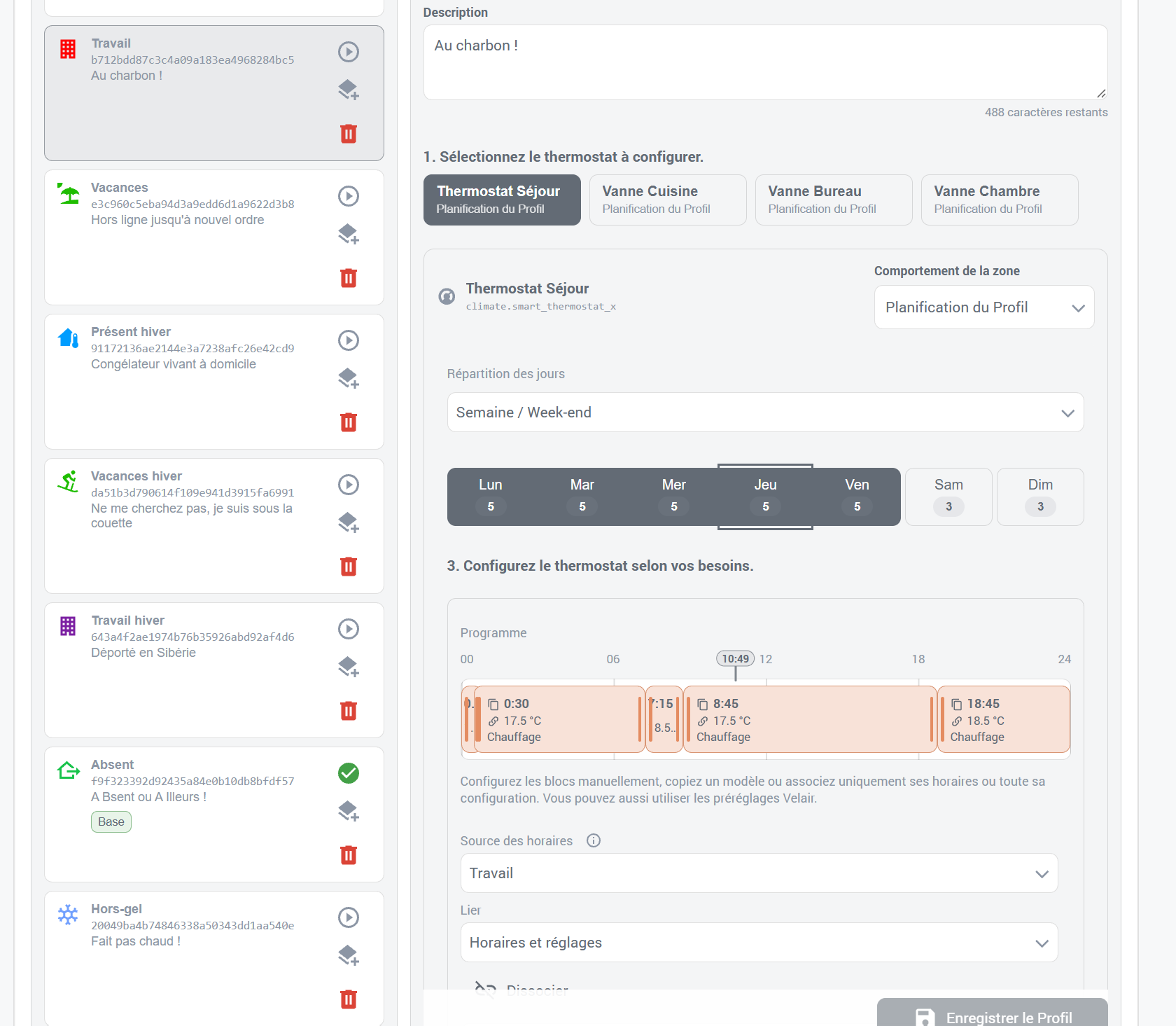
It brings together household occupancy, Away settings, an expected arrival time, and Velair’s existing adaptive preconditioning. It uses Modes and Profiles to define the away and return settings, so each room can have its own targets.

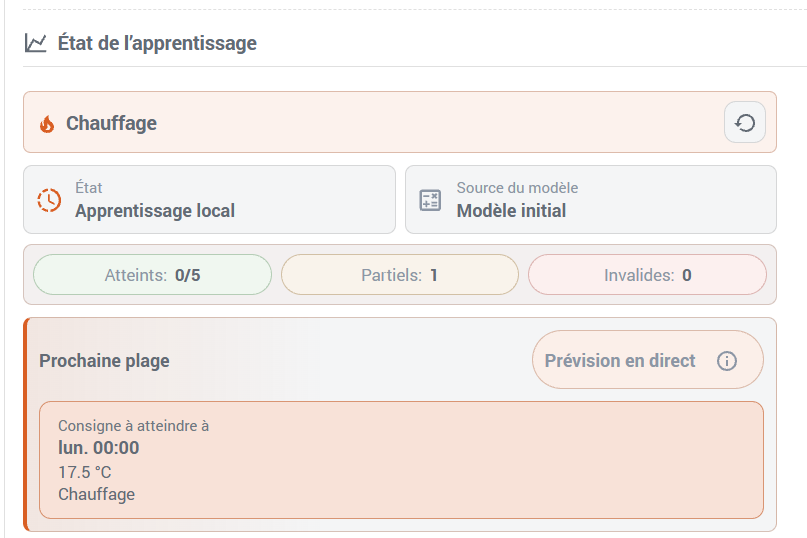
You can configure a regular weekly arrival routine or plan a one-off return for later today, including when you’re already away. Velair calculates preparation for each room using its existing heating/cooling learning and the temperature required by the destination schedule at arrival.

For your example of keeping the house at 17°C while away and wanting 20°C at 7 PM, the aim is to calculate when preparation should begin so the house is closer to that target by 7 PM. That anticipation is handled inside Velair, without having to calculate the timing yourself in external automations.

You can also adjust the arrival time, skip the planned return, or indicate that you’re home early. The panel shows each room’s preparation status and explains when advance preparation is unavailable.

This first beta supports same-day returns. Overnight and multi-day planned arrivals aren’t included yet, so it doesn’t cover every absence scenario you described. That is a deliberate scope choice for the first iteration: I prefer to develop and validate features step by step. My intention is to expand the supported return scenarios as the feature matures.

Reusable temperatures and seasonal schedules

The new version also introduces shared climate presets and linked daily templates.

Several schedule blocks can reference the same preset, and editing that preset updates its linked uses. Daily templates can share just their times, allowing different temperatures in different Profiles, or share both times and climate settings. This should help with your “same schedule, different winter/summer temperatures” example.

For dynamic adjustments, the new velair.update_block_preset action lets a Home Assistant automation or script update a shared preset using values calculated by Home Assistant templates. Velair then updates the affected schedules and preconditioning plans.

This provides a route for template-driven temperatures, although it isn’t direct Jinja template support inside Velair’s temperature fields. Your existing approach of selecting Modes from Home Assistant can also work alongside these reusable schedules and presets.

A suggestion for Comfort

From your walkthrough, one option I’d recommend exploring is Guided psychrometric range in the Comfort configuration. It accounts for the physical relationship between temperature and relative humidity, adapting the acceptable humidity range across your configured temperature range. This gives a more useful interpretation than treating the same humidity percentage identically at every temperature.

If you also enable Outdoor comparison and select outdoor temperature and humidity sensors, Velair can suggest when opening a window could move the room closer to your comfort range, potentially reducing the need for heating or air conditioning. It can also highlight trade-offs when ventilation would improve one aspect but worsen another.

Those suggestions are available through the Ventilation opportunity sensor, so you could use it in an automation to send yourself a notification when ventilation might help.

Window handling

That ventilation guidance is separate from your suggestion about automatically pausing a thermostat when a window opens. I understand the distinction you’re making between a robust automation mechanism and a simple built-in setup.

Directly assigning a window sensor to a thermostat for automatic pausing isn’t part of this beta; the existing window-pause blueprint remains the available approach. I’ve kept your suggestion in mind.

Although Velair already has quite a few features, they reflect the care, time, and effort I put into my projects. It is still only a few months old, and this will be its first winter in real-world use. I expect broader testing to reveal bugs and details that need refining. That’s why I’ve also put considerable work into diagnostics and clear explanations of what Velair is doing: to make problems easier to understand and investigate, and help limit their impact wherever possible.

I’m aiming to release the beta over the next few days, hopefully this weekend, once the remaining checks are complete.

Would you be willing to try it and share your feedback—especially on Planned Return and whether it fits the away/anticipation workflow you described? Testing it against your actual setup would be very helpful.

Thanks again for taking the time to explore Velair so thoroughly and explain where it could work better for you! :blush:

1 Like

Hi @CristianGonzalezFern,

Thanks for the detailed update and for taking these points on board so quickly, this upcoming release sounds great!

I would be more than happy to test the beta, especially since the Planned Return feature directly addresses one of the biggest missing pieces for my setup.

The only small caveat is that I only run a single production installation for my home heating, so as long as it’s reasonably stable for daily use, I will definitely put it through its paces and share my feedback with you.

Really looking forward to trying it out!