@drift3r The recommended way is to use the Scheduler Component, at least from docs here
@jmcollin Can I somehow have more presets in a VTherm thermostat service? Because HA docs state that one can define their own presets, but also there are some more predefined like “home” “sleep” “activity”, which would perhaps be enough and I see them exposed on your own example screenshot from your own scheduler docs (which I just mentioned above).
So can we use all builtin ones and set temperature for them, and switch them (via UI or scheduler)? Or can we create our own presets and do the same for them too?
Because it is needed to have more than the basic ones I see currently “Eco”, “Comfort”, “Boost”, “Frost”. Well at the very least we need to distinct “Eco” from “Sleep” - so at least these builtin ones (sleep, home, activity) should be suppoorted
@limidet Thanks very much! I have followed the link and now have a working schedule! Still basic but it works for the time being, will make adjustments once I have more experience.
But one thing I noticed, is that I have comfort temp set to 20c, and the TRV valve will close to 0 degree when the room temp reached 18c (using external temp sensor), so what happened was that I had 3 rooms set to comfort but all 3 TRV valve closed when room temp was 18c, but the Vtherm card sees room temp not reach to 20c so central boiler is still on, I have then a few towel rails very hot but the rooms are at 18c only. What could be the problem, or any parameter/logs I need to look at and provide details to help with the trouble shooting? Thanks
Hello, no you cannot. Have in mind that those Eco, Comfort, Boost, Frost has the equivalent when absence is detected and when the device is in AC (cooling).
So in fact you have 3 x 4 = 12 possible preset + the activity and power which are additional presets.
Thanks @jmcollin , I have the valve closing degree configured.
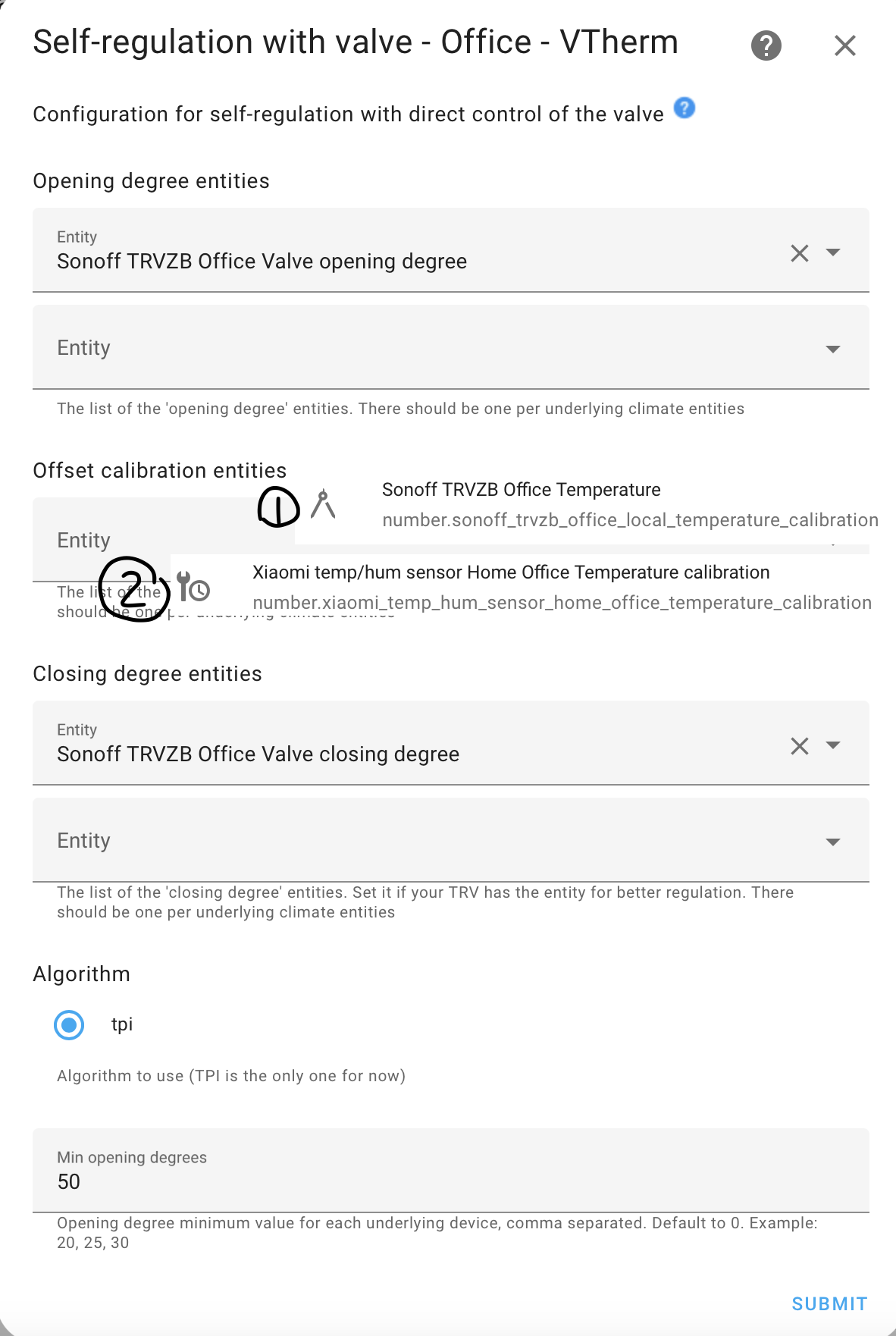
But for the offset calibration entities, I read from manual this is temperature offset. However I am not clear it suppose to offset from the internal temperature sensor or something? But from the drop down list I have the 2x number entities with ‘calibration’ in the name (one is from TRVZB and one from xiaomi external sensor), are these the one I am suppose to use?
Hello, I don’t get your point. Opening and closing degree don’t need calibration itself. They are from 0 to 100% each.
The calibration is for the internal temperature sensor, not for opening or closing degree.
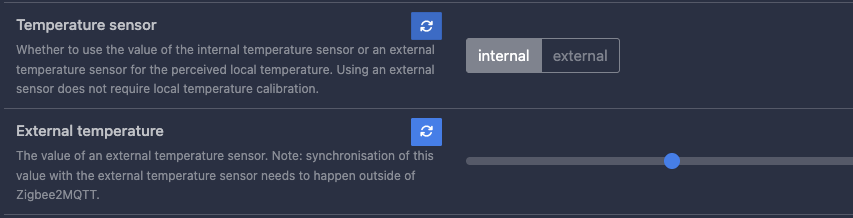
Aha… so that calibration… ok, thanks. I did wonder what kind of calibration would be possible on the valve itself… THat one i don’t need since i use external temperature sensor.
But still - what is “valve closing degree” and “valve opening degree” on sonoff’s settings? By default they are both set to 100.
Thanks @jmcollin I’m same as Protoncek that I use TRVZB with external temperature sensor (mixture of xiaomi and hue sensors), is there still a need to use the TRVZB calibration entity?
Central gasboiler that is being controlled by an OpenTherm (DIYLESS) controller (a climate entity in HA);
100% floor heating. So I don’t need features such as window/presence detection;
Multi-zone control (14 zones in total). I have connected thermoelectric valves to my floor heating zones. The are being controlled by a Sonoff 4CH Pro R3 (on/off switch per zone in HA);
Each zone has a temperature sensor that sends regular updates;
I want to use Versatile Thermostat to control each zone, and to make optimum use of my gasboiler (no simple on/off switch but energy efficiënt modulation).
I think I have figured out setting up a VTherm Thermostat for each zone. It is a fairly easy process where I configure the room temperature sensor and the Sonoff switch as the underlying device. I am not sure if I should flag the “Used by central boiler. Check if this VTherm should have control on the central boiler” setting, though. For all other parameters, I just refer to the central parameters.
Additionally, I have also configured another VTerm Thermostat that should control the climate entity of the DIYLESS Opentherm controller. And here I am a bit (more) stuck. I am not sure what to select as a room temperature sensor (I have 14 zones and 14 temperature sensors). In the underlying devices, I have selected the DIYLESS climate entity, and set to “no auto-regulation” for now.
In the central configuration, I have configured the outdoor temperature sensor, and I have not made any other changes to the default settings.
I’m not sure if this is the right way. How will the gasboiler be controlled? Will it shut down when all underlying climate entities have reached the setpoint temperature? Will it modulate correctly?
Hello, First of all thank the author for great work. I am playing with Versatile Thermostat and my first impression of it is very good.
I am planning to use VTherm with scheduler instead of with bunch of presence/movement sensors (we have well predicable presence depending on time and also clear temperature requests).
I have several questions on it.
is there an option how to rename predefined temperature entities number.vt_name_preset_comfort_temp, number.vt_name_preset_frost_temp, number.vt_name_preset_eco_temp and number.vt_name_preset_boost_temp the way to see these names in the scheduler? For my purpose them names like “Morning”, “Worktime”, “Evening” amd “Night” would be much more useful. I can rename them in the settings, but the new names are visible only if I add them at the dashboard, not in the relating components like scheduler. Also adding more (“custom”) states would be fine, but it is only “nice to have”.
also option to set other icons would be usefull for my use-case. Again -like for the names, I can change them, but not for the VTherm UI component; changed ones are visible only in the dashboard directly.
I control old gas boiler whichdoesn’t like too short cycles. (how) can I set minimal on time and minimal off time (independently, or single value for both - doesn’t matter)?
More of a query about a possible setup using versatile thermostat.
Is it possible to have a central control thermostat E.G [ on my HA homepage ] that will operate all my Sonoff TRVZB effectively central control & have independent thermostats as well ?.
What i’m trying to achieve is let each room [ Zone ] have there own local software defined thermostat using versatile thermostat control but have a master software defined thermostat using versatile thermostat that will override the the local ones ?..
Hi, I’m having some problems. I’ve set the temperature to 30 and the temperature in the room is 22.5, but it’s idle. I’ve set the hardware also to 35 but it’s idle (heat). There’s no window detection, it’s in heat mode, do you know what’s happening?
Only if you want that VTherm turn off (or lower the target temperature) of your central boiler. If it is already done natively by your system this is not needed.
This is not the way it should be used. The central boiler is not controled by a dedicated VTherm but by the central configuration itself. Cf. versatile_thermostat/documentation/en/feature-central-boiler.md at e7ac176b52fc268573c515829924b5fff1c90a77 · jmcollin78/versatile_thermostat · GitHub. Once configured, you check the “Used by central boiler” for each zone VTherm that need to control the central boiler. You can configure the central configuration for boiler, to turn it on/off when a zone VTherm needs heating or by updating the target temperature (Eco / Comfort) or directly by the setting the target temperature. See READMe and let me know if it ok for you.
Hi Jean-Marc,
Thanks, this is clear now. What I understand is that using Versatile Thermostat you can turn on/off the central heating device, but it does not allow to control the modulation of the central boiler.
What I mean with modulation is that, instead of switching on (boiler working at 100%) or off, it could also be able to tell the boiler to work at a lower capacity instead.
I think this is more or less described in this topic:
Instead of switching the boiler, it will control the target temperature of that boiler. If the boiler knows that the difference between target and actual temperature is only 1°C, it will already operate at a lower capacity. If all rooms have reached target temperature, it will turn itself of.