Hi all, i’ve been trying to see how htis system could work in an Australian ducted reverse cycle air conditioner. The purpose would be to have individual room/zone controlled temperature. The problem I have is I can’t figure out how to set this up as it looks like the the “central boiler” would be the equivalent of the main air conditioner system (Vtherm over climate) and then the rooms or zones would be made up as individual Vtherms over switch that control the central system “boiler”. The issue is you don’t really want to just be turning the air conditioner on and off but rather just gradually adjusting the set point higher or lower based on the rooms need for cooler or warmer air (depending on weather is summer or winter). From what i can see though with the central boiler system you would only do a service call though to just have the set point above or below a number not dynamically change based on the individual Vtherms (rooms) temperature and the main units current temperature. If anyone has achieved this or has any advice it would be greatly appreciated.
I am not sure if I fully understand your last remark. But in this post, I explain how I finally ‘solved’ it.
The central boiler now automatically takes both current and target temperature from the room with the biggest delta between current and target temperature (= the room with biggest heating need).
So I didn’t solve it with the Versatile Thermostat functionality (I use it for all the other stuff), but with some template sensors and one automation.
I am having an issue with controlling my AC. In the end, it leads to VTherm getting turned off. Logs would suggest it is from the underlying AC turning of VTherm?
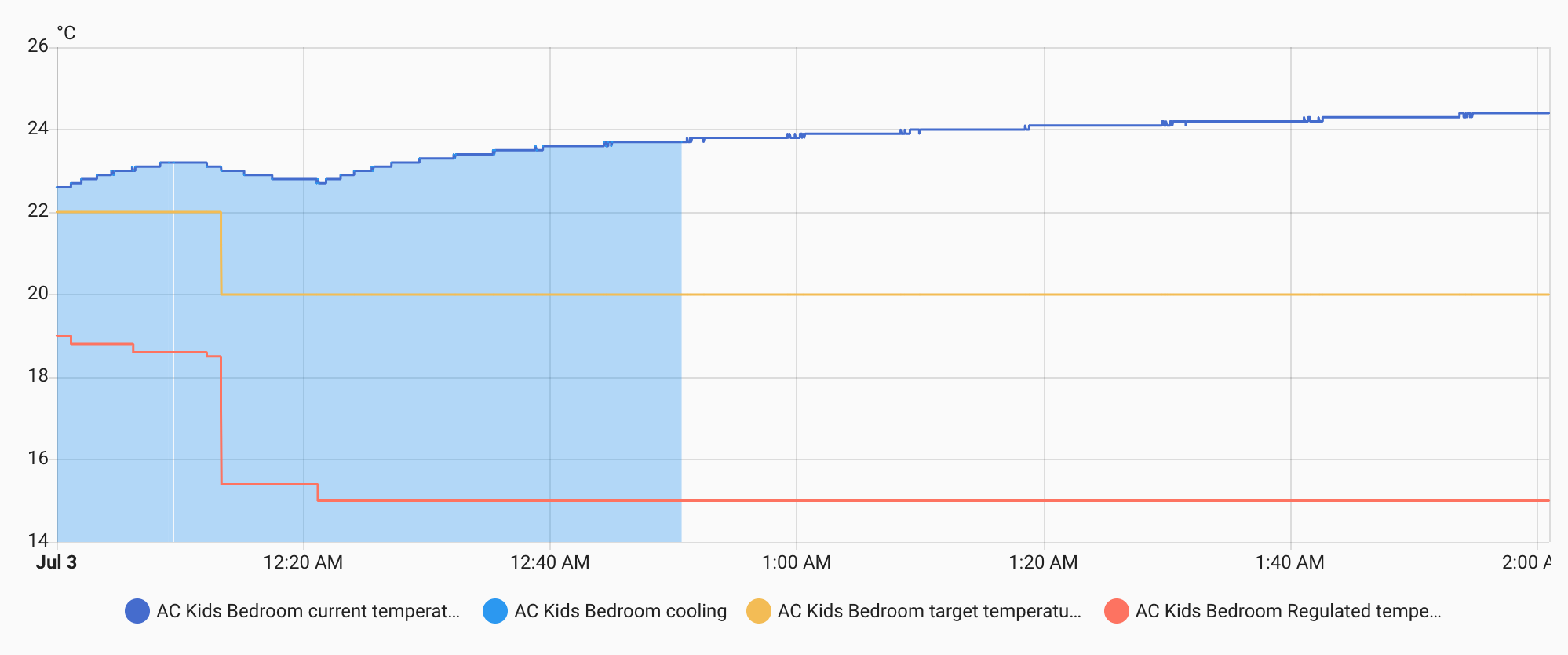
Heres the first part, where you can see that the temperature is rising, but VT keeps lowering the regulated temperature (as it should):
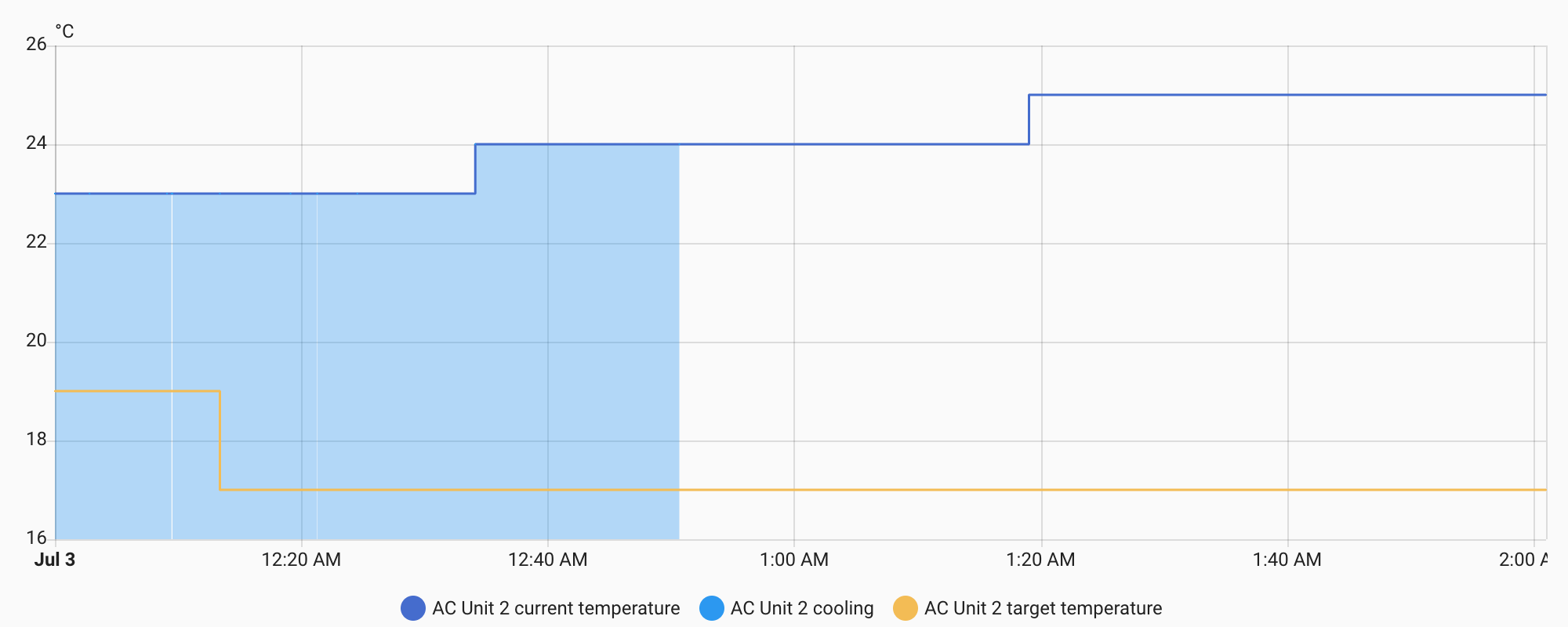
The AC also seems to following, the setpoint is constantly being lowered:
But then, here’s was the logfiles show:
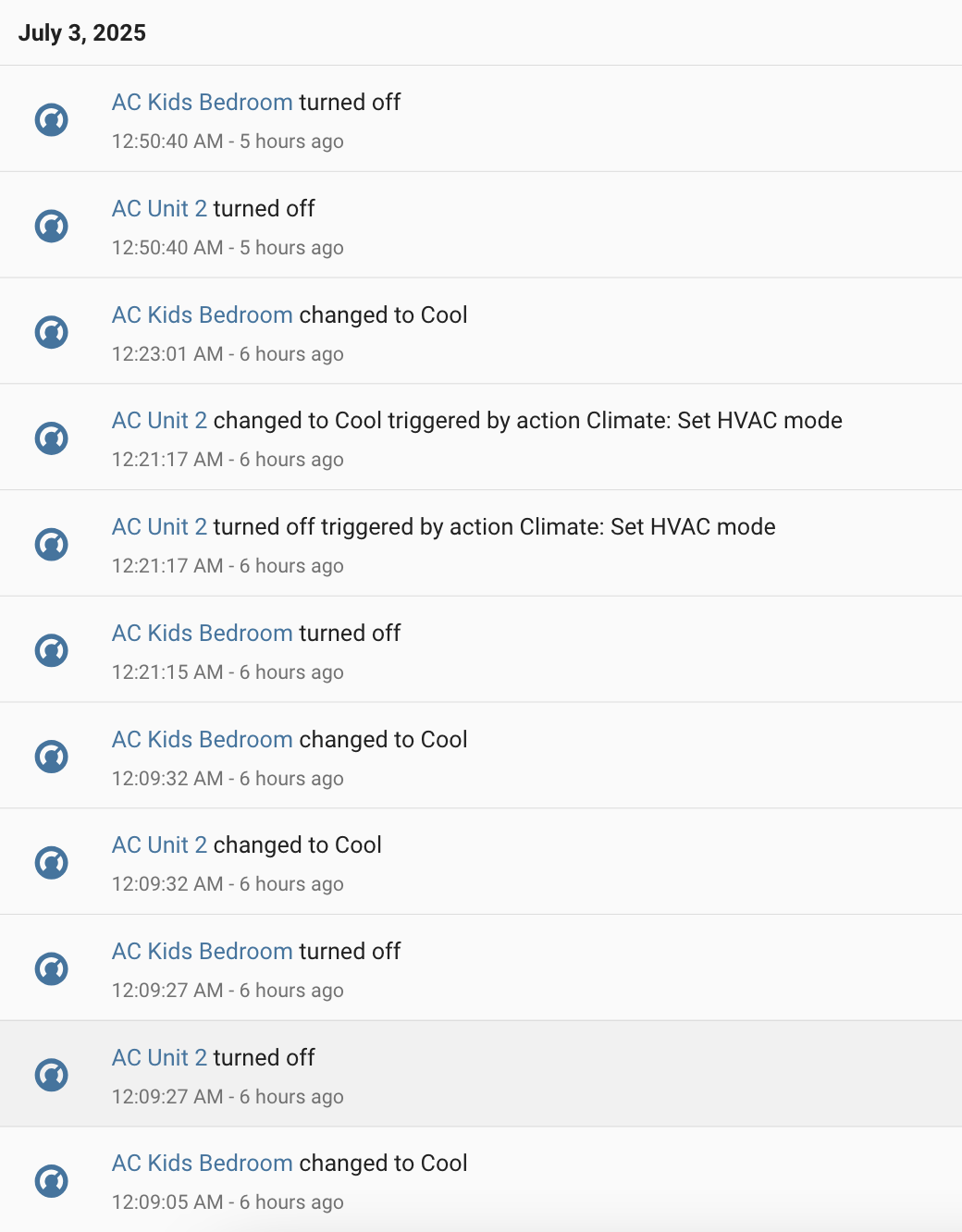
At 12:09:37, the underlying AC is being turned off. I’d have assumed this is coming from VTherm’s regulating (maybe ?). I have not found anything in the system logs, it only shows entries where the AC does not accept float values, but nothing indicating an issue that would lead to AC Unit 2 being turned off:

Somewhat lost here, cannot really pin down what’s going on here. Any ideas?
VTherm seems to send float temperature sensors to climates that only allow integers values.
The HASS UI correctly respects this (it is the target_temp_step attribute of the climate), but VTherm sends float values resuting in errors in the climate being controlled.
This would probably need to be fixed.
Traceback (most recent call last):
  File "/usr/src/homeassistant/homeassistant/core.py", line 2819, in _run_service_call_catch_exceptions
    await coro_or_task
  File "/usr/src/homeassistant/homeassistant/core.py", line 2842, in _execute_service
    return await target(service_call)
           ^^^^^^^^^^^^^^^^^^^^^^^^^^
  File "/usr/src/homeassistant/homeassistant/helpers/service.py", line 1011, in entity_service_call
    single_response = await _handle_entity_call(
                      ^^^^^^^^^^^^^^^^^^^^^^^^^^
        hass, entity, func, data, call.context
        ^^^^^^^^^^^^^^^^^^^^^^^^^^^^^^^^^^^^^^
    )
    ^
  File "/usr/src/homeassistant/homeassistant/helpers/service.py", line 1083, in _handle_entity_call
    result = await task
             ^^^^^^^^^^
  File "/usr/src/homeassistant/homeassistant/components/climate/__init__.py", line 828, in async_service_temperature_set
    await entity.async_set_temperature(**kwargs)
  File "/config/custom_components/toshiba_ac/climate.py", line 120, in async_set_temperature
    await self._device.set_ac_temperature(set_temperature)
  File "/usr/local/lib/python3.13/site-packages/toshiba_ac/device/__init__.py", line 275, in set_ac_temperature
    state.ac_temperature = val
    ^^^^^^^^^^^^^^^^^^^^
  File "/usr/local/lib/python3.13/site-packages/toshiba_ac/device/fcu_state.py", line 407, in ac_temperature
    self._ac_temperature = ToshibaAcFcuState.AcTemperature.to_raw(val)
                           ~~~~~~~~~~~~~~~~~~~~~~~~~~~~~~~~~~~~~~^^^^^
  File "/usr/local/lib/python3.13/site-packages/toshiba_ac/device/fcu_state.py", line 50, in to_raw
    return temp_to_raw[temperature]
           ~~~~~~~~~~~^^^^^^^^^^^^^
KeyError: 20.7
Dear Jean-Marc @jmcollin , dear community,
as autumn has arrived and I’ll soon need to start heating again, I’m wondering:
Is there a way to permanently change the values of the three presets (and their three _away presets) via automation?
I know about versatile_thermostat.set_preset_temperature, but as far as I understand, those changes don’t survive a reboot — so maybe there’s a more persistent solution?
Here’s what I’m trying to achieve:
I have around 10 rooms, all configured with their own presets, and managed through a mix of scheduler, motion detection, and presence detection — so quite a few moving parts.
I’d like to dynamically adjust all preset temperatures based on the outside temperature (a 3-day moving average).
- Right now, in early autumn, I’d like rooms to be slightly warmer, since I’m still used to summer and even 22 °C feels a bit cool.
- Later in winter, when it’s freezing outside, even 20 °C will feel comfortable enough.
So my goal is to write an automation that updates all preset temperatures accordingly — to stay comfortable while optimizing energy use.
Any ideas or best practices for making these preset changes persistent would be greatly appreciated. Thanks!
Loving the versatile thermostat.
A quick question.
I have alot of thermostats and TRV’s which have a minimum temperature of 5 degrees. my Vtherms can’t go below 7, so if I set a TRV to (say) 5, and have ‘follow’ turned on, the vtherm does not adjust because its below its allow threshold. How do I change it so that 5 is the minimum and not 7 ?
I looked in the central config, and it looks like I can set the minimum for presets, but this is whilst I am just in manual mode.
EDIT (Actually even in the central config I cant go below 7).
UPDATE:- Ignore me, it IS in the central config cog wheel.
One more question. Given that VT can directly control the boiler switch and turn the boiler on or off via the central configuration, how do I stop it doing this and only turn on the heating within a scheduled time, rather than purely being just based on the temperature. ?
I thought about using a template switch and block VT from turning on the real switch if outside the scheduled hours, but then if I really do need the heating on a short while later (and assume we are now in the scheduled heating hours), it will already think its on and not try again…
Hi, and thanks for the VT integration!
I’ve set up the central configuration, and in the device overview for the central config I can define the preset temperatures for Frost Protection, Comfort, and Eco.
However, in the entity select.central_mode, I can only select modes like Auto, Stopped, Cool, etc. — but not Eco (and therefore not its associated temperature).
So, what’s the purpose of defining the Eco, Boost, and other preset temperatures if they can’t be selected directly in the central_mode entity?
Hey,
Fyi I am really new to this and only been using it since Thursday last week.
The way I have it, so far, is to use a schedule helper, which currently will be on or off. So say 6:30 til 8am, then nothing and then 2:30 to 8pm.
I than I have written an automation which will take the start or end of a schedule as the trigger.
Then if the schedule is staring set to comfort, else set to eco.
As I am moving from only 4 TRVs, with 3 schedules to 11 TRVs and potentially 10 schedule (most likely not that many, but a few more), my plan is to write it as a script that will take the schedule start / endpoint, and a thermostat name and change It, making my automation a bit more generic and scalable.
I am not a huge fan of using the schedule helper, as it is not great for the WAF, but it worked as needed to get it up and running quickly.
Happy to share anything as I build it out, if interested of course.
I also have another script, as I see that the “follow underling temperature” is not recommended, so have not enabled that in versatile, but have written a script that will change the settings or versatile for the trv when the temperature is changed on the trv (i.e. manual change), this means that my wife and kids can use the trv as intended and it will then reflect on the versatile trv, have tested it and get almost instance changes, and so far (apart from it moving to manual mode, so I am thinking about how do I create a max time / check to flick back to schedule) it has given a bit more flexibility for a feature they are used to with heating.
I am having some issues with the “Follow underlying temp change” feature. I use Sonoff TRVZBs. I’d say that about 50% of the time, VTherm really uses the temperature set at the TRV as its new target temp, but it also very often just ignores the change. Debug logging says
underlying event is received less than 10 sec after command. Forget it to avoid loop
which matches my observations, that very often a second change is simply ignored. But this is something that very often happens: “Lets change the temp to 25°C” “Ohhh wait, 25°C is too warm lets do 24°C”
I then messed with the Minimum activation delay and Minimum deactivation delay, but no matter what I set this to, the 10s just always remains. Can someone explain to me what those settings do, and how to get rid of this 10sec blind spot?
I stopped using these addons, because i don’t need all those extra features they offer, just regulation with external temperature sensor. Versatile thermostat is too complicated for me (too many features i don’t need or understand…), so i used better thermostat at first. But then i realized that latest FW in sonoff’s allow use of external sensor. So now i only use automation which sends external temperature value into sonoff, and valve itself does the rest internally, without HA. For external sensor i use Xiaomi thermo/hygro BLE devices, connected to HA via BT proxy. I have such config about a week now and so far it works perfectly - room temperature is held at ± 0.5 degree of set temperature, which is perfect for my needs.
You can either write your own automation or just use THIS blueprint.
Note also that by default sonoff reacts at room temperature changes ± one degree - this can also be changed in latest fw - it allows lower settings, down to ± 0,2 degree.
Thanks a lot for this nice integration.
I have a room with 2 radiators controlled by Sonoff TRVZB.
Both are added to 1 versatile thermostat and the regulation to meet the target temperature works very well.
However the temperature of these 2 radiators are not equal. One is warm and the second is coldish. Does control versatile thermostat the opening % of both in parallel?
Is it possible to adjust the % of the radiotors like 1/3 power to radiator 1 and 2/3 power to radiator 2? I would like to have second one warmer than the first one.
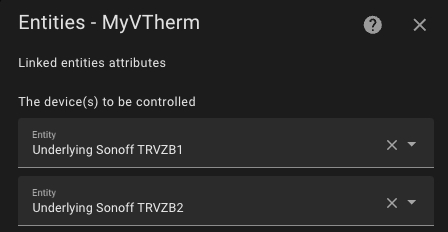
I can hear from the flowing water noise, that the valve on radiator 1 is more open than on radiator 2.
I’ve had similar “problem”… two valves, controlled simultaneously, and with same external temperature sensor. I must say that while “verstatile thermostat” is a great addon it’s just too complex for my simple needs.
Since sonoff valves (at least with latest fw) have the possibility to use external temperature sensor i ended up with a simple automation instead of using versatile, better… thermostat addon. I just send external temperature sensor value to sonoff’s entity
number.sonoff_....external_temperature_sensor_value.
For trigger i use time: i send value every minute no matter what. I guess this interval could be longer, say up to 5 minutes. I could use temperature change as trigger, but bear in mind that sonoff needs to receive external temperature value at least once every 2 hours, otherwise it will switch to internal sensor by itself. So it’s possible to use temperature change and additionally time, say every hour. Perhaps i’ll try that in the future.
And, of course, turn on:
switch.sonoff_ ..... external_temperature_sensor
Hello,
There is no link between central mode and central temperature configuration. Definining centrale temperature configuration allows you to reuse it for all your VTherms without having to reconfigure it.
The central mode is a feature that allows to control all your Vtherm with one action. You can turn off all your VTherm or set it to Frost protection (you go to holidays in winter) or whatever. If you set central mode to Frost protection or Eco it just switch all your VTherm to the preset Frost or Eco. Each VTherm will use the temperature configured for its preset (or the central preset config if configured like that).
Hello @menschmachine-de ,
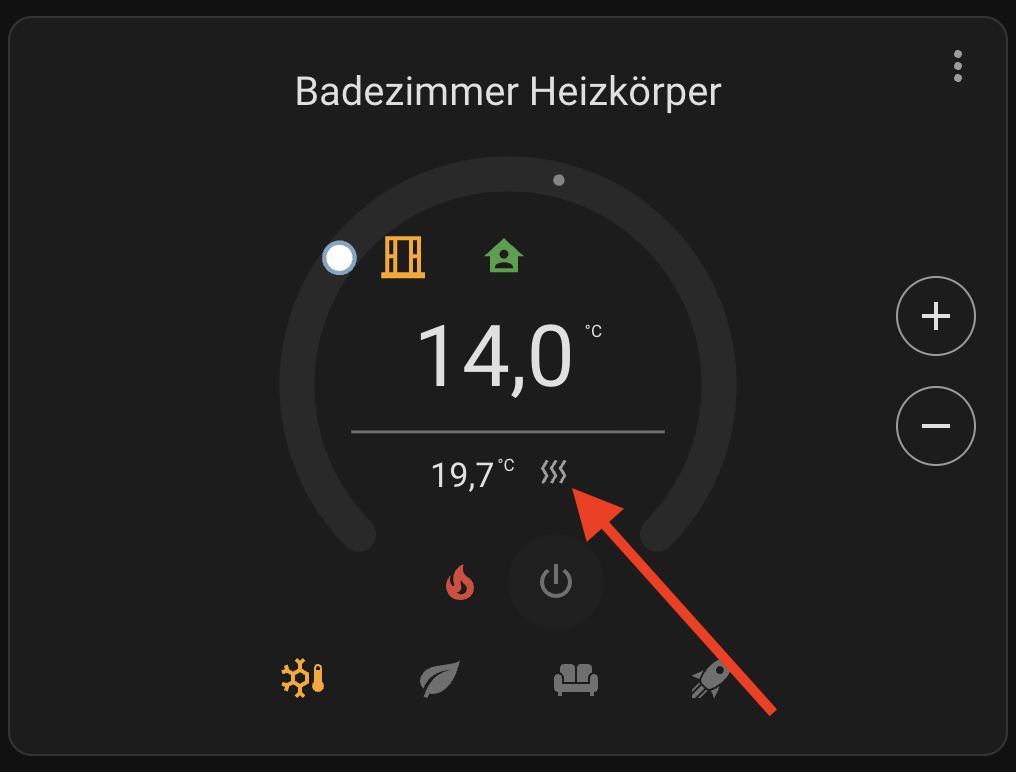
This represent the hvac_action attribute of the VTherm. The hvac_action tells if the device is heating or cooling or Idle. You can set the hvac_mode to heat but because the temperature is high, the device is not heating.
Hello @Pbathuk
This is exactly what does the “follow underlying temp” switch. So it is sad to not use it. With TRV there is no drawback of using it. It is more with air pump that have smart functions. It can change mode or preset or temperature itself and then it can generate conflict with VTherm orders.
Hello, [quote=“petwri, post:237, topic:546761”]
VTherm really uses the temperature set at the TRV as its new target temp, but it also very often just ignores the change. Debug logging says
[/quote]
Yes this is to avoid some fatal loop. Vtherm sends a setpoint, the setpoint changes, then Vtherm is triggered cause the setpoint has change, Vtherm calculate and maybe will resend some new setpoint, etc.
I will probably improve this feature as describe here: [Feature Request] - Change the way the temporal filter works for TRV commands · Issue #1072 · jmcollin78/versatile_thermostat · GitHub
Hello @Protoncek ,
Features are not mandotory, you can have a very simple configuration without any additional feature. Then you have a simple thermostat with the self-regulation which helps to keep a stable temperature and do some money saving.
Hello @Tim66,
Yes VTherm controls the both in parallel. It is not possible to control the percentage of power but you can specify the min openess with different values on each TRV.