Versatile Thermostat: a full feature thermostat (energy, door/window, presence, motion, preset, ... management)

I will probably improve this feature as describe here: [Feature Request] - Change the way the temporal filter works for TRV commands · Issue #1072 · jmcollin78/versatile_thermostat · GitHub

This would be very helpful. I fully agree with whats mentioned in the github-issue. A certain loop-avoidance makes sense, but a forced 10s delay seems rather drastic. Improvements here would be very welcome. In the meantime, I’ll do some ugly hacking and manually set it to 0.

The preview release with this improvement is v8.0.0. This is a beta but it works great, I will release soon.

1 Like

Don’t know if I’m wrong but I’m pretty sure that this worked before updating Versatile Thermostat.
With the latest version I can no longer select “heat/cool” mode through versitile themostat even though the underlying HVAC support it.

Anyone else with the same issue?

Hi @jmcollin, thanks for the great work. I have been using VTHERM for the last year and it works great. Having said that, I was a bit reluctant about updating to version 8.X (as the release log shows quite a few changes were made and I would not like to mess with the thermostats when temps outside are around 0).

The question I have is: how stable is the newest version? I am using Sonoff ZBTRV. Can anyone using those share some experience with the current version? Does it seem safe to update the integration?

Hi All,

I have a query… is there any way i can use Node-Red to monitor if a particular V-Therm is calling on the central configuration firing up the boiler?.. If so can i have this trigger a helper input_booleen?. I’m trying to have a readout to determing what poticular thermostat has triggered the boiler.

A quick run down of what i have setup, I have several Sonoff SNZB-02P, Sonoff TRVZB… I have a Central configuration setup to trigger a boiler relay.
The SNZB-02P & Sonoff TRVZB are all tied together through VTherms for each room.

— EDIT 01 —
I Beleve i have found a solution using the ( Call For Boiler ) Entity.

Node-Red JSON
[
    {
        "id": "1734410157d4d130",
        "type": "server-state-changed",
        "z": "a5574c37c05ee714",
        "g": "8b1d76b8df90e4b6",
        "name": "Watch Boiler Active Sensor",
        "server": "13912b6009076c18",
        "version": 6,
        "outputs": 1,
        "exposeAsEntityConfig": "",
        "entities": {
            "entity": [
                "sensor.nb_device_active_for_boiler"
            ],
            "substring": [],
            "regex": []
        },
        "outputInitially": false,
        "stateType": "str",
        "ifState": "",
        "ifStateType": "str",
        "outputOnlyOnStateChange": false,
        "for": "0",
        "forType": "num",
        "forUnits": "minutes",
        "ignorePrevStateNull": false,
        "ignorePrevStateUnknown": false,
        "ignorePrevStateUnavailable": false,
        "ignoreCurrentStateUnknown": false,
        "ignoreCurrentStateUnavailable": false,
        "outputProperties": [
            {
                "property": "payload",
                "propertyType": "msg",
                "value": "string",
                "valueType": "entityState"
            },
            {
                "property": "data",
                "propertyType": "msg",
                "value": "",
                "valueType": "eventData"
            },
            {
                "property": "topic",
                "propertyType": "msg",
                "value": "$entity.entity_id",
                "valueType": "jsonata"
            }
        ],
        "x": 210,
        "y": 640,
        "wires": [
            [
                "57019f88bdbae6f8"
            ]
        ]
    },
    {
        "id": "57019f88bdbae6f8",
        "type": "switch",
        "z": "a5574c37c05ee714",
        "g": "8b1d76b8df90e4b6",
        "name": "Check All Active Device IDs",
        "property": "data.new_state.attributes.active_device_ids",
        "propertyType": "msg",
        "rules": [
            {
                "t": "cont",
                "v": "number.ID1",
                "vt": "str"
            },
            {
                "t": "cont",
                "v": "number.ID2",
                "vt": "str"
            },
            {
                "t": "cont",
                "v": "number.ID3",
                "vt": "str"
            },
            {
                "t": "cont",
                "v": "number.ID3.1",
                "vt": "str"
            },
            {
                "t": "cont",
                "v": "number.ID4",
                "vt": "str"
            },
            {
                "t": "cont",
                "v": "number.ID5",
                "vt": "str"
            },
            {
                "t": "else"
            }
        ],
        "checkall": "true",
        "repair": false,
        "outputs": 7,
        "x": 480,
        "y": 640,
        "wires": [
            [
                "428ff10ef2f40dfb"
            ],
            [
                "9cd40f9df5d42836"
            ],
            [
                "db28a01720898ade"
            ],
            [
                "db28a01720898ade"
            ],
            [
                "5de915dcde6219b4"
            ],
            [
                "f9f85b119ecf101b"
            ],
            [
                "acb4514eeae4f287"
            ]
        ]
    },
    {
        "id": "428ff10ef2f40dfb",
        "type": "api-call-service",
        "z": "a5574c37c05ee714",
        "g": "8b1d76b8df90e4b6",
        "name": "BL1: ON",
        "server": "13912b6009076c18",
        "version": 7,
        "debugenabled": false,
        "action": "input_boolean.turn_on",
        "floorId": [],
        "areaId": [],
        "deviceId": [],
        "entityId": [
            "input_boolean.bl1_vtherm"
        ],
        "labelId": [],
        "data": "",
        "dataType": "jsonata",
        "mergeContext": "",
        "mustacheAltTags": false,
        "outputProperties": [],
        "blockInputOverrides": false,
        "domain": "input_boolean",
        "service": "turn_on",
        "x": 740,
        "y": 500,
        "wires": [
            []
        ]
    },
    {
        "id": "5de915dcde6219b4",
        "type": "api-call-service",
        "z": "a5574c37c05ee714",
        "g": "8b1d76b8df90e4b6",
        "name": "BL4: ON",
        "server": "13912b6009076c18",
        "version": 7,
        "debugenabled": false,
        "action": "input_boolean.turn_on",
        "floorId": [],
        "areaId": [],
        "deviceId": [],
        "entityId": [
            "input_boolean.bl4_vtherm"
        ],
        "labelId": [],
        "data": "",
        "dataType": "jsonata",
        "mergeContext": "",
        "mustacheAltTags": false,
        "outputProperties": [],
        "blockInputOverrides": false,
        "domain": "input_boolean",
        "service": "turn_on",
        "x": 740,
        "y": 680,
        "wires": [
            []
        ]
    },
    {
        "id": "acb4514eeae4f287",
        "type": "api-call-service",
        "z": "a5574c37c05ee714",
        "g": "8b1d76b8df90e4b6",
        "name": "BL: OFF",
        "server": "",
        "version": 7,
        "debugenabled": false,
        "action": "",
        "floorId": [],
        "areaId": [],
        "deviceId": [],
        "entityId": [
            "BL1: OFF",
            "BL2: OFF",
            "BL3: OFF",
            "BL4: OFF",
            "BL5: OFF"
        ],
        "labelId": [],
        "data": "",
        "dataType": "jsonata",
        "mergeContext": "",
        "mustacheAltTags": false,
        "outputProperties": [],
        "blockInputOverrides": false,
        "domain": "input_boolean",
        "service": "turn_off",
        "x": 740,
        "y": 820,
        "wires": [
            []
        ]
    },
    {
        "id": "9cd40f9df5d42836",
        "type": "api-call-service",
        "z": "a5574c37c05ee714",
        "g": "8b1d76b8df90e4b6",
        "name": "BL2: ON",
        "server": "13912b6009076c18",
        "version": 7,
        "debugenabled": false,
        "action": "input_boolean.turn_on",
        "floorId": [],
        "areaId": [],
        "deviceId": [],
        "entityId": [
            "input_boolean.bl2_vtherm"
        ],
        "labelId": [],
        "data": "",
        "dataType": "jsonata",
        "mergeContext": "",
        "mustacheAltTags": false,
        "outputProperties": [],
        "blockInputOverrides": false,
        "domain": "input_boolean",
        "service": "turn_on",
        "x": 740,
        "y": 560,
        "wires": [
            []
        ]
    },
    {
        "id": "db28a01720898ade",
        "type": "api-call-service",
        "z": "a5574c37c05ee714",
        "g": "8b1d76b8df90e4b6",
        "name": "BL3: ON",
        "server": "13912b6009076c18",
        "version": 7,
        "debugenabled": false,
        "action": "input_boolean.turn_on",
        "floorId": [],
        "areaId": [],
        "deviceId": [],
        "entityId": [
            "input_boolean.bl3_vtherm"
        ],
        "labelId": [],
        "data": "",
        "dataType": "jsonata",
        "mergeContext": "",
        "mustacheAltTags": false,
        "outputProperties": [],
        "blockInputOverrides": false,
        "domain": "input_boolean",
        "service": "turn_on",
        "x": 740,
        "y": 620,
        "wires": [
            []
        ]
    },
    {
        "id": "f9f85b119ecf101b",
        "type": "api-call-service",
        "z": "a5574c37c05ee714",
        "g": "8b1d76b8df90e4b6",
        "name": "BL5: ON",
        "server": "13912b6009076c18",
        "version": 7,
        "debugenabled": false,
        "action": "input_boolean.turn_on",
        "floorId": [],
        "areaId": [],
        "deviceId": [],
        "entityId": [
            "input_boolean.bl5_vtherm"
        ],
        "labelId": [],
        "data": "",
        "dataType": "jsonata",
        "mergeContext": "",
        "mustacheAltTags": false,
        "outputProperties": [],
        "blockInputOverrides": false,
        "domain": "input_boolean",
        "service": "turn_on",
        "x": 740,
        "y": 740,
        "wires": [
            []
        ]
    },
    {
        "id": "acc3c06f0e031227",
        "type": "comment",
        "z": "a5574c37c05ee714",
        "g": "8b1d76b8df90e4b6",
        "name": "Boiler Activation Check ( Who )",
        "info": "",
        "x": 230,
        "y": 500,
        "wires": []
    },
    {
        "id": "13912b6009076c18",
        "type": "server",
        "name": "HA SERVER",
        "addon": true,
        "rejectUnauthorizedCerts": true,
        "ha_boolean": [],
        "connectionDelay": false,
        "cacheJson": false,
        "heartbeat": true,
        "heartbeatInterval": "10",
        "statusSeparator": "",
        "enableGlobalContextStore": false
    },
    {
        "id": "248f5f8b2222fc1e",
        "type": "global-config",
        "env": [],
        "modules": {
            "node-red-contrib-home-assistant-websocket": "0.80.3"
        }
    }
]
Kind Regars
Mr. S. J. Dorrington

For an over_climate entry for a Sonoff TRV with direct valve regulation, is the min regulation threshold percentage set as a whole number or a decimal? E.g. I want there to be a min 10% difference, do I enter 10, or 0.1?

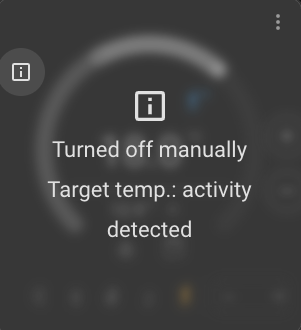
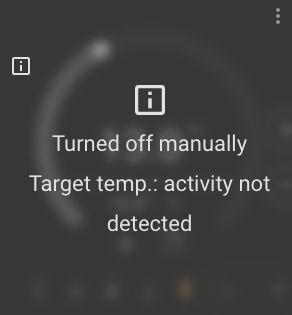
Not following underlying temp changes but I often find my vtherm “Turned off Manually”. I am using this atop a evohome climate entity and I have disabled all scheduled setpoint adjustments in the evohome app.

I have a motion group entity which does reliably see motion, and a contact sensor on the door to the room which I configured as a window such that it will change to eco should the door be open or nobody in the room.

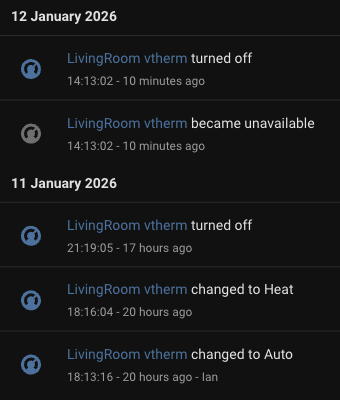
All I see in the logs is that it was turned off:

I did run through the vtherm config to check it all out at 14:13 today so I think that is when it went unavailable.
I have reviewed other entries in the log in the minutes before it’s turned off but nothing stands out to me.

Could anybody help me understand how I might track down what is turning this off?

Hello,

You need to set the log level to INFO for VTherm (see versatile_thermostat/documentation/en/troubleshooting.md at 2c3fc91f57a6425acd84e46dac73393f0e2cd770 · jmcollin78/versatile_thermostat · GitHub), wait for reproduction and then dowload the logs. You should see that event causes the off state.

You can post it here (keep only log just before the event) and only VTherm logs.

Is VTherm turning off at startup ?
please post also your custom attributes like explain here: versatile_thermostat/documentation/en/reference.md at 2c3fc91f57a6425acd84e46dac73393f0e2cd770 · jmcollin78/versatile_thermostat · GitHub

Hi everyone,

First of all, thank you for this amazing integration! I have been using Versatile Thermostat (v8.5.1) for about two weeks now and am very happy with the feature set.

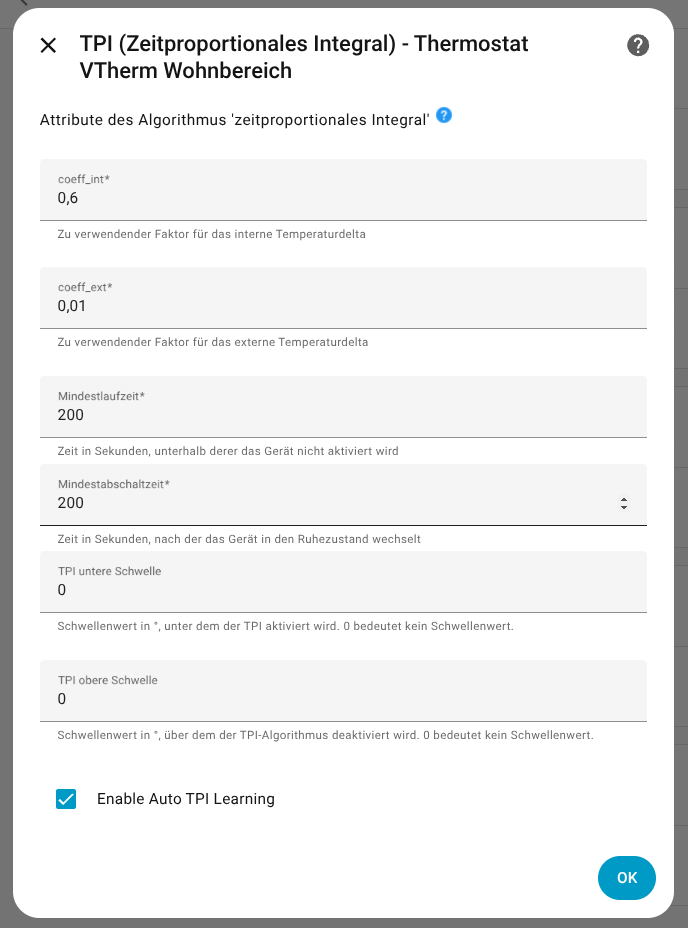
However, I have a question regarding Auto TPI Learning. I enabled it in the configuration, but it seems it never starts. The state remains Off (or toggles to unknown briefly) and never switches to learning or active. The auto_tpi_learning attribute is completely empty {}.

I have two main VTherm entities configured differently, but both show the same behavior regarding TPI learning.

I have two main VTherm entities configured differently, but both show the same behavior regarding TPI learning.

  1. Main Room (Type: over_switch)
    Controlling a switch (Shelly).
Click to see Attributes (YAML)
type: over_switch
hvac_modes: [heat, "off"]
current_temperature: 16
target_temperature: 16
auto_tpi_state: "off"
auto_tpi_learning: {}
on_percent: 0.1
# TPI Settings
tpi_coef_int: 0.6
tpi_coef_ext: 0.01
minimal_activation_delay: 200
  1. Bedroom (Type: over_climate_valve)
    Controlling a TRV via Valve Position (Zigbee).
Click to see Attributes (YAML)
type: over_climate_valve
hvac_modes: [heat, sleep, "off"]
have_valve_regulation: true
current_temperature: 12.6
target_temperature: 12
auto_tpi_state: "off"
auto_tpi_learning: {}
valve_open_percent: 0
# TPI Settings
tpi_coef_int: 0.6
tpi_coef_ext: 0.01
minimal_activation_delay: 10

Looking at the history of sensor…_auto_tpi_learning_state, it only fluctuates between unknown and Off.

Here you can find the history of one of the Vtherm instances: history_vtherm_7_days.zip

Is there a specific condition (min temperature delta, specific HVAC mode duration) that prevents the learning from kicking in? Or did I miss a configuration step for the valve regulation?

Thanks for your help!

@toot-217

However, I have a question regarding Auto TPI Learning. I enabled it in the configuration, but it seems it never starts. The state remains Off (or toggles to unknown briefly) and never switches to learning or active. The auto_tpi_learning attribute is completely empty {}.

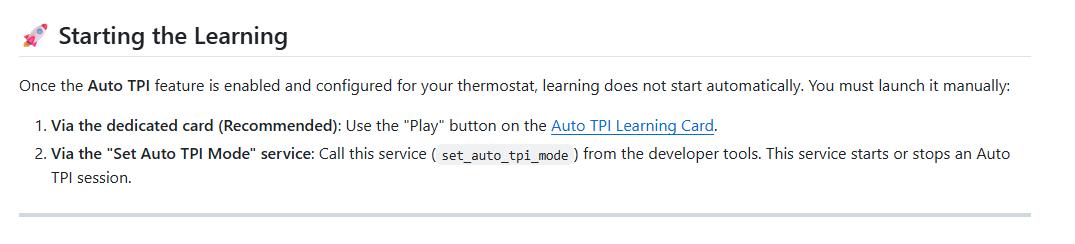
Learning sessions are started over service call, or from the auto tpi learning card I suggest to install.

You should read the doc first. It has been rewritten recently to be more concise and accessible, and is mandatory for such a feature.

Just managed to catch it happening:

2026-01-18 13:47:14.155 INFO (MainThread) [custom_components.versatile_thermostat.base_thermostat] 
2026-01-18 13:47:14.155 INFO (MainThread) [custom_components.versatile_thermostat.base_thermostat] ---------------------> NEW EVENT: VersatileThermostat-Lounge vtherm - Temperature changed to state 7.51799392700195 --------------------------------------------------------------
2026-01-18 13:48:10.505 INFO (MainThread) [custom_components.versatile_thermostat.thermostat_climate] VersatileThermostat-LivingRoom vtherm - Calling ThermostatClimate._send_regulated_temperature force=False
2026-01-18 13:48:10.506 INFO (MainThread) [custom_components.versatile_thermostat.thermostat_climate] VersatileThermostat-LivingRoom vtherm - regulation calculation will be done
2026-01-18 13:48:10.506 INFO (MainThread) [custom_components.versatile_thermostat.thermostat_climate] VersatileThermostat-LivingRoom vtherm - Regulated temp have changed to 18.0. Resend it to underlyings
2026-01-18 13:48:10.506 INFO (MainThread) [custom_components.versatile_thermostat.thermostat_climate] VersatileThermostat-LivingRoom vtherm - dtemp (0.0) is < 0.5 -> forget the regulation send for climate.01_138490_00
2026-01-18 13:48:10.506 INFO (MainThread) [custom_components.versatile_thermostat.base_thermostat] 
2026-01-18 13:48:10.506 INFO (MainThread) [custom_components.versatile_thermostat.base_thermostat] ---------------------> NEW EVENT: VersatileThermostat-LivingRoom vtherm - Periodical control cycle started --------------------------------------------------------------
2026-01-18 13:48:10.543 INFO (MainThread) [custom_components.versatile_thermostat.base_thermostat] 
2026-01-18 13:48:10.544 INFO (MainThread) [custom_components.versatile_thermostat.base_thermostat] ---------------------> NEW EVENT: VersatileThermostat-Kitchen Heating - Periodical control cycle started --------------------------------------------------------------
2026-01-18 13:48:10.578 INFO (MainThread) [custom_components.versatile_thermostat.base_thermostat] 
2026-01-18 13:48:10.578 INFO (MainThread) [custom_components.versatile_thermostat.base_thermostat] ---------------------> NEW EVENT: VersatileThermostat-Lounge vtherm - Periodical control cycle started --------------------------------------------------------------
2026-01-18 13:48:58.740 INFO (MainThread) [custom_components.versatile_thermostat.thermostat_climate] 
2026-01-18 13:48:58.740 INFO (MainThread) [custom_components.versatile_thermostat.thermostat_climate] ---------------------> NEW EVENT: VersatileThermostat-LivingRoom vtherm - Underlying climate state changed from <state climate.01_138490_00=off; hvac_modes=[<HVACMode.HEAT: 'heat'>, <HVACMode.AUTO: 'auto'>], min_temp=5.0, max_temp=23.0, target_temp_step=0.5, preset_modes=['none', 'temporary', 'permanent'], current_temperature=15.3, temperature=5.0, preset_mode=none, id=01:138490_00, params=config=min_temp=5.0, max_temp=23.0, local_override=True, openwindow_function=True, multiroom_mode=False, mode=mode=follow_schedule, setpoint=5.0, name=LivingRoom, zone_idx=00, heating_type=radiator_valve, mode=mode=follow_schedule, setpoint=5.0, config=min_temp=5.0, max_temp=23.0, local_override=True, openwindow_function=True, multiroom_mode=False, schedule=None, schedule_version=None, icon=mdi:radiator, friendly_name=LivingRoom, supported_features=17 @ 2026-01-18T11:35:23.775382+00:00> to new_state <state climate.01_138490_00=off; hvac_modes=[<HVACMode.HEAT: 'heat'>, <HVACMode.AUTO: 'auto'>], min_temp=5.0, max_temp=23.0, target_temp_step=0.5, preset_modes=['none', 'temporary', 'permanent'], current_temperature=15.2, temperature=5.0, preset_mode=none, id=01:138490_00, params=config=min_temp=5.0, max_temp=23.0, local_override=True, openwindow_function=True, multiroom_mode=False, mode=mode=follow_schedule, setpoint=5.0, name=LivingRoom, zone_idx=00, heating_type=radiator_valve, mode=mode=follow_schedule, setpoint=5.0, config=min_temp=5.0, max_temp=23.0, local_override=True, openwindow_function=True, multiroom_mode=False, schedule=None, schedule_version=None, icon=mdi:radiator, friendly_name=LivingRoom, supported_features=17 @ 2026-01-18T11:35:23.775382+00:00> --------------------------------------------------------------
2026-01-18 13:48:58.740 INFO (MainThread) [custom_components.versatile_thermostat.thermostat_climate] VersatileThermostat-LivingRoom vtherm - Underlying climate climate.01_138490_00 have changed. new_hvac_mode is off (vs auto), new_hvac_action=None (vs None), new_target_temp=5.0 (vs 18.0), new_fan_mode=None (vs None)
2026-01-18 13:48:58.740 INFO (MainThread) [custom_components.versatile_thermostat.base_thermostat] VersatileThermostat-LivingRoom vtherm - find preset temp: comfort
2026-01-18 13:48:58.740 INFO (MainThread) [custom_components.versatile_thermostat.base_thermostat] VersatileThermostat-LivingRoom vtherm - current state changed to VThermState(hvac_mode=off, target_temperature=18.0, preset=activity, is_changed=True)
2026-01-18 13:48:58.740 INFO (MainThread) [custom_components.versatile_thermostat.base_thermostat] VersatileThermostat-LivingRoom vtherm - Applying new hvac mode: off
2026-01-18 13:48:58.740 INFO (MainThread) [custom_components.versatile_thermostat.const] VersatileThermostat-LivingRoom vtherm - Sending event EventType.HVAC_MODE_EVENT with data: {'hvac_mode': 'off'}
2026-01-18 13:49:08.562 ERROR (MainThread) [homeassistant.components.mqtt.number] Invalid value for number.kitchen_radiator_timer_mode_target_temp: 0 (range 4.0 - 35.0)
2026-01-18 13:49:11.563 ERROR (MainThread) [homeassistant.components.mqtt.number] Invalid value for number.kitchen_radiator_timer_mode_target_temp: 0 (range 4.0 - 35.0)
2026-01-18 13:49:14.152 INFO (MainThread) [custom_components.versatile_thermostat.base_thermostat] 
2026-01-18 13:49:14.152 INFO (MainThread) [custom_components.versatile_thermostat.base_thermostat] ---------------------> NEW EVENT: VersatileThermostat-Lounge vtherm - Temperature changed to state 7.50288772583008 --------------------------------------------------------------

Hello everybody

Thanks for this comprehensive integration with the TPI enhancement.

Maybe one stupid question, but I didn’t find the answer in the document and tis topic :

What happens when HA starts ?
It seems that VTherm heat button is Off and climate is set to manual.

Is there a way to set VTherm to restart the climate in the situation before HA stopped ?

Thanks for ypour help

Oh, I didn’t provide the config, sorry!

hvac_modes:
  - heat
  - auto
min_temp: 5
max_temp: 25
target_temp_step: 0.5
preset_modes:
  - none
  - frost
  - eco
  - comfort
  - boost
  - activity
current_temperature: 14.9
temperature: 18
hvac_action: idle
preset_mode: activity
hvac_mode: "off"
ema_temp: 14.6
specific_states:
  is_on: false
  last_central_mode: null
  last_update_datetime: "2026-01-19T13:28:10.622108+00:00"
  ext_current_temperature: 6.11111111111111
  last_temperature_datetime: "2026-01-19T13:25:11.448423+00:00"
  last_ext_temperature_datetime: "2026-01-19T12:02:08.656769+00:00"
  is_device_active: false
  device_actives: []
  nb_device_actives: 0
  ema_temp: 14.6
  temperature_slope: 2.95
  hvac_off_reason: null
  total_energy: 925.14
  last_change_time_from_vtherm: "2026-01-19T13:27:01.426151+00:00"
  messages:
    - target_temp_activity_detected
  is_sleeping: false
  is_locked: false
  is_recalculate_scheduled: false
configuration:
  ac_mode: false
  type: over_climate
  is_controlled_by_central_mode: false
  target_temperature_step: 0.5
  timezone: Europe/London
  temperature_unit: °C
  is_used_by_central_boiler: false
  max_on_percent: null
  have_valve_regulation: false
  cycle_min: 10
preset_temperatures:
  frost_temp: 5
  eco_temp: 13
  boost_temp: 20
  comfort_temp: 18
  frost_away_temp: 0
  eco_away_temp: 0
  boost_away_temp: 0
  comfort_away_temp: 0
current_state:
  hvac_mode: "off"
  target_temperature: 18
  preset: activity
requested_state:
  hvac_mode: "off"
  target_temperature: 5
  preset: activity
is_presence_configured: false
is_power_configured: false
power_manager:
  device_power: 1
  mean_cycle_power: 0
is_motion_configured: true
motion_manager:
  motion_sensor_entity_id: binary_sensor.living_room_motion_group
  motion_state: "on"
  motion_delay_sec: 30
  motion_off_delay_sec: 300
  motion_preset: comfort
  no_motion_preset: frost
is_window_configured: true
is_window_auto_configured: false
window_manager:
  window_state: "off"
  window_auto_state: unavailable
  window_action: window_frost_temp
  is_window_bypass: false
  window_sensor_entity_id: binary_sensor.livingroom_door_contact
  window_delay_sec: 40
  window_off_delay_sec: 30
  window_auto_open_threshold: 3
  window_auto_close_threshold: 0
  window_auto_max_duration: 30
is_safety_configured: true
safety_manager:
  safety_state: "off"
  safety_delay_min: 60
  safety_min_on_percent: 0.5
  safety_default_on_percent: 0.1
is_lock_configured: true
lock_manager:
  is_locked: false
  lock_users: true
  lock_automations: true
  lock_code: false
timed_preset_manager:
  is_active: false
  preset: null
  end_time: null
  remaining_time_min: 0
is_heating_failure_detection_configured: false
is_auto_start_stop_configured: false
fan_mode: null
fan_modes: []
is_over_climate: true
regulation_accumulated_error: 0
regulated_target_temperature: 18
vtherm_over_climate:
  start_hvac_action_date: null
  last_mean_power_cycle: 1
  underlying_entities:
    - climate.01_138490_00
  is_regulated: false
  auto_fan_mode: auto_fan_none
  current_auto_fan_mode: auto_fan_none
  auto_activated_fan_mode: null
  auto_deactivated_fan_mode: null
  follow_underlying_temp_change: false
  auto_regulation_use_device_temp: false
friendly_name: LivingRoom vtherm
supported_features: 401

Hi,
I’m using Versatile Thermostat for quite some time, and last week I decided to use the new auto TPI feature.

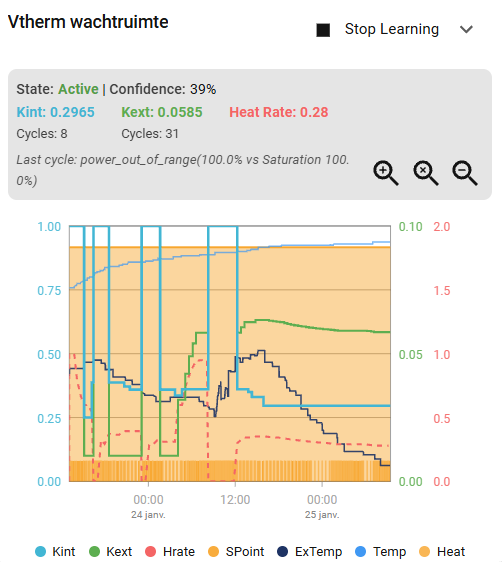
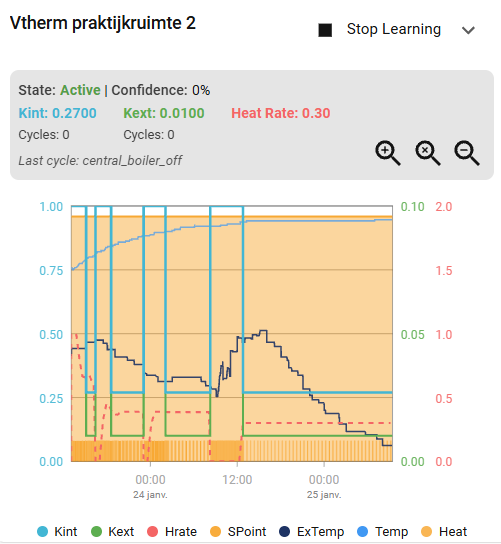
I enabled it on three rooms (of 11 rooms). And each room seems to have a different behaviour in the discovery learning:

I enabled learning when the temperature was rather low (18°) and needed to increase to a higher temperature (21°).

This room seems to do fine. Confidence is increasing and number of cycles are increasing:

This room has stalled. At some point in time, no new cycles are detected. Confidence has stayed at 23% for multiple days. I have reduced the temperature to 19° and then increased back to 21° to see if it would have any impact, but it didn’t.

And this room still has zero confidence. Although the temperature has increased up to the setpoint temperature.

What does this mean? All rooms have now reached the target temperature, so there is no real heating problem. But the learning behaviour is very different.

Hello @Merangle ,

At startup, VTherm restores its previous state and synchronize with the device controlled (the underlying equipement).

In the GitHub docs regarding tuning examples it mentions notifications for battery powered temperature and climate sensors.

Versatile Thermostat allows you to be notified when such an event occurs. Set up the appropriate alerts as soon as you start using this thermostat. See (#notifications).

But I can’t find any link or reference to notifications and alerts in the docs.

1 Like

Hi! I’m really appreciate for your great work! I love this add-on and using it for a year already.

I’m trying new feature with auto learning and have a couple of question:

  1. Is it OK to use them with opened windows? I’m using CO2 sensor and without slightly opened window the sensor quickly goes off the scale. It seems to me that the Heat Rate graph displays low values ​​when the window is open (0.2-0.4), but as soon as I close the window, the value increases sharply (1.3.1.5). Is this normal and doesn’t it break the algorithms?

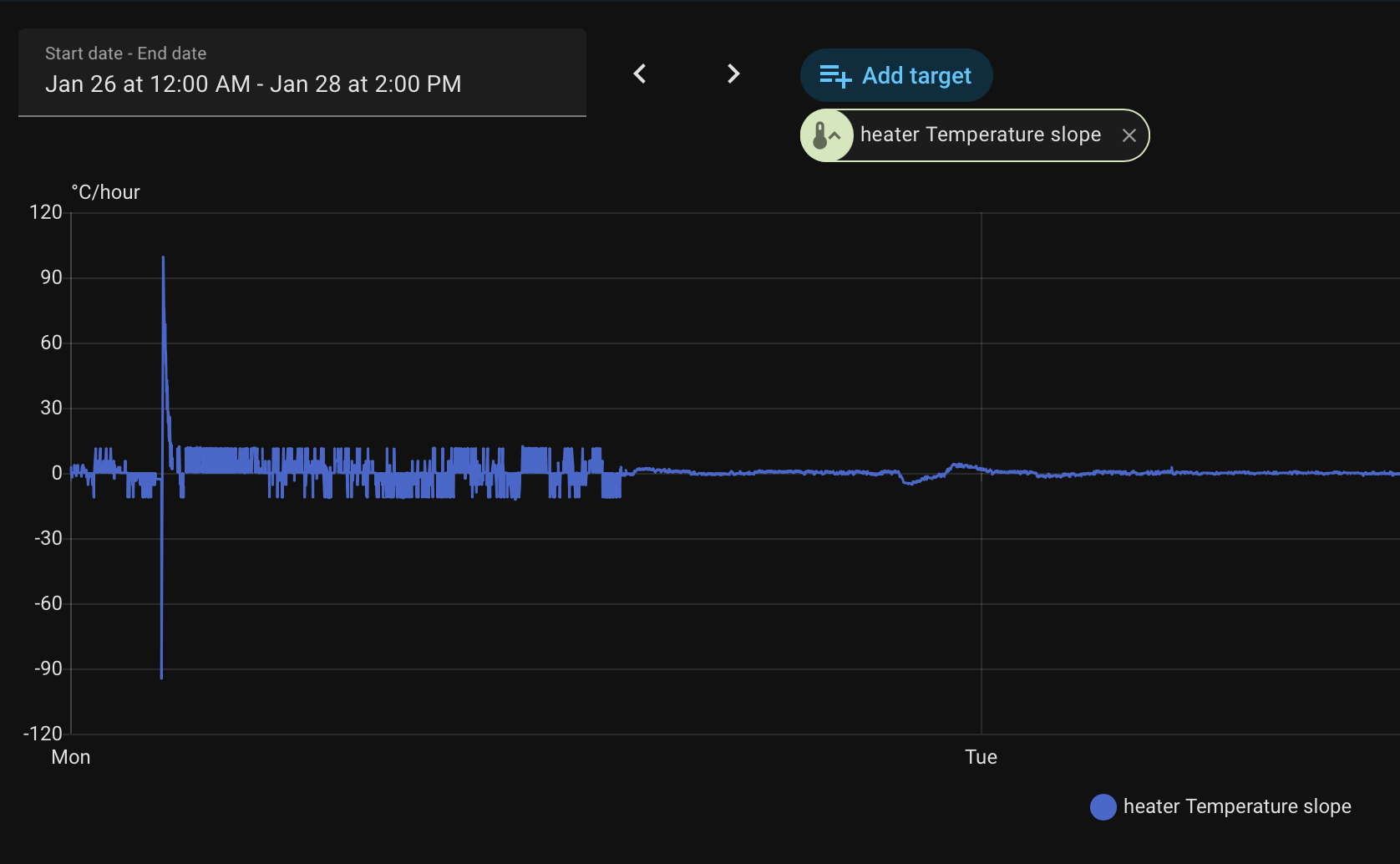
  2. I have a network-powered Zigbee sensor that sends readings once per second. I average the values ​​over 40 seconds, but still update the readings once per second. I noticed that the integration is very difficult with these readings; there’s a spike (-10 - +10) in the Temperature Slope graph (see screenshots).
    I configured it so the readings accumulate over 30 seconds and the average is calculated, but the sensor for the versatile thermostat updates every 30 seconds, and all the spikes are gone. Perhaps it would be worth adding similar filtering (like throttling) inside the thermostat itself to prevent these spikes? Or is this not critical?

I’m a new user and add only one screenshot(

Hi!

I’ve just switched to Versatile Thermostat after having used various based Automation-based solutions for years, and it’s amazing!

I’m currently moving over from Tado due to their policy changes last year, but I had a key question!

Is there any standard approach that people use for OpenTherm Combi Boilers with Versatile Thermostat and Sonoff TVRs?

This is the last piece of the puzzle stopping me from switching, so I’d love some advice before jumping down the rabbithole of OpenTherm again! (It was frustrating enough with Tado!)

Thanks!!!

Just a heads up, 2026.2 broke VTherm for me - noticed no rooms were calling for heat shortly after updating despite being well below target, increased target on all rooms but still 0kW being called. VTherm itself seemed to be up and running - tbh I didn’t diagnose for long as it’s late, rolled back HA and it’s working fine again.