Visual Mapper v0.4.0 - Transform Android Devices into HA Sensors & Automation
Hey everyone! I’ve been working on an open-source project that I think could be useful for the community, and I’m looking for testers and contributors to help improve it.
What is Visual Mapper?
Visual Mapper lets you create Home Assistant sensors from any Android app’s UI and automate device interactions - all without modifying the Android app itself. It works by connecting to your Android device via ADB and reading the screen/UI elements.
Example Use Cases:
-
Create a sensor from your EV app showing battery %, range, charging status
-
Monitor your robot vacuum’s status from its Android app
-
Read values from legacy devices that only have Android apps (old thermostats, cameras, etc.)
-
Automate repetitive tasks: “Open app → Navigate to screen → Capture value → Return home”
How It Works
-
Connect your Android device via WiFi ADB (Android 11+) or USB
-
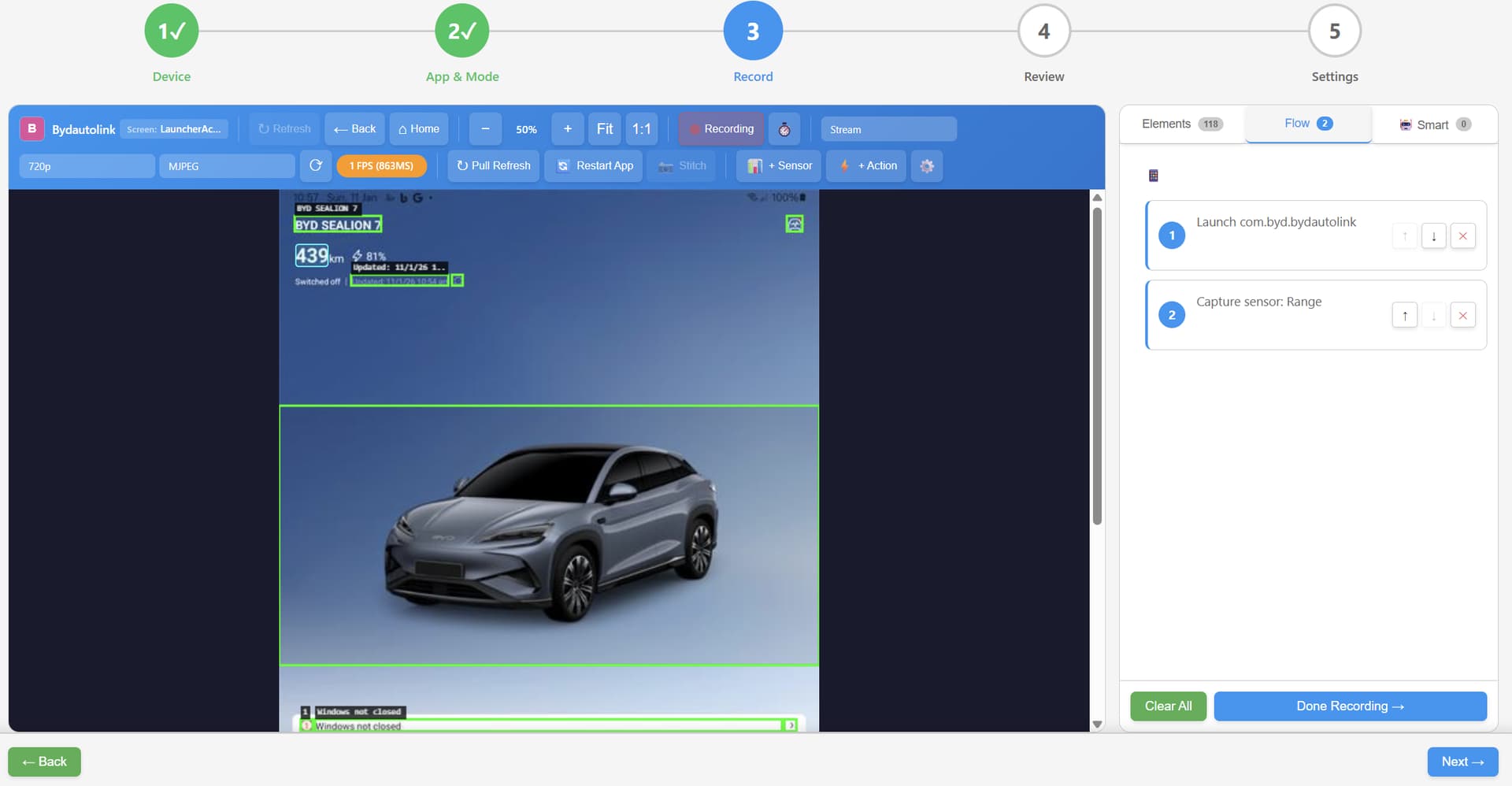
Use the visual Flow Wizard to record navigation steps
-
Select UI elements to capture as sensors
-
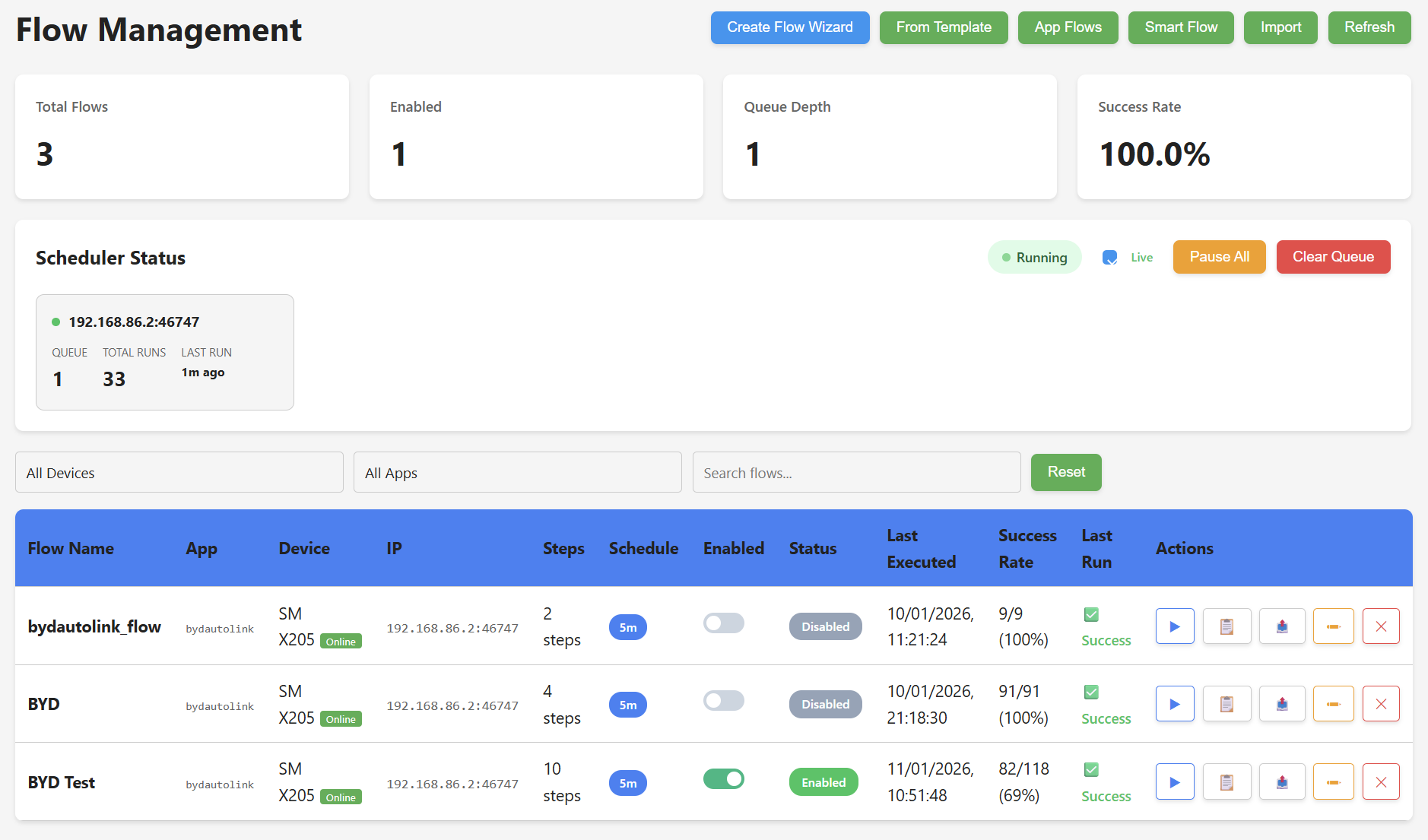
Schedule flows to run periodically (e.g., every 5 minutes)
-
Sensors auto-publish to HA via MQTT with auto-discovery
Current Features (v0.4.0)
-
 WiFi ADB connection (Android 11+)
 -
USB ADB connection
-
Screenshot capture & element detection
-
Visual Flow Wizard (record & replay)
-
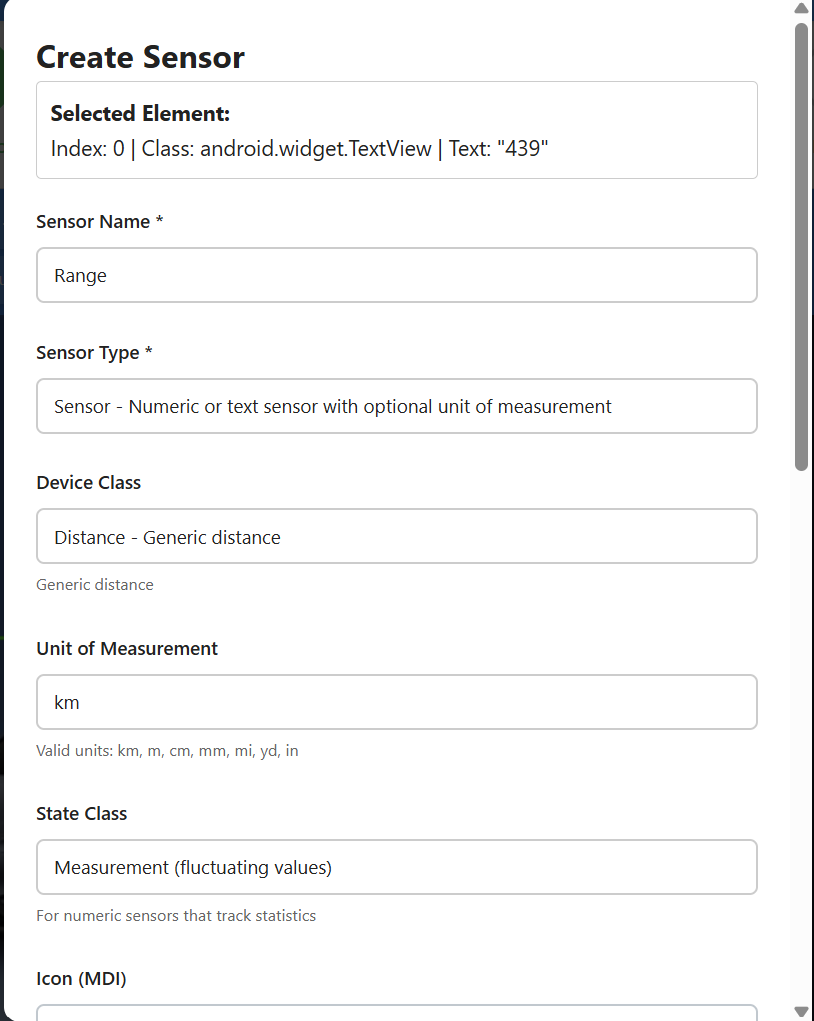
Sensor creation from UI elements
-
MQTT auto-discovery to Home Assistant
-
Scheduled flow execution
-
Multi-device support
-
Live screen streaming (MJPEG v2)
-
Auto-unlock (PIN/passcode)
-
Smart screen sleep prevention
-
ML Training Server (optional)
-
Android Companion App
-
Dark mode UI
-
NEW Full-width responsive UI
-
NEW Mobile/tablet support
Screenshots
Flow Wizard UI
Flow Management
Sensor creation dialog
Dashboard
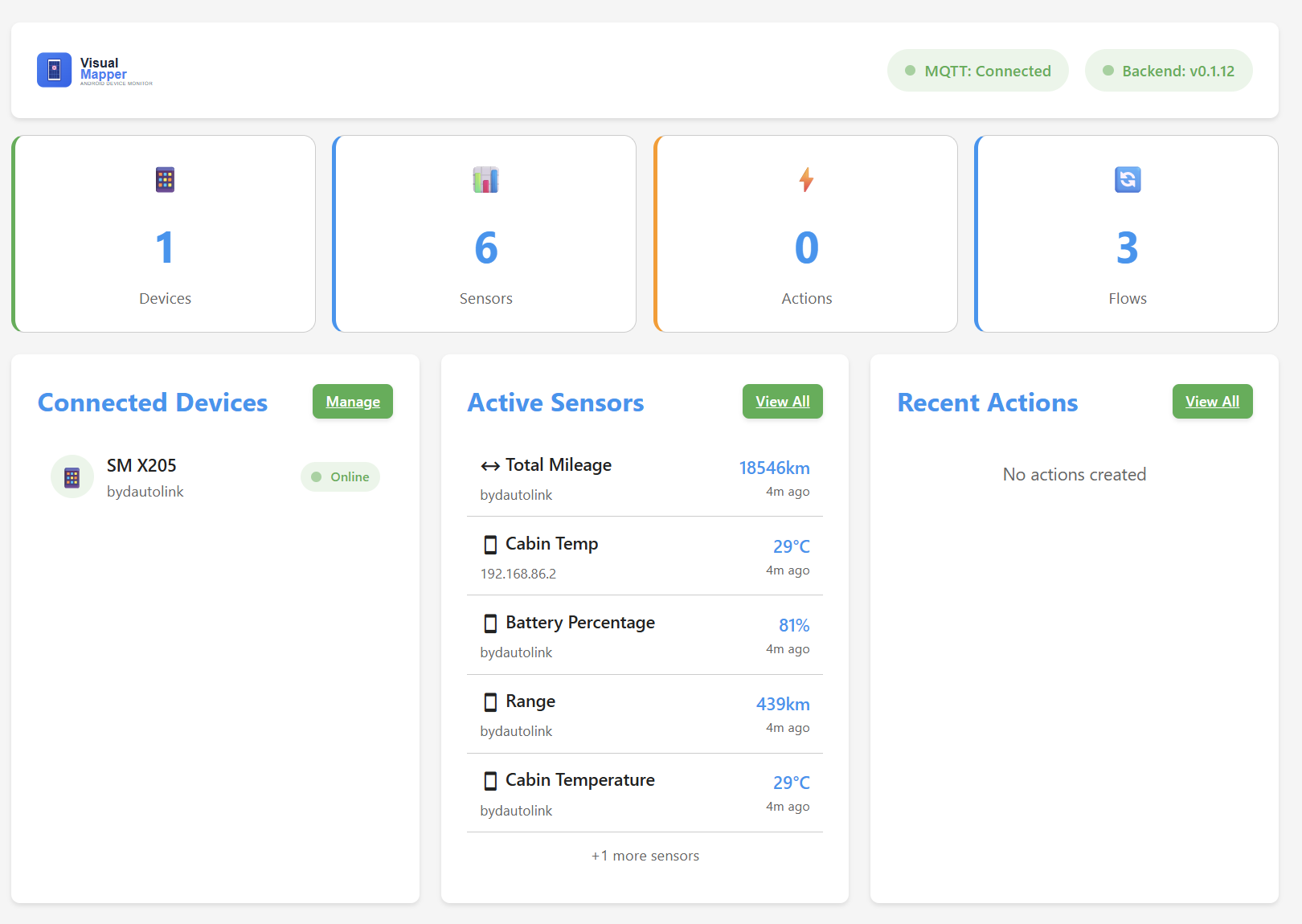
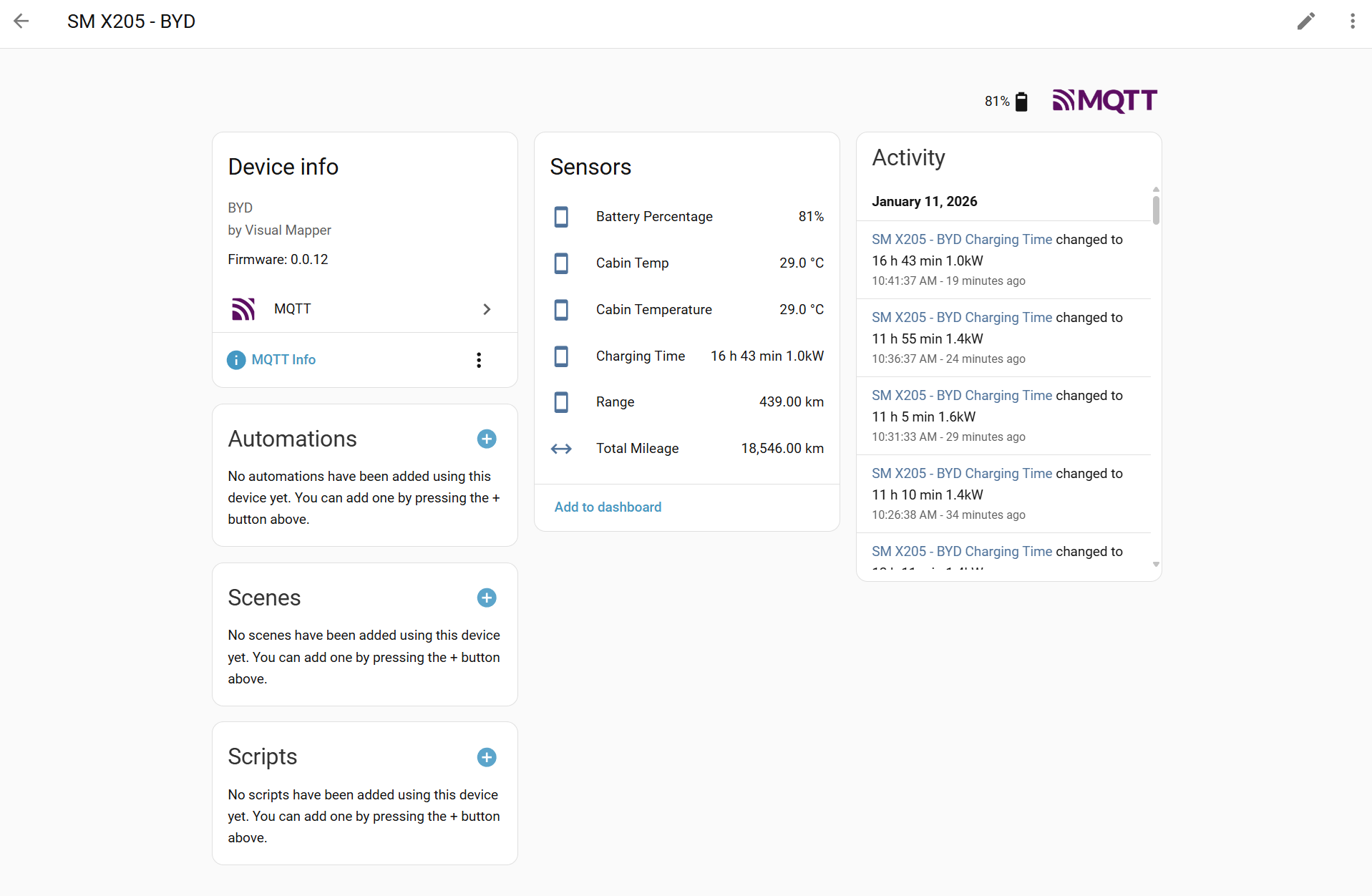
HA sensors created
Android Companion App
The optional Android companion app provides enhanced automation via Accessibility Service instead of ADB. This gives you reliable, native access to UI elements without ADB connection issues.
Download APK (v0.3.3 - Signed)
Features
Screen Streaming (NEW)
-
MediaProjection low-latency capture (50-150ms)
-
Adaptive FPS based on battery state
-
WebSocket MJPEG binary protocol
-
Orientation change handling
Accessibility Service
-
UI element capture & interaction
-
Gesture dispatch (tap, swipe, scroll)
-
Pull-to-refresh automation
-
Text input automation
-
Screen wake/sleep control
-
Key event simulation
Flow Execution
-
All step types (TAP, SWIPE, TEXT_INPUT, WAIT, etc.)
-
Conditional logic (if element exists, if text matches)
-
Screen wake/sleep steps
ML & Navigation
-
TensorFlow Lite with NNAPI/GPU acceleration
-
Q-Learning exploration with Room persistence
-
Dijkstra path planning with reliability weighting
-
On-device model inference
Server Integration
-
MQTT sensor publishing to Home Assistant
-
Bidirectional flow sync with server
-
Real-time status updates
Security
-
Encrypted storage
-
Audit logging
-
Privacy controls & app exclusions
When to Use the Companion App
-
Device doesn’t support WiFi ADB reliably
-
Want ML-assisted app exploration (learns optimal paths)
-
Need more reliable UI interaction than ADB provides
-
Want flows to run even when HA server is offline
-
Need Accessibility Service features not available via ADB
ML Training Server
The ML Training Server enables real-time Q-learning from Android exploration data. The Android app explores your apps and learns optimal navigation paths over time.
Deployment Options:
-
Local (in add-on) - Enable in add-on config, ML runs alongside Visual Mapper
-
Remote - Run on a separate machine with GPU/NPU for better training
-
Dev machine - Use included scripts to run ML training with full hardware acceleration
Hardware Acceleration:
-
Coral Edge TPU - USB/M.2/PCIe - Raspberry Pi, Linux servers
-
DirectML (NPU) - Windows ARM/x64 - Windows laptops with NPU
-
CUDA (GPU) - NVIDIA GPUs - High-performance servers
-
CPU - All platforms - Fallback, always available
# Add-on config to enable local ML training

ml_training_mode: "local" # or "remote" or "disabled"

ml_use_dqn: true # Use Deep Q-Network (better learning)
For machines with hardware accelerators:
# Windows with NPU

.\scripts\run_ml_dev.ps1 -Broker 192.168.x.x -DQN -UseNPU

# Linux/Raspberry Pi with Coral Edge TPU

./scripts/run_ml_dev.sh --broker 192.168.x.x --use-coral

# Linux with NVIDIA GPU

./scripts/run_ml_dev.sh --broker 192.168.x.x --dqn
Installation Options
1. Home Assistant Add-on (Recommended)
Add this repository to your HA add-on store:
https://github.com/botts7/visual-mapper-addon
2. Docker (Standalone)
docker run -d --name visual-mapper \

--network host \

-e MQTT_BROKER=your-mqtt-broker \

ghcr.io/botts7/visual-mapper:latest
3. Manual Installation
git clone https://github.com/botts7/visual-mapper.git

cd visual-mapper/backend

pip install -r requirements.txt

python main.py
4. Android Companion App (Optional)
Download from: Releases · botts7/visual-mapper-android · GitHub
Enable “Install from unknown sources” in Android settings to install.
Requirements
-
Android device with Developer Options and Wireless Debugging enabled (Android 11+)
-
Both devices on the same network
-
MQTT broker (Mosquitto) for HA integration
For Companion App:
-
Android 8.0+ (API 26)
-
Accessibility Service permission
-
Optional: Notification access for richer automation
Current State / Known Limitations
This is beta software - it works, but there are rough edges:
-
Samsung devices: Required extra work for lock screen handling (now mostly working)
-
Element detection: Sometimes UI elements move between app updates
-
ADB stability: WiFi connections can drop occasionally (auto-reconnect implemented)
-
Documentation: Still being written
What I’m Looking For
Testers
-
Try it with different Android devices (especially non-Samsung)
-
Test with various Android apps
-
Report bugs and edge cases
-
Suggest UX improvements
-
Test the Android companion app on different devices
Contributors
-
Python/FastAPI backend
-
JavaScript frontend
-
Android/Kotlin development
-
Machine Learning improvements
-
Documentation
-
UI/UX design
Links
-
Main Repository: GitHub - botts7/visual-mapper: Visual Mapper - Home Assistant Android Device Monitor
-
v0.4.0 Release: Release v0.4.0 · botts7/visual-mapper · GitHub
-
HA Add-on Repository: GitHub - botts7/visual-mapper-addon: Visual Mapper Home Assistant Add-on
-
Add-on v0.4.0 Release: Release v0.4.0 · botts7/visual-mapper-addon · GitHub
-
Android Companion App: GitHub - botts7/visual-mapper-android: Visual Mapper Android Companion App
-
Download Android APK v0.3.3: Release v0.3.3 - Screen Streaming & Performance · botts7/visual-mapper-android · GitHub
-
Issues / Bug Reports: GitHub · Where software is built
-
ML Training Docs: visual-mapper/docs/ML_TRAINING.md at main · botts7/visual-mapper · GitHub
Changelog
v0.4.0 (Latest)
-
Full-Width Layout: All pages now use full viewport width with 24px edge padding - no more wasted screen space
-
Mobile Responsive Design: Flows and Navigation Learn pages now work properly on mobile/tablet devices
-
Elements Tab Redesign: Card-based layout matching Smart tab style with type icons, alternative names dropdown, current value display, and collapsible grouped tree structure
-
UI Consistency: All container widths now consistent across dashboard, flows, performance, and flow wizard pages
Android Companion App v0.3.3
-
MediaProjection Screen Streaming: Low-latency capture (50-150ms vs 100-3000ms ADB)
-
Adaptive FPS: 25 FPS when charging, 20/12/5 FPS on battery based on level
-
Battery Caching: Check battery state every 30s instead of every frame
-
Improved Frame Buffer: Increased buffer size for smoother capture
-
MJPEG Protocol v2: Header includes width/height for orientation detection
-
WebSocket MJPEG Protocol: Binary streaming compatible with backend SharedCaptureManager
-
Orientation Handling: Automatically recreates VirtualDisplay when device rotates
v0.3.1
-
Dynamic Cache Busting: All pages now use session-based cache busting - no more stale CSS/JS
-
Dark Mode Everywhere: Dark mode support added to all pages with instant theme switching (no flash)
-
Dev Tools Improvements: Version info now fetched dynamically from API
-
Diagnostic Page: Dynamic CSS and module loading
-
Flow Tab Fix: Fixed button visibility in dark mode
v0.2.97
-
Adaptive Backend Sampling: Fixed monotonic counter vs capped timing lists
-
Async Streaming: stopStreaming() now properly awaited in all callers
-
Capture Mode Fix: setCaptureMode race condition resolved
-
Sensor Edit: Fixed API path for editing sensors
-
Persistent Shell: Now default for UI dumps (faster than per-command subprocess)
v0.2.86
-
Edit Buttons: Added edit button for sensor and action flow steps in Step 3 and Step 4
-
Click pencil icon to edit linked sensor or action directly from flow step
v0.2.80
-
MJPEG v2 Streaming: Shared capture pipeline with single producer per device
-
SharedCaptureManager: Broadcasts to all subscribers, eliminates per-frame ADB handshake overhead
-
New endpoint:
/ws/stream-mjpeg-v2/{device_id}
v0.2.66
-
Companion App Integration: Fast UI element fetching (100-300ms vs 1-3s)
-
Canvas Fit Mode: Defaults to fit-height (shows full device screen)
-
Stream Quality: Default changed to ‘fast’ for better WiFi compatibility
v0.2.6
-
Coral Edge TPU: Hardware acceleration support for Raspberry Pi and Linux servers
-
Hardware Accelerators UI: Services page shows available accelerators
-
ML Training Server: Multiple deployment options (local, remote, dev)