The box I use is well designed with enough space to cope with temp issues. There are no temp issues. The issue was the AI replies. If they were long the esp would become over loaded and the speech would break up. This was solved by connecting the Ld2410 via Bluetooth. I could maybe have got away with just using the detected sensor on its own but I wanted more than that.
I am thinking to add an Air Quality Sensor 
I still have a little bit of space…
How do you power the ESP32S3? Through the USB port or directly to the 5V pin? Is it possible that yours could be a power problem and not a RAM problem? What powers the LD2410 you use via Bluetooth? Is the LD2410 connected to the Bluetooth of your ESP32S3?
Sorry for the many questions… but I’ve only been using ESPHOME for a few months and I’m always curious to discover new configurations.
Its all powered by the usb, if that helps. I don’t think its a power issue. I have 4 all built exactly the same. They all exhibited the same issues in the same circumstances, using various power supplies. Only when the complete ld2410c config was removed from the yaml did they work correctly. They have been performing faultlessly for some months. I don’t see connecting the ld2410c via Bluetooth as an issue. I don’t see why you seem to think it is. It is a working solution that I will continue to use.
a strip of 4 WS2812 LEDs draws about 240mA… half of Amps the ESP32 can supply from the 5V pin (for example).
If I’m not mistaken, the voltage regulator on the ESP32S3 board on the 5V pin shouldn’t give you more than 500mA… or maybe I misunderstood?
No idea about power outputs, my setups only have 1 LED (even thought the yaml says 4) not sure how I missed that  The LEDs will only draw that current if all colours are on full brightness.
They give no issues so I can only guess power is not a factor, When building the all in one device I did try hanging the LD2410 off its own power supply, as i understand they use a bit of power, but it made no difference,
I had the ld2410s running from esp8266 boards with the full yaml setup for some time before building these boxes, When copied that code to the yaml voice responses were not great and radio playback was poor, not that they are used for that often.
I tried without bluetooth enabled , due to the fact bluetooth uses a lot of memory.It was OK, but part of the boxes requirement was bluetooth BLE location stuff, so really needed that. This all led to my conclusions that memory was probably the issue.
As I have stated this has been running faultlessly since about mid June.
do you have a wiring diagram? Im horrible at this stuff i have tried everything and i cannot get the mic or speaker to work
I don’t have a picture as such but all the connections are listed on the start of my yaml, even the colour of wire I used. Make sure everything is soldered as you will just be setting yourself up to fail if you use jumper wires.
But then again 45 years ago I did an apprenticeship in prototype electronic assembly, so its easy for me having spent my life building or managing the building of prototypes of all kinds of things.
Can u help me to disable the led when the switch “Enable voice Asistant” is OFF?
Can you explain to me where and how to change it?
Thanks.
(I tried searching, but I can’t find the correct line and how to change it)
It doesn’t flash in my yaml. set “on turn off” to this.
  - platform: template
    name: Enable Voice Assistant
    id: voice_enabled
    optimistic: true
    restore_mode: RESTORE_DEFAULT_OFF
    icon: mdi:assistant
    on_turn_on:
      - light.turn_on:
          id: led_internal
          red: 0%
          green: 0%
          blue: 100%
          brightness: 11%
      - if:
          condition:
            lambda: return !id(init_in_progress);
          then:
            - lambda: id(voice_assistant_phase) = ${voice_assist_idle_phase_id};
            - if:
                condition:
                  not:
                    - voice_assistant.is_running
                then:
                  - micro_wake_word.start
    on_turn_off:
      - light.turn_off:
          id: led_internal
        #  red: 90%
        #  green: 90%
        #  blue: 20%
        #  brightness: 90%
        #  effect: Scan
      - if:
          condition:
            lambda: return !id(init_in_progress);
          then:
            - voice_assistant.stop
            - micro_wake_word.stop
            - lambda: id(voice_assistant_phase) = ${voice_assist_muted_phase_id};
Thanks…
it works partially.
I mean… if I disable “Enable voice assistant” it doesn’t flash and this is good.
But if the device is rebooted/shut down (removed power) and I reconnect it, “Enable voice assistant” is OFF, it start to flash.
I mean… if you reboot with “Enable Voice Assistant” OFF it starts flashing.
(and I should avoid it because in case of a blackout it would start flashing)
(Let me briefly explain why I always need OFF: I use an ESP32S3 ONLY for announcements in certain areas of the house, so I don’t need the “Voice Assistant” part. The LED flashing like that would cause interference with the amplifier (in other cases, the flash doesn’t make any noise so this is why I want to disable it).
Probably this section needs to be set to off as well. Easy thing to do is search the yaml for “Fast Pulse” or “slow pulse” and adjust accordingly if it looks like the script to turn them on or off.
  # Script executed during initialization
  # Fast Blue pulse if Wifi is connected, Else slow blue pulse
  - id: control_leds_init_state
    then:
      - if:
          condition:
            wifi.connected:
          then:
            - light.turn_off:
                id: led_internal
          else:
            - light.turn_on:
                brightness: !lambda return max( id(led_internal).current_values.get_brightness() , 0.2f );
                red: 9%
                green: 73%
                blue: 95%
                id: led_internal
                effect: "Slow Pulse"
1 Like
THANK YOU!!!
It works!
Since I want to activate “Assistant” only when someone is in the room… I couldn’t keep the LED flashing!
I have an ESP32-S3 N8R2. Probably, the memory is too low, so the V3 does not work. In fact, Ok Nabu and led lights are working well, but I have no response from the speaker.
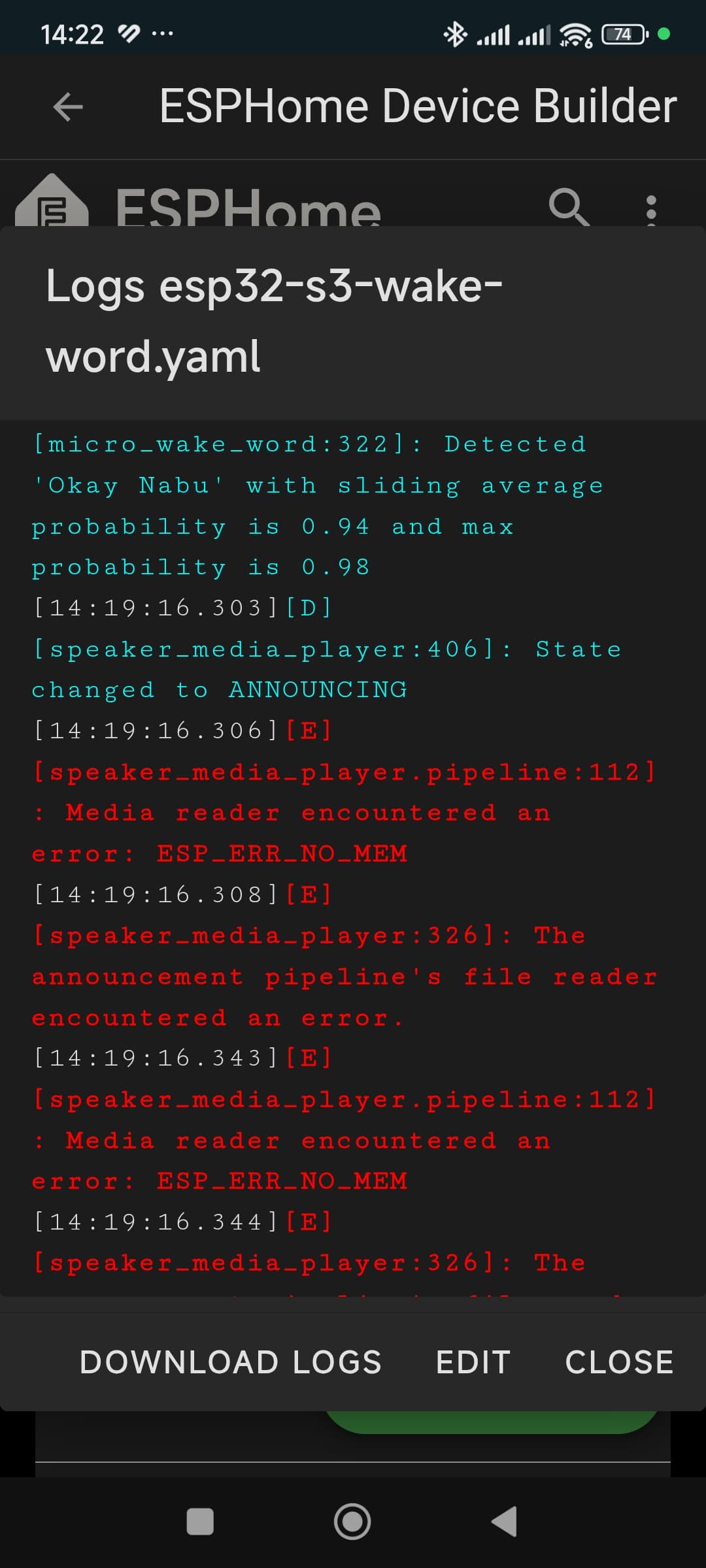
.
I’m not a specialist… but…
the PSRAM in the base YAML is set to:
psram:
  mode: octal
  speed: 80MHz
maybe you have to change it:
psram:
  mode: quad
  speed: 80MHz
(Line 156)
(quad for N8R2 and octal for N16R8… maybe someone will be able to help you better)
I’d like to lower the LED brightness for anything, but I don’t know what to do. I tried this:
ight:
  - platform: esp32_rmt_led_strip
    id: led_internal
    name: Status Led
    rgb_order: GRB
    pin: ${ledpin}
    num_leds: 12
    rmt_symbols: 192
    chipset: ws2812
    default_transition_length: 0s
    effects:
      - pulse:
          name: "Slow Pulse"
          transition_length: 250ms
          update_interval: 250ms
          min_brightness: 25%
          max_brightness: 50%
      - pulse:
          name: "Fast Pulse"
          transition_length: 100ms
          update_interval: 100ms
          min_brightness: 25%
          max_brightness: 50%
      - addressable_scan:
          name: "Scan"
          move_interval: 50ms
          scan_width: 2
      - addressable_lambda:
          name: Volume Level Display
          update_interval: 500ms
          lambda: |-
            float volume = id(external_media_player).volume;
            int num_leds_on = round(volume * 4);
            for (int i = 0; i < it.size(); i++) {
              if (i < num_leds_on) {
                it[i] = Color(0, 0, 255); // Blue
              } else {
                it[i] = Color::BLACK;
              }
            }
but it’s seems that is not working…
Look for the the “light.turn_on” bits and set the brightness there.
    on_turn_on:
      - light.turn_on:
          id: led_internal
          red: 0%
          green: 0%
          blue: 100%
          brightness: 11%
You are setting the brightness of the pulse effect. so unless your LED is using the pulse effect there will be no difeerence in brightness.
It works perfectly, thanks.
It works well on all my devices with 1 or 12 LEDs.
But I have a device with 16 LEDs (which must be mounted on the ceiling), with the exact same configuration… if I turn on the STATUS LEDs, they light up at 100%. If I start the “Time Ringing” function, the first flash is at 100%, then it decreases to 15% (and has the exact same configuration as the other devices).
Any ideas?

As I suggested search for the bits of code that turn the lights on, then work out what those bits of code are doing you will soon get the idea of what to set then.
Your code will not be exactly the same as you have a different number of LED’s so start with making sure the code is accounting for that.
Chances are it will be in this section.
  # Script executed when the timer is ringing, to control the LEDs
  # The LED blinks green.
  - id: control_leds_timer_ringing
    then:
      - light.turn_on:
          brightness: 60%
          red: 50%
          green: 0%
          blue: 50%
          id: led_internal
          effect: "Fast Pulse"
You will see that if you search for the action that is running when the lights are on like “timer is ringing” you will find the script with the settings in it. You will then need to set the settings in fast pulse as well.
  # Script executed when the timer is ringing, to control the LEDs
  # The LED blinks green.
  - id: control_leds_timer_ringing
    then:
      - light.turn_on:
          brightness: !lambda return min ( max( id(led_internal).current_values.get_brightness() , 0.2f ) + 0.1f , 1.0f );
          red: 0
          green: 1
          blue: 0
          id: led_internal
          effect: "Fast Pulse"
ok…
I was wrong… because I set the value as a percentage… and it gave me an error. Instead, use 1 for 100% and 0.5 for 50%.
I tried with quad, too. Same situation, unfortunately. I just ordered a N16R8 ESP32-S3 board. Thank you for pointing to my mistake.