wyx087
August 5, 2025, 8:25am
1
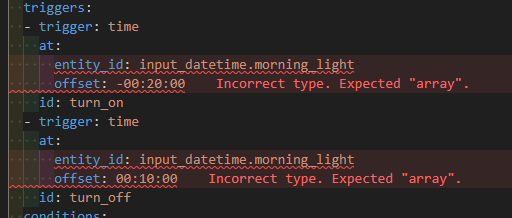
VSCode is throwing a fit with these two:
  - trigger: time
    at:
      entity_id: input_datetime.morning_light
      offset: -00:20:00
    id: turn_on
  - trigger: time
    at:
      entity_id: input_datetime.morning_light
      offset: 00:10:00
    id: turn_off
Incorrect type. Expected “array”.yaml-schema.
It was generated by HA automation GUI editor, I can’t see anything wrong with it at all.
Any idea how to stop VSCode from freaking out? Is there some minor edit I can do that is correct both for HA and VSCode schema?
tom_l
August 5, 2025, 10:41am
2
Are you using the Studio Code add-on or stand alone VSCode?
Either way, ensure the Home Assistant Helper extension is up to date (or the add-on if that is what you are using). I just tried adding your trigger to one of my automations, no error.
1 Like
wyx087
August 5, 2025, 11:24am
3
Sorry, I wasn’t clear. I’m using the Studio Code Server add-on. It is fully up to date at 5.19.3.
The add-on configuration is at default.
Interesting you don’t get this syntax error. What else can I check with my addon or other HA configuration?
tom_l
August 5, 2025, 11:35am
4
I just tried in the same version of the add-on (I was using stand alone desktop VSCode). I got no error there either.
1 Like
petro
August 5, 2025, 1:48pm
5
Is your extension up to date? Not addon, the extension in the addon.
wyx087
August 5, 2025, 8:52pm
6
For extensions, available update shown as 0.
I’ve even uninstalled, checked delete data and clean re-installed the add-on.
In case it makes any difference, here is the full automation. I’ve looked at it many times, I can’t see anything wrong anywhere.
- alias: Aircon - Morning Bedroom Heating
  id: '1754172233015'
  description: ''
  triggers:
  - trigger: time
    at:
      entity_id: input_datetime.morning_light
      offset: -00:20:00
    id: turn_on
  - trigger: time
    at:
      entity_id: input_datetime.morning_light
      offset: 00:10:00
    id: turn_off
  conditions:
  - condition: state
    entity_id: sensor.home_presence_simple
    state: home
  actions:
  - choose:
    - conditions:
      - condition: trigger
        id:
        - turn_on
Feels like I’m going mad, those red lines really bothers me.
tom_l
August 5, 2025, 9:35pm
7
I don’t think you get any choice with that. It’s bundled with the add-on.
tom_l
August 5, 2025, 9:36pm
8
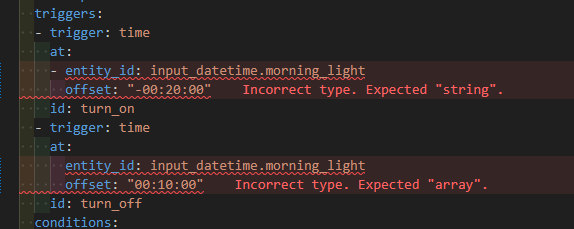
What happens if you quote the offset value?
  - trigger: time
    at:
      entity_id: input_datetime.morning_light
      offset: "-00:20:00"
petro
August 6, 2025, 9:12am
9
It’s complaining about it not being a list/array. So this would likely fix it:
  - trigger: time
    at:
    - entity_id: input_datetime.morning_light
      offset: 00:10:00
wyx087
August 7, 2025, 6:15am
10
I get a different error adding a dash. Wrapping offset with quotes doesn’t seem to do anything.
petro
August 7, 2025, 11:34am
11
At this point, just ignore vscode and create the automation. Everything you’ve tried is valid yaml and only vscode is complaining about it.
wyx087
August 7, 2025, 2:39pm
12
Indeed only VSCode is complaining about it. But I don’t like to see red.
Anyway, I’ve changed my way of implementing this. Just single time trigger without offset. Use a delay in actions before turn off.
No more red warnings and still functions the same.
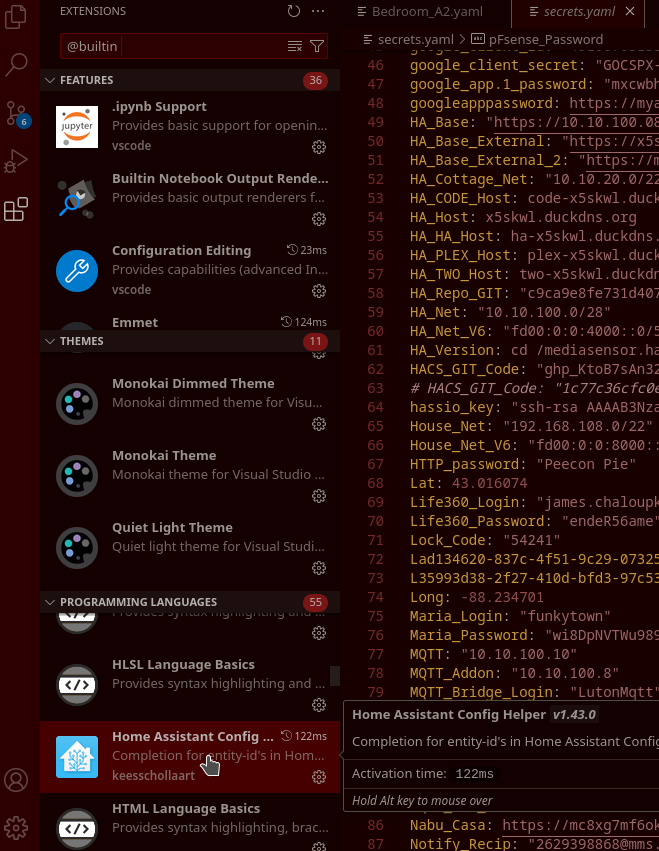
It comes bundled, but you can update it once it’s there.
tom_l
August 8, 2025, 10:20pm
14
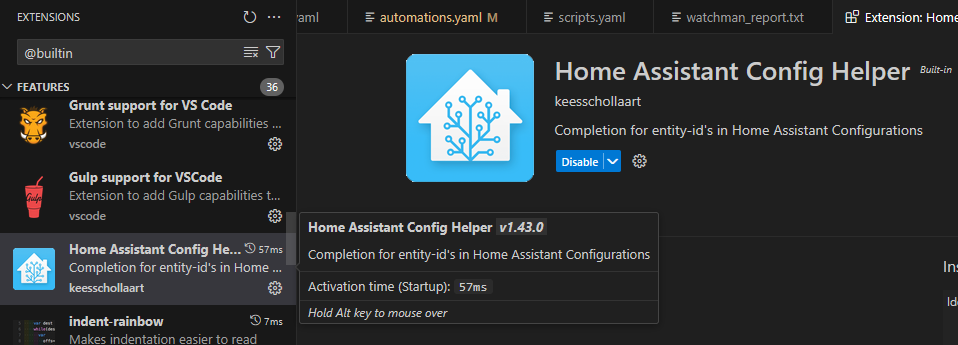
It doesn’t even show up in my add-on.
Click built-in… after you click the filter symbol under extensions.
1 Like
tom_l
August 9, 2025, 3:17am
16
Ah. That’s where it’s hiding. Thanks.
1 Like
wyx087
August 9, 2025, 7:24pm
17
How do I update it?
Looks like I have the same version as you though.
Presumably v1.43.0 is the latest?