Water-meter with ESPHome and pulse_counter resets total to 0 upon reboot

Hi there,

I just configured a water-meter with an ESP8266 and combined a few info gathered in the documentation and the forums.

I want my water meter in HA to show the total (in m3) I read on the physical water meter.

I found documentation on how to create an action to arbitrarily set the total to the value I read, which can for sure gets handy if for any reason the value in HA diverges from the physical water meter, or to preset the info without having to hard-code it at compilation time, making it dangerous to adapt each time I make a change or whenever ESPHome gets updated and I want to recompile with latest version (which happens every few weeks for sure).

I understand that ESPHome is supposed to be able to persist the total in flash so that it gets reset to that value if the board is rebooted for instance (taken for granted the previous value was indeed persisted, which happens every 5 minutes in my setup, if some changes happened, at least that what I understood).

So:

  1. My current total is in phase with the physical reading
  2. I made sure water was used and usage detected in HA
  3. I waited (much) more than 5 minutes to be on the safe side
  4. I reboot the device
  5. Total is reset to 0

Somehow I miss something but don’t know what.

Here is the relevant part of the corresponding YAML, if that rings some bell.

esphome:
  name: water-meter
  friendly_name: water-meter
  on_boot:
    then:
      - pulse_meter.set_total_pulses: 
          id: water_pulse_meter
          value: !lambda 'return id(water_meter_total);'

esp8266:
  board: esp01_1m

preferences:
  flash_write_interval: 5min

globals:
  id: water_meter_total
  type: float
  restore_value: yes

# Enable Home Assistant API
api:
  encryption:
    key: "--redacted--"
  actions:
    - action: set_pulse_total
      variables:
        new_pulse_total: float
      then:
        - pulse_meter.set_total_pulses:
            id: water_pulse_meter
            value: !lambda 'return new_pulse_total;'

ota:
  - platform: esphome
    password: "--redacted--"

wifi:
  ssid: !secret wifi_ssid
  password: !secret wifi_password
  min_auth_mode: WPA

sensor:
  - platform: pulse_counter
    pin: 
      number: GPIO12
      allow_other_uses: true
    update_interval: 6s
    name: "Water Pulse"
    id: water_pulse

  - platform: pulse_meter
    pin: 
      number: GPIO12
      allow_other_uses: true
    id: "water_pulse_meter_internal"
    unit_of_measurement: "liter/min"
    icon: "mdi:water"
    total:
      name: "Water Total"
      unit_of_measurement: "liter"

  - platform: pulse_meter
    pin:
      number: GPIO12
      allow_other_uses: true
    name: "Water Pulse Meter"
    id: water_pulse_meter
    unit_of_measurement: "liter/min"
    icon: "mdi:water"
    total:
      name: "Water Meter Total"
      unit_of_measurement: "mÂł"
      #id: water_meter_total
      accuracy_decimals: 3
      device_class: water
      state_class: total_increasing
      filters:
        - lambda: |-
            id(water_meter_total) = id(water_pulse_meter).raw_state;
            return x / 1000.0;
        #- multiply: 0.001

  - platform: template
    name: "Water Usage Liter"
    id: water_flow_rate
    accuracy_decimals: 1
    unit_of_measurement: "l/min"
    icon: "mdi:water"
    lambda: return (id(water_pulse).state * 10);
    update_interval: 6s

Why you have one pulse_counter and two pulse_meters on same input??

This allows to get multiple sensors.

That’s the kind of setup that is suggested on various blogs.

E.g., Build a cheap water usage sensor using ESPhome and a proximity sensor - PieterBrinkman.com

You find such links in the official documentation of HA: Integrating your water usage - Home Assistant so I’m basically trying to follow the “guide”, but I’m open to any suggestion based on my requirements I listed.

I don’t really need all those sensors, but what’s interesting:

  • Total volume in m3, so that it’s usable in the Energy dashboard and easily comparable with the figures I read on my own
  • Debit: number of liters/min
  • Number of liters since last reset, always handy, (directly related to m3, or the other way around but handy anyway)

So if you have any suggestion, I’m open.

I suggest that you have one gpio connected sensor (meter or counter).
Make a template number to adjust total.
Make whatever template sensors if you want to see different formats (no-sense to me).

So I dug a bit instead of blindly just trying some code I found somewhere (what I always end up with but normally it works better to start with :D…)

For others reading anytime, good summary of the difference between pulse_counter and pulse_meter: Pulse_counter vs pulse_meter - #2 by der-optimist

I simplified the definition to what is actually only needed, with some slightly better naming (for me at least):

esphome:
  name: water-meter
  friendly_name: water-meter
  on_boot:
    then:
      - pulse_meter.set_total_pulses: 
          id: water_pulse_meter
          value: !lambda 'return id(water_meter_total);'

esp8266:
  board: esp01_1m

preferences:
  flash_write_interval: 5min

globals:
  id: water_meter_total
  type: int
  restore_value: yes

# Enable Home Assistant API
api:
  encryption:
    key: "--redacted--"
  actions:
    - action: set_total_liters
      variables:
        new_total_liters: int
      then:
        - pulse_meter.set_total_pulses:
            id: water_pulse_meter
            value: !lambda 'return new_total_liters;'

...

sensor:
  - platform: pulse_meter
    pin: GPIO12
    name: "Water Meter Flow"
    id: water_pulse_meter
    unit_of_measurement: "liter/min"
    icon: "mdi:water"
    total:
      name: "Water Meter Total"
      unit_of_measurement: "mÂł"
      accuracy_decimals: 3
      device_class: water
      state_class: total_increasing
      filters:
        - lambda: |-
            id(water_meter_total) = id(water_pulse_meter).raw_state;
            return x / 1000.0;

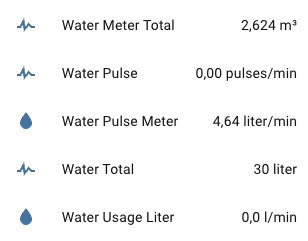
This results into two sensors, one for the water flow, the other one for the measure on total consumption, which is exactly what is expected from such a device, nothing more, nothing less.

What I figured out:

  • The globals water_meter_total is still an integer, even if displayed divided by 1000 to get m3
  • I have 4 counters, the inductive sensor is on the fourth one but that one measures deciliters (dl), so its value is naturally to be excluded when presetting the total counter

So now my ESP8266 is flashed with this strip-down (and much more meaningful) version, nice!

  1. I install the device
  2. I set the initial total value
  3. Water has been used here and there and properly reported
  4. It’s more than 45 minutes since the installation
  5. I reboot the device by removing power supply and back

Result: total meter resets to 0. So it still doesn’t work!

That will basically reset your global to zero the first time the pulse_meter will return a value after boot (which will be zero), or am I missing something?

Well, sure:

  id: water_meter_total
  type: int

Ah! there’s a note on ESPHome Core Configuration - ESPHome - Smart Home Made Simple

For ESP8266, restore_from_flash must also be set to true for states to be written to flash.

There’s not any other description of that flag, and logically it must be at the same level of flash_write_interval but no :slight_smile: so looking around and trial and error because syntax/naming changed) I found this to work for the compilation at least:

esp8266:
  board: esp01_1m
  restore_from_flash: true

preferences:
  flash_write_interval: 5min

Trying again, it resets to something else than 0 but does not reset to the final value I read prior to reboot, where I bumped it up the total counter to what I read. Looks like it was reset to the actual number of liters consumed and tracked by the inductive sensor only. But basically it starts working :slight_smile:

(and for those reading and wondering how to use the action to preset the value, it’s hidden in the Developer Tools > Actions).

Will publish everything with instructions on: GitHub - xperseguers/esphome-watermeter: Water usage monitoring using ESPHome and Home Assistant

Glad! The real complexity with HA and ESPHome is that the documentation lacks some (more) examples and the examples found in the wild are often not up-to-date anymore, with the syntax/options/locations to edit sometimes having changed a lot.

I wrote this because if you have a look at what I posted first in my very first message, I configured it as a float. So I was just explaining my findings.

1 Like

OK, finally got it working, I needed a trick posted by @dzegarra in Retain total values of pulse_meter - #8 by dzegarra

Solution for my own project: [BUGFIX] Ensure counter resets to last value upon reboot · xperseguers/esphome-watermeter@228d224 · GitHub

1 Like

later I discovered creating data_was_restored was not needed. Just set priority: -100 to on_boot.

1 Like

With ESPhome 2026.2.4 this did not work. when booting on_value executed first and wrote over the global variable before on_boot could restore the total.

My solution was to perform the initialization after boot in on_value when the value is 0 which it of course is only upon first triggering during bootup:
          - if:
              condition:
                lambda: 'return x == 0;'
              then:
                - pulse_meter.set_total_pulses: 
                    id: water_cold
                    value: !lambda 'return id(water_cold_total_pulses);'
              else:
                - lambda: 'id(water_cold_total_pulses) = id(water_cold_total).raw_state;'