Waterproof ultrasonic distance sensors, jsn_sr04t, aj_sr04m or sr04m-2?


This sensor I bought from a chinese site made me loose about a day of work to get it up and running. At first glance it could be attributed to wrong documentation, this page in particular: https://esphome.io/components/sensor/jsn_sr04t
but I actually think that at the time of writing this particular board was not yet around, and then the chinese made a mess with the naming.

TLDR: this board (SR04M-2) has to be configured as a JSN-SR04T, from the resistor to set the operating mode, to the YAML

This is the relevant part of my working config (Mode 1 and heavy filtering to slow down the rate, prioritizing having no outlyers):

uart:
  tx_pin: GPIO14
  rx_pin: GPIO12
  baud_rate: 9600

sensor:
  - platform: "jsn_sr04t"
    name: "Livello Intercapedine"
    filters:
      - quantile:
          window_size: 10
          send_every: 50
          send_first_at: 1
          quantile: .9

I hope this can be of help to anyone like me that bought this board. Take care.

2 Likes

Hello!
Did you leave R19 free or solder a resistor?
Thank you.

(In this case, it seems that you are using an ESP32. I am using an ESP8266.)

I soldered a 47k resistor to get into Mode 1, lots of data that I then can filter a lot to mitigate outlyers. I’m planning to try Mode 2 by soldering a 120k resistor or another board.

I’m using too a ESP8266 (nodemcuv2), but it’s not relevant

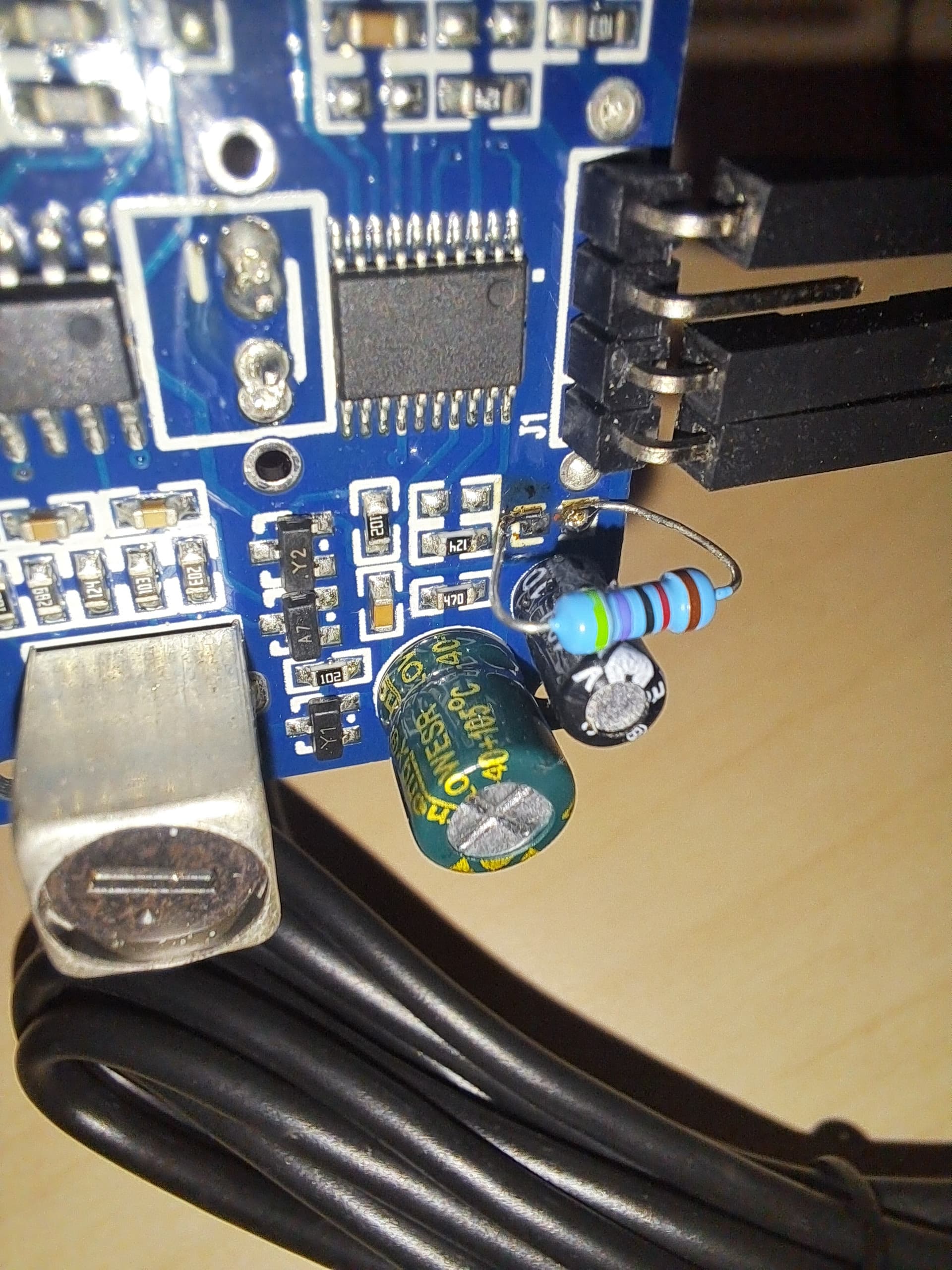
Here is the board with the 47k resistor:


as you can see the RX (and TX on the ESP) pin is disconnected at the moment because not needed in Mode 1

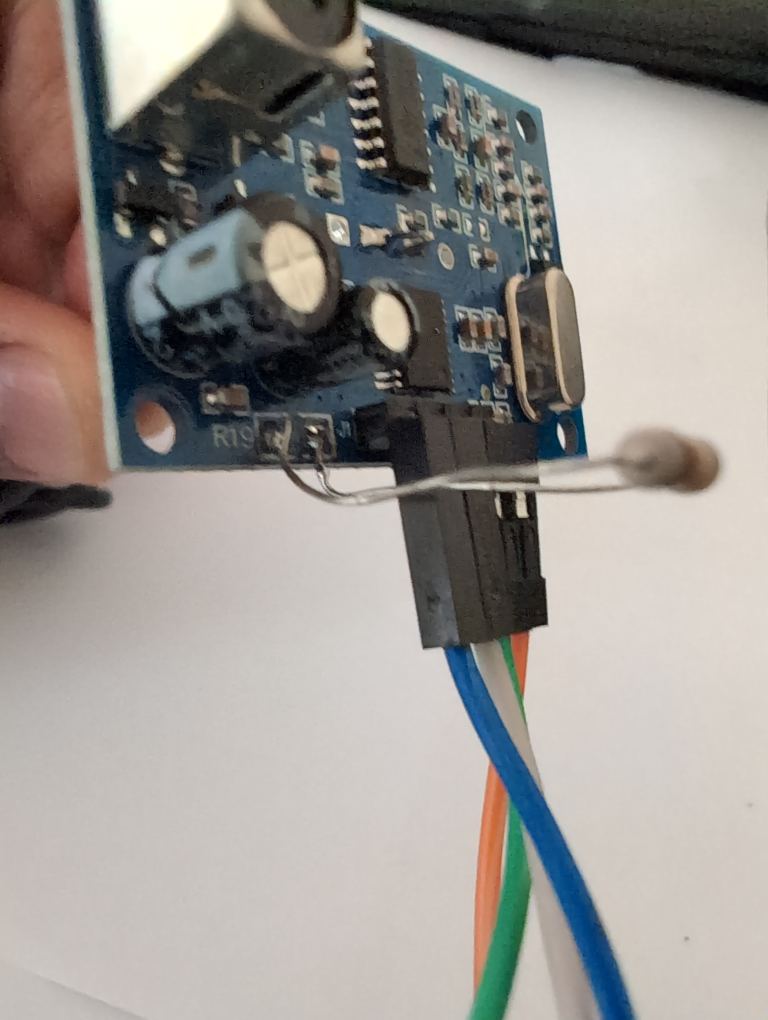
Here the test for mode 2, with a 120k resistor (100k+22k):

and the updated YAML:

sensor:
  - platform: "jsn_sr04t"
    name: "Livello Intercapedine"
    id: livello_intercapedine
    update_interval: 1s
    filters:
      - clamp:
          min_value: 0.4
          max_value: 3.0
          ignore_out_of_range: true
      - sliding_window_moving_average:
          window_size: 7
          send_every: 3 # TODO slow down to 10sec
          send_first_at: 3

Note the update_interval now is mandatory to send the trigger packet, and the RX wire needs to be connected to the ESP TX.

I’ve also changed the filtering strategy, but still experimenting with it.

3 Likes

I’m having no luck. I can never figure out what I did wrong.
I have an ESP8266. The schematic is below.
On it, the TX is GPIO15 (D8) and the RX is GPIO13 (D7).
My board is different from yours. I used an AJ-SRO4M, with a JSN-SR04T ultrasonic sensor.
I put a 120K resistor to activate mode 2 and was inspired by your settings to control the measurement.
But, although the sensor appears online, nothing is measured.
Have you ever worked with the AJ-SRO4M?

Hi, thanks for your contribution - I am trying to get it to work for days now - I used your settings (using an ESP 32 wroom board) with Rx from the sensor going to TX on the board. The sensor shows up after compiling with “unknown” - however on the Webpage of the board I get the following checksum errors.

Now I also found this link: jsn_sr04t component: AJ_SR04M compatibility mode in checksum calculation by soeffi · Pull Request #7044 · esphome/esphome · GitHub which describes how they created a solution that should be part of the ESPhome “package”. What I have been using as yaml is the following: `uart:
id: uart_bus
tx_pin: GPIO21
rx_pin: GPIO19
baud_rate: 9600
#parity: NONE
#stop_bits: 1
#rx_buffer_size: 5
(forget the buffer size - I picked that up in another post where they complained about the extra bot, however makes the board disfunctional)
— and —
sensor:

  • platform: jsn_sr04t
    name: “Drive distance”
    model: aj_sr04m
    uart_id: uart_bus
    id: drive_distance
    device_class: distance
    update_interval: 1s
    filters:
    • clamp:
      min_value: 0.4
      max_value: 3.0
      ignore_out_of_range: true
    • sliding_window_moving_average:
      window_size: 7
      send_every: 3 # TODO slow down to 10sec
      send_first_at: 3

(note there are no " " around the platform and the model names. If you put “” arond the model name, the compilation takes ages and eventually hangs)
`

[09:26:50][W][jsn_sr04t.sensor:054]: checksum failed: 76 != 75
[09:26:51][W][jsn_sr04t.sensor:054]: checksum failed: 76 != 75
[09:26:52][W][jsn_sr04t.sensor:054]: checksum failed: da != d9
[09:26:53][W][jsn_sr04t.sensor:054]: checksum failed: cb != ca
[09:26:54][W][jsn_sr04t.sensor:054]: checksum failed: ad != ac
[09:26:55][W][jsn_sr04t.sensor:054]: checksum failed: 67 != 66
[09:26:56][W][jsn_sr04t.sensor:054]: checksum failed: 59 != 58
[09:26:57][W][jsn_sr04t.sensor:054]: checksum failed: dd != dc
[09:26:58][W][jsn_sr04t.sensor:054]: checksum failed: bc != bb
[09:26:59][W][jsn_sr04t.sensor:054]: checksum failed: 76 != 75
[09:27:00][W][jsn_sr04t.sensor:054]: checksum failed: cc != cb
[09:27:01][W][jsn_sr04t.sensor:054]: checksum failed: b0 != af
[09:27:02][W][jsn_sr04t.sensor:054]: checksum failed: 76 != 75

I am continuing the search and will keep you up to date of any progress.

btw, I put 120k resistor on the points of the sensor - see picture.

The led on the sensor and the board are flashing in tandem, so they are talking to each other - which in and of itself is a breakthrough after 2 days…

Ok! I found the solution in this post: Ultrasonic aj-sr04m not working - #8 by Zarka44

egidro
Egidijus

malaTG
20d
Hi, I had similar issue and debugged it using simple Arduino program. The issue is that checksum that is calculated is not clearly defined: the response from sensor is 4 bytes - header, high bits, low bits checksum. And some examples add highbits+lowbits and expect this to be equal to checksum, while others add header+highbits+lowbits and expect it to be checksum. Since header is always FF, it introduces this one bit change. So this is the reason. The solution at least for me was to use platform jsn_sr04t and NOT use specific model (using specific model caused 1 bit difference in checksum calculation)
sensor:

  - platform: "jsn_sr04t"
    name: "Distance"
    update_interval: 1s
    uart_id: Serial_2
#    model: aj_sr04m

I left out the reference to model: aj_sr04m and it works:


sensor:
- platform: jsn_sr04t
  name: "Drive distance"
  #model: aj_sr04m
  uart_id: uart_bus
  id: drive_distance
  device_class: distance
  update_interval: 1s
  filters:
    - clamp:
        min_value: 0.4
        max_value: 3.0
        ignore_out_of_range: true
    - sliding_window_moving_average:
        window_size: 7
        send_every: 3 # TODO slow down to 10sec
        send_first_at: 3


(I also have a piezoelectic sensor and a reed sensor attached - all to check the mailbox)

I still have no luck with this. Tried both a 47k and a 120k resistor as well as removing ajsr04m from model. The blue light is blinking but sensor values shows NA. Am I doing this right?

esphome:
  name: tank-water-level-sensor
  friendly_name: Tank-Water-Level-Sensor

esp32:
  board: esp32dev
  framework:
    type: arduino

# Enable Home Assistant API
api:
  encryption:
    key: !secret encryption_secret

ota:
  - platform: esphome
    password: !secret ota_pass

wifi:
  networks:
    - ssid: !secret wifi4_ssid
      password: !secret wifi_password
    - ssid: !secret wifi_ssid
      password: !secret wifi_password

  # Enable fallback hotspot (captive portal) in case wifi connection fails
  ap:
    ssid: "${friendly_name}"
    password: !secret ap_password

captive_portal:
    

logger:
  baud_rate: 0

# Web server
web_server:
  port: 80
  auth:
    username: admin
    password: !secret webserver_password

time:
  - platform: homeassistant
    id: esptime 

uart:
  tx_pin: GPIO1
  rx_pin: GPIO3
  baud_rate: 9600

sensor:
- platform: jsn_sr04t
  name: "Water Distance"
#  model: aj_sr04m
#  uart_id: uart_bus
  id: drive_distance
  device_class: distance
  update_interval: 1s
  filters:
    - clamp:
        min_value: 0.4
        max_value: 3.0
        ignore_out_of_range: true
    - sliding_window_moving_average:
        window_size: 7
        send_every: 3 # TODO slow down to 10sec
        send_first_at: 3

# Reboot switch
switch:
  - platform: restart
    name: "ESP Distance Sensor Restart"

Well, since 2 days mine is only churning out 6m distance.
I did not change anything to the code.

in the compilation I got error message:

Compiler error:

Compiling .pioenvs/esphome-test-2/src/jsn_sr04t.cpp.o src/jsn_sr04t.cpp:1:2: error: 'include' does not name a type 1 | include "jsn_sr04t.h" | ^~~~~~~ *** [.pioenvs/esphome-test-2/src/jsn_sr04t.cpp.o] Error 1 ========================= [FAILED] Took 298.41 seconds =========================

so I figured something has changed with some of the recent updates.
I restored home assistant from 2 days ago
Started a new compilation with the same program.
It started a detached heat in git (learning every day) - which too ages to compile. Then the system worked again - however with the same result - 6m no matter what I do with the sensor.

I guess someone changed something in the "jsn_sr04t.h file which is now giving different results.

Not sure where to report this. Anyone any suggestions?

I have a SRM04-2 sensor connected to a esp32. I have it tested and worked for me without a resister on R19 with .
After installing it in the water tank it reads through the water and shows the bottom of the tank in the reading.

Do I have the wrong sensor or it something wrong with the settings?

Regards

Sander

I have it fixed by replacing the sensor. It was not installed in right angle. After fixing this i got the correct value.

JSN-SR04T + ESP32 works ok for me with ESPHome addon version 2025.8.3. (The device actually shows AJ-SR04M-2 label on it)

Put a 120k resistor for Mode 1.

uart:
  id: uart_bus
  tx_pin: GPIO5
  rx_pin: GPIO18
  baud_rate: 9600
sensor:
  - platform: jsn_sr04t
    name: "Distance"
    update_interval: 1s
1 Like

Hi mate, it looks like I have the same module as you labelled SR04m-2, could you get it working in the ping mode or do you have to use Mode 1/2?

1 Like

This worked for me. I used a 47k Ohm resistor (100ms mode). thanks alot