Hi Derham
will test with 2025.8.1 version
Hi Derham
will test with 2025.8.1 version
Hi Derham
loaded ESPHome with 2025.8.1 and the touch is now working, pressing numbers 10 to 100 moves the meter to the correct number touching the meter face returns the needle to zero
Touching the clock give you the message box
thanks for you assistance
Great news. Things do break quite often so it’s always useful to keep the old esphome available as a fall back 
Glad you’re all working
Having trouble with my 7" waveshare display. Updated to esphome 2025.8.4 (from 2025.7.x), but it wouldnt boot, just got stuck in a boot loop.
Then i lowered PSRAM to 80MHz and set mode to quad, and commented out “cpu_frequency: 240MHz” and the “enable_idf_experimental_features” och all related SDK options. Now it boots and initiate all sensors and stuff, but the display is black! giving errors in the log:
[11:45:53][E][rpi_dpi_rgb:077]: lcd_lcd_panel_draw_bitmap failed: ESP_ERR_INVALID_ARG
[11:45:53][D][esp-idf:000]: E (516585) lcd_panel: esp_lcd_panel_draw_bitmap(34): invalid panel handle
using inytar’s foundation and have built an LVGL gui using different elements from various projects.
just curious if anyone have had the same issue since updating to 2025.8.4?
Hi, I’ve just recompiled for 2025.8.4 this morning and everything is working fine at 120MHz .
Mine stopped rebooting automatically after an OTA upgade some time ago, which I haven’t resolved yet, so I have to press the reset button after every OTA.
Also need to reboot manually after OTA updates…
But this issue is quite annoying, dont work at all. Tried to use the most basic yaml (stripped out everything), and it wont work with PSRAM at 120MHz and cpu at 240MHz. Just getting this error from the logs:
[20:32:02]Build:Mar 27 2021
[20:32:02]rst:0x10 (RTCWDT_RTC_RST),boot:0x8 (SPI_FAST_FLASH_BOOT)
[20:32:02]SPIWP:0xee
[20:32:02]mode:DIO, clock div:1
[20:32:02]load:0x3fce2820,len:0x16d0
[20:32:02]load:0x3c8700ff,len:0x440
[20:32:02]Invalid image block, can't boot.
[20:32:02]ets_main.c 329
[20:32:03]ESP-ROM:esp32s3-20210327
[20:32:03]Build:Mar 27 2021
[20:32:03]rst:0x7 (TG0WDT_SYS_RST),boot:0x8 (SPI_FAST_FLASH_BOOT)
[20:32:03]Saved PC:0x40043ac8
[20:32:03]SPIWP:0xee
[20:32:03]mode:DIO, clock div:1
[20:32:03]load:0x3fce2820,len:0x16d0
[20:32:03]load:0x3c8700ff,len:0x440
[20:32:03]Invalid image block, can't boot.
[20:32:03]ets_main.c 329
This is now working for me with these settings:
esphome:
  name: ${device_internal_name}
  friendly_name: ${device_friendly_name}
  min_version: 2025.7.0
  platformio_options:
    build_flags: "-DBOARD_HAS_PSRAM"
    board_build.flash_mode: dio

esp32:
  board: esp32s3box
  variant: ESP32S3
  flash_size: 16MB
  framework:
    type: esp-idf

psram:
  mode: octal
  speed: 80MHz
I’ve created a clock demo that compiles and works fine today here…
Clock Demo
with PSRAM at 120MHz
Interested to see if it works ok for you.
Hello everyone, I have the same problem: a black screen after loading a firmware. I need to restart the screen.
I created a restart button, but it restarts the black screen. If I restart using the reset button, everything works.
I made all the changes indicated in Pippo’s example file, but it still gives me this problem.
Another thing: when I restart the screen, the screen saver doesn’t work until I press it.
Any suggestions?
With mine when it reboots after firmware update, it black screens and does not connect to wifi, so restart buttons in the yaml do not work. I just unplug it and plug it back in.
No idea why and not tried looking at logs via usb so never found out whats wrong.
I have the same problem.
If you try adding a restart button, you’ll see that it behaves the same way.
This is the USB output after restarting with the button.
[12:01:44]ESP-ROM:esp32s3-20210327
[12:01:44]Build:Mar 27 2021
[12:01:44]rst:0xc (RTC_SW_CPU_RST),boot:0x8 (SPI_FAST_FLASH_BOOT)
[12:01:44]Saved PC:0x403772a5
[12:01:44]SPIWP:0xee
[12:01:44]mode:DIO, clock div:1
[12:01:44]load:0x3fce2820,len:0x16d0
[12:01:44]load:0x3c8700ff,len:0x440
[12:01:44]Invalid image block, can't boot.
[12:01:44]ets_main.c 329
Terminal disconnected: NetworkError: The device has been lost.
I got it working by doing a partial rollback just for this device, (full config here) by adding:
external_components:
  - source: github://esphome/[email protected]
    components: [i2c, ch422g]
And last two lines of:
esp32:
  board: esp32-s3-devkitc-1
  variant: esp32s3
  flash_size: 16MB
  cpu_frequency: 240MHz # For 2025.5.1
  framework:
    type: esp-idf
    version: 5.3.2
    platform_version: 53.3.13
Would be good to get to the bottom of the issue - this “fix” has a shelf life.
I posted this what I think is the issue: 2028.8 onwards UART Pins can not be used for C6/S3 · Issue #10405 · esphome/esphome · GitHub
Thank you so much, it works.
The only thing is I can’t set the flash size to 16MB.
It only works with 8MB, with 16MB, the screen stays black even after rebooting.
Cool - glad it works. Odd about the flash size, but again this is only a temporary “fix”. When I get some more time, I’ll have a better look at possible solutions without rolling back.
Hi everyone,
with gingermist’s advice, everything works. The only problem is that when I restart the screen, it doesn’t go into snow and blacklight mode. If I press the screen once, it works fine. This is a problem when I do a remote update and no one is around to press the screen.
Can you help me with some advice?
I’ve finally done a deep dive into the issues with running the Waveshare on recent versions of ESPHome (see: Waveshare ESP32-S3-Touch-LCD-7 - #53 by gingermist). Gone are the hard coded older framework and i2c and ch422g components.
Now it’s just:
esphome:
  name: waveshare-7inch
  friendly_name: Waveshare 7inch
  area: Lounge
  platformio_options:
    board_upload.maximum_ram_size: 524288

psram:
  mode: octal
  speed: 120MHz

esp32:
  board: esp32s3_120_16_8-qio_opi
  variant: esp32s3
  flash_size: 8MB
  cpu_frequency: 240MHz
  framework:
    type: esp-idf
    sdkconfig_options:
      CONFIG_BOOTLOADER_FLASH_DC_AWARE: n     # To fix reset issue
      CONFIG_SPI_FLASH_HPM_DC_DISABLE: y
      CONFIG_ESP_CONSOLE_USB_CDC: y
    advanced:
      # Required for 120MHz PSRAM & FLASH:
      enable_idf_experimental_features: True
I found that sometimes after an upload you need to press the “reset” button on the back of it. The sdkconfig_options seems to fix that, but mentioning it in case this happens.
Even though the board has 16MB of flash, ESPHome only supports 8MB as the rest of the flash is used for something else. In fact, if you set it to 16MB then ESPHome will change that to 8MB by design anyway.
Full config is available at: Waveshare-ESP32-Sci-fi-dashboard/Waveshare.yaml at 52ab400c2045604d7f260486797aa2fc203acab2 · charrus/Waveshare-ESP32-Sci-fi-dashboard · GitHub
I’m much happier with a lot of the custom config gone (by specifying a closer match board: esp32s3_120_16_8-qio_opi, rather than the default of esp32-s3-devkitc-1).
Edit: esp32s3_120_16_8-qio_opi Is specifically for the ESP32S3-N8R16 with 120MHz PSRAM speed - this uses the board.f_boot platformio options introduced in Platformio: S3 QIO 120Mhz Flash speed not possible #9351 together with the speed: 120MHz in the PSRAM section. I suspect "board.f_boot": "120000000L" is the equivalent of adding to the sdkconfig_options CONFIG_ESPTOOLPY_FLASHFREQ_120M: y.
For 80MHz PSRAM speed (for example the Waveshare ESP32-S3-Touch-LCD-7B) then the board should change from esp32s3_120_16_8-qio_opi to esp32-s3-devkitc1-n16r8 which omits the build.f_boot platformio option and the PSRAM speed set to 80MHz.
Disclaimer The 7B bits above are untested, however they closely align with the platformio board json file included with the demo download on the Waveshare wiki
Please give the newer config above a try and let me know if it helps.
Thanks gingermist, the previous attemps didn’t work for me but this change now solves the problem. Thanks for spending the time on it.
I did have to press the reset button after the first upload but the subsequent OTAs worked fine. The screen does flicker as the update starts which looks a bit odd but once uploaded it resets and displays properly.
Thanks for confirming!
The screen corruption during updates is known - some folks have made the screen backlight go off just before updates - it’s in the forums here somewhere or on the ESPHome discord.
Hi,
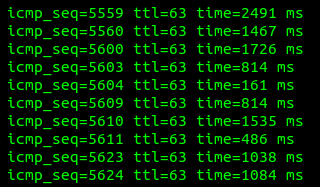
I’m struggling a bit with my ESP32-S3 touch display and ESPHome. Whenever I try shared code from GitHub or forums, either the Wi-Fi doesn’t work properly, the ping goes above 1000ms, or the buttons don’t respond. (Even AI- hasn’t helped so far)
I’m looking for a basic working example with a button to turn on a light (light.room) so I can have a starting point and build from there.
Here’s my hardware setup:
LVGL works visually, but the network becomes slow and the display seems to hang when sending commands, even though it still responds on the screen.
I would really appreciate a minimal working YAML example with just a button to turn on a light. Something simple to start with.
Thanks in advance!
With the working code lost packets and ping time > 1S 
( With only the Wi-Fi configuration, so without a display and LVGL, the ping time is around 1 ms." )
esphome:
  name: esp32-s3-lcd-display
  friendly_name: ESP32-S3 LCD Display
  platformio_options:
    build_flags: "-DBOARD_HAS_PSRAM"
    board_build.arduino.memory_type: qio_opi
    board_build.flash_mode: dio
    board_upload.maximum_ram_size: 524288


psram:
  mode: octal
  speed: 120MHz

esp32:
  board: esp32-s3-devkitc-1
  variant: ESP32S3
  flash_size: 8MB
  cpu_frequency: 240MHz
  framework:
    type: esp-idf
    advanced:
      enable_idf_experimental_features: true
    sdkconfig_options:
      COMPILER_OPTIMIZATION_SIZE: y
      CONFIG_ESP32S3_DATA_CACHE_64KB: "y"
      CONFIG_ESPTOOLPY_FLASHSIZE_8MB: "y"
      CONFIG_FREERTOS_HZ: "1000"
      CONFIG_ESP_DEFAULT_CPU_FREQ_MHZ_240: y
      CONFIG_ESPTOOLPY_FLASHMODE_QIO: y
      CONFIG_ESPTOOLPY_FLASHFREQ_120M: y
      CONFIG_SPIRAM_MODE_OCT: y
      # CONFIG_IDF_EXPERIMENTAL_FEATURES: y
      CONFIG_SPIRAM_SPEED_120M: y
      CONFIG_SPIRAM_FETCH_INSTRUCTIONS: y
      CONFIG_SPIRAM_RODATA: y
      CONFIG_ESP32S3_DATA_CACHE_LINE_64B: y
      CONFIG_COMPILER_OPTIMIZATION_PERF: y

logger:

api:
  encryption:
    key: ""

ota:
  - platform: esphome
    password: ""

wifi:
  power_save_mode: none
  ssid: !secret wifi_ssid
  password: !secret wifi_password
  reboot_timeout: 3min


  ap:
    ssid: "Esp32-S3-Lcd-Display"
    password: ""

i2c:
  sda: GPIO8
  scl: GPIO9
  id: bus_a
  frequency: 400kHz
  scan: True


ch422g:
  - id: ch422g_hub


captive_portal:


display:
  - platform: rpi_dpi_rgb
    id: mijn_display
    auto_clear_enabled: false
    color_order: RGB
    pclk_frequency: 16MHZ
    dimensions:
      width: 800
      height: 480
    de_pin:
      number: 5
    hsync_pin:
      number: 46
      ignore_strapping_warning: true
    vsync_pin:
      number: 3
      ignore_strapping_warning: true
    pclk_pin: 7
    reset_pin:
      ch422g: ch422g_hub
      number: 3
    enable_pin:
      ch422g: ch422g_hub
      number: 2
    hsync_back_porch: 8
    hsync_front_porch: 8
    hsync_pulse_width: 4
    vsync_back_porch: 16
    vsync_front_porch: 16
    vsync_pulse_width: 4
    data_pins:
      red:
        - 1   # r3
        - 2   # r4
        - 42  # r5
        - 41  # r6
        - 40  # r7
      blue:
        - 14  # b3
        - 38  # b4
        - 18  # b5
        - 17  # b6
        - 10  # b7
      green:
        - 39  # g2
        - 0   # g3
        - 45  # g4
        - 48  # g5
        - 47  # g6
        - 21  # g7

touchscreen:
  platform: gt911
  id: mijn_touch
  interrupt_pin: GPIO4
  reset_pin:
    ch422g: ch422g_hub
    number: 1
    mode: OUTPUT
  on_touch:
    - lambda: |-
        ESP_LOGI("Touch", "Touch at x=%d, y=%d", touch.x, touch.y);

font:
  - file: "gfonts://Roboto"
    id: roboto_button
    size: 18
    bpp: 4
  - file: "gfonts://Roboto"
    id: roboto18
    size: 18
    bpp: 4
  - file: "gfonts://Roboto"
    id: roboto24
    size: 24
    bpp: 4


  - file: 'fonts/materialdesignicons-webfont.ttf' # http://materialdesignicons.com/cdn/7.4.47/
    id: light32
    size: 70
    bpp: 4
    glyphs: [
      "\U000F0335", # mdi-lightbulb
      "\U000F0769", # mdi-ceiling-light
      "\U000F08DD", # mdi-floor-lamp
      "\U000F12BA", # mdi-string-lights
      "\U000F0150", # mdi-clock
      "\U000F1797", # mdi-ceiling_fan
      "\U000F179B", # mdi-light_recessed
      "\U000F1A2B", # mdi-blinds_horizontal
      "\U000F1A2C", # mdi-blinds_horizontal_closed
      "\U000F1847", # mdi-curtains_closed
      "\U000F1846", # mdi-curtains
      "\U000F091C", # mdi-wallsconce
      "\U000F02E3", # mdi-bed
      "\U000F08A0", # mdi-bed_empty
      "\U000F10C2", # mdi-thermometer_high
      "\U000F058E", # mdi-humidity
      "\U000F091E", # mdi-wallsconce_variant
      "\U000F0C73", # mdi-kiss
      "\U000F0D43",
      "\U000F0580", #  mdi:volume-down
      "\U000F057E", #  mdi:volume-up
    ]


sensor:
  - platform: homeassistant
    id: ha_licht_status
    entity_id: light.room
    internal: true
    on_state:
      then:
        - lambda: |-
            if (id(ha_licht_status).state) {
              lv_obj_add_state(id(lv_button_licht), LV_STATE_CHECKED);
              lv_label_set_text(id(licht_status_label), "Aan");
            } else {
              lv_obj_clear_state(id(lv_button_licht), LV_STATE_CHECKED);
              lv_label_set_text(id(licht_status_label), "Uit");
            }

lvgl:
  displays:
    - mijn_display
  touchscreens:
    - mijn_touch
  theme:
    button:
      bg_color: 0x333333
      bg_grad_dir: VER
      text_color: 0xFFFFFF
      checked:
        bg_color: 0xcc9900
        text_color: 0x000000
        bg_grad_color: 0x664d00
      pressed:
        border_color: 0xff6600
  pages:
    - id: main_page
      layout:
        type: flex
        flex_flow: column_wrap
      width: 100%
      bg_color: 0x000000
      bg_opa: cover
      pad_all: 5
      widgets:
        - button:
            checkable: true
            id: lv_button_licht
            width: 90
            height: 95
            widgets:
              - label:
                  text: "\U000F08DD"
                  text_font: light32
                  align: top_mid
              - label:
                  text: "Living"
                  text_font: roboto_button
                  align: center
              - label:
                  id: licht_status_label
                  text: "Uit"
                  text_font: roboto18
                  align: bottom_left
                  text_color: 0xCCCCCC

            on_click:
              then:
                - homeassistant.service:
                    service: light.toggle
                    data:
                      entity_id: light.room