You know that moment when your weather app cheerfully says "sunny" and your soaking wet laundry on the line strongly disagrees? I built a Lovelace card for that.
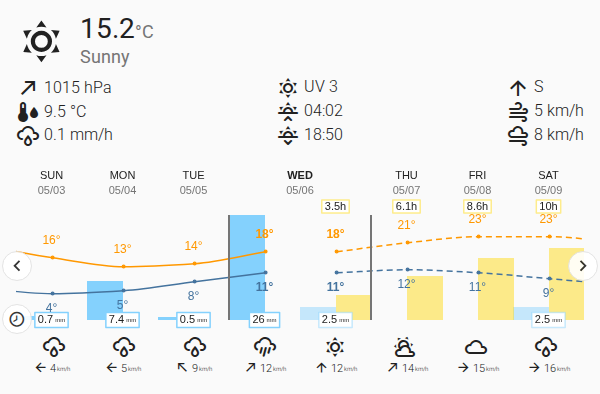
It puts what your weather station actually measured over the past few days right next to what the forecast says is coming, on one chart. Today is the column where the two halves meet — convenient for "did the forecast lie to me again?" research.
Got a weather station? Past comes from your sensors. The forecast is graded.
No weather station, just a weather.* entity? A toggle pulls past data from Open-Meteo so you still get the side-by-side view.
Sensors but no forecast? Also fine. Just your data, no fortune-telling.
On top sits a live "now" panel — temperature, condition icon, clock — driven directly by your sensors, so it doesn't quietly disagree with the chart underneath it.
Installation is via HACS as a custom repository. Setup is mostly pointing the card at your sensors and pressing save; the README has the full reference for the day you want to make it complicated.
Feedback, bug reports and translations very welcome — easier to wrangle in GitHub Issues or Discussions than buried in this thread.
Big thanks to @mlamberts78, whose weather-chart-card is the upstream this forked from. None of this would exist without that chart layout.
Thanks for the detailed report and screenshots, @chairstacker — that was exactly the right catch.
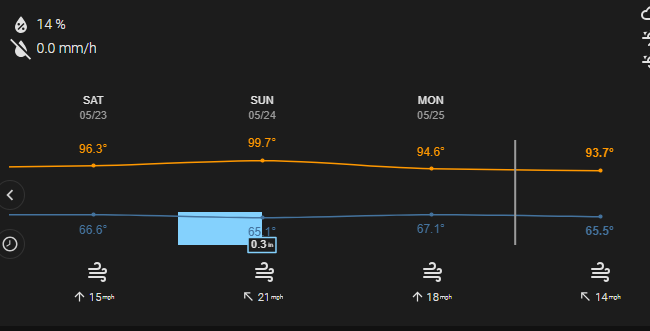
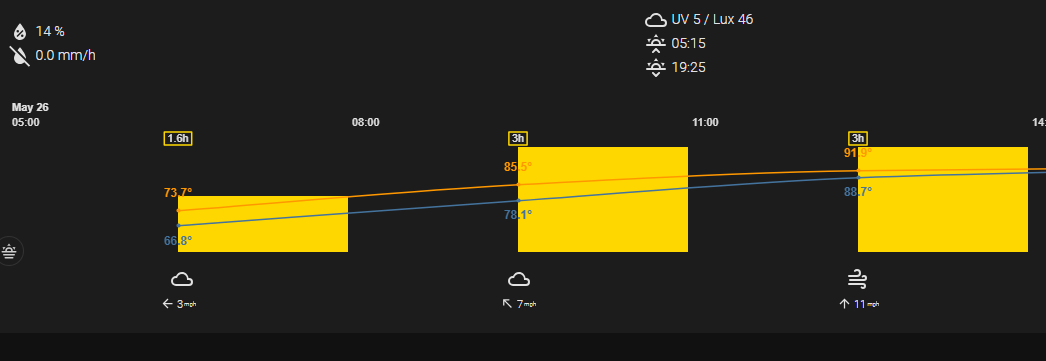
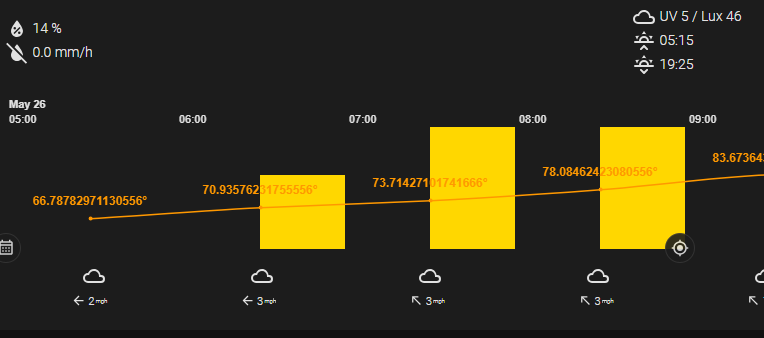
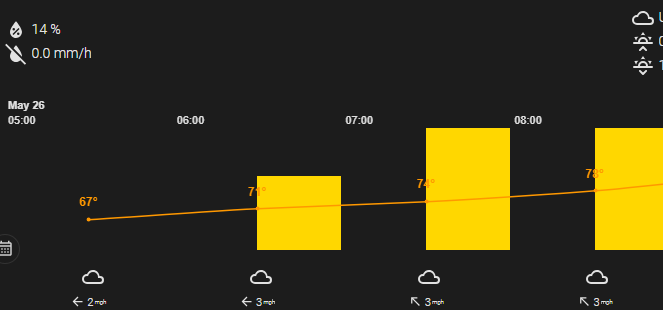
You were seeing it correctly: with Round temperatures turned off, the card was just showing whatever precision the weather data happened to have, so
the daily/today views showed one decimal while the hourly view looked rounded to whole numbers. That inconsistency is fixed in v2.1.1: Release v2.1.1 · chriguschneider/weather-station-card · GitHub
Now, with Round temperatures off, every temperature — daily, today and hourly — shows exactly one decimal place (e.g. 28.0°). With it on, you still
get whole numbers everywhere, same as before. Nothing to change in your YAML; just update via HACS and hard-reload.
Thanks for both posts, this one slipped past us until you reported it.
The one-click install button was handing HACS the wrong category, which caused that pop-up. Adding the repo manually, like you did, was the right workaround. It's fixed now, so the button works without the error.
Very interesting Card!
Before find this, I used the Weather Chart Card from @mlamberts78, in association with a weather template.
The Weather Template combine the data from Met.No for the forecasts and from my Meteobridge for the local data.
The ability to show past data from the local weather station is very kind.
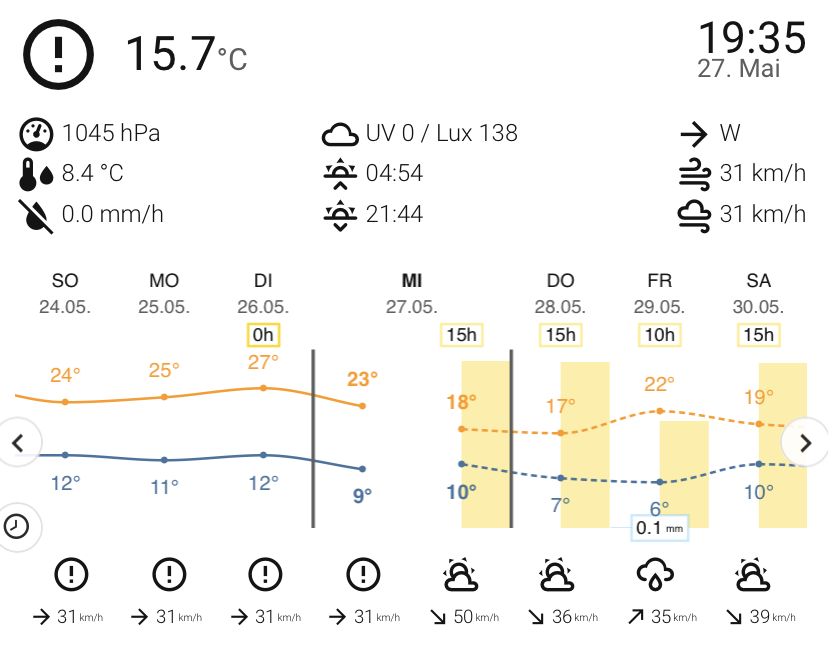
Thanks for the screenshot — that made it easy to spot. Good news: the icon isn't broken or failing to load. A circle with an exclamation mark is actually the card's "severe weather" symbol, and the card was wrongly deciding that you were having a storm.
Here's why: to pick a weather symbol, the card looks at your wind. Internally it expects wind in metres per second, but your station reports in km/h. The card wasn't converting between the two, so a perfectly normal breeze of ~31 km/h was read as if it were 31 m/s — that's hurricane-force — and it put the severe-weather symbol on the current conditions and on every past day. Your future days looked fine because those icons come straight from your weather integration, which the card doesn't re-evaluate.
The same issue also affected °F temperatures (snow could show as rain) and rainfall measured in inches, so I fixed all three at once.
@PecosKidd Turns out hard-coding "mm" was a bold assumption about how the world measures rain. Fixed in v2.1.3 — inch sensors now read in / in/h on their own, and Units → "Convert precipitation to" lets you force either. Thanks for catching my metric tunnel vision. Update via HACS.
Hi,
First of all, I’d like to thank you for all the work you’re putting into this project. I just recently got my first weather station, and now I’m trying to improve our dashboard to display the data in the best possible way. Your widget is almost exactly what I was looking for. But I have a few suggestions, if you don’t mind.
Red color - even though I have rounding set to one decimal place in the entity settings and rounded temperatures set in the tab. The dew point value is showing this crazy result.
Blue color - there’s almost no space between the card elements, which makes it hard to read, not just on mobile devices.
Yellow color - In some cases, the temperature value in the chart overflows into the element above it
Purple color - and this might be due to my theme settings, although I see it in your screenshots as well. The temperature is very hard to read on the chart. It would most likely be enough to tone down the color of the yellow column slightly so it isn’t so prominent.
And one last thing—though this is definitely my mistake and I haven’t been able to fix it yet. I’m unable to set the value for the “Illuminance” entity. My weather station interprets this as “Solar Irradiance” with the unit W/m².
@Faasteer Thanks a lot for the detailed writeup with the marked screenshot — that kind of feedback is gold. Everything you flagged has been worked through over the last releases; I’d love your verdict on whether it’s enough:
Fixed in v2.2.2:
Dew point decimals (red): attribute-sourced dew points are now capped at one decimal.
Temperature overflowing into the labels above (yellow): the temperature scale now always reserves enough pixel room for its labels, even at small chart heights — the line can’t push its values into the date band anymore. Bar heights are untouched.
Readability on the yellow columns (purple): every temperature value now draws with a halo in the card’s background colour, so labels stay legible on top of the sunshine bars in both themes. Dark themes additionally render the forecast sunshine in a warmer honey gold instead of the old murky olive, and the low-temp blue is now theme-aware (brighter in dark, deeper in light).
New in v2.2.3 (just released):
Solar irradiance support: your SWS-12500’s W/m² sensor now works directly in the Illuminance slot — the card detects the unit / device_class: irradiance and converts internally (~120 lm/W). It feeds the condition classifier, the measured sunshine bars, and the live sun-strength row. If the sunshine detection feels too eager or too strict for your sensor, condition_mapping.sunshine_lux_ratio is the tuning knob.
Still open — and here I’d like your opinion (blue): the spacing between the card elements hasn’t changed structurally yet. Could you update to v2.2.3, have a fresh look on your mobile layout, and tell me whether the readability improvements above already do the job for you — or whether the rows still feel too cramped? If it’s the latter, a spacing rework is next on my list, and a current screenshot from your setup would help me aim it right.
Two releases went out and I forgot to post about the bigger one. So, quickly:
v2.3.0 — the editor got its life together: a 4,200 px scroll became five collapsible panels whose headers tell you what’s inside. The whole card speaks 23 languages now (the editor used to fall back to English for everything but DE/EN), and the moon line computes itself — no Moon integration, and the disc is drawn to the actual illumination instead of picking one of 8 phase icons.
v2.4.0 — open a panel and everything’s actually there: toggle pills instead of the old add-dropdown. If you never knew this card had a sunshine bar, that’s why.
And if your station gives you rain rate and daily total as two separate entities, you can wire both now:
sensors:
  precipitation: sensor.rain_today       # mm — the bars
  precipitation_rate: sensor.rain_rate   # mm/h — the live cell
Ecowitt, Tempest, ESPHome gauge, whatever. Keep the total, the bars need it. Nice side effect: the live weather icon can finally show rain on a counter-only setup — a cumulative total isn’t a rate, and the classifier won’t guess one.
One more thing: the card is in the HACS default store now — just search for it under Frontend, no custom repository. Which also retires the “Repository not found” mess a couple of you ran into back in May.
Two releases today, both about the one number that matters in October: where is the snow line, and is it coming for me.
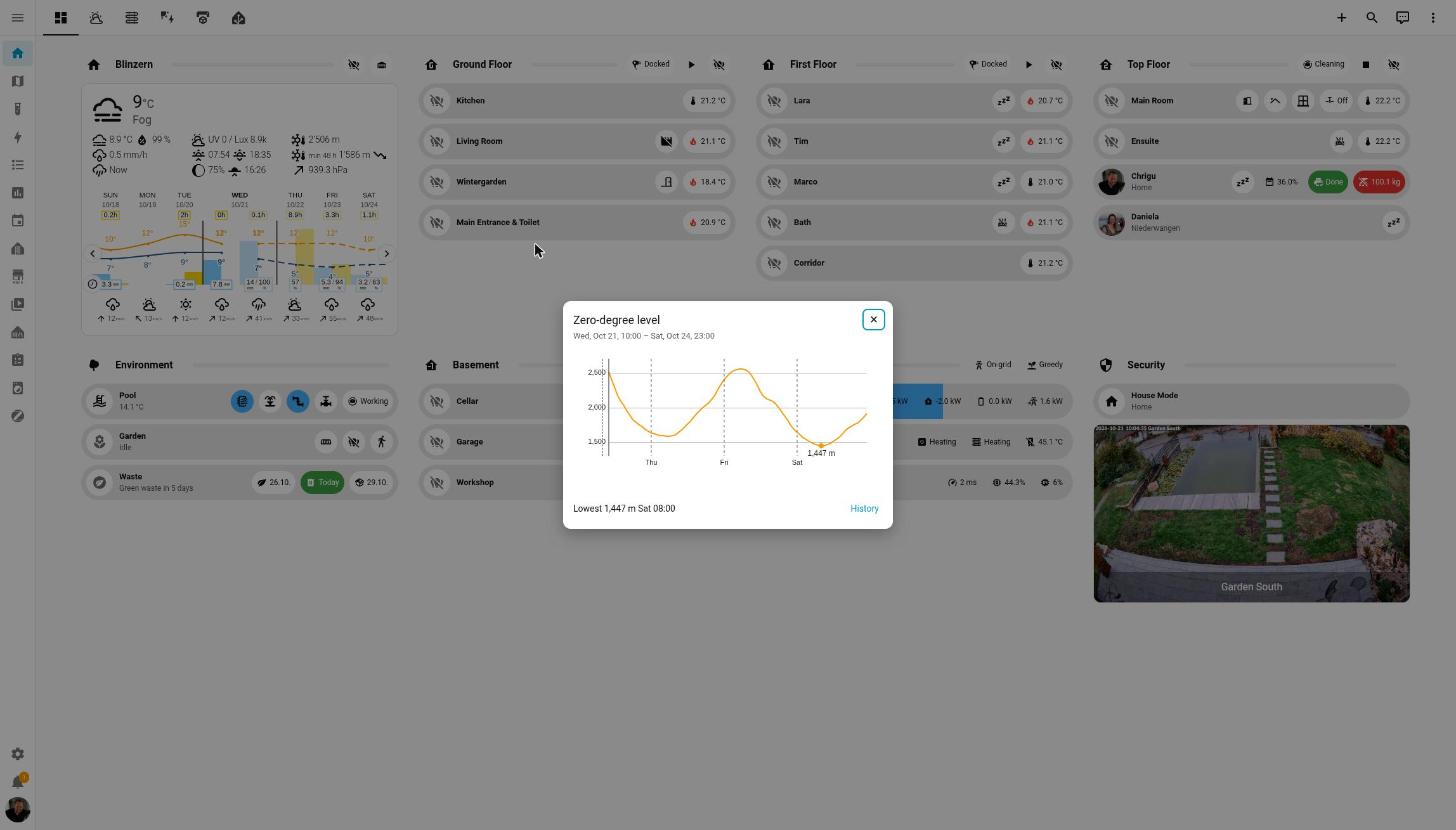
v2.13.0 — tap the zero-degree row. A popup with the forecast curve for the coming days, the low point marked, day separators, and a History link for the nostalgic. Needs a sensor with a forecast attribute of {datetime, level} points; MeteoSwiss Weather v0.10.0 ships one (new thread, say hi). Nothing to configure.
v2.14.0 — the row tells you where it’s heading. An arrow for direction and pace (rises fast · rises · stays · falls · falls fast — the pressure-trend arrows, you know them), then the next low or high with weekday and time: 1’578 m Thu 04:00. The tooltip adds the turn after it (“then up to 2’509 m Fri 05:00”). The snowflake on the current row changes when the estimated snow line gets within 300 m of your elevation, and when the coming low brings it to your doorstep the value turns rain-blue with a . Elevation comes from HA, from the sensor, or from the new elevation option.






 1’578 m Thu 04:00. The tooltip adds the turn after it (“then up to 2’509 m Fri 05:00”). The snowflake on the current row changes when the estimated snow line gets within 300 m of your elevation, and when the coming low brings it to your doorstep the value turns rain-blue with a
  . Elevation comes from HA, from the sensor, or from the new