Hello, to me it is very unclear what I actually need to do to see my Lovelace dashboard edits. I am working on a dashboard using different HACS components like browser mod and UI eXtension. But whenever Claude Code changes something for me, I am clueless when I will know if the change actually did something or not. What I usually do is reboot HA, clean cached data in Chrome, reload resources, and even then I am not sure if it’s definitely refreshed. It costs me immense amount of time to do this after every prompt, so I would be thankful if someone could clarify what I need to do exactly?
The solution is simple.
Stop using the crutch that is making you a cripple and try actually reading and learning the documentation (HA and CSS).
2 Likes
That’s very helpful, thanks!
- Reboot, hardly never needed ( In specific not for frontend changes )
- Clean cached data in Chrome ( Sometimes needed, sometimes not, some times Clear All Cache is best )
- Reload Resources ( Not Sure what you mean, are you referring to custom:Cards .JS , for Dashboards ? ) Or are you meaning refresh Your Browser-View ?
- Refresh Browser ( Sometimes Sufficient )
- If You don’t know what your “friend” Claude is doing, or suppose to, and Claude can’t or won’t assist you in figuring out, what you should do/choose to see what He Did for You, ask Him
1 Like
I meant this:
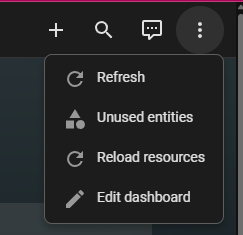
This is the issue I am experiencing, the word “sometimes”. Since I can’t know for sure I do all of them because otherwise I’m not sure if I’m looking at a stale browser instance or his changes didn’t do anything.
Back in the day when I was programming it myself (by copying and pasting from ChatGPT) I noted that sometimes just reloading the resources was enough, or a hard reset of the browser, but sometimes it wasn’t. I could never figure it out.
I don’t care so much about what Claude changes, I care about the results, and I have everything pushed to git and backed up so I’m not really worried that he will mess anything up. But he doesn’t seem to know himself how refreshing of the dashboard works.
And this will remain so until you learned your self, what you are doing, and where
i would assume number 2 , thou i have no clue what you are trying to do, and
im not sure where you get that “sub-menu” when editing a Dashboard, or Card ?
Could be because i don’t use built-in dashboards
What ???
As Tom said, Do It Your Self , as at next Update(Changes) Claude can’t help you, because He’s chocked with old, obsolete or simply bogus Code examples generated by someone who really don’t care so much
I have that submenu too. I am not sure if it came with my YAML-only dashboards, but I click the Refresh option and then I force reload the browser cache, which always work (with frontend stuff !!).
The trick is to figure out how to force reload the browser cache, because that is a browser specific thing and not related to HA, so it depends on what browser you use.
Since I do not use Chrome, then I can not help there.
1 Like